
Stumbled upon a tweet that's just too good to forget? Then save that tweet!
Saving tweets ensures you can revisit them later without scrolling endlessly through your feed.
So, let's explore the different ways you can save tweets.
Quick answer: which way to save a tweet
| You want to | Best way |
|---|---|
| Save it privately on X | Bookmark it |
| Keep it as an image | Screenshot it |
| Save a whole thread | Bookmark the first post |
| Save many tweets at once | Export them as a CSV |
| Save a Twitter video | Download it |
| Save your own unfinished post | Save it as a draft |
1. Use Twitter’s Bookmark Feature to Save Tweets
One of the easiest and most reliable ways to save a tweet is by using Twitter’s built in Bookmarks feature. This lets you save tweets privately, and only you can see the bookmarked list.
- Find the tweet you want to save.
- Click or tap the Bookmark icon (the ribbon) in the row of buttons under the post.
- Open your saved posts any time from Bookmarks in the left menu on desktop, or from your profile menu in the app.
Bookmarks are private: the author can see how many people bookmarked a post, but never who. Premium subscribers can also sort bookmarks into folders.

This method is quick, private, and ideal for users who want a hassle free way to organize tweets.
 Arif Akdogan

2. Save Tweets by Liking Them
Another simple way to save a tweet is by liking it. Likes are private, too, and they also make it easy to access tweets in the future.
Just click or tap the heart icon under the tweet to like it. Whenever you need to find your liked tweets, go to your profile and click on “Likes” in the menu.

 infocircleboom.com

3. Save a Tweet as an Image With a Screenshot
For offline access or sharing outside of Twitter, taking a screenshot is a great option. This method works on any device.
In order to take Twitter screenshots you can use the built in features of your smartphone or computer.
You can also rely on Circleboom's Twitter screenshot generator by simply adding the link of the tweet you'd like to save.
Here’s how you can use Circleboom’s screenshot tool to take high quality, aesthetic screenshots of tweets:
Step #1: Go to ➡️ Circleboom Twitter Screenshot Generator
First, navigate to the Circleboom Twitter Screenshot Generator. Paste the URL of the tweet you want to capture in the provided field. Then, click the 'Screenshot' button.

Step #2: Customize Your Screenshot
Circleboom will generate the screenshot for you instantly. If you’d like, you can change the size, layout, and theme to fit your preferences.

Step #3: Download the Screenshot
Once you’ve adjusted the design to your liking, simply click the 'Download' button. Circleboom will provide you with a high quality screenshot of the tweet, ready to use.

This method allows you to save the screenshot to your photo gallery, cloud storage, or a specific folder for easy access.
4. Copy the Link to a Tweet to Save It
If you want to save a tweet for sharing or referencing later, copying the link is a simple solution.
Just grab it from your browser's address bar and paste it wherever you'd like to keep it.
This option works well if you want to store tweets alongside other information in note taking apps, but it may also be hard to keep them organized in the long run.
5. Export Tweets and Save Them in Bulk
If you want to save many tweets, especially those belonging to the same person, you can get help from Circleboom's tweet exporter to download and save them.
Type in the handle and your email address to receive the latest 3,200 tweets of any public account in the email as a spreadsheet. Circleboom is an Official X Enterprise Developer, so the export runs on X's official API. Step by step guide: how to export all tweets of a Twitter (X) user to Excel or CSV.
Here’s a detailed guide on how to export tweets from any Twitter account using Circleboom’s export feature:
Step #1: Enter the Username
On the Circleboom export page, type in the Twitter/X username of the account you want to export tweets from (without the “@” symbol) and click on the blue “Search” button.

Step #2: Confirm the Tweet Count
Circleboom will display the total number of tweets available for export from the selected account. Review this information, then click the “Next” button to proceed with the export process.

Step #3: Enter Your Email Address
Enter the email address where you’d like to receive the exported tweet file. Circleboom also recommends creating an account for easy access to your export file at any time. After entering your email, click the “Next” button to continue.

Step #4: After entering your email address, Circleboom sends the exported tweets in a CSV format directly to your inbox.
This CSV file includes essential details like Post ID, username, tweet text, engagement metrics (likes, retweets, replies), language, and timestamps, making it easy to review, analyze, or archive the tweets.
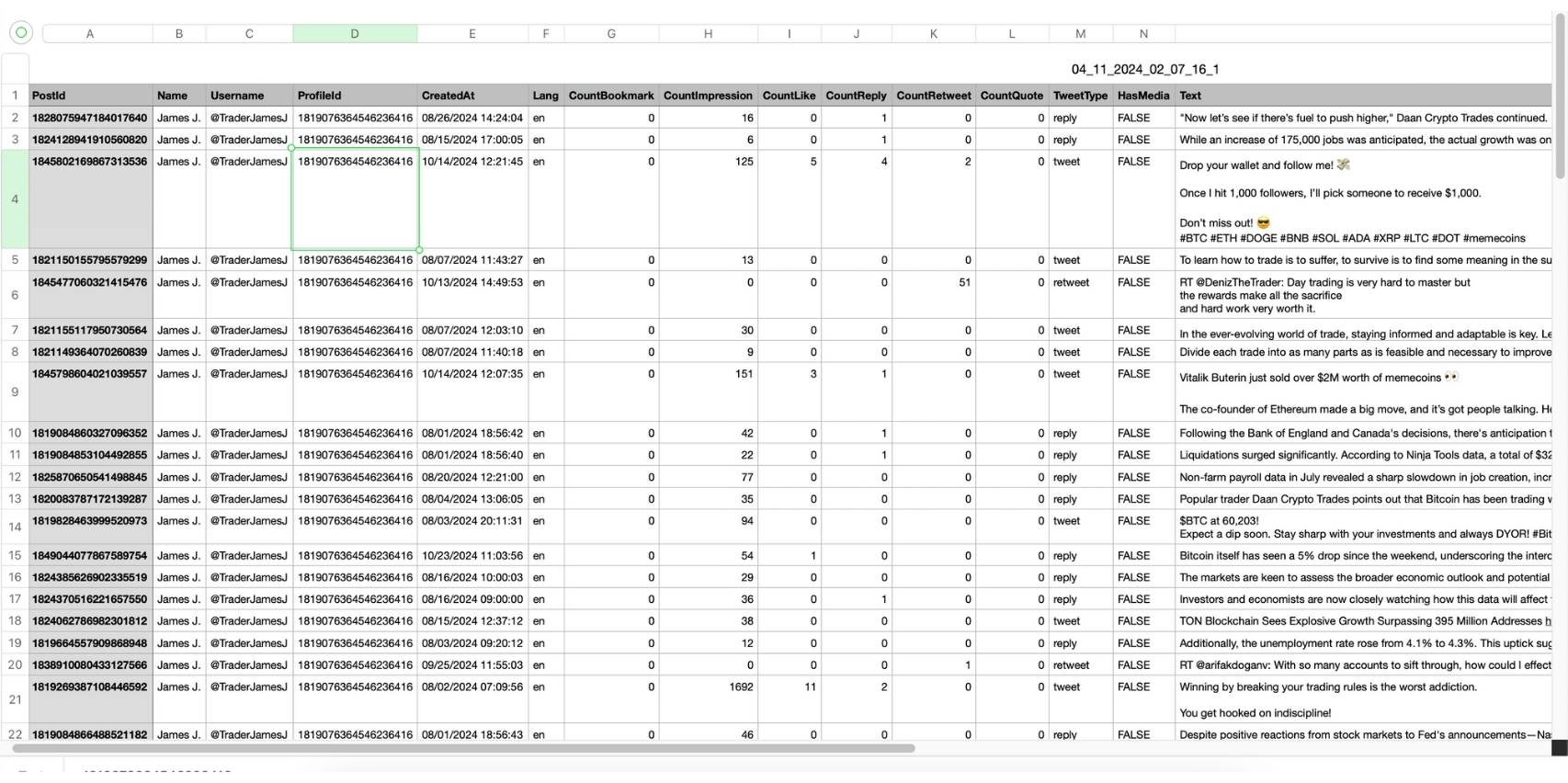
This allows you to save tweets both on your device and within your inbox, making it a robust and long term solution, including the ability to organize and search for them.
Altug Altug
6. Save a Twitter Thread
A thread is a chain of posts, so you don't need to save every post in it. Bookmark the first post of the thread. When you open that bookmark later, X shows the whole thread under it, as long as the author hasn't deleted it. To read a long thread as one page instead of post by post, you can also unroll the Twitter thread.
Want a copy that stays with you even if the thread disappears? Two options:
- Run the thread's posts through the Circleboom Twitter Screenshot Generator one by one and keep the images in a folder.
- Copy the link of the first post into your notes app, together with a few words about what the thread covers, so you can find it again by search.
If a saved thread has already been deleted, you may still find a copy: here is how to find deleted tweets.
And if you write threads yourself, the Circleboom Twitter Thread Maker splits a long text into a numbered thread and schedules it, so the thread you want people to save goes out at the time your followers are online. Here is how to schedule threads on Twitter.
7. Save Twitter Videos on PC, Mac or Desktop
You just have to follow these simple steps in order to get your videos either on desktop or on mobile devices. Your cool Twitter videos are just a few clicks away from your device.
Follow these steps to download high quality Twitter videos with Circleboom Twitter Video Downloader:
Step #1: Find and copy the Twitter (X) video link you want to download.
You should click on the "Share" button under the video tweet and copy the link.

Then, copy the share link of this video tweet, go to Circleboom's Twitter Video Downloader, and paste it.

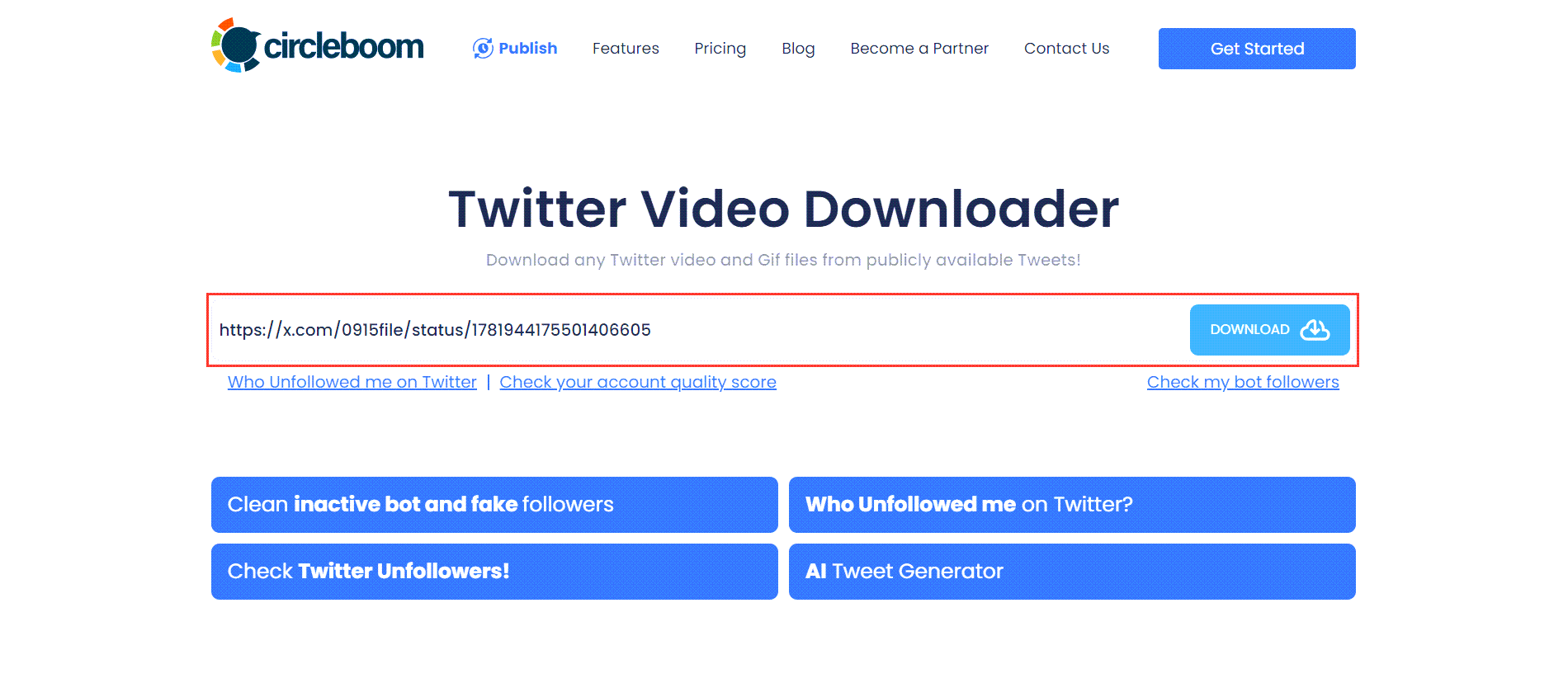
Step #2: You will see a text bar on Circleboom's Twitter Video Downloader page.
Paste the link to the video tweet here, as shown in the image below! Then, click on the "Download" button!
You will see download options below the text bar. If the video has versions of multiple qualities, all will be listed here. In this example, there is only one option, and I click on the "Right click to save" button next to it!
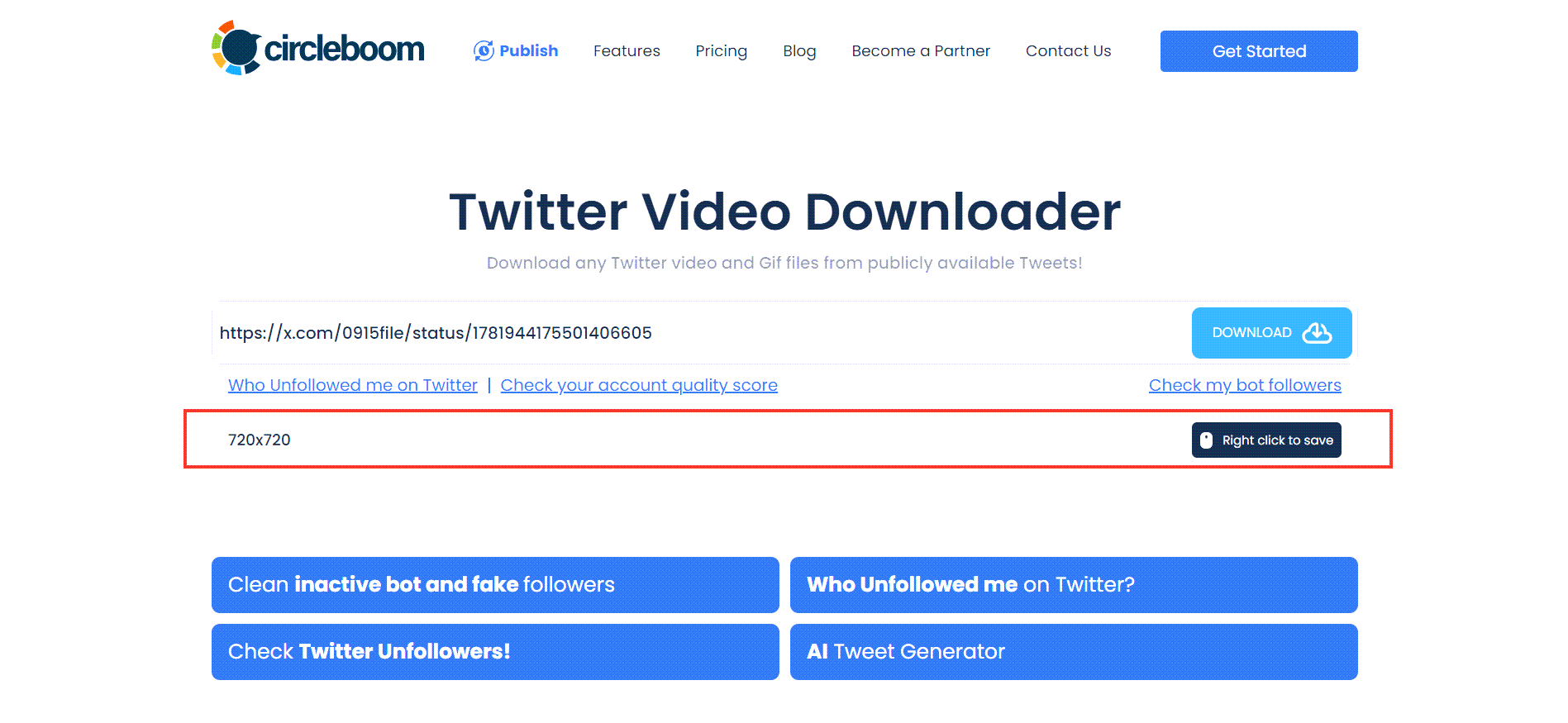
Step #3: Your Twitter video will be open in a new tab on your browser.
Click on three dots and open up the menu.

Click on "Download," and that's it! Your Twitter video is downloaded onto your device. You can use it on other social media channels.

Last words
Whether you save tweets for inspiration, research, or a quick laugh later, there’s a method to fit every need. From using Twitter’s bookmark feature to organizing them in external tools, saving tweets has never been easier.
However, act ethically and responsibly while using the tools and methods that are non native to Twitter itself, not to mention the need to comply with the platform rules and policies.
FAQ: Saving Tweets on Twitter (X)
Can I save posts on Twitter privately?
Yes. Bookmarks are private: only you see your bookmarked posts, and the author only sees a total bookmark count, never your name. Likes are private too since 2024, but a like still tells the author that someone liked the post, so bookmarks are the quieter choice.
How do I save a tweet as an image?
Take a screenshot on your phone or computer, or paste the post link into the Circleboom Twitter Screenshot Generator to get a clean image with the theme and size you choose. Full walkthrough: how to save a tweet as an image.
How do I save a Twitter thread?
Bookmark the first post of the thread. Opening it later shows the full thread. For a copy outside X, screenshot each post as shown in step 6.
How do I save a draft on Twitter desktop?
Write your post, click the X at the top left of the composer and choose Save. To open it again, start a new post and click Drafts at the top right of the composer. If you already know when the post should go out, schedule it in the Circleboom Twitter Scheduler instead of leaving it in drafts.
Can I export my Twitter bookmarks or liked tweets?
X has no export button for bookmarks, but there are workarounds: see how to export bookmarks from Twitter. Your likes are included in the data archive you can request under Settings and privacy > Your account > Download an archive of your data, and you can turn that file into a spreadsheet as shown in how to download Twitter likes. To save the posts of any public account as a spreadsheet, use the Circleboom tweet exporter from step 5.
How can I save a Twitter video before it gets deleted?
Download it now. Once the post is deleted, its link stops working and no downloader can fetch the video. Paste the link into the Circleboom Twitter Video Downloader and save the file to your device. On a phone? Here is how to save Twitter videos on iPhone, and for animations, how to download Twitter GIFs.
How do I save photos from Twitter?
Open the photo, then right click and save it on desktop, or long press it in the app. To get every photo of a post in full size at once, use a Twitter image downloader.