
How many of my Twitter followers are active, and how do I get the real number instead of a guess? You count it from each follower's recent posting and interaction behavior, tier by tier, because X shows a follower total but never an active total.
Manual: open every follower's profile on X, check how recently they posted, and keep a tally by hand, which stops working once the list passes a few hundred accounts. Circleboom: one table. Circleboom sorts every follower on X into Active, Moderate Active and Inactive tiers through X's official API at Enterprise level.
→ Check how many Twitter followers are active on your account
Then read that split against your engagement, not against the number on your profile.
What counts as an active follower on Twitter?
An active follower on Twitter is an account that still posts and still interacts with content. That is the only kind of activity anyone outside X can measure, because the platform's own idea of an active account is something you cannot see.
X's inactive account policy says inactivity is based on logging in, and asks people to log in at least every 30 days. The same page notes that you may not be able to tell whether an account is inactive, because not all signs of account activity are publicly visible.
So the honest version of the question is narrower: how many of my followers show visible activity?
How Circleboom labels each follower
Circleboom answers that version by labeling every follower of your X account for activity and engagement. In its All My Followers view, every follower carries a two-part label in the Active & Inactive column:
- Active or Inactive describes how recently and how often the account has been posting.
- High or Low Engagement describes whether the account interacts with content, such as liking or retweeting.
The two parts combine into three tiers: Active / High Engagement user, Moderate Active / Medium Engagement user, and Inactive / Low Engagement user. The middle tier covers accounts with some activity and some engagement that fall short of the top tier.
One detail is easy to miss: the two halves can disagree. An account can post often and still sit at Low Engagement, because it broadcasts and never likes or retweets anyone else.
For your reach, that follower is less useful than its tweet count suggests.
Why your X follower count overstates your real audience
Your follower count is a running total of every account that ever followed you and has not left. It never subtracts the people who stopped posting, stopped reading or abandoned the account years ago.
That is why two accounts with 5,000 followers each can get very different results from the same kind of post. One may have most of its list in the Active tier. The other may be carrying a large dormant layer that cannot see, like or share anything.
Some readers want to settle the bigger question first. It is answered in is it better to have lots of Twitter followers or fewer followers who are more engaged.
For this check, the point is simpler: the total hides the split you need, which is why you check how many Twitter followers are active before you judge a single post.
The profile number also cannot be fixed by posting more. Every new post goes out to the same list, dormant accounts included, so better content lifts results only among the people who are still there to see it.
Want the split before reading further? See how many of your Twitter followers are active, then come back to interpret it.
How to check how many Twitter followers are active
Circleboom pulls your full follower list from X, labels each account with its activity and engagement tier, and lets you filter the list down to one tier at a time.
Circleboom holds Enterprise-level API access from X, so the data comes through approved access and your account never shares a password with a scraper.
The four steps below take you from login to a count per tier, and you can run a Twitter follower analysis on your own list alongside them.
Behind the table, the X API returns each follower's public profile fields, and Circleboom computes three extra values on top: the engagement classification, the follow ratio and the account age. Those computed fields are what make the activity filter possible.
Open your complete follower list
- Log in to Circleboom Twitter with the X account you want to measure, and authorize it through X's own sign-in screen.

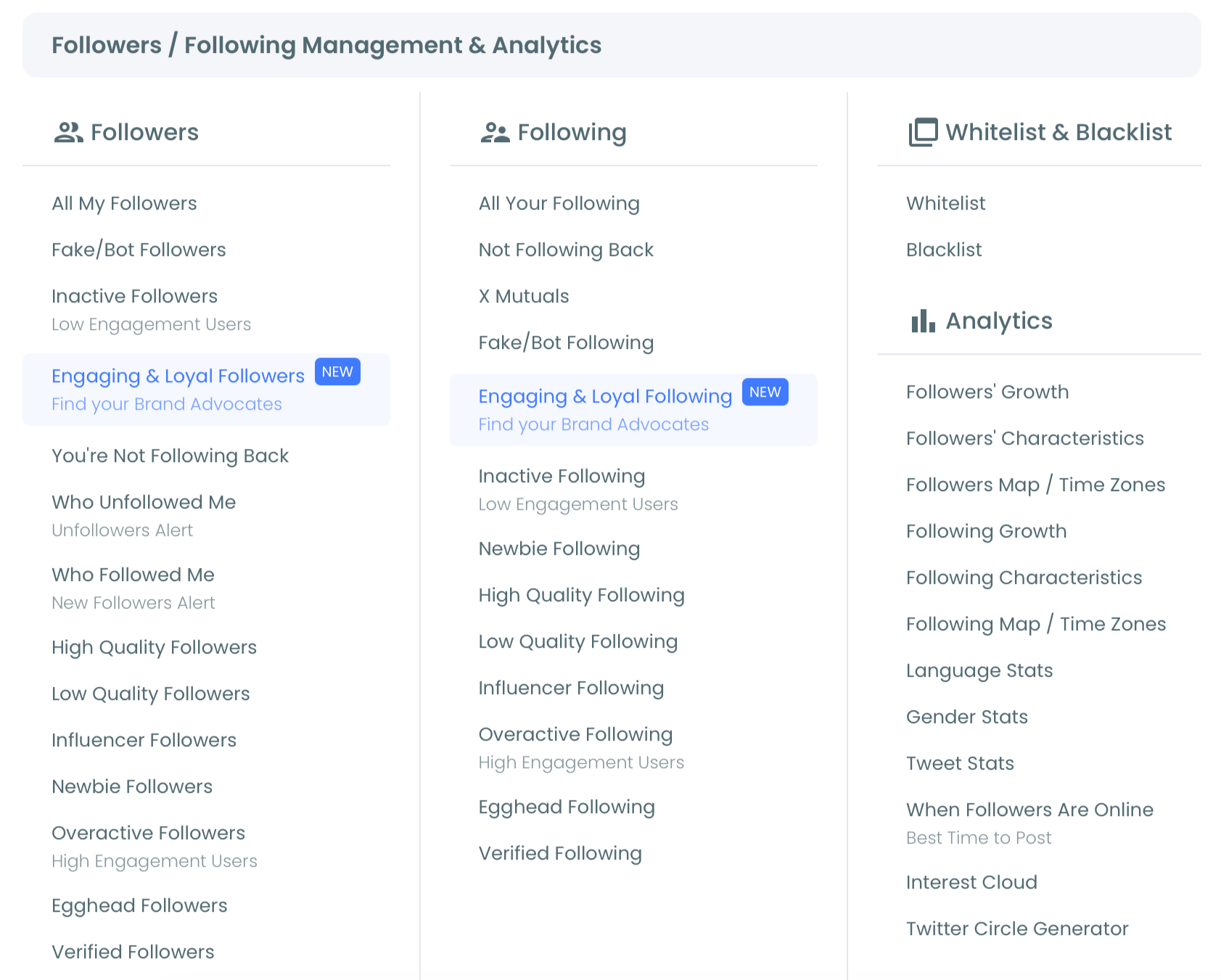
- Go to the Followers / Following Management and Analytics menu in the left sidebar and open its Followers group.
Split the list by activity tier
- Open our All My Followers view and read the header, which shows the size of your full list ("Displaying your N followers"), and the Active & Inactive column on each row.
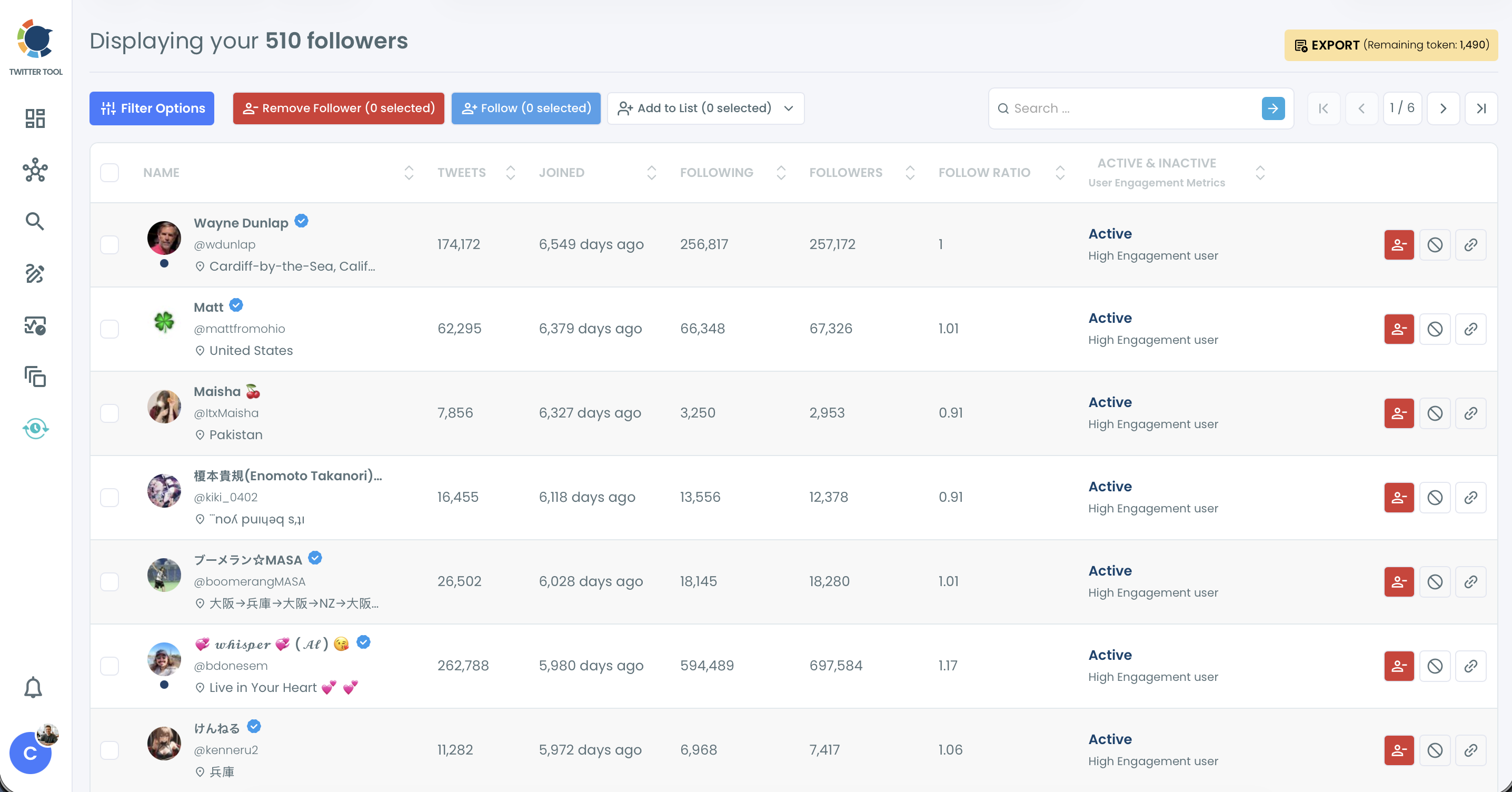
- Filter by one tier at a time. Open Filter Options, choose a level in the Engagement dropdown, apply it, and note the size of the filtered list, which the pagination totals across all pages (a CSV export of that list gives the same count as rows); repeat for each tier, or set Inactive to "only" under Follower Quality to isolate the dormant group.
Recording the full-list total before you filter gives every tier count something to be measured against.
If you would rather not filter, sort the Tweets column ascending. The lowest-activity accounts rise to the top, which gives you a quick feel for the size of the dormant layer before you count it properly.
How to read your active follower share once you have it
Your active share is the Active tier divided by your total, but the number that changes decisions is the engagement rate you calculate against active followers only. A rate measured against the whole list blames your content for people who were never going to see it.
Which denominator to use
Here is an illustrative calculation. Say the check returns this split for an account with 4,200 followers:
| Tier | Followers | Share |
|---|---|---|
| Active / | 1,890 | 45% |
| Moderate Active / | 1,050 | 25% |
| Inactive / | 1,260 | 30% |
A post that collects 84 likes, replies and reposts looks like a 2% rate against 4,200 followers. Against the 1,890 active followers it is about 4.4%, and against active plus moderate (2,940) it is about 2.9%.
Same post, same numbers, three different verdicts on your content.
Pick one denominator and keep it from month to month, so a change in the rate reflects your posts and not a change in who is counted. The free Twitter tweet engagement calculator does the arithmetic for a single tweet.
The Moderate tier is the judgment call. I count it with the active group when I report reach, and leave it out when I judge whether a post landed, because those accounts are active only part of the time.
Once the denominator is settled, the tactics that move the rate itself are collected in how to improve your Twitter engagement rates.
What to do with the inactive tier
What you do with the inactive tier is a separate decision. Some accounts deserve to stay, and for the rest, remove Twitter followers who don't engage sets out the cleanup route.
From count to cleanup: the Inactive Followers list, the Filter Options panel and a gradual removal through the Chrome extension, in a little over two minutes.
How to find the active share inside one market or language
The account-wide number can hide a lopsided audience. If you sell in two countries or post in two languages, the active share of each group matters more than the blend.
All My Followers lets you stack filters for this:
- Set Filter by Location to a city or country.
- Set Filter by Language to the language you post in.
- Keep the Engagement filter on the active tiers.
The list that remains is the part of that market that can still see you.
Two cautions apply here. Location and language come from what each follower typed into their own profile, so the fields can be empty, outdated or wrong. And a small segment swings hard: ten accounts moving tiers in a group of 200 changes its active share by five points.
Use segment shares to compare markets, not to celebrate a single month.
Is an inactive Twitter follower the same as a fake one?
No. Inactive describes behavior, while fake describes who is behind the account, and Circleboom keeps the two apart.
Its own documentation says an account classified as Inactive may still be a real and valuable follower who simply reads without interacting. A former colleague who checks X once a week and never likes anything lands in the Inactive tier, and so does a customer who follows your brand for announcements only.
Fake or bot accounts are a separate Follower Quality type in the same filter panel, the one to review when the list shows very low tweet counts, missing profile details, poor follow ratios or clusters of brand-new accounts.
You can learn to check your unfollowers, fake, spam and inactive followers as distinct groups rather than one pile of "bad" followers.
The overlap is where your count gets sharper. Combine the Inactive filter with a low follow ratio and a low tweet count, and you are looking at accounts that are both dormant and suspicious.
For a single account you are unsure about, the fake Twitter account checker gives a second opinion.
Count inactive and fake separately, or your active share will look worse than it is.
Why do some inactive X followers show recent tweets?
Some followers labeled inactive show a recent tweet because the label reads long-term behavior, and the data behind it is cached. One fresh post does not move an account out of the Inactive tier if it rarely posts otherwise.
Circleboom's help page on why some of the accounts listed as inactive had tweeted a few times explains both halves. The cached data is refreshed every 15 days, so what you see can be up to 15 days old. And an account with a few new tweets can still be inactive, because it is not tweeting frequently.
Two practical consequences follow from that:
- Do not judge one account by its last tweet; judge it by its pattern.
- Run your count again after a couple of weeks if you have just posted something that pulled old followers back.
This is also why the label is a behavioral indicator, not a verdict. Circleboom computes the classification from public signals, and X does not supply it.
The one Twitter number worth tracking
Your follower count tells you how many people once said yes. The active share tells you how many are still in the room. Count the tiers, divide by the total, and measure every post against the people who can see it.
Circleboom gives you that split from X's own data, through the official route X grants its Enterprise customers, with no password handed to a third party and no scraping.
→ Measure your active Twitter followers by tier in Circleboom
Active follower count on X: open questions
Can I export the active and inactive split for a sponsor or media kit?
Yes. From All My Followers, select the filtered tier and click Export to download it as a CSV that includes every column, the engagement label among them. Export runs on tokens, and your remaining balance is shown next to the button.
Can I see which followers are active on X without a tool?
Only one profile at a time. X's own follower list is chronological, with no sorting, no filters and no activity label, so you would open each profile and judge its last posts yourself.
Should I protect quiet followers before acting on the count?
Yes, whitelist them first. Partners, customers and friends who rarely post will sit in the Inactive tier, and a whitelisted account is excluded from every bulk action in Circleboom.
Does Circleboom count all of my followers or only recent ones?
It retrieves your complete follower list, not just recent followers. How much of a very large list loads depends on X's API limits and the size of the account.