
An account you left alone for a year or more does not wait for you. The people you followed went quiet, some of your followers stopped logging in, and the first posts you publish after the break land in a network that no longer matches the one you remember.
That is why posting again rarely works on its own, and why the order of the comeback matters more than the content of the first post.
To revive an old Twitter account, rebuild the network before you post: review who you follow, check who still follows you, unfollow dead accounts in paced batches, then restart posting on a schedule. Circleboom audits your following and follower lists on X through X's Enterprise API connection and unfollows the accounts you confirm at a pace designed to protect the account.
→ Revive your old Twitter account by clearing out dead follows
The sections below cover what to protect first, how fast to go and what to post once the cleanup is done.
Why an old Twitter account stays quiet after you come back
A dormant account has two problems, and only one of them is yours. The obvious one is the silence: no posts, no replies, no reason for anyone to look at the profile.
The less obvious one is that your network aged while you were away.
Every account you followed kept its own life going. Some of those people moved platforms, some abandoned their profiles and some became spam feeds.
None of that shows on X, because the Following tab looks exactly as it did the day you stopped checking it.
Your feed is built from those follows. So when you come back and try to revive an old Twitter account, you scroll a timeline full of stale or empty sources, and the replies and reposts that used to keep you visible have nobody to go to.
The full case is laid out in the need to unfollow inactive Twitter accounts and how to do it. It applies twice over to an account coming out of a long break.
Posting into a stale network wastes the posts that matter most: the first ones after the silence.
Confirm X still counts the account as active
If you can still log in, the account is still there. X's inactive account policy asks users to log in at least every 30 days and says accounts may be permanently removed after prolonged inactivity. X bases inactivity on logging in, not on posting.
Logging in is the real first step of any revival, and it is worth doing now even if the cleanup waits a week.
Once the login works, revive an old Twitter account from the unfollow side first. That is where the stale part of the feed lives.
What changes in your network while the account sleeps
Two lists drift during a long break, and they drift differently:
- Your following list fills with accounts that stopped posting, changed topic or were abandoned. You chose every one of them, so visitors read them as your choices.
- Your follower list keeps its count but loses its activity. Some followers left X without unfollowing, and some were never real.
- Your follow ratio stays lopsided, because the count of accounts you follow never shrinks on its own.
The arithmetic shows how much the following side can move. Say your account follows 1,850 accounts and has 1,200 followers, a ratio of about 0.65. If a review finds 640 dormant follows and you unfollow them, you follow 1,210 accounts and the ratio rises to about 0.99.
You gained no followers, and the profile already reads like an account that pays attention.
How Circleboom handles the cleanup side of a comeback on X
Circleboom shows every account you follow on X in one sortable table, with tweet count, join date, follower counts, follow ratio and an Active & Inactive label per row. The dead weight is visible before you touch anything.
Circleboom holds official Enterprise API access from X, so the lists come from X itself and every unfollow is processed by X at a paced speed.
The view you start from is All My Following, the full and unfiltered list, rather than a pre-built segment.
The problem on an old account is rarely one neat category. A follow from years ago can be inactive, one-sided and off-topic at the same time. The Followers and Following management page lets you combine those signals in one filter.
On X, you would open each profile and unfollow one account at a time, with no filter for inactivity. Circleboom lets you unfollow the dead accounts on your old Twitter profile in reviewed batches and keeps the queue moving in the background.
Still weighing your options? Read which Twitter unfollow tools are best for cleaning up my account and reducing unwanted follows for what to look for.
Protect the accounts you still want before any unfollow
Whitelist your keepers before the first bulk unfollow. A whitelisted account is excluded from bulk unfollow, bulk remove follower and mass block in every Circleboom feature, so a broad filter can never catch a friend, a client or a source you read on purpose.
This step matters more on an old account than on an active one. People you have not spoken to in two years can still be people you care about, and a quiet profile is exactly what the Inactive label picks up.
Select them in All My Following and choose Add to List, then Whitelist, or click the shield icon on a single row. The help page on whitelisting Twitter followers shows where the full list of protected accounts lives afterwards.
Two minutes of whitelisting is the cheapest insurance in the whole comeback.
The same inactive-account cleanup, filmed from the Following menu to the bulk unfollow.
How to revive an old Twitter account in four phases
The steps that work, in order, start with the list you control and end with your first scheduled post.
Log in and open your following list
- Open Circleboom Twitter and connect the X account you are bringing back.

- Go to the Followers and Following menu in the left sidebar, where both of your lists live.
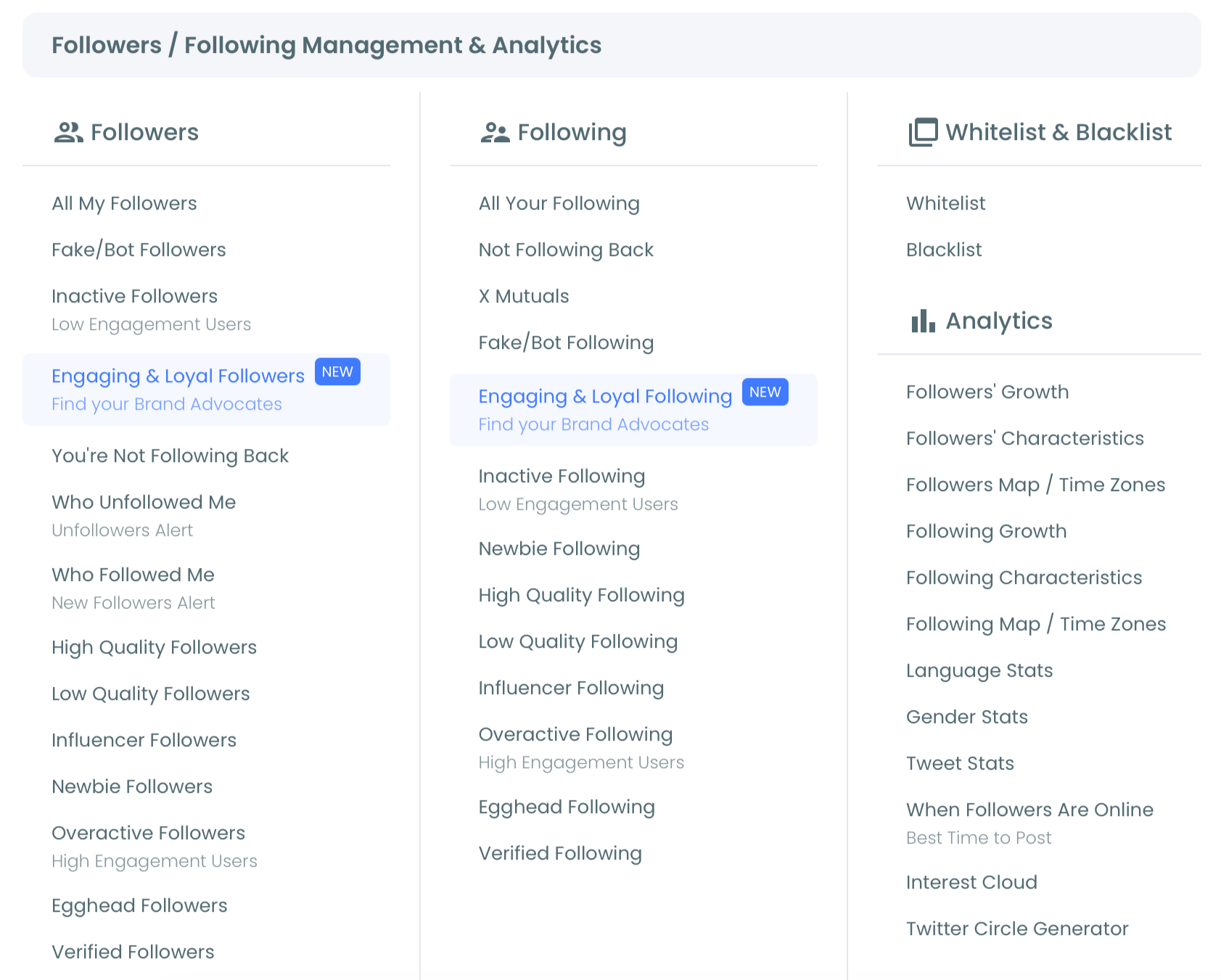
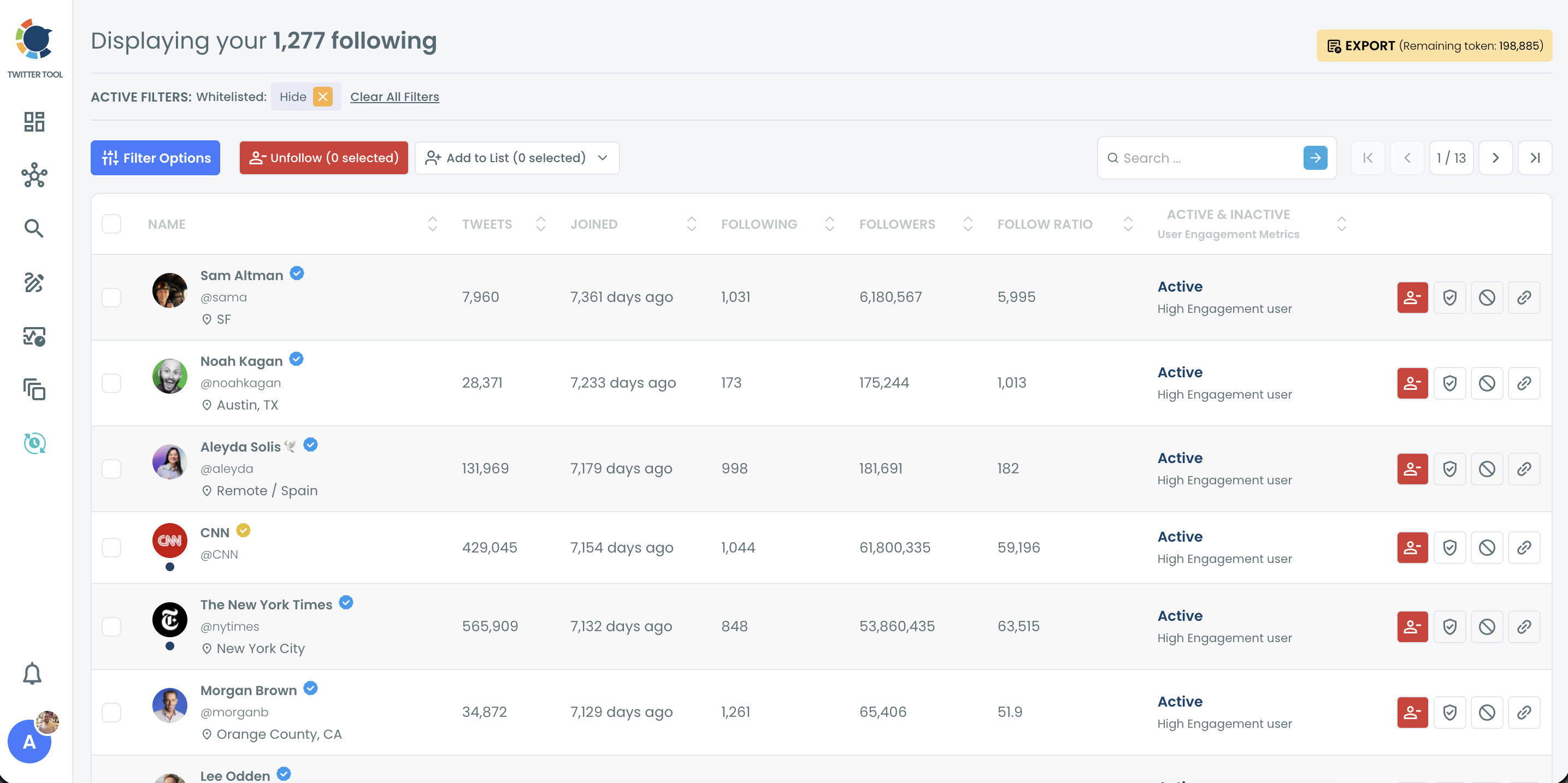
- Select All My Following under Following. The header shows how many accounts you follow, and every row carries its own data.
Find and remove the dead follows
- Sort by Joined and by Follow Ratio to see the oldest and the most lopsided accounts first, then open Filter Options and set Inactive to show only those accounts.
- Check the Active Filters bar before you select anything. Whitelisted accounts are hidden by default, so your keepers stay out of the view. Export the segment as a CSV first if you want a record of who went.
- Select the reviewed accounts and click Unfollow. Confirm the count in the Unfollow Profiles pop-up, and Circleboom processes the queue at 50 unfollows every 15 minutes, up to 800 a day.
Check who still follows you
- Open All My Followers under Followers. It shows every account that follows you, with the same columns.
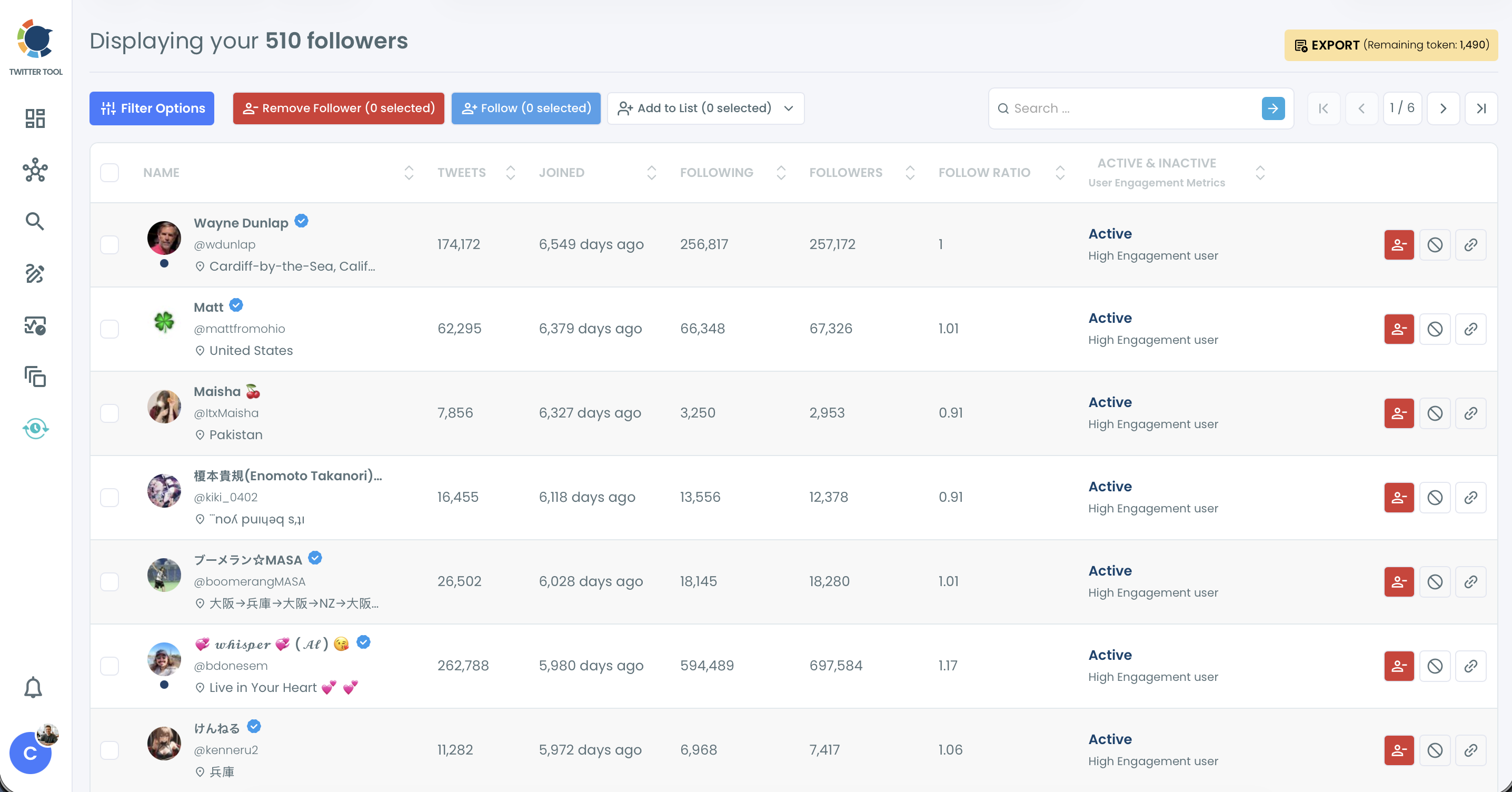
- Sort by Tweets and by Followers to spot empty accounts and the real supporters worth whitelisting.
- Remove only the clear bots with Remove Follower. The removal runs through the Circleboom Chrome extension once you click Start, so keep the browser open while it works.
Restart posting on a schedule
- Open X Post Planner, write your first posts and click Schedule. Use Find your best posting time to pick from six suggested slots, and keep a few drafts in Collections so the queue never runs dry.
Following comes first because it shapes the feed you will engage from and it is the list visitors read as your own judgment. Posting comes last, because the first posts after a long silence should reach the active people who remain, not a network of empty profiles.
Is it safe to unfollow hundreds of accounts on a dormant account?
Yes, when the unfollows are reviewed and paced. Circleboom spaces unfollows at 50 every 15 minutes with a daily safety limit of 800, and whatever is left in the queue continues automatically the next day, with no manual restart.
The pace exists because X watches for the opposite behavior. Its platform manipulation and spam policy lists "indiscriminate following", following and unfollowing a large number of unrelated accounts in a short time period, particularly by automated means.
A dormant account that wakes up and drops a thousand follows in an hour looks like that pattern. The same thousand spread over two days looks like housekeeping.
The All My Following documentation is direct about the risk: unfollow limits on X vary from account to account, and unfollowing too many accounts aggressively may get an account temporarily locked.
Every unfollow is your decision, so review the selected count before you confirm.
For the broader housekeeping that follows a first pass, clean X account covers the rest of the profile.
Gradual is how you keep the account you are trying to save.
What to post first after a long break on Twitter
Post in the voice your followers remember, then steer. The people who still follow you followed the old account, so a first post that sounds like a stranger gives them no reason to re-engage.
Generate My Next Post inside X Post Planner reads your past tweets and drafts the next one in the same tone, vocabulary and topics. Its documentation names this exact moment: the start of a content session after a break, to pick up the account's usual pattern. You can try it from the generate your next tweet page.
Two limits are worth knowing before you rely on it:
- An account with few published tweets, roughly fewer than 50 to 100, gets more generic drafts, because there is less history to learn from.
- If the comeback is also a change of topic, drafts lag behind the new direction until enough new posts exist.
Drafts never post by themselves. Add one concrete detail from your own life or work, then schedule it.
Pick a rhythm you can keep for months
The cadence matters more than the first post. The X Post Planner documentation makes the point with a comparison: three posts a week at consistent times for six months builds more momentum than ten a week for three weeks followed by silence.
That second pattern is how many accounts went dormant in the first place.
When you revive an old Twitter account, plan the pace you can still hold in month three, fill the queue for a week at a time and treat the first month as proof that the account is back for good.
Once posts are going out again, Auto Retweet can resurface the strongest ones for followers who were offline the first time.
A comeback checklist for your Twitter account
Use this as the order of operations when you revive an old Twitter account:
- Log in now, even before the cleanup, so X counts the account as active.
- Whitelist the people you still value in All My Following and All My Followers.
- Unfollow reviewed inactive follows in paced batches and let the queue run.
- Remove only clear bots from your followers, never quiet real people.
- Schedule a week of posts in your old voice before you post anything live.
After two weeks of posting, check how much of your audience is responding. A quick 1 minute Twitter audit to find your real followers gives you that baseline without guesswork.
→ Start reviving your old Twitter account with a following cleanup
Reviving an old Twitter account: questions after the cleanup
How long does it take to unfollow a few thousand inactive accounts?
At Circleboom's pace of 800 unfollows a day, a 2,000-account queue runs 800 on day one, 800 on day two and the last 400 on day three. You submit it once, and the remaining actions continue automatically each day until the queue is empty.
Why are some accounts labeled inactive when they posted recently?
The Inactive label is an indicator computed from public signals, not a final verdict. An account that posts a few times a year can still be flagged, so open borderline profiles before you unfollow them.
Can I undo a bulk unfollow on X?
No, not through Circleboom. The relationship is removed once the unfollow is processed, and you can only re-follow an account manually from its profile.
Will my scheduled posts go out if I am not online?
Yes. X Post Planner publishes at the time you set, as long as the post is scheduled at least 15 minutes ahead and your X account stays connected and authenticated.