
How do you grow on Twitter by replying when your own posts reach only a few hundred people? You put your best thinking under posts that already have readers, and you make each reply good enough that some of those readers click your name. The routine below shows which posts to pick, what a reply has to add, and where X draws the line.
Your reply routine, in three parts.
• Pick fresh posts in your niche that already have readers.
• Write a reply that adds an example, a question or a reasoned counterpoint.
• Edit every AI draft into your own voice before you post it.
Circleboom drafts replies to trending X posts in your topics through X's Enterprise API access, and you review each one before it goes out. Grow on Twitter by replying with drafts you edit first.
Why replies grow a Twitter account when posting alone stalls
A new post from a small account starts with a small audience. Most of the people who could follow you have never seen your name, and the timeline gives them no reason to.
A reply changes where your words appear: under a post that a larger account already put in front of its own readers.
I treat replies as the cheapest distribution I have on X. The post you reply to has already done the hard part, which is collecting attention. Your job is to say something in that thread that makes a reader curious about who wrote it.
That is the whole mechanism behind the plan to grow on Twitter by replying. Each reply is a small public sample of how you think, placed in front of people who already care about the topic.
The trouble is that most replies are invisible noise. "Great point" and "So true" add nothing, so nobody clicks the name next to them.
The accounts that grow on Twitter by replying treat each reply as a short post with its own job: an example, a question, a correction, a next step.
If you want to see what that looks like before reading further, you can start growing on Twitter by replying from a feed of posts in your topics.
A reply only grows your account when a stranger would miss it if it were gone.
Do your followers see when you reply on X?
Some of them may, but your followers are not the audience that matters here. The readers of the original post are.
A reply sits in the conversation under someone else's post, so the people opening that conversation are the ones who meet you for the first time.
The question of whether your followers see when you reply to a tweet matters for a different reason. It tells you not to treat replies as a substitute for your own posts.
Your followers come for your posts. Strangers come through your replies.
This changes how you write when you grow on Twitter by replying. A reply aimed at your own followers can lean on context they already have.
A reply aimed at strangers has to stand on its own in one or two sentences, because the reader has no idea who you are and decides in a second whether to keep reading.
Which posts are worth a reply on Twitter
The right post is in your niche, fresh, and already collecting engagement. Picking that post is half the work when you grow on Twitter by replying, and missing any one of these conditions wastes the reply:
- In your niche: the readers there are the people you want as followers.
- Fresh: a post that is still growing keeps bringing new readers to the conversation.
- Already engaged: replies, reposts, likes and bookmarks show a real audience is there.
- Open to discussion: a question, a claim or an announcement leaves room to add something.
The fresh-post logic is easy to picture with numbers. A post in your topic that already has 2,000 likes and is still growing keeps pulling in readers. A useful reply posted while it is fresh is read by many of the people following that conversation, and some of them click through to the profile.
Finding those posts by hand means scrolling X and guessing.
The Inspiration feed in Circleboom shows trending posts from other accounts in your interest topics, and every card carries its replies, reposts, likes and bookmarks. You read the numbers, pick the conversation, and reply from the same screen.
What a reply needs to add before it earns a profile visit
A reply earns a click when it adds one thing the original post did not have. Circleboom's AI Reply is built around four kinds of contribution, and they make a good checklist for any reply, drafted or not:
- An example from your own work that proves or tests the point.
- A specific follow-up question about the author's main claim.
- A practical suggestion the reader can use today.
- A respectful disagreement with your reason stated.
Generic praise fails this test every time. A reply such as "Love this" tells a stranger nothing about you, so it cannot bring a visit.
Where an AI draft fits in a good reply
Circleboom generates a reply to the post you picked, written in your style, inside the same panel that shows the original. You add the part only you know (the number from your last campaign, the client situation, the reason you disagree) and the reply stops being generic.
You can draft a reply that grows your Twitter account this way without starting from a blank box.
Circleboom keeps you in charge of every word. The AI writes a first draft, and you read, change and post it.
Your account connects through Circleboom, one of the Enterprise developers X publishes by name, so the posts you send go out through official access rather than a scraping workaround.
Compared with writing every reply from scratch on X, the time saving sits in the first draft and the context. The original post, your style and the publishing buttons sit in one panel, so the effort goes into the line only you can write.
How to grow on Twitter by replying with AI Reply drafts
See the AI Reply flow in Circleboom: topic chips, a trending post, and the reply draft with Rewrite and AI Quote alongside it.
The routine to grow on Twitter by replying has seven steps in three phases, and the order puts your judgment before anything gets published.
Set up a feed that shows your niche
- Log in to Circleboom Twitter and connect the X account you want to grow.

- Open the X Post Planner menu and choose Inspiration in the sidebar, under Schedule.

- Click the topic chip that matches your niche, then type a term in Search keywords to narrow the feed to one angle.
Pick a conversation and draft the reply
- Hover over a card that is fresh and already busy, then click AI Reply to generate a draft under the original post.
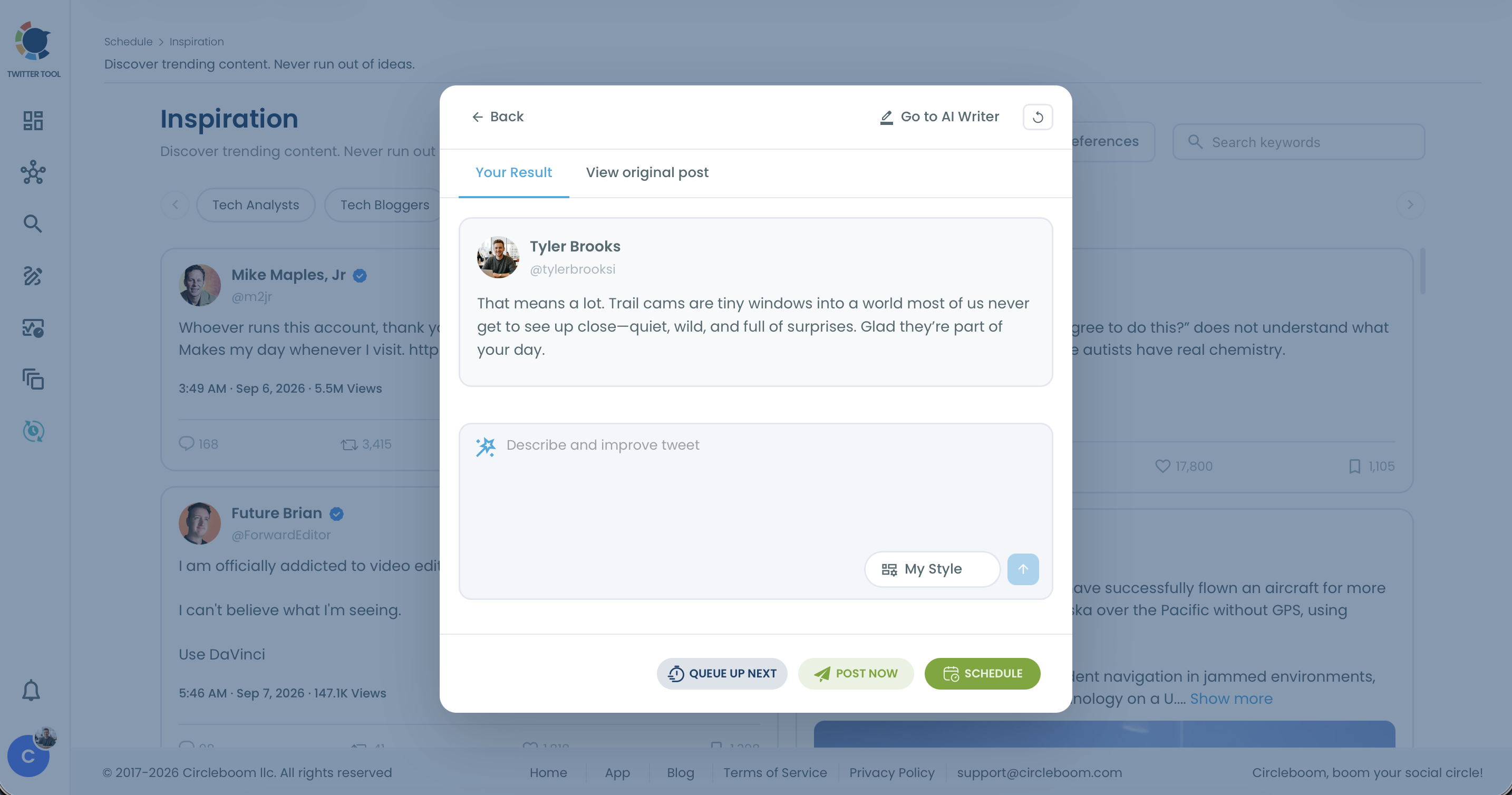
- Choose a style in My Style and type one instruction in the Describe and improve tweet box, such as "Ask one specific follow-up question about the author's main point."
Edit it into your voice and publish at the right speed
- Edit the draft against the original post until it sounds like you, and add one detail from your own experience; use Go to AI Writer if it needs more rounds.
- Click Post Now while the conversation is fresh, or use Queue Up Next or Schedule for a reply that will still make sense later.
The sequence holds because the slow part sits in the middle: you choose the conversation and edit the words before the publish button is ever in reach, so speed never replaces judgment.
Two habits make the routine stick. Keep the session short and daily rather than long and occasional, and switch topic chips when one topic goes quiet.
Five replies a day adds up to 35 visible contributions a week, each one a chance to be noticed by a reader who has never seen your name.
Is replying a lot on Twitter treated as spam?
Replying often is not spam; replying in bulk with irrelevant or repeated text is. X spells this out on its own pages, and the lines are specific. X's authenticity rules list these as not allowed:
- Sending bulk, aggressive, high-volume unsolicited replies or mentions.
- Promoting content by replying with something irrelevant to the original post.
- Repeatedly posting identical or nearly identical text.
X's automation rules go further on automated replies. Sending automated replies to posts based on keyword searches alone is not permitted, spammy or duplicative replies can lead to removal from Search or suspension, and running an AI reply bot needs prior written approval from X.
That is why the routine above keeps a person at every step. Circleboom's AI Reply writes a draft for a post you chose, and you decide whether it gets posted at all.
Nothing replies on your behalf, and no keyword triggers a reply.
You can grow on Twitter by replying every day and stay well inside these rules.
The practical rule I follow: every reply must be about the post it sits under, and no two replies should read alike. The debate over whether Twitter reply guys are dead now is really about accounts that ignored both rules.
How to tell whether your replies are working on X
Your replies are working when profile visits and follows rise in the weeks you keep the routine, and when the replies themselves collect responses.
Measure the routine over weeks, not single replies, because one reply under one post says little.
X does not hand you one number that says whether replying is growing your account, so you read it from a few signals side by side.
Keep a simple tally of how many replies you posted each week; without it, a rise or a dip in followers has nothing to be compared against.
Three signals are worth tracking:
- Follower count week over week, set against the number of replies you posted.
- Replies and likes on your own replies, which show which contributions landed.
- Engagement on your own posts published from Inspiration, such as rewrites, read in Post Engagement Analytics.
Circleboom's Twitter engagement analytics helps with the third signal. If your posts on one topic keep outperforming the rest, that topic is well matched to your audience, and it deserves more of your reply time too.
For a baseline, knowing what a good engagement rate on Twitter is keeps you from judging a week of replies against the wrong number.
Pick your next reply move on Twitter
Where you start depends on where your account is today:
- If your feed shows posts outside your niche, fix the topics first, because every reply after that lands in front of the wrong readers.
- If you reply but nobody responds, check your last ten replies against the four contributions and rewrite the generic ones.
- If replies get responses but follows stay flat, look at your profile and recent posts, since the visit has to find a reason to follow.
- If one topic keeps winning, give it more of your daily replies and turn the best ideas into posts with Inspiration.
Whichever branch you are on, growing on Twitter by replying comes down to the same small daily session of picking, drafting and editing.
In my own routine, the draft is the part a tool speeds up, and the judgment stays mine.
→ Write your first growth reply on Twitter with AI Reply
Questions about replying your way to growth on Twitter
How do I make the Inspiration feed show my niche?
Update your Content Interests in Account Settings, under AI Preferences, or click the AI Preferences button on the Inspiration page. The topic chips come from those settings, so changing them changes the feed right away.
Should I reply to a post or quote it on X?
Reply when you want to join that specific conversation, and quote when you want to explain the post to your own followers. Circleboom has an AI quote generator for the second case, and the quote shows your comment with the original embedded below.
Why can't I see my reply under the post?
X does not show every reply to every reader, and some replies sit behind extra prompts. The breakdown of why Twitter doesn't show all replies and how to see them covers what you can check.
Can I schedule a reply instead of posting it right away?
Yes. The AI Reply panel in Circleboom has the same Queue Up Next, Post Now and Schedule buttons as a rewrite, so a reply on an evergreen post can wait for a better time.