
There is no universal number for how often to post on social media. LinkedIn and Pinterest state a weekly habit, Instagram gives guidance only inside its app, and the other platforms publish no figure, so consistency is the rule that holds everywhere.
What this answer gives you.
• The posting frequency each platform states on its own pages, and where none is published.
• Why a steady weekly pace beats bursts of daily posting on every network.
• A way to hold that pace across Instagram, Facebook, LinkedIn and Pinterest without posting live.
Circleboom Publish keeps a per-account queue of recurring time slots and fills them from one composer across ten social platforms. Automate a steady posting pace for each account on every platform you run.
Why posting frequency charts disagree
Most frequency charts online come from one vendor's study of business accounts, presented as rules. One says post on Facebook daily, another says three times a week, and both are averages of other people's accounts, not instructions from the platform.
The question a small team actually faces is narrower. Which platforms say anything at all, and what does a business do on the ones that don't? Separating owner-stated cadences from folklore is the first step, and keeping a steady posting frequency is the second.
Circleboom Publish lets one person schedule, queue and analyse posts for Instagram, Facebook, LinkedIn, Pinterest, Threads, Bluesky, TikTok, YouTube and Google Business Profile from a single login.
That matters here because frequency is decided per platform, but kept across all of them at once.
What each platform actually says about posting frequency
Only two platforms publish a cadence, one points to in-app guidance, and the rest leave the number to you. This table separates what the platform owner states from what it doesn't.
| Platform | What the platform itself states | What to do with it |
|---|---|---|
| LinkedIn Pages | Companies that post weekly see a 2x lift in engagement with their content | Post at least weekly from every Page |
| Create Pins frequently and consistently; aim to create original content weekly | Add original Pins every week | |
| The in-app Best Practices "Creation" section gives insights on how often to post | Follow your own account's in-app insight; no public number exists | |
| No published number | Pick a pace you can hold every week | |
| TikTok | No published number | Pick a pace you can hold every week |
| YouTube (Shorts) | No published number | Pick a pace you can hold every week |
| Threads | No published number | Pick a pace you can hold every week |
| Bluesky | No published number | Pick a pace you can hold every week |
| Google Business Profile | No published number | Pick a pace you can hold every week |
Pinterest's guidance comes from its own Pin performance and distribution help page, which also notes that Pins can be scheduled up to two weeks in advance. Instagram's position is explained in its best practices for creators announcement: the cadence advice is personalized inside the app, so the page itself gives no figure.
Counting questions, such as how many Idea Pins per day on Pinterest to publish, get settled by your own results. Pinterest's page sets no daily figure.
The consistency rule behind every row
The reason is mechanical. A feed ranks posts partly on whether the account behind them appears on a reliable rhythm, and partly on how quickly each post draws reactions once it is live.
Long gaps weaken the first signal. Posting while followers are active strengthens the second.
The number you pick matters less than whether you hit it every week.
How to pick a pace where no number is published
Start from what you can produce, not from what a chart promises. Count how many posts one weekly sitting realistically gives you, then divide them across platforms by where your audience is.
As an illustration: if one sitting yields ten solid posts, a business might give its LinkedIn Page two, Pinterest three fresh Pins, Instagram four, and Google Business Profile one. Every row of the table is covered, and nothing depends on finding extra time midweek.
Raise the pace only after a full month at the first number.
A pace that survives a busy month is a real pace; one that only works in a quiet week is a wish.
That is why the "no published number" rows still have an answer. A pace you hold for months tells every algorithm the account is active and current. A pace you abandon after two weeks tells it the opposite.
Is there such a thing as posting too much on social media?
Volume alone rarely does the damage. Repetition, bursts and gaps do. Three posts in an hour compete with each other for the same early engagement, and a burst followed by silence reads as an account that comes and goes.
What holds up on every network is a regular rhythm, posts that differ from each other, and replies to the people who comment. Video channels face the same consistency signal; if YouTube is part of your mix, read up on how the YouTube algorithm works before you set a pace for Shorts.
Spacing helps as much as volume. Because each queue slot is a fixed time, posts on the same account land hours apart instead of minutes apart, and each one gets its own window for early engagement.
Duplicate posts and sudden reach drops
Duplicate content is the real risk of chasing a high number. Repeating the same text, or sending one identical post to several accounts on the same platform, can shrink an account's reach, and a serious case can end in a restriction.
The fix built into the composer is the AI writer: rephrase, change the angle, or add a fresh example before a message goes out a second time.
A common version is the catch-up burst. An account misses a week, then posts four times in one afternoon to make up the count.
The weekly total looks right on paper, but the algorithm saw a gap and then a crowd of posts competing with each other.
A sudden, unexplained drop in reach on one platform can also signal a shadowban. Check for it before cutting your frequency, since the cause may be the account's standing rather than the number of posts.
Is there a daily limit on how much you can post?
Yes. Every platform enforces its own posting-rate caps, and they still apply underneath any scheduling tool's queue. Circleboom's posting limits per 24 hours list includes:
- Facebook: 35 posts.
- Instagram: 50, counting posts, Reels and Stories together.
- LinkedIn: 50 posts.
- Pinterest: 25 posts.
- Google Business Profile: 50 posts.
On Instagram, posts, Reels and Stories all draw from the same daily allowance, so a day with heavy Stories leaves less room for feed posts.
Threads allows about 250 posts per 24 hours.
A queue never pushes you near these numbers by accident, because you set the slots yourself. If an account ever needs more posts in a day, add slots there rather than stacking Post Now sends.
None of these caps is a target. They sit far above any cadence a platform recommends, which tells you how much room exists between "too little" and "too much": the usual failure is going quiet, not hitting a ceiling.
Is a scheduling tool worth it, or should you post live?
A scheduling tool is worth it once you run more than one account, because native schedulers each post to one account on one platform at a time. Keeping a weekly pace on four networks by hand means four apps, four logins and four decisions every week.
Circleboom Publish handles three things a native scheduler doesn't:
- When: account-specific best times from each account's own followers, instead of a generic chart.
- Where: any mix of accounts across all ten platforms in one send.
- How often: a Queue of recurring slots per account, so each post drops into the next open slot.
How the queue holds a frequency per account
The Queue is the frequency tool. In Time and Queue Settings, each connected account gets its own posting times, and Post to Queue drops a finished post into the nearest open slot of every account selected. Queue configuration is per account, not global, so your LinkedIn Page can run weekly while Instagram runs several times a week.
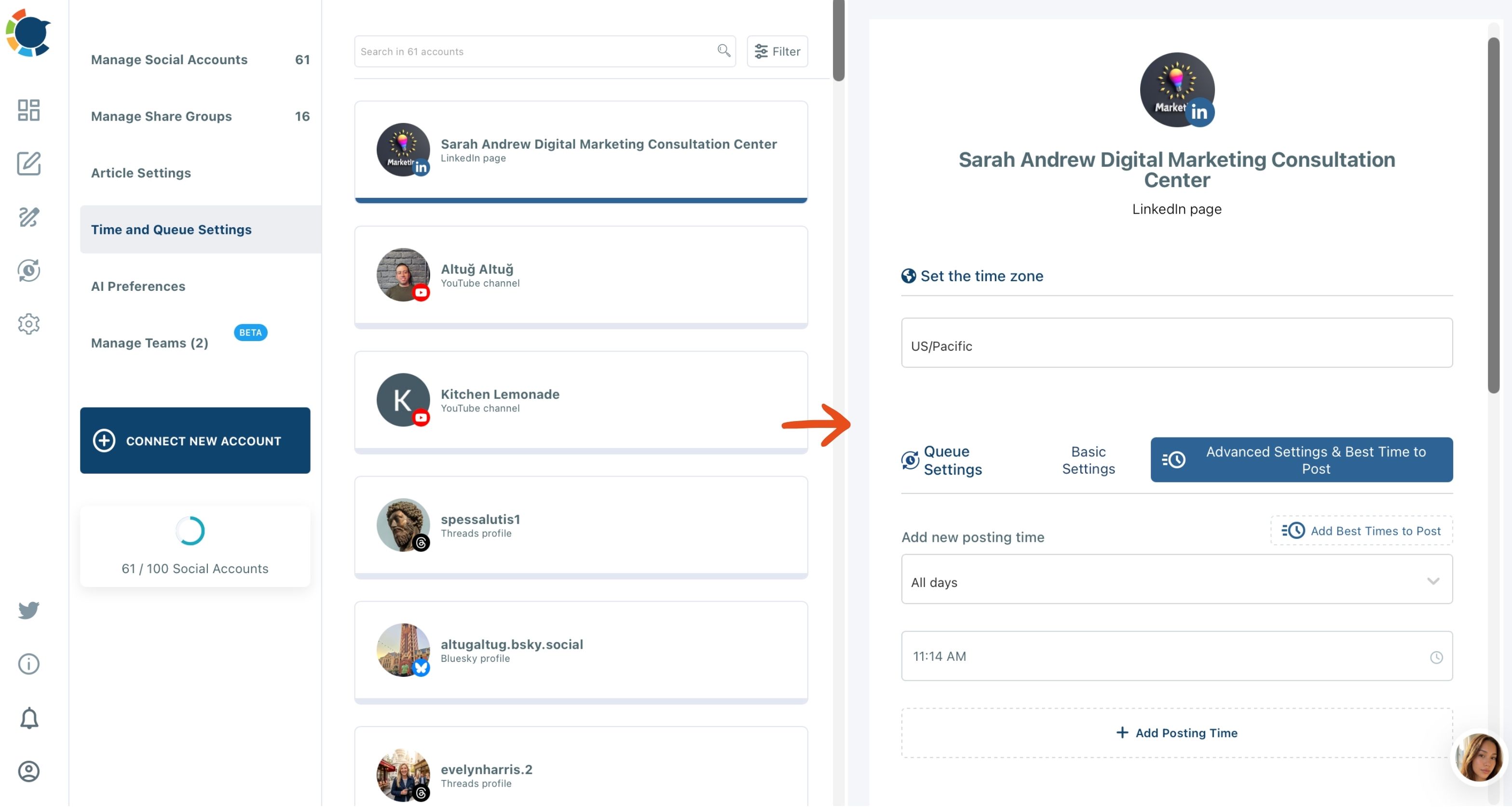
The queue also sits beside two other buttons. Schedule picks an exact date and time for a post tied to a moment, such as a webinar that starts at a set hour. Post Now publishes immediately for the rare post that cannot wait. For frequency, Post to Queue is the default, because it removes the decision about when entirely.
Filling the slots at each account's best times
Add Best Times to Post fills those slots with the account's own suggested windows. Posting at a suggested time instead of a random one is tied to up to 300% more engagement on the same post.
Teams comparing social media automation tools usually weigh exactly this: whether the tool keeps a pace per account or only books single posts. If you want to automate your social media posts at a set frequency, the per-account queue is what does it.

The clip below opens Time and Queue Settings, adds a posting time across the week and saves it.
For accounts with more sources than time, an RSS feed can keep a baseline running. Circleboom can post RSS to social media on its own, with a daily limit you set, for the platforms RSS supports.
Automation without the queue: a Facebook Page posting on its own in a few clicks, the baseline layer under a weekly pace.
What batching buys in time
Circleboom's Queue, RSS feeds and bulk scheduling together set up a month of posting in about two hours. Spread across a month, that is roughly half an hour a week for a pace that never slips, compared with a few minutes of live posting every single day on every network.
Running several brands or locations adds one more layer. The tools to manage multiple social media accounts let a Share Group select a whole bundle of accounts in one click. One queue send then reaches every account that should carry the post.
Google Business Profile shows why this matters. Google's own dashboard can schedule posts for a profile, and for one location that may be enough.
For a business with several locations plus Instagram and Facebook, the value is batching the week once, with AI copy and templates, and sending each location its own version in one session.
What a steady pace adds up to over three months
Consistency compounds. A weekly LinkedIn Page clears the bar LinkedIn names; weekly original Pins match what Pinterest asks for; and every other network sees an account that never goes dark.
A three-month window is a sensible test period for any pace, and it is the horizon behind growing social media platforms in 3 months. Hold the pace without a break for the whole window, then check what actually worked. Circleboom's social media post analytics give each platform its own Content Performance Analytics for that check.
Three months is long enough for the pattern to show. Watch whether reach on each platform rises after the gaps disappear, and whether the posts that went out at suggested best times outperform the rest.
On a day with nothing new ready, a proven past post can be sent again from Sent Items instead of leaving a slot empty.
Choosing your posting frequency: a decision tree
Pick the branch that matches your accounts:
- If you run a LinkedIn Page, post at least weekly, since that is the cadence LinkedIn ties to a 2x engagement lift.
- If Pinterest matters to you, add original Pins every week and keep them coming consistently.
- If Instagram is your main channel, use the in-app Best Practices insight for your own account; there is no public number to copy.
- If you are on Facebook, TikTok, YouTube, Threads, Bluesky or Google Business Profile, choose the pace you can hold every week for three months, then adjust from your analytics.
- If you run several of these at once, decide the pace per account once and let a queue hold it.
The common thread is that the right number is the one you never miss.
→ Set your social media posting cadence per account
How often to post: what people ask about cadence
Do I still have to log in to every app each day once the queue is set?
No. Once each account has its recurring slots and the week's posts are sent with Post to Queue, Circleboom Publish releases them on its own. You come back when the queue runs low, and the Outbox Calendar View shows which days still have nothing booked.
How can I tell if posting this often is paying off after a month?
Compare this month's top posts with last month's in each platform's Content Performance Analytics, and check whether posts went out at random times instead of the suggested best times. If engagement dropped, timing or format is usually the cause before frequency is.
Can one queued post go to every platform at once?
Yes, the universal composer sends one post to any mix of accounts, but the strictest platform limit applies. A 500-character post fits Facebook, Instagram, LinkedIn and Threads but not Bluesky's 300 characters, and a Pin takes one image, so check the per-platform preview before sending.