A nonprofit Facebook Page that has not posted in six weeks tells every visitor the same thing: nobody is home. The donor checking before a gift, the volunteer asking whether Saturday's shift is still on, the local reporter looking for a quote, all of them read that silence as a group that has stalled.
Small nonprofits rarely go quiet for lack of news. They go quiet because one person holds every channel, and that same person also runs the food drive, writes the grant report and answers the phone.
On a small budget, social media management for nonprofits works when one person writes each post once and Circleboom Publish schedules it to Facebook, Instagram, LinkedIn and X in a single send.
→ Manage your nonprofit's social media accounts from one dashboard
Keep reading for the weekly time math, the fix for empty weeks and a safe way to let volunteers help.
What a quiet Facebook Page costs a small nonprofit
A quiet Page costs a small nonprofit trust first and reach second. People who are about to give money or time look you up, and the most recent post is the first proof that the organization is still running.
I think most boards underrate this. They see social media as a megaphone for big campaigns, so when there is no campaign, nobody posts.
But the Page also works as a front door, and a front door with dust on it turns people away before anyone says a word.
The usual plan sounds reasonable: "We will get back to posting after the gala." Then the gala needs a month of prep, the month after needs the thank-you calls, and the Page sits untouched until spring.
If your board still needs convincing that the channels matter at all, the overview of social media for nonprofits makes that case well. This article starts one step later, with the harder question of how a team of one keeps up.
Social media management for nonprofits fails for a reason that has little to do with ideas or effort. It fails on logistics.
The fix starts with a setup that lets you handle social media management for your nonprofit in one place instead of in four separate apps.
Why posting app by app wears out a one-person team
Posting app by app breaks a small team because the work grows with every channel, not with every idea.
One appeal for winter coats is one idea. Shared by hand on four channels, it becomes four logins, four uploads and four chances to make a typo.
Here is the routine most small teams fall into.
Write the appeal in a notes app. Open Facebook, switch to the organization's Page, paste and post. Open Instagram, find that it needs a photo, go back to the camera roll. Switch to the LinkedIn Page.
Then trim the whole thing for X, where the limit is 280 characters.
Each platform's native scheduler only helps with one account on one platform at a time. So even the disciplined version, sitting down on Sunday to schedule the week inside each app, still means a separate trip through every app for every post.
The thought that follows is a dangerous one: "Maybe we are just not a social media kind of organization." It is a common conclusion on small teams, and it is almost never true. Small groups often have the best material, real people helping real neighbors.
The post on how social media helps a small organization shows how much a modest presence can do for a team without a marketing department.
The bottleneck was never ideas; it was the number of times one person had to log in.
Picking the channels a small nonprofit can keep alive
A small nonprofit should run the three or four channels its supporters already use, and no more. Every extra account is another place that can go quiet, so the right number is the one you can keep active every week.
Pew Research Center's social media fact sheet gives a useful starting point for U.S. audiences.
YouTube reaches 84% of U.S. adults, Facebook 70% and Instagram 51%.
Those numbers explain why the Facebook Page is the front door for most local nonprofits, and why Instagram is usually the second channel. A practical lineup for nonprofit social media management on a one-person team looks like this:
- Facebook Page: events, appeals and thank-you posts for the local community.
- Instagram: photos from the work itself, since every Instagram post needs an image or a video.
- LinkedIn Page: updates for funders, corporate partners and board members.
- X: quick updates, advocacy and contact with local press.
X earns its place when your cause moves with the news: a policy vote, a weather emergency, a city council meeting. The piece on choosing a Twitter tool for nonprofits covers the X side in more depth.
If X is not part of your supporters' week, leave it out and spend that time on Facebook.
How I would run social media management for nonprofits from one dashboard
I would put every channel into one composer and send each post once. In Circleboom Publish that composer is called "Create New Post on All Platforms," and it covers ten platforms, including Facebook, Instagram, LinkedIn and X.
The flow is short. You select the Facebook Page, the Instagram account, the LinkedIn Page and the X account together, write the post, attach the photo and send it to all of them in one action.
The same send can reach many accounts at once; it has been used with 30 Facebook Pages in a single send.
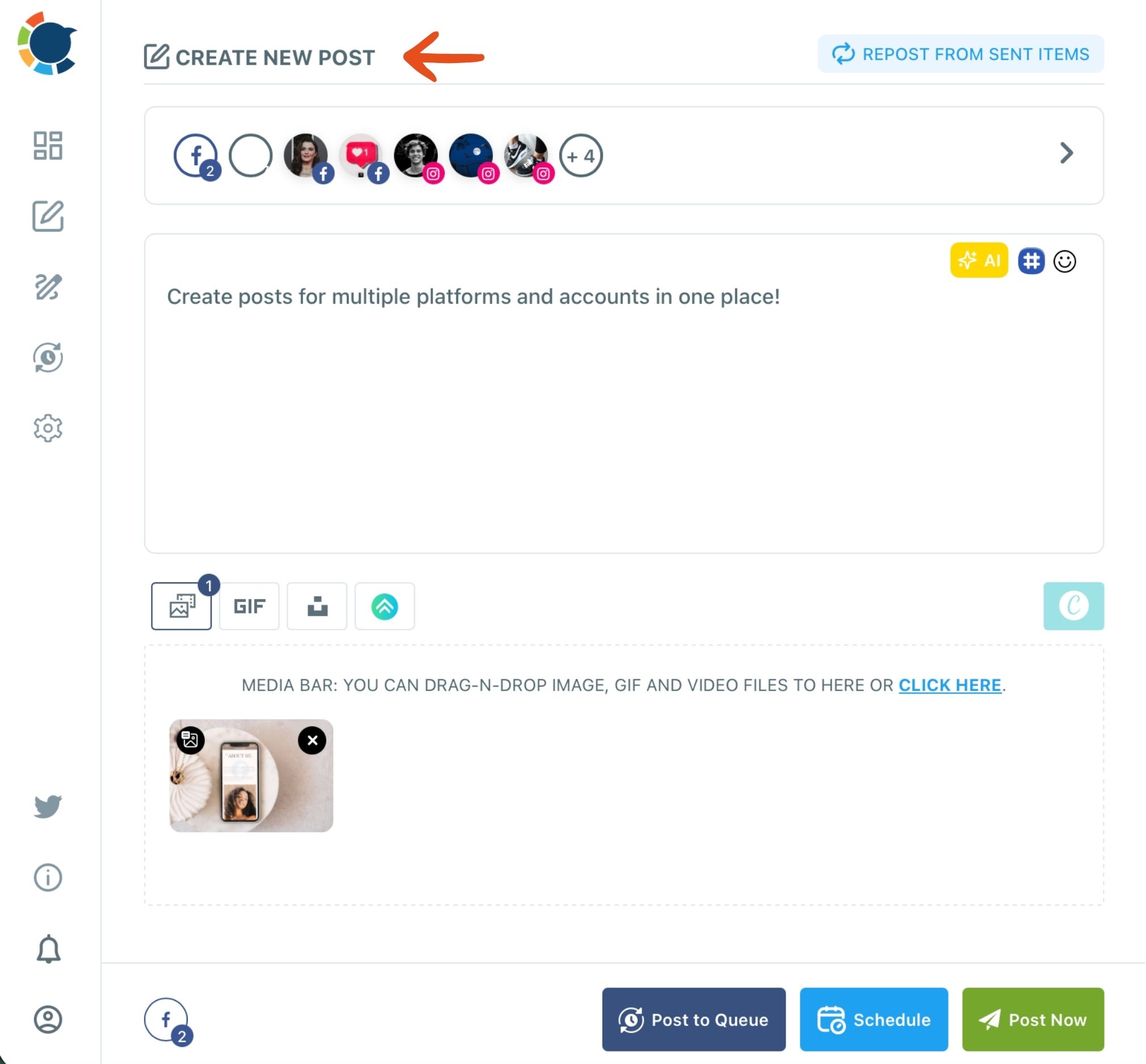
For a charity with one coordinator, that single change is the whole budget plan. You no longer pay in hours for every extra channel.
You can post to every nonprofit channel in one send. Then decide whether it goes out now, at a chosen time or into the next open slot of each account's queue.
The checks that keep a busy coordinator safe
Three details make the composer safe for a busy person:
- Post Preview shows how the post looks on each network before it goes out.
- Save as Draft keeps the accounts, text and media if the phone rings mid-post.
- Share Groups save the usual bundle of accounts so the next selection is one click.
There is one rule to respect. A post going to several platforms has to fit the strictest one, so a post that includes X stays within 280 characters, and a post that includes Instagram needs an image or a video.
The built-in AI button can draft or shorten the text, but it does not apply platform limits on its own, so tell it plainly: "make it max 280 characters."
On the X side, Circleboom is an official X Enterprise developer, so connecting the organization's X account does not mean handing it to a workaround. That matters for a nonprofit, where the account often belongs to the organization and outlives any one staff member.
See it in action: one event or appeal post sent to a nonprofit's Facebook Page and Instagram account in the same action.
The two-hour week: what one person can keep running
Two hours a week, spent in one sitting, can keep four nonprofit channels posting every week. The math below is an illustration built from how the composer works, not a measured result, but it shows where the time goes.
Take a small food pantry with four accounts: a Facebook Page, an Instagram account, a LinkedIn Page and an X account. The coordinator wants four posts a week on every channel.
Done natively, that is 4 posts × 4 accounts = 16 separate publishes a week, each with its own login and upload, or 64 a month.
With one composer, the same week is 4 sends. The product's own worked example makes the scale clear: 4 posts to 7 accounts on four platforms means 28 native publishes, or 4 sends and about 10 minutes in Circleboom Publish.
| Weekly task | Time (illustrative) |
|---|---|
| Draft four posts with the AI button | 40 minutes |
| Add photos from your device or Canva | 30 minutes |
| Preview and send to every account | 15 minutes |
| Fill empty days with shared articles | 15 minutes |
| Reply to comments and messages | 20 minutes |
Let the queue pick the posting times
That is two hours, and the Queue does the rest. Each account can hold recurring time slots set in Time and Queue Settings, and Add Best Times to Post fills those slots with times worked out from that account's own followers' activity.
You stop picking times. Posts simply drop into the next open slot.
For a team of one, the scarce resource is not money or content; it is the number of separate tasks in a week.
That reframes the budget side of social media management for nonprofits too. A tool that saves close to 50 publishes a month is paying for itself in the coordinator's evenings, which are the hours a small nonprofit can least afford to lose.
What to post on weeks with no news
On weeks with no news, share useful articles from your field and let your own blog or newsletter post itself. Both keep the channel alive without asking the coordinator to invent a story.
The manual option is Discover Articles. You choose topics your supporters care about (housing, literacy, animal welfare), browse fresh articles and add the good ones to the Queue in one click.
The article curation page shows how it works, and it suits text-first networks like Facebook, LinkedIn and X best. Add one line of your own to each shared post, such as why it matters for your neighborhood, and it reads as a recommendation rather than a filler link.
Let your blog or newsletter post itself
The automatic option is RSS. Does your organization publish a blog, a news page or a newsletter archive with a feed?
Then Circleboom Publish can post RSS to social media on its own after a one-time setup. Every new item goes out to the accounts you pick, and a "Begin with" or "End with" line can add your donation link or a hashtag to each one.
RSS works for X, Facebook, LinkedIn, Google Business Profile, Bluesky and Threads. It does not post to Instagram, so Instagram still gets its posts from the composer, which suits a channel that needs a photo every time anyway.
For the posts you write yourself, the list of low-budget nonprofit marketing ideas is a good source of formats. Volunteer spotlights, behind-the-scenes photos and plain thank-you notes cost nothing and tend to get comments.
How can volunteers post without risking mistakes?
Volunteers can post safely when they draft and an admin approves. Circleboom Publish's Team Management gives each person a role, and a User's posts wait for an Admin's approval before anything goes live.
Delegation is where social media management for nonprofits usually breaks, and that one rule changes what you can delegate. The college student who takes great event photos can prepare the Saturday post.
The board member who writes well can draft the annual appeal. Neither of them needs the organization's passwords, and nothing goes out under the nonprofit's name until the coordinator says yes.
There are only two roles, Admin and User, and a User only sees the accounts assigned to them. The team management page lays out the setup.
For a nonprofit with a rotating volunteer base, the most useful part is that you can remove a member when a semester ends, while the accounts and the post history stay with the organization.
Is there a nonprofit discount for Circleboom Publish?
Yes. Circleboom offers a nonprofit discount of 30% off all plans, and it applies to renewals as well. There is no separate free nonprofit plan; the discount is the program.
The process is simple. Subscribe to the plan you need, then email the billing team. They verify your nonprofit status using your social media handle and website, apply the discount code and refund 30% of the payment.
It also helps to separate paid tools from free programs. Google for Nonprofits lists no-cost products for eligible organizations, including Google Workspace for Nonprofits, the YouTube Nonprofit Program and Ad Grants for Google Search ads; the details are on the Google for Nonprofits page.
Those programs cover search ads and office tools, not social posting, so they sit alongside a scheduler rather than replacing one.
Weighing paid ads against organic posting? Read the list of cost-effective advertising ideas before you spend any of the budget on boosts.
You do not need a comms department to stay visible
You do not need a comms department, a big budget or a daily posting habit to run a nonprofit's channels well. You need one weekly sitting, one composer and a short list of channels you can keep alive.
Start small. Connect the Facebook Page and one more account. Send next week's four posts in one go, and add a few shared articles for the quiet days. If it holds for a month, add the next channel or invite a volunteer as a User.
That is what social media management for nonprofits on a small budget looks like in practice. The posting gets lighter, the Page stops gathering dust, and the coordinator gets a few evenings back.
→ Run your nonprofit's social media from one login
Nonprofit social media FAQ
Can we post the same appeal on every account?
You can send one appeal to Facebook, Instagram, LinkedIn and X at once, since each is a different platform. If you run several accounts on the same platform, give each its own version with the AI writer, because identical posts across accounts can limit reach.
Circleboom also blocks the same tweet from going out again within a week on X.
Which platforms does Circleboom Publish cover?
Circleboom Publish posts to ten platforms: X (Twitter), Instagram, Facebook, LinkedIn, Pinterest, Google Business Profile, Threads, Bluesky, YouTube and TikTok. A nonprofit can start with two or three and connect more later.
Does the AI writer keep posts within X's character limit?
No, not on its own. The AI writer drafts general text, so ask for the limit directly, for example "make it max 280 characters," before you send a post that includes X.