How do you run a Twitter profile audit that tells you more than "the bio could be better"? You check two layers: the surface a visitor judges in a few seconds, and the evidence behind it that the profile never displays, then score each area pass or fix.
What does a proper Twitter profile audit cover?
The surface (name, photo, bio, pinned post, link) and the account behind it: who follows it, who it follows, how it posts and how its posts perform. With Circleboom's X Account Analysis tool, you can audit that second layer for any X profile, your own or someone else's, from X's official API at Enterprise level.
→ Start a Twitter profile audit with X Account Analysis
What a Twitter profile audit actually checks
A Twitter profile audit is a structured check of an X account against a fixed list, so that the result is a set of findings rather than an impression.
Most audits stop at the surface. They rewrite the bio, swap the header and call it done. That part matters, but it is the part anyone can see and copy.
The useful half of the audit is the layer underneath: the audience, the following list, the publishing habits and the results per post. That is where the problems that hold an account back usually sit.
A profile audit that only looks at the profile is a design review, not an audit.
The same checklist works whether the profile is yours, a client's or one you are vetting. The difference is only what you do with the findings.
The surface layer: what visitors judge in seconds
The surface is everything a visitor reads before deciding to follow, reply or leave. X's own data model shows how few fields that is. The user object in X's API carries the profile image, the description it calls the bio, the pinned post and a verification type such as blue, business or government.
Check each one against a simple question:
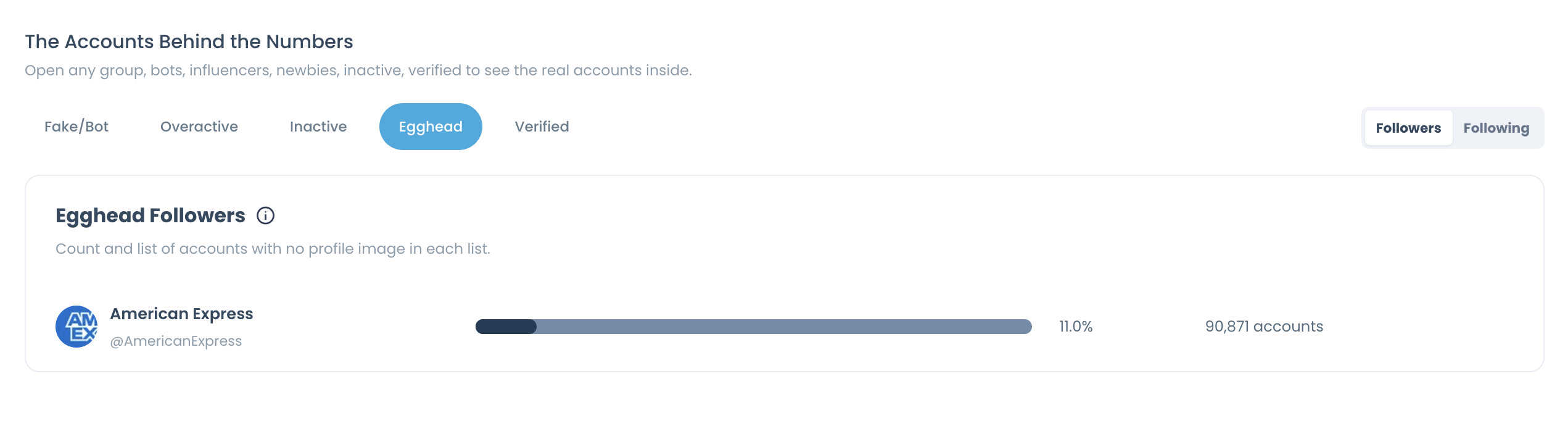
- Photo: is it a real image, or the default avatar? Circleboom calls accounts with no profile image "Egghead" accounts, and visitors treat them with suspicion.
- Name and handle: can someone find and remember them?
- Bio: does it say who the account is for and what it posts about, in plain words?
- Pinned post: does it show the best reason to follow today, not a campaign from last year?
- Link: does it go somewhere that still works and still matters?
The surface layer is a quick pass. Fix what fails and move on, because the deeper findings often change what the bio should say.
When the goal is trust, how to make a Twitter account look more credible goes further into what visitors check after the bio.
The evidence layer: what the profile cannot show
Below the surface sit five areas no profile page displays. Each one has its own failure pattern, and each maps to a section of Circleboom's X Account Analysis report:
| Audit area | What to check | Report section | Fix signal |
|---|---|---|---|
| Audience | Real, active share of followers | Audience Quality | High fake/bot or inactive share |
| Network | Who the account follows | Following view | Many dead or bot follows |
| Habits | Cadence and consistency | Posting behavior | Output far below lifetime average |
| Content | Format and post types | Content type & format | One format fills the feed |
| Results | Per-post engagement and impressions | Engagement, Impression/Views | Rate high only on tiny impressions |
The table is also the order to audit in. Results come last because every result is measured on the audience and the habits above it.
How Circleboom covers the evidence layer
With Circleboom's X Account Analysis tool, you can audit any X profile from its handle. The account does not need to be connected, so the same audit works for your own profile, a client's or one you are researching.
Circleboom retrieves the profile's followers, following and recent posts through X's official Enterprise APIs. Records come from X itself rather than from scraped pages, which matters in an audit: a finding based on a partial follower list is a finding about a different account.
The report is dated and saved, which turns a one-off audit into a baseline. The next audit is read against it, not against memory.
You can run the evidence side of your Twitter profile audit while you follow the steps below.
How to do a Twitter profile audit with Circleboom
Run the report on the profile, then score each audit area from the section that covers it. Seven steps in two phases.
Run the report on the profile
- Log in to Circleboom Twitter with your X account.
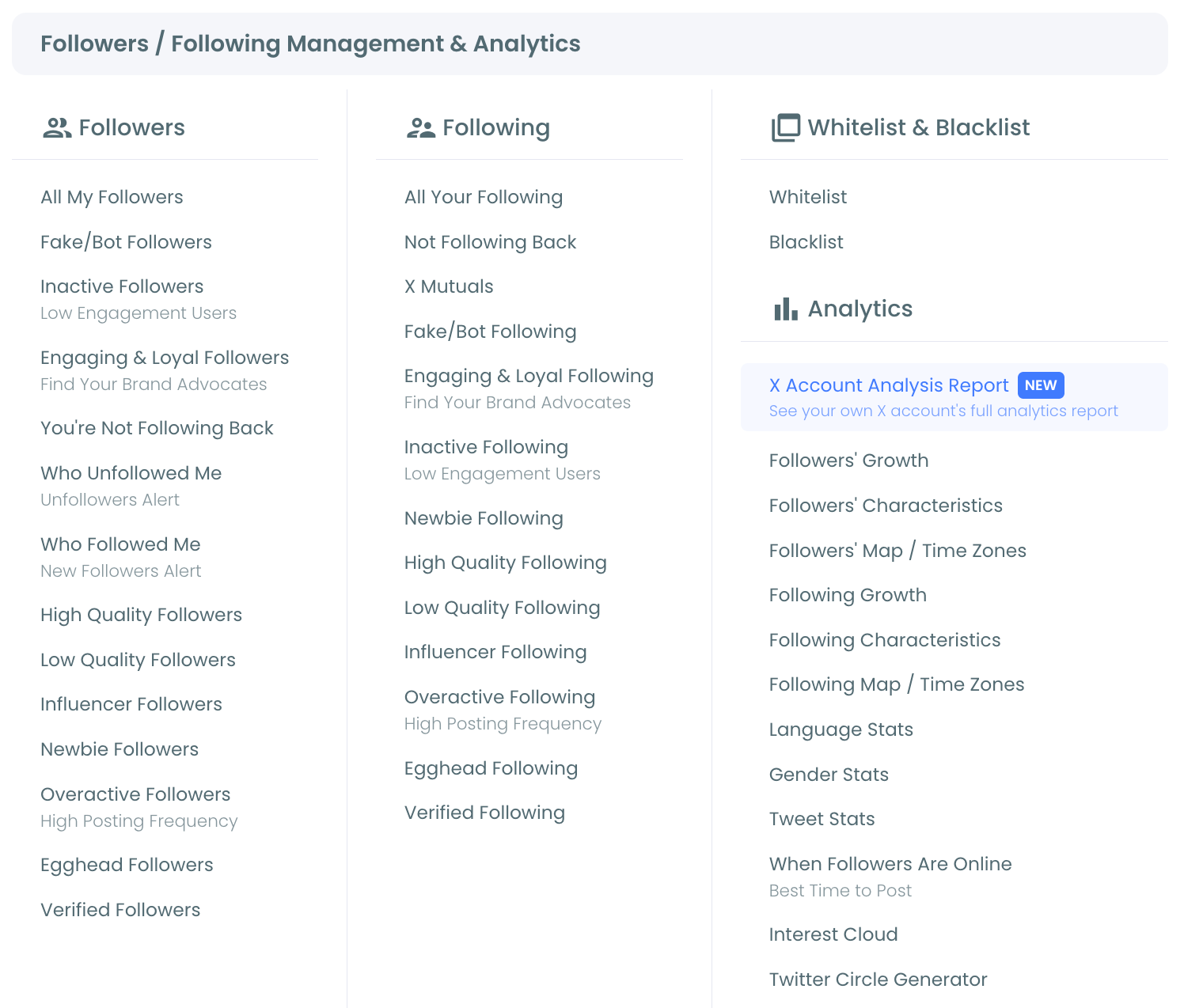
- Open the Followers / Following Management & Analytics menu and choose X Account Analysis Report under Analytics.
- Type the handle of the profile you are auditing and click Start Account Analyses.
- Choose Keep it up to date every month if you will audit the profile again, or Just this once for a single check.
Score each audit area
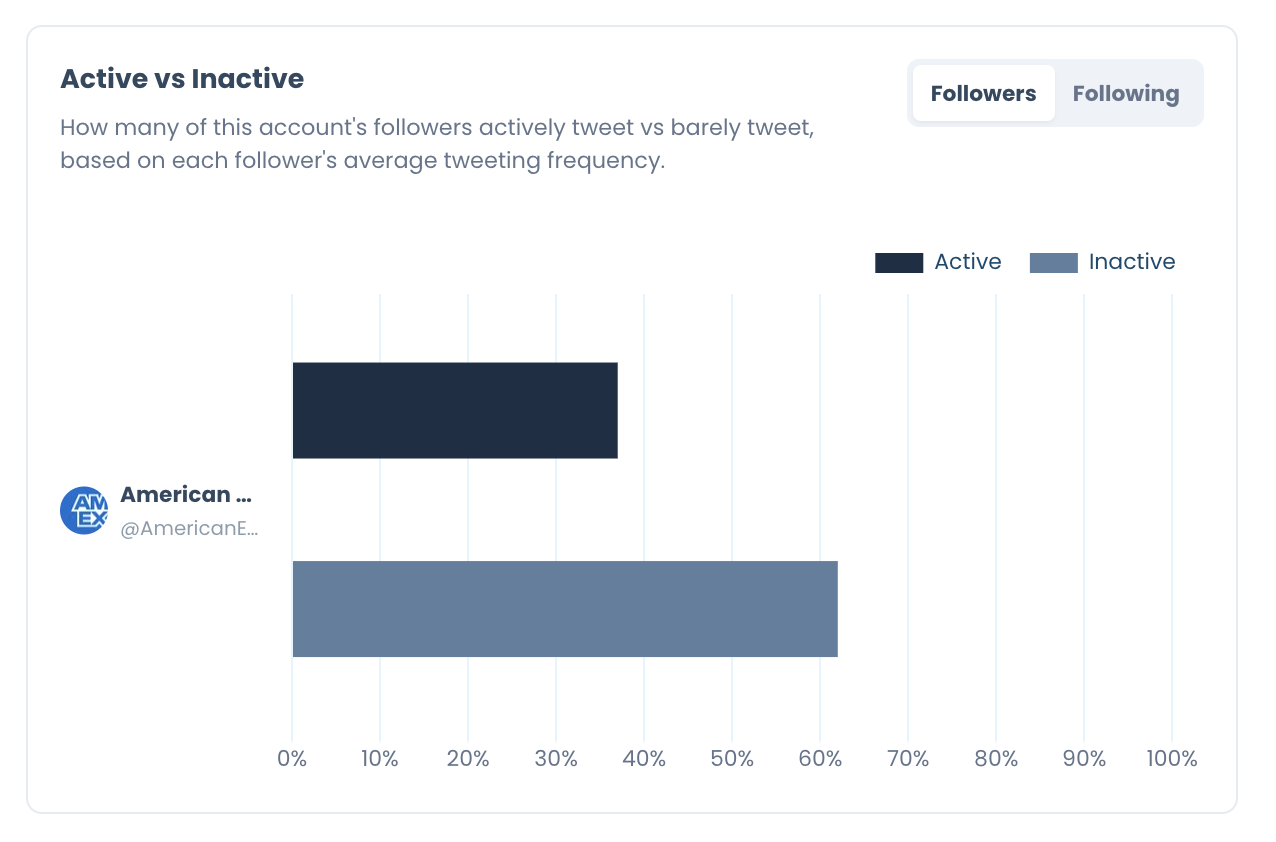
- Score the audience from Audience Quality: Human vs Fake/Bot, Active vs Inactive and the drill-down counts such as Egghead, which lists followers with no profile image.
- Flip to the Following view and score the network with the same panels.
- Score habits, content and results from Posting behavior, Content type & format, the Engagement summary and Impression/Views, then write one finding per area.
Writing one finding per area is what makes it an audit. "Audience: 30% inactive" is a finding. "Engagement looks low" is not.
In short: run the report, score audience, network, habits, content and results, and write one finding for each.
Turn the audience score into an effective audience
The most useful single number from a profile audit is the effective audience: the follower count minus the accounts that cannot respond.
Here is an illustrative calculation for a profile with 12,000 followers:
- Audience Quality shows 14% suspected fake or bot accounts, about 1,680 followers.
- It shows 26% inactive, about 3,120 followers.
- Subtracting both leaves about 7,200.
The two groups can overlap, because a bot can also be inactive, so treat 7,200 as a floor. The real figure sits between that floor and the count after removing only one group.
The follower count is the number on the profile; the effective audience is the number the algorithm works with.
Circleboom's report explains why. X first shows a new post to a small test group of followers, and if they do not engage, reach slows. Dormant and automated followers in that group make the first test fail even when the post is good.
Audit the following list, not only the followers
The following list is the one part of the network the account chose, and it shows up on the profile for anyone who taps it. An audit that skips it misses half the picture.
The Following view applies every audience panel to the accounts the profile follows: Human vs Fake/Bot Following, Inactive Following, Overactive Following and the rest.
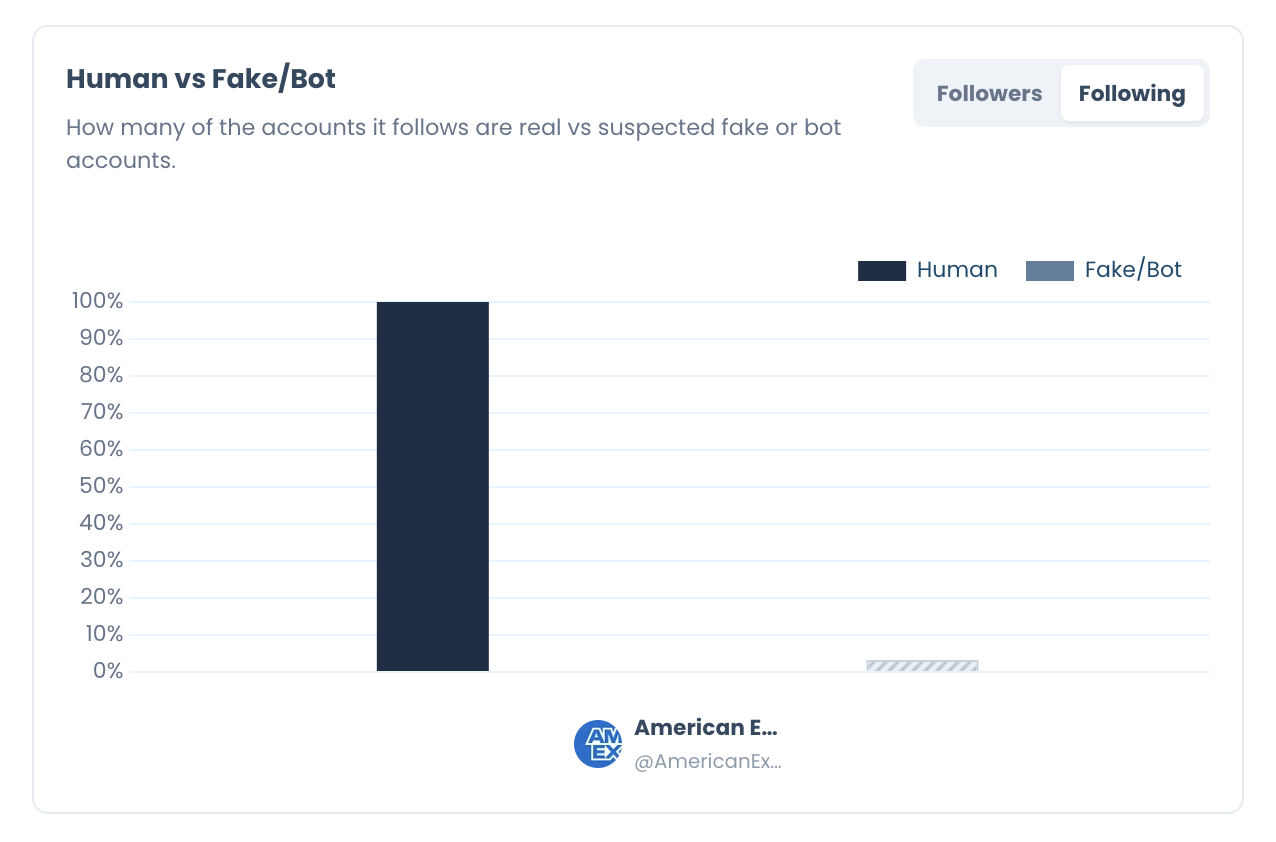
A following list full of abandoned and automated accounts makes a profile look careless and fills its timeline with nothing. The step-by-step version of that check is in how to run a Twitter following audit.
Check whether the posting habits fit the audience
Habits fail quietly. The posting-vs-audience timing panel overlays when the profile posts with when its audience is online.
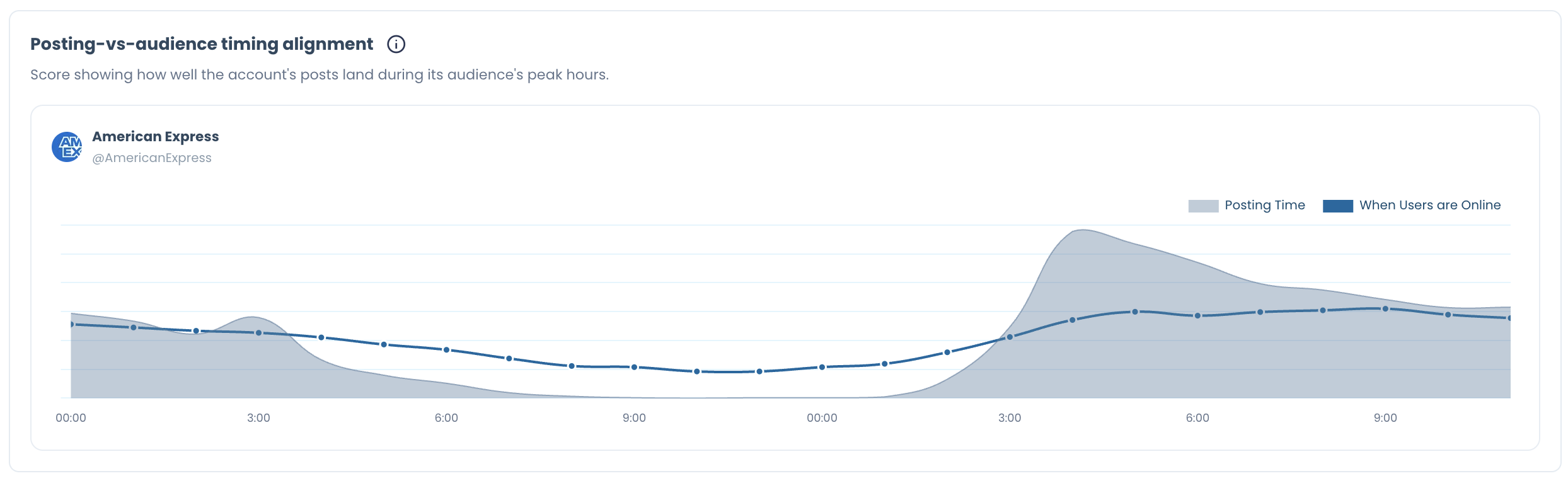
Closer curves mean more overlap. The panel prints no numeric score, so read the shape: a profile that posts at 2 a.m. for an audience that is online at 9 a.m. has found an easy fix.
Content type & format is the second habit check. If Post Format Distribution shows almost all text while Top-performing format leads with images or video, the audit has a finding.
Audit results per post, not per month
Results are the last area in the audit and the easiest to misjudge, because monthly totals rise and fall with how often the profile posts.
The Engagement summary avoids that trap. Every figure in it is an average per post over the last 90 days, and the engagement rate is total engagement divided by total impressions, not by followers.
The monthly charts tell the other half. Engagement Rate Over Time shows whether the rate is stable, and the Impression/Views section shows whether posts are being seen.
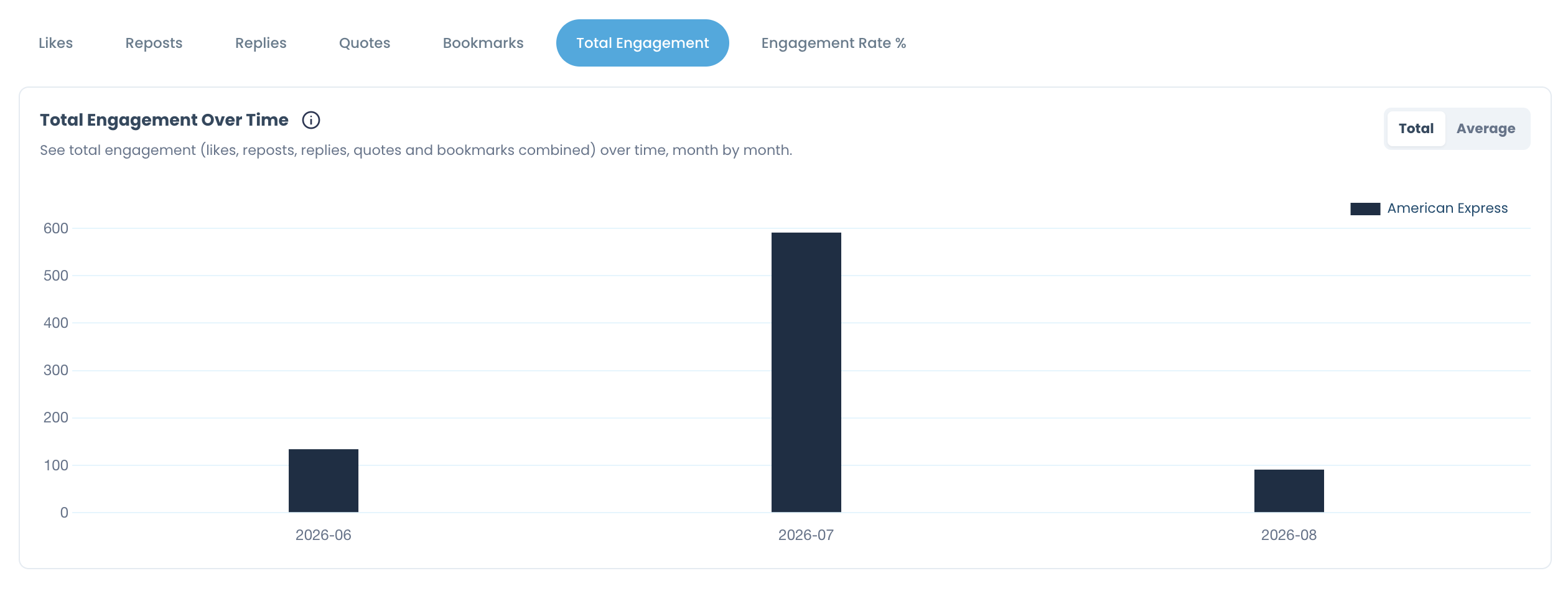
A profile whose total engagement climbs while its per-post average stays flat is posting more, not posting better. That is a finding about habits, not content.
Score results on the per-post row; use the monthly charts only to find the month worth investigating.
Once you have that month, the posts behind it are in Post Engagement Analytics for your own account. A deeper pass on the content side is covered in how to improve Twitter engagement with a three-pass audit.
After the audit: fix, then audit again
When the profile is your own, each finding maps to one Circleboom action:
- Fake or bot followers: review them in Fake/Bot Followers, whitelist anyone you recognize, then remove the rest.
- Inactive followers: review them in Inactive Followers before deciding, since a quiet reader can still be valuable.
- Dead or bot follows: clear them from your following list with Fake/Bot Following; unfollows run in a controlled queue that continues automatically the next day.
- Timing gap: read When Followers Are Online and schedule inside the peaks with the X Post Planner.
Then take a new analysis. The audit, cleanup and new audit loop is what proves a fix worked, and a fuller cleanup sequence is laid out in how to do a fake follower audit on X.
When the profile belongs to someone else, the findings feed a decision instead: partner or not, pitch angle, or what to learn from a rival.
Which result calls for which next step
Your audit result decides the next move:
- If the surface fails and the evidence passes, fix the bio, photo and pinned post, and stop there.
- If the audience fails, start with cleanup and audit again after it.
- If habits fail, fix timing and cadence before touching content.
- If only results fail, look at the Top 5 Tweets by Engagements and the format panels, because the audience is not the problem.
- If you are auditing a rival or several profiles, move to X Competitor Analysis to read them side by side.
One failing area at a time is enough. Fixing everything at once makes the next audit impossible to read.
→ Run a Twitter profile audit on any X account
An audit is a baseline, not a makeover
The surface is what people see, and it is worth fixing. The evidence layer is what decides whether a better bio leads anywhere.
Circleboom gives you that layer for any profile, from records retrieved by an Official X Enterprise Developer, with a date on every report so the next audit has something to be measured against.
→ Audit an X profile with X Account Analysis
Twitter profile audit questions
How often should I audit my X profile?
Once a month is a good rhythm for an active account. The monthly plan in X Account Analysis takes a new dated report on the day you choose, so the audit runs itself.
Can I audit someone else's profile the same way?
Yes. Type their handle; the account does not need to be connected to Circleboom. The audit and the findings are the same, only the next step changes.
Is a default profile photo proof that an account is fake?
No. Egghead is one profile characteristic among several. Read it with tweet count, account age and follow behavior before you judge an account.
Where do I start if I want a guided audit of my own account?
Start with how to audit your own Twitter account, then run X Account Analysis on your handle and keep the first report as your baseline.