A rushed bulk removal can cost you followers you cannot get back, because a removed person has to choose to follow you again.
After a follower spike, the pressure is to clear everything suspicious at once.
The order you work in decides whether a fake follower audit cleans your audience or quietly damages it.
What is the safe order for a fake follower audit on X?
Scan, stack signals, whitelist, export, then remove. Circleboom lists suspicious accounts from your X follower list using official X data, so you review each candidate before anything leaves your audience.
→ Scan your X followers for Fake/Bot candidates
What a follower spike leaves behind on Twitter
A follower spike usually leaves a mix of real new followers and low-authenticity accounts in the same pile. Viral posts, giveaways, large mentions and trending-topic appearances all attract both, and nothing on your profile tells them apart.
The clock matters. Suspicious accounts are most concentrated among recent followers in the first week after a spike, which makes them easier to compare with the timing of the event.
After that, they fade into your baseline.
If you suspect a bot Twitter followers problem, the useful move is to begin a fake follower audit that same week.
Keep two dates separate while you investigate:
- Join Date tells you how old an account is.
- Who Followed Me tells you who arrived recently.
An account created six years ago can still have arrived yesterday. Mixing up those two dates is how people misread a spike.
The spike itself proves little: it shows that something happened, without showing who caused it or why.
Why the order of a fake follower audit matters
Each stage of the audit protects the next one, so skipping ahead moves the risk onto real people. Removal sits last because it is the one stage you cannot reverse through the tool.
Circleboom's Fake/Bot Followers feature retrieves your complete X follower list and isolates accounts that cross a suspicion threshold across several signals at once.
As an official X Enterprise developer, Circleboom works from official account data, so you connect safely and review actual profile records.
The fake or bot classification on top is Circleboom's own analysis, and your review finishes the job.
Native X cannot run this process. You can remove one follower at a time in the app or on the web, but X does not give you the complete list, so bulk review is impractical there.
A quick one-minute Twitter audit to find your real followers shows how fast the first look can be once the list sits in one table.
The first scan is the fast part, and the decisions take the time.
You can pull your flagged followers into one sortable view in a moment, and every action after that stays yours.
Stack signals before you trust a flag on X
One signal is a reason to look, and several signals together are a reason to act.
A single suspicious account may be a false positive, while a cluster of new accounts with no photos, low tweet counts and extreme following behavior is a far stronger sign.
Each common red flag maps to a control you can use in the list:
| Red flag | Where to check it |
|---|---|
| No profile photo | Eggheads filter |
| Gibberish username | Name column |
| Thousands followed, few followers | Follow Ratio filter |
| Same tweet or link repeated | Overactive filter |
| Created days or weeks ago | Join Date filter |
A profile with no photo, a username like "j483hf92", 4,000 followings, 12 followers and a join date last week ticks four of those boxes. That one is a clear removal candidate.
A profile with no photo and nothing else unusual is only a reason to open it.
For the deeper mechanics of reading these patterns, this Twitter bot follower check is a good reference. A lone doubtful profile can also go through the Twitter bot checker before you decide on it.
A useful filter combination after a spike is recent Join Date, Tweet Count under 5 and Follow Ratio below 0.05.
Newness combined with weak profile signals is a stronger warning than either one alone, and that is the group worth clearing first.
Read the columns before you select
Age alone will not clear an account, either. In the sample list further down, the top rows joined more than 2,000 days ago, yet they show between 0 and 3 tweets, follow ratios between 0.24 and 0.38 and an Inactive, Low Engagement label.
Those old profiles still earn a place on the review list, because the signals line up even though the date looks harmless.
Sorting does part of this work for you. Follow Ratio ascending brings mass-follow patterns to the top, Tweets ascending brings up near-zero activity, and Joined shows you the newest profiles.
Start with whichever column matches the wave you are investigating, and work from the most obvious cases toward the less certain ones.
What to protect and back up before removing followers on X
Whitelist the accounts you know, then export the group you plan to remove.
Those two moves take minutes, and they are the only insurance a removal has, because Remove Follower relationships cannot be restored through Circleboom.
The whitelist comes first, because unusual but legitimate accounts land in this list regularly. A brand support account with a strange follow ratio can look like a bot, and so can a real customer who has not posted in years.
Whitelist status persists across every Circleboom feature, so those accounts stay out of later bulk operations too.
In the sample screen further down, the Active Filters bar reads "Whitelisted: Hide", which keeps protected accounts out of view while you select.
The export comes second. A CSV taken through export Twitter accounts records each account's username, tweet count, following and follower counts, fake and inactive flags, creation date and bio.
Exports use tokens, and your remaining balance shows next to the button.
That file answers the question people ask a week later: who exactly did I remove? It also lets you line up the suspicious wave against the date of your campaign or viral post.
How to run a fake follower audit on X, step by step
The flow below follows the order above, in three phases.
Open the list and narrow it down
- Log in to Circleboom Twitter and connect your X account.
- Navigate to the Followers menu in the dashboard.
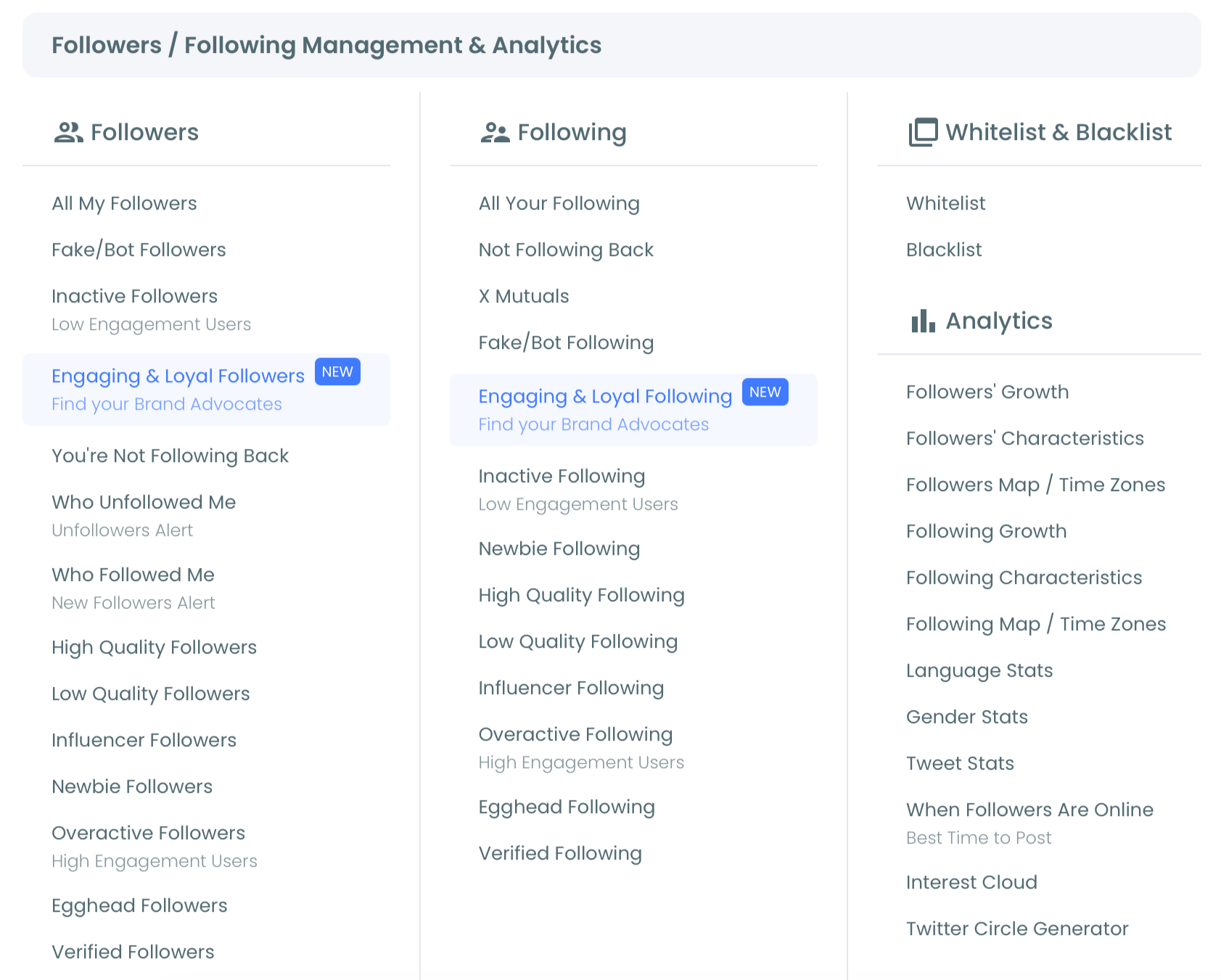
- Select Fake/Bot Followers to load every flagged account with its columns.
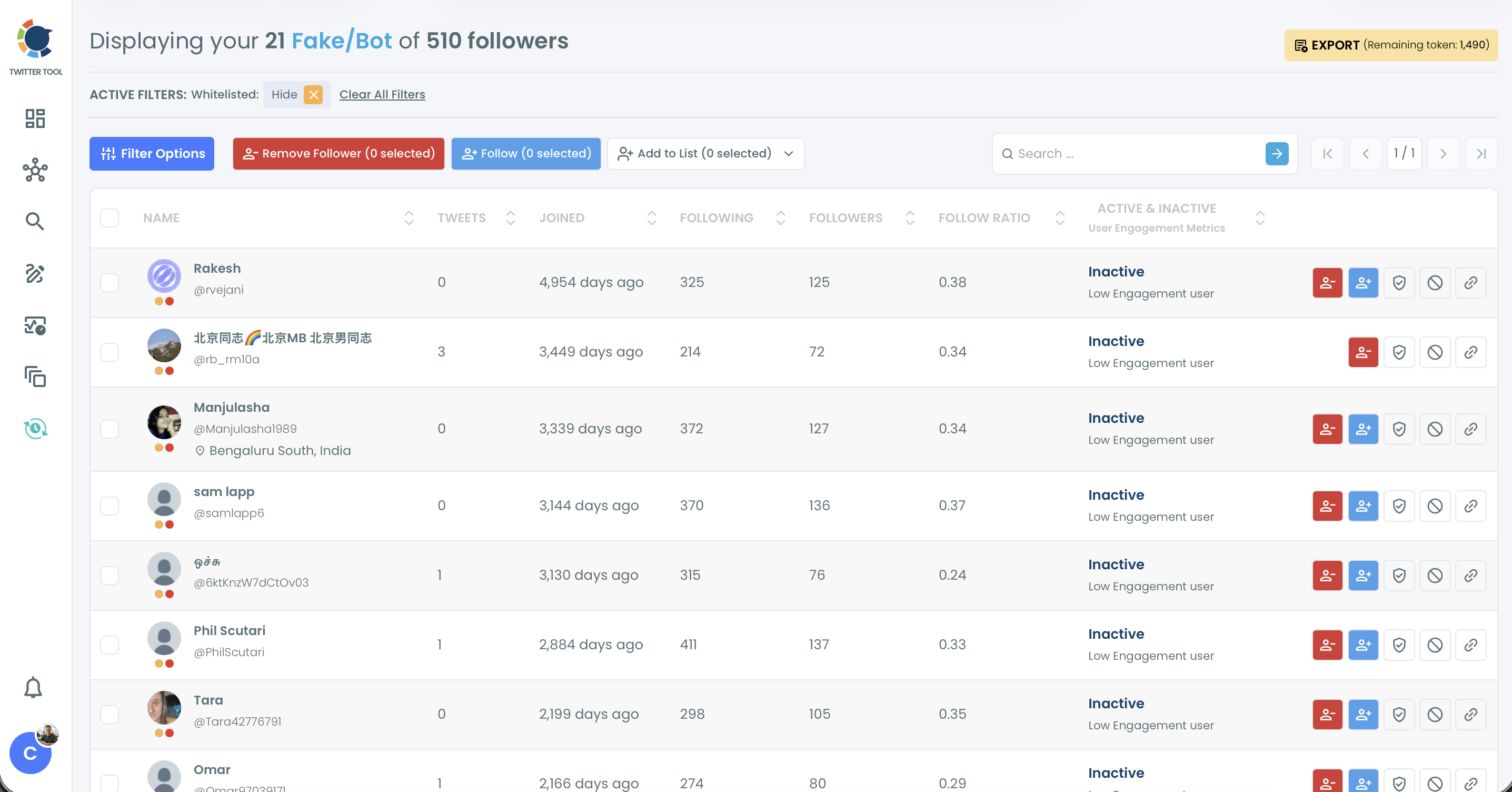
- Apply Filter Options such as Join Date, Tweet Count and Follow Ratio, then sort the Follow Ratio column ascending.
Protect exceptions and keep a record
- Open borderline profiles with the Open Profile action, and review a sample before any bulk step.
- Whitelist known contacts from the row action or from Add to List.
- Export the remaining segment as a CSV.
Hand the confirmed group to the extension
- Select the confirmed accounts, click Remove Follower and confirm the pop-up, which adds them to the removal queue.
- Click Start in the Circleboom Remove Twitter/X Followers Extension, and leave the browser open until the queue finishes.
This sequence works because the irreversible action comes after every check that could stop it.
A selection or a queue entry is not a completed removal, so review your follower list once processing ends.
Bulk removal is gradual by design. When the API rate limit is reached, the extension pauses for 1 to 20 minutes and shows the message "The removing process will continue in N minute(s). Please keep your browser open."
That short break helps protect your account by pacing removal activity, and it then resumes by itself.
The 400 and 800 daily limits you may have read about belong to Follow and Unfollow, and they do not apply to Remove Follower.
Checking the result once the extension finishes on Twitter
Open the Fake/Bot Followers list again after processing, because the job is only finished when your follower list confirms it.
Compare the new total with your export, and see whether suspicious patterns continue.
Accounts that return, or a fresh wave of lookalikes, tell you the cleanup needs a stronger response.
Spam is worth checking at this point as well. Spam DMs and scam replies mostly come from bot accounts, so removing or blocking those followers cuts new ones at the source, while Delete All DMs clears what already sits in your inbox.
With the suspicious group handled, turn your attention to the audience that remains. Engaging & Loyal Followers and High Quality Followers show who is worth building relationships with, which is a better use of the time you just saved.
Should you remove or block flagged accounts on Twitter?
Remove accounts that simply should not count in your audience, and block accounts that are harmful.
Most flagged followers belong in the first group, since low authenticity alone does not call for the strongest action you have.
The practical difference is what happens next:
- Remove Follower ends the current relationship, and the account can follow you again.
- Mass Block prevents the account from re-following or interacting with you, and it runs through its own Chrome extension.
So watch for returners. If removed accounts come back, or the group involves scams, abuse or coordinated behavior, move them to Add to Mass Block List.
Blocks stay reversible, too: Accounts I've Blocked lets you unblock later through the separate Mass Unblock Twitter extension.
This guide to remove bot, fake, inactive and ghost Twitter followers goes further into matching each account type to an action.
To go straight to the action page, use remove Twitter X followers.
How much a bot cleanup changes your X engagement rate
A cleanup can change the rate a lot, because bots sit in the denominator. Engagement rate is measured against audience size, so accounts that add to the count without interacting pull the percentage down.
Two illustrative calculations show the range. They use example figures, not results from any real account.
With 1,500 followers and 50 interactions per post, the rate is 3.33%. If 1,000 of those followers are bots, the 500 real followers are engaging at 10%.
At a larger scale, 500 retweets on 500,000 followers is 0.10%. After removing 100,000 low-quality followers, the same 500 retweets is 0.125%.
In both examples the interaction count stays flat, so the higher rate reflects a cleaner audience and no extra attention.
That distinction keeps your reporting honest. Measure what real people do after the cleanup, because a smaller follower count alone does not establish improvement.
If you want the case for going further, read about how to remove fake Twitter followers and accounts for the wider effects on your account.
The safe order in short
A fake follower audit is five decisions in a fixed order: scan the list, stack signals, whitelist the people you know, export a record, and only then remove.
Run in that order, it turns a messy spike into a reviewed, documented cleanup, with Circleboom's official data access as a listed company on X's Enterprise customer directory behind it.
You keep the people you reviewed and protected, and you end with a list you can explain.
→ Launch your fake follower audit on X
FAQ for removing followers after an audit
How accurate is the detection in a fake follower audit?
Detection is probabilistic, so Circleboom can flag some real users on X. It reports likelihood and not certainty, which is why a quick review before any bulk action matters.
How often should I run this audit?
Run it within the first week after any spike, and as a quarterly check otherwise. Busy accounts that run frequent campaigns can scan monthly, since bots also accumulate slowly during normal activity.
Can I audit someone else's followers?
The Fake/Bot Followers view covers your own follower list only. For another public X account, Circleboom can export its follower list as a CSV that includes fake and inactive flags.
This piece on whether you can audit someone else on Twitter covers that route.
Why does removing X followers run through a Chrome extension?
Circleboom's Remove Follower runs through a Chrome extension, so the web app only stages your selection in a queue. Without the extension, nothing is removed from X.
The guide on how to install the Circleboom Remove Twitter/X Followers Chrome extension covers the setup.