

Finding every account tweeting about your topic and following them by hand does not scale. The conversation moves faster than you can click, native X search has no follow workflow attached, and by the time you have reviewed twenty profiles the live moment has passed. This guide explains how to automate that process on X without breaking platform rules or risking your account.
Keyword auto-follow turns a live tweet stream into a following list.It targets accounts by what they tweet now, not by their bio.It runs through the official X API, so there is no scraping risk.It applies quality filters before any follow happens.
Set it up once and Circleboom keeps following on-topic accounts for you. Start with the auto follow accounts tweeting keyword Twitter workflow.
What keyword auto-follow is and why it works
Keyword auto-follow is a workflow that monitors live public tweets matching a topic and follows the accounts behind them. The logic is simple: someone tweeting your keyword today is expressing current interest, which makes them a far better follow than an account whose bio merely mentions the topic.
That timing difference is the core of the method. A bio describes a long-term identity, while a fresh tweet captures what a person is focused on right now. Following the second group consistently produces a more relevant, more responsive audience.
The native platform does not connect search to action. You can read live tweets on X, but converting them into a reviewed, filtered, followed audience is manual. Circleboom's Real-time Tweet Search closes that gap by collecting matching tweets, extracting the unique authors, and exposing a bulk Auto Follow from matching keyword action.
 infocircleboom.com
There are three measurable advantages to targeting tweets instead of profiles:
- Follow-back rates rise because the accounts are actively engaged with the topic.
- The audience is current, so engagement happens while context exists.
- Filters remove spam and low-quality accounts before they enter your following list.
Why the method matters for account safety
Not all auto-follow tools are equal. Many scrape X behind the scenes, and X's rules treat that automation as a violation regardless of pacing. Accounts using scraping-based tools risk action blocks and suspension.
Circleboom is registered through the X Enterprise developer program, which means every read and every follow runs through sanctioned channels. This is the structural difference between a safe workflow and a risky one. The official API status is what allows automation without the suspension exposure.
Pacing reinforces that safety. Circleboom follows 50 accounts every 15 minutes, up to 400 per day, then pauses and resumes automatically the next day. The deliberate rate keeps the account out of aggressive-action territory. If safety is the deciding factor, the option to auto follow X accounts by keyword through official infrastructure is the one to choose.
How to set up keyword auto-follow on X
The setup runs from login to a live follow stream. The steps below are grouped by phase so the workflow stays clear even though there are several of them.
Connect your account and launch the search
- log in to Circleboom and authorize the X account you want to grow.

- Open the Advanced X Search menu and select Real-time Tweet Search.
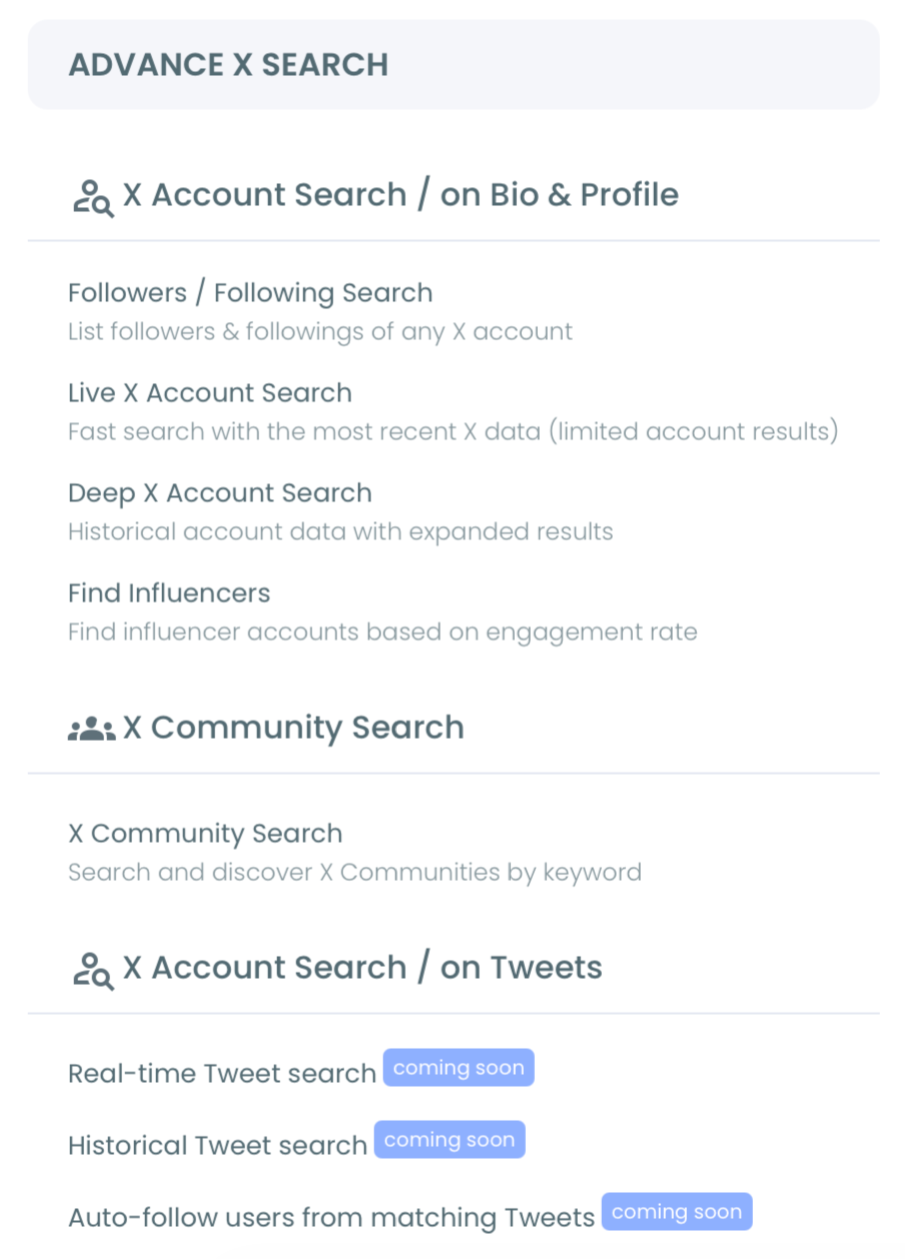
3. Describe the tweets to target in plain language, such as "people asking for tool recommendations in marketing."
4. Review the AI search suggestions and confirm or refine the query.
Apply filters and enable Auto Follow
- Set the filters: keyword match type, exclude terms, language, media type, and minimum engagement metrics.
- Choose a start date (Last 24 Hours, Last 7 Days, Last 30 Days, or custom) to anchor the live collection.
- Select how many tweets to collect, then review the matching tweets.
- Switch to the profile view, select the qualifying accounts, and choose Auto Follow from matching keyword.
Applying filters before enabling Auto Follow is the step that determines quality. With thresholds in place, the workflow follows accounts that genuinely match the topic instead of every account that happened to use the word.
Three scenarios where the live trigger wins
The value of keyword auto-follow is easiest to see in the moments where timing is the whole point. These are illustrative situations, not reported results, but each maps to how the live trigger is meant to be used.
A competitor has a visible outage. Affected accounts are tweeting their frustration right now, and that window lasts hours, not weeks. Setting the start date to the moment the incident began captures those accounts while the alternative is still credible. A historical search would surface them after the moment has cooled; only the live search reaches them during it.
You are launching a product this week. Anchoring the start date to your launch hour and running the campaign keyword shows which accounts pick up the conversation first, ask questions, or share it onward. That live participant list is something post-campaign analytics can describe but never let you act on in time.
You are working a live event or conference. The event hashtag produces a short, intense burst of posting from the most engaged attendees. Running the search from the event start date builds a targeted engagement list for the duration, while the shared experience still gives every connection a natural reason to land.
What the two output views contain
The results arrive as two views of the same dataset, and each answers a different question. Knowing the fields in each one tells you how much you can do with a single sweep before any manual research.
The tweet view answers what was said. Each row carries the tweet text with a direct link to the original post, plus the full metric set: impressions, likes, retweets, quotes, bookmarks, replies, and the creation timestamp. That is your evidence layer for judging how much traction a post earned before you decide to engage.
The profile view answers who said it. After clicking Display Profiles, you get the deduplicated accounts behind those tweets, each row showing follower count, following count, follow ratio, total tweet count, join date, and an active-or-inactive engagement label. Those columns let you tier the audience and act on the strongest accounts first. Both views export to CSV independently, so you can capture the conversation and the audience as separate working files, which is the same structured output you would expect when you analyze someone's Twitter followers from a raw account list.
See the live monitoring step in action
The video below demonstrates real-time keyword monitoring on X, which is the same collection process that feeds the auto-follow action.
After the workflow is running, two follow-up actions extend its value. The first is account-level discovery: search X accounts directly to catch on-topic profiles that have not tweeted recently. The second is precision: the advanced search filters let you narrow the live stream further by account age, follower count, and language before following.
Common mistakes to avoid
A few errors undermine keyword auto-follow, and each is avoidable with a small adjustment.
The first is using a keyword that is too broad. Generic terms during a trending moment return huge, noisy result sets. Narrow the keyword and add exclude terms so the stream stays relevant.
The second is skipping the profile review. A keyword match does not guarantee a real prospect; some accounts tweet the term sarcastically or as spam. The dual tweet-and-account view exists so you can verify fit before scaling.
The third is leaving the workflow running indefinitely on a broad term. Treat each keyword as a campaign window tied to an event, a launch, or a topic spike, then organize the results rather than letting the list refill with noise. This balances raw count against relevance, the same tradeoff explored in whether it is better to have many followers or fewer engaged ones.
Where this fits in a broader workflow
Keyword auto-follow is one input into a larger audience system. It complements collecting Twitter followers without coding when you want a no-script approach to growth. It also pairs with ongoing monitoring, which is why a reliable app to monitor Twitter activity belongs in the same toolkit.
Timing the follows around when your audience is active improves the payoff further. Knowing when your followers are online helps you schedule the replies and posts that turn a new keyword-based follower into an engaged one.
Action checklist
Use this checklist to run keyword auto-follow correctly from start to finish:
- Log in to Circleboom and open Real-time Tweet Search under Advanced X Search.
- Describe your keyword in plain language and confirm the query.
- Set filters: exclude terms, language, and engagement minimums.
- Choose a recent start date and a sensible tweet count.
- Review the profile view, then enable Auto Follow on qualifying accounts.
Run those steps in order and the workflow stays both relevant and safe. When you are ready to put it into practice, the keyword-based X auto-follow setup is the place to begin.
→ Auto-follow X accounts by keyword now
Frequently asked questions
Does keyword auto-follow violate X's terms?
Scraping-based automation does. Circleboom runs keyword auto-follow through sanctioned developer access with safe pacing, which keeps the workflow within platform rules and protects your account.
What is the daily follow limit?
Circleboom follows 50 accounts every 15 minutes, up to 400 per day. When the limit is reached, processing pauses and resumes automatically the next day.
Can I target tweets in a specific language?
Yes. The language filter restricts the live stream to a chosen language, and you can combine it with exclude terms and engagement minimums for tighter targeting.
How is this different from following by bio?
Following by bio targets static profile claims. Keyword auto-follow targets live tweets, so it captures accounts expressing current interest rather than accounts that merely list the topic.
Do the tweet count and the number of accounts match?
No. The tweet count controls how many tweets the search collects, not how many unique accounts it extracts. One account can author several matching tweets, so the deduplicated profile view is usually smaller than the tweet view. Plan the count around collection volume, then read the profile total separately.
What does a search cost to run?
Each search consumes GetTweetTokens proportional to the number of tweets collected, and export draws tokens separately. The balance is shown during setup and decreases per execution. Saved search logs can be reopened without spending tokens again, so revisiting a past result is free.
Can I reuse a result later instead of re-running it?
Yes. Results are stored under a search log and can be revisited without re-consuming tokens. Bear in mind that live tweets can be deleted or edited after collection, so a stored result reflects the moment it was captured rather than the current state on X.






