A custom Twitter feed is a curated subset of accounts you can read separately from your main timeline. The platform supports this natively through Lists, but the native interface makes Lists hard to build at scale and even harder to maintain. The result is that most accounts have a few abandoned Lists and a main feed that has to do all the work of surfacing every type of content.
Circleboom's X List Manager retrieves and manipulates Twitter/X Lists through official X Enterprise APIs, with bulk add, bulk move, search-result-to-list creation, and CSV export. The result is a workflow that turns Lists from a forgotten feature into a reliable custom-feed system.
→ Build a custom Twitter feed
Keep reading for what a custom feed actually solves, the workflow to build one properly, and how to keep it clean without polluting your main timeline.
What a Custom Feed Solves That the Main Timeline Cannot
The main Twitter timeline is structurally one-to-many: every account you follow contributes to one feed, and the algorithm decides what surfaces. That works when your interests are narrow and the accounts you follow all post about the same things. It breaks when you follow accounts across many topics, because the feed becomes a chaotic mix and individual topics get crowded out.
A custom feed (built as an X List) breaks the one-to-many constraint. You can follow accounts for niche reasons without having them dominate your main timeline, and you can read those accounts as a focused feed when you want to. The separation lets you scale your following list to match your actual interests without the cost of timeline chaos.
The strategic value compounds for anyone who reads on X for work. A monitoring List for industry peers, a research List for adjacent topics, an outreach List for accounts you want to engage with: each one is a focused feed you can read separately, and none of them pollute the main timeline where you do casual reading.
The cost of not building custom feeds is the cost of treating the main timeline as the only surface. Accounts get unfollowed because their posts crowd the feed, even though their content is valuable in context. Other accounts never get followed because adding them would make the feed worse, even though they would be useful on a separate feed. The custom-feed workflow removes both failure modes.
How to Build a Custom Twitter Feed Step by Step
Four actions, three are one-time setup. The List populates immediately and renders as a separate feed on X.
Connect your X account to Circleboom
- Log in to Circleboom Twitter and authorize your X account with official OAuth.

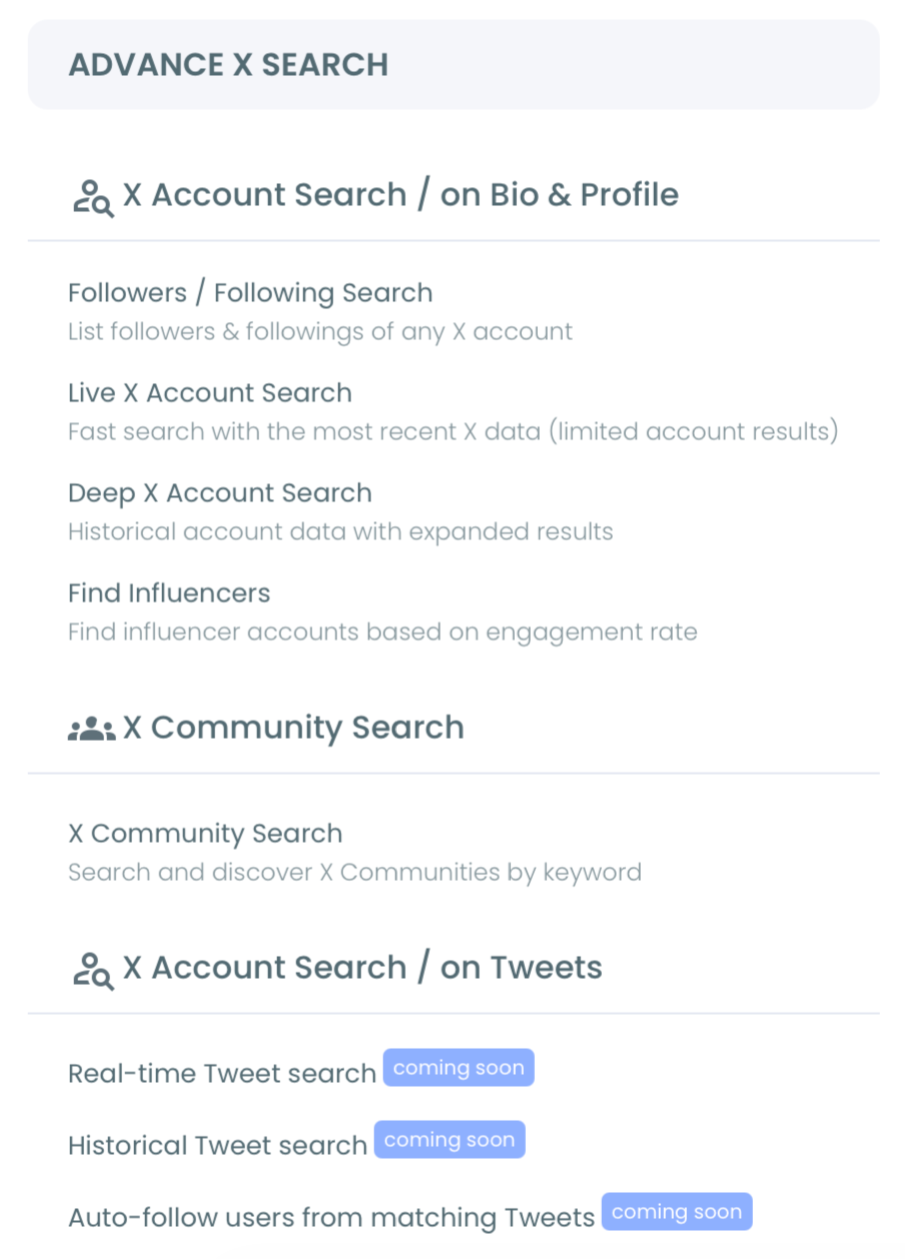
Open the X List Manager from the Advanced X Search menu
- Open the Advanced X Search menu and click X List Manager to load the list-building dashboard.
Create the list and pick its visibility
- Create a new list, name it descriptively (something like "industry peers" or "research feed"), and decide whether it should be public (discoverable by other users) or private (only visible to you).
Add accounts in bulk
- Add accounts to the list by selecting from your followers, search results, or by entering usernames directly. The bulk-add and bulk-move actions are what turn list-building into a fast workflow instead of the slow one-at-a-time native experience.
That sequence is the working build process. The login earns sanctioned API access. The menu loads the list management surface. The visibility decision sets the privacy posture. The bulk add is what makes the list actually scale. Skipping the bulk-add and falling back to manual entry is what makes most lists feel pointless.
Video walkthrough: how the X List Manager turns the native list-building experience into a real custom-feed workflow.
Why the Custom Feed Approach Pays Back
The first payback is timeline quality. Your main feed gets to stay focused on the content you want surfacing in the casual-read context, while the niche accounts live on the dedicated List feeds where their content is welcome rather than competing.
The second payback is scalable following. With Lists, you can follow many more accounts than your main timeline could absorb, because most of those accounts feed dedicated Lists rather than the main feed. Total following expands while feed quality improves, which is a combination most operators assume is impossible.
The third payback is monitoring and research efficiency. A private List of industry peers becomes a focused read you can scan in a few minutes per day, without having to sort their posts out of the broader feed. A research List on an adjacent topic gives you a dedicated surface for ambient learning that does not interfere with your main attention.
There is one reframe worth catching. Most people think of X Lists as a niche feature for power users. The healthier mental model is that Lists are the primary feed system, and the main timeline is just one List among several. That framing reverses how most accounts use the platform, and it produces a meaningfully better reading experience.
Circleboom is an official X Enterprise Developer company, so all list operations run against X's published platform limits. X's official documentation on Lists covers the native behavior and the platform-level constraints that the workflow respects.
X Communities is the adjacent native feature for joining curated topic feeds maintained by others, which complements personal custom feeds. X's developer documentation on list timelines covers the embedded-feed mechanics for anyone who wants to render lists outside the native interface.
Build your custom Twitter feed is the page that handles the bulk-build and management workflow.
Related Circleboom reading that goes deeper on the list-management angle:
- Twitter list manager on the tool overview.
- how to make and use Twitter lists on the use-case framing.
- how do lists work on Twitter on the underlying mechanics.
- Twitter lists to follow on public-list discovery.
FAQ
How is a custom feed different from the main timeline?
A custom feed (built as an X List) shows posts from a specific subset of accounts you choose, separately from the main timeline. The main feed includes everything from accounts you follow, while a List feed includes only the accounts you put on the List.
Can I have both public and private lists?
Yes. Each list has its own visibility setting. Private lists are visible only to you and are ideal for monitoring or research. Public lists are visible to other users and can be followed by them, which is useful for curation or authority-building.
How many lists can I have?
X allows up to 1,000 lists per account, with a maximum of 5,000 accounts per list. The platform-level limits are generous enough that most operators never hit them in practice.
Can I follow other people's lists?
Yes. Public lists from other accounts can be followed, and the followed list shows up alongside your own lists in the navigation. That is one of the underused features of the X List system.
Do accounts on my list know they are on it?
Public lists are visible to the accounts on them. Private lists are not visible to anyone except the list creator. The visibility behavior is consistent with the list's privacy setting.
Reinforcing Why This Workflow Holds Up
The reason the custom-feed approach holds up is that it solves the structural problem (one feed cannot serve every type of content) instead of trying to fix the symptom (the main feed feels crowded). Once you have multiple feeds, the main feed gets to be specific, the niche feeds get to be focused, and the total reading experience improves on every axis.
The maintenance cost is small. Lists need occasional cleanup as accounts go dormant or pivot topics, but the maintenance cost is far lower than the daily cost of dealing with a polluted main feed. The trade-off is asymmetric in the favor of the custom-feed approach.
Build your custom Twitter feed and the timeline experience you have been settling for will start matching the actual breadth of accounts you want to be following.