Short answer: to create a new location on Facebook, open the Facebook app on your phone, start a check in, search for your place, tap Add "your place name" at the bottom of the results, fill in the Create Custom Place form and tap Save Custom Place. Then wait, and search for it again on Instagram.
You have to create a location on Facebook because Instagram has no option to create one. Every time you add location on Instagram, the places you see come from Facebook's list of places. The same places show up in both apps. If your business is not on Facebook's list, it is not on Instagram's either.
Our example: Helen Barlow Fitness
To keep the steps concrete, we follow one example from start to finish.
Helen Barlow is a fitness creator. Her Instagram handle is helennbarlow, and she runs a gym called Helen Barlow Fitness. After a workout she wants to share a Story from the gym with a Location sticker, and later a training photo as a feed post with the gym as its location, so people who tap the tag can find the place.
The screenshots below are illustrative. The Facebook and Instagram post screens come from real screens, and we edited the names to fit this example. The Story screens are mockups of the Instagram app, because Stories can only be made in the Instagram phone app.
Step 1: Try to Add Location on Instagram (Story and Post)
On a Story: the Location sticker
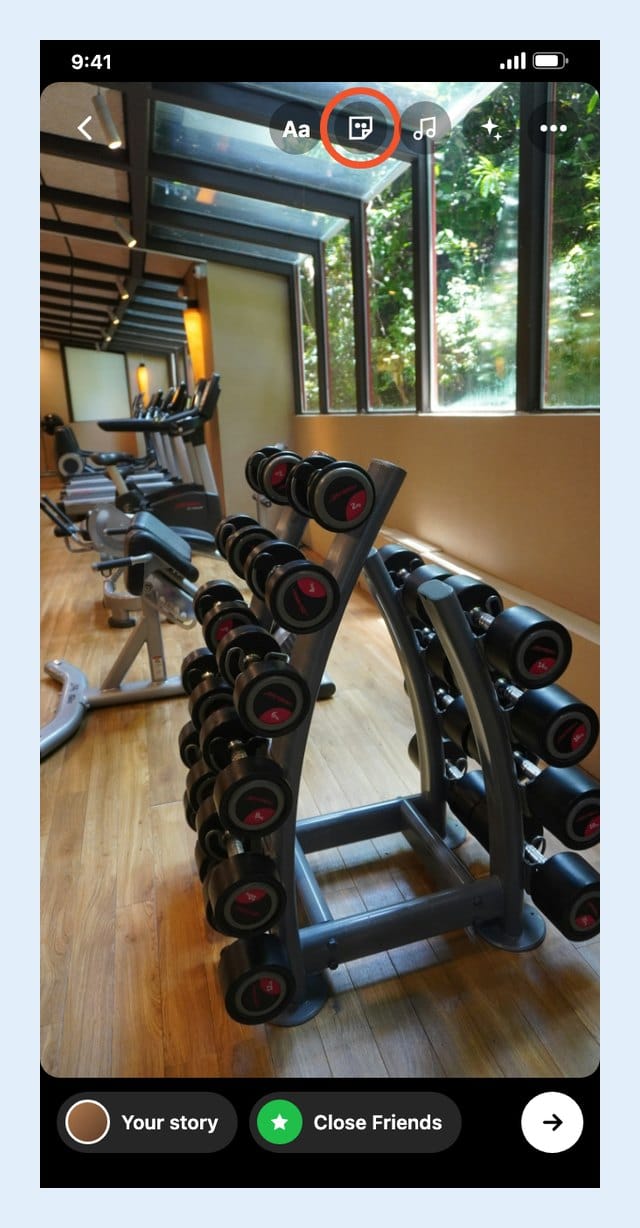
Helen starts with a Story. The usual way to add location to Instagram Story photos is the Location sticker. She takes a photo of the gym after her workout, and taps the sticker icon in the top toolbar.
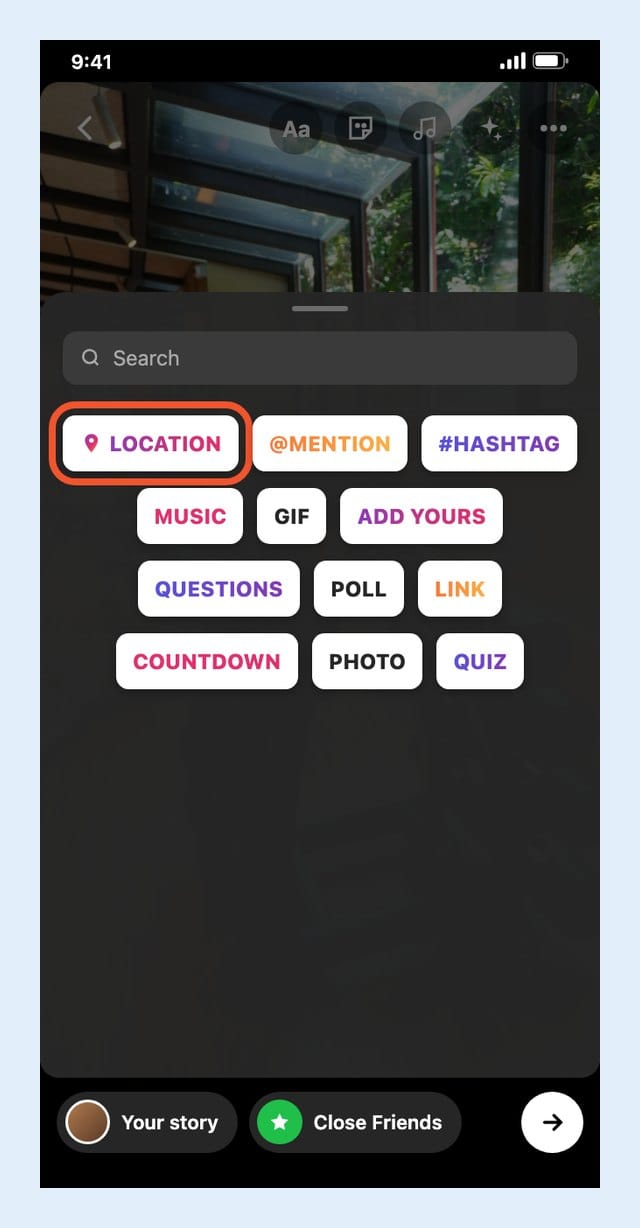
The sticker tray opens. Location is the first sticker in the list, so she taps it.
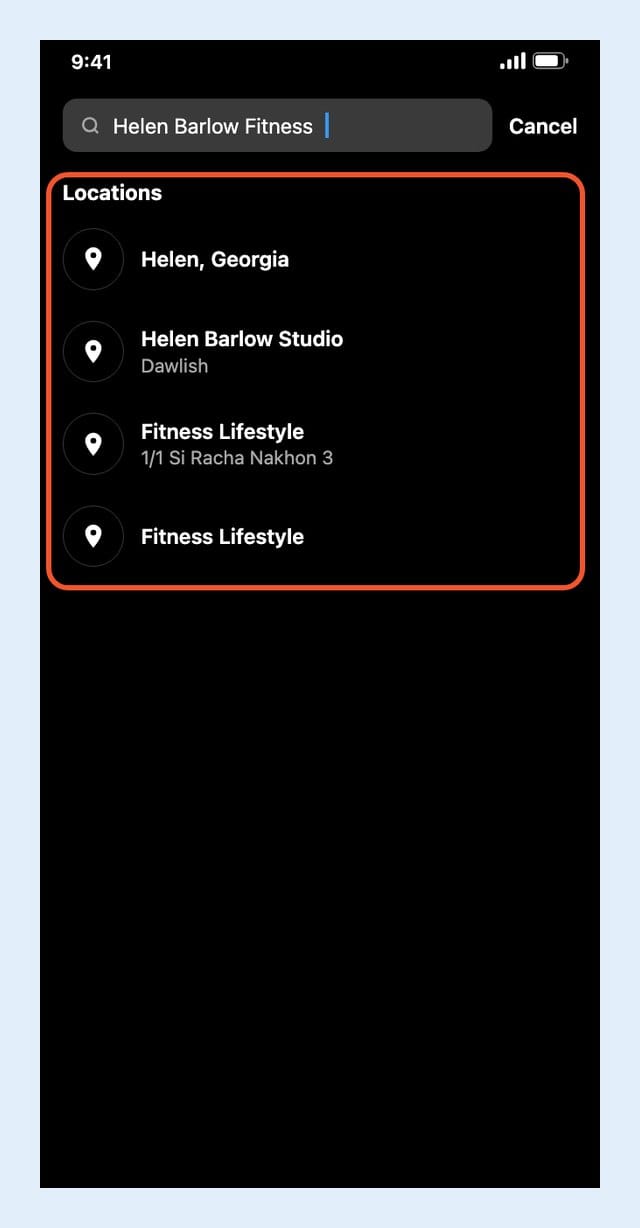
She types "Helen Barlow Fitness" into the location search. The results show Helen, Georgia, Helen Barlow Studio and a couple of fitness places with other names. Her gym is not among them.
On a feed post: the Add location field
Next, she tries a feed post. In the new post screen, she types "Helen Barlow Fitness" into the Add location field.
The list shows places with similar names, such as Helen, Georgia and Helen Barlow Studio in Dawlish. Her gym is not there.
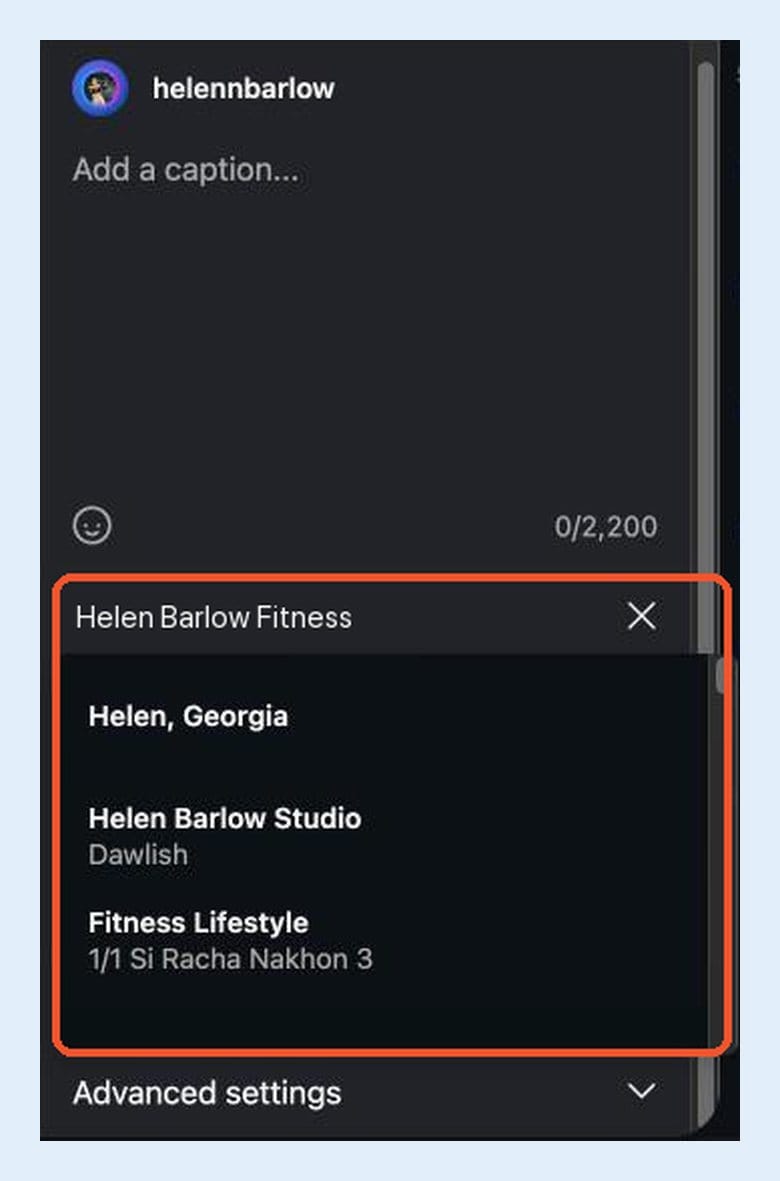
There is no "create" or "add" button in this list. Typing a new name and pressing enter does not create a place either.
That is the moment to switch to Facebook.
Step 2: Open the Facebook App (Desktop Cannot Add a Place)
On a computer, Facebook's check in search shows a Search for location window with results only. There is no option to add a new place at the bottom, so you cannot add a place on Facebook from the website this way.

So pick up your phone. The Facebook mobile app is where the add option lives.
Step 3: Add a Location on Facebook From the App
This is where you add a location on Facebook. In the Facebook app, start a new post and tap Check in. The Add location screen opens.
Type the exact name, "Helen Barlow Fitness", into the search bar. Facebook lists every place with a similar name: other fitness studios, places with "Lifestyle" or "Fitness" in the name, some of them thousands of miles away.
Scroll to the very bottom of the list. The last row reads Add "Helen Barlow Fitness". Tap it.
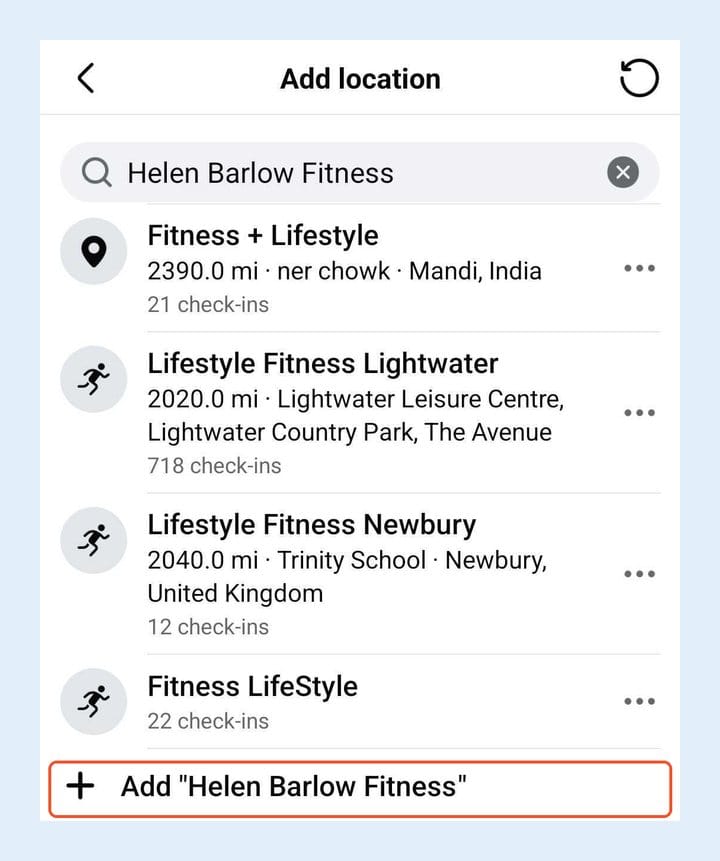
Tip: Before you tap Add, read the list once. If your business is already there under a slightly different name, use that place instead of creating a duplicate. Two places with almost the same name split your tags between them.
Step 4: Create a Custom Location on Facebook
To create a custom location on Facebook, the app opens a short form called Create Custom Place. The name you searched for is already in the first field.

Here is what each field does and what we suggest:
| Field | In the app | Our tip |
|---|---|---|
| Name | Prefilled | Exact name |
| Address | Optional | Fill it in |
| City | Optional | Fill it in |
| Map Location | Tap the map | Real spot |
Address and City are marked optional, but they help people tell your place apart from others with a similar name. In the version of the app we used, the form had only these four fields; some guides also show a category field.
Tip: Use the name people actually type when they look for you. If everyone calls the gym "Helen Barlow Fitness", do not save it as "HB Fitness Studio Ltd". The name you save here is the name people will search for on Instagram.
Step 5: Drop the Pin and Save the New Location
Tap the Map Location box ("Click to add map location"). A full map opens. Move it until the pin sits on the real building, then confirm.
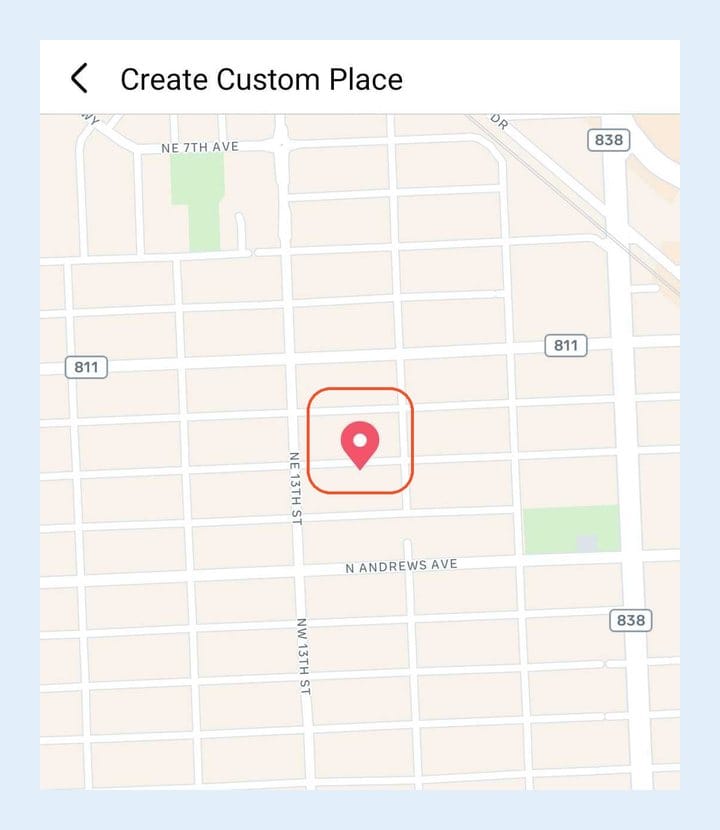
Back on the form, tap Save Custom Place.
Facebook then returns to your check in with the new place attached. The guides we read do not agree on what comes next: some say saving the place is enough, others say you should share the check in post so the place registers. If you share it and do not want a public check in, choose a smaller audience before you post.
Tip: Put the pin on the actual entrance, not the middle of the street or the city center. People who tap your location on Instagram expect a place they can walk to.
Step 6: Wait, Then Tag the Place on Instagram
This is the step most people get wrong. They save the place, switch to Instagram right away, search, and find nothing.
That is normal. When we searched on Instagram about 20 minutes after creating a place on Facebook, it was not there yet. A new Facebook place can take from a few hours up to about 48 hours to appear in Instagram's location search, according to guides from HubSpot, Social Champ and EvergreenFeed.
So give it time and search again later. When Helen searches for "Helen Barlow Fitness" on the later attempt, her gym is at the top of the list, with its street address under the name.
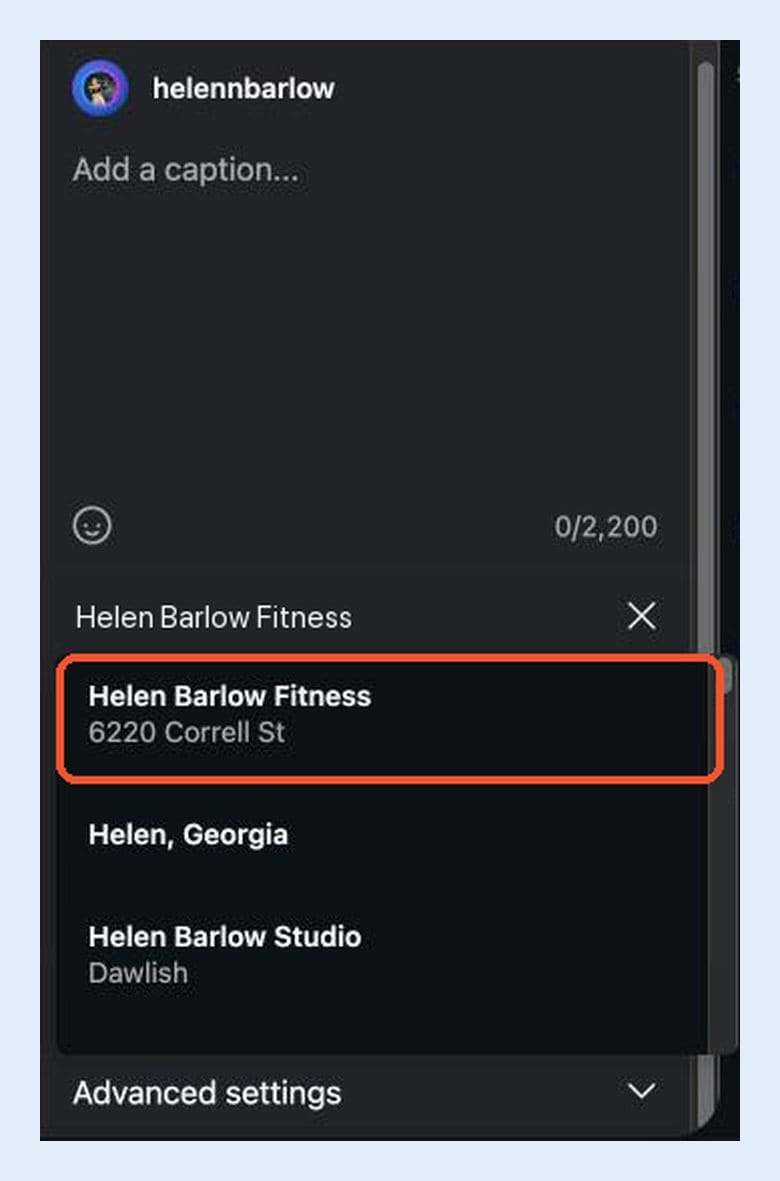
Tap it, and the location is on the post. That is how you tag a place on Instagram that did not exist a few days earlier.
The Story works too
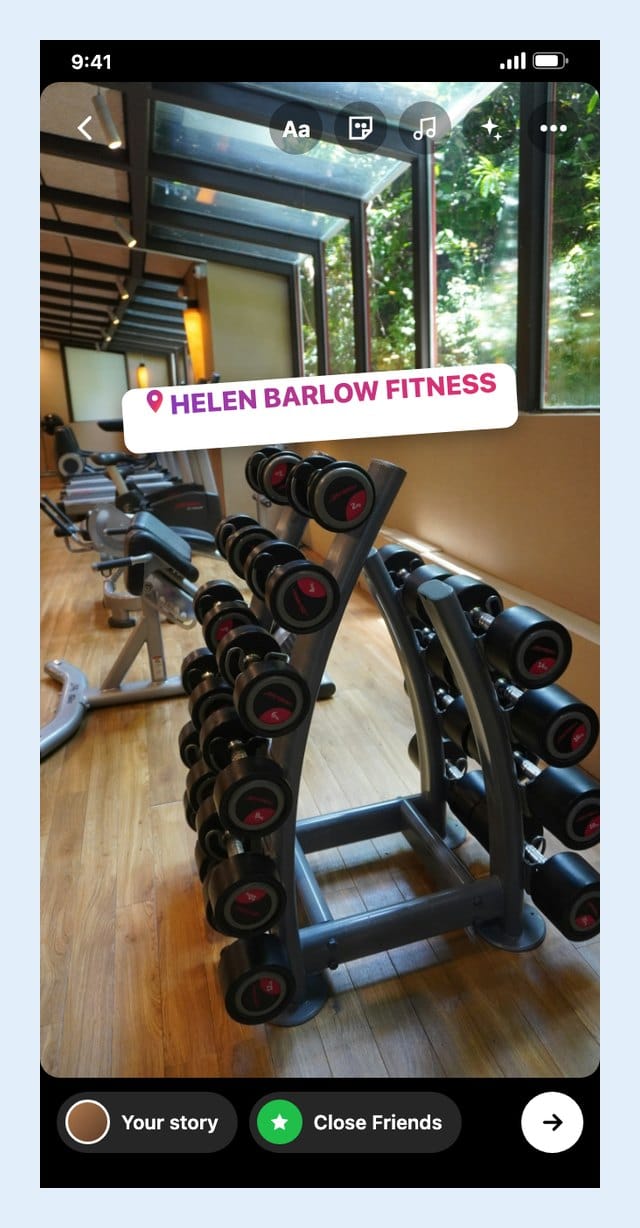
The Location sticker searches the same list of places, so Helen goes back to her Story, opens the sticker tray, taps Location and types the name again. This time "Helen Barlow Fitness" is the first result.

She taps it, and the sticker sits on her Story. Anyone who taps it can open the place on Instagram.
Instagram Location Not Showing or Not Found? Check These First
- Location sticker not showing your place? The Story sticker and the post field search the same places, so the same fixes below apply to both.
- Check the spelling. Search on Instagram with the exact name you saved on Facebook, including spaces.
- Give it the full window. Search again after a few hours, and again the next day, before you try anything else.
- Do not create it twice. A second copy makes things more confusing. Look for the first one on Facebook (search for it in Check in) before adding anything new.
- Turn on location services for the Facebook app. EvergreenFeed lists this as a requirement for adding a place. If the Add option does not appear, try again with location on, ideally when you are at or near the place.
- Skip location tricks. Fake GPS apps can get an account into trouble. A correctly named place with a real address and pin is all you need.
Why It Pays to Tag a Place on Instagram
A location tag tells people where the photo was taken. Tapping it opens the place's page on Instagram, where people see other posts tagged at that spot.
For a gym, a studio or a shop, that is a quiet path from a post to a visit. Someone sees Helen's training photo, taps "Helen Barlow Fitness", sees the address and more posts from the gym, and books a trial class.
One location tag on one post is a small thing. A location tag on every post, week after week, adds up.
The same logic works on Google. People who search for a gym nearby see Google Maps results first, so if your business is not there yet, here is how to register your business on Google Maps.
Tip: Instagram captions do not have clickable links, so put a link with UTM tags in your bio (Circleboom's UTM Link Builder creates one). Our guide to UTM parameters for social media posts explains the setup. Then you can see in your analytics how many trial class bookings or shop visits came from Instagram.
Make the Tag Count: Three Ways to Go Further With Circleboom
Creating the place is a one time job. Getting people to see it is not. The Instagram algorithm favors accounts that show up regularly and posts that earn likes and comments soon after they go live.
That is where Circleboom Publish comes in. You can schedule a whole week of Instagram posts in one sitting, and Circleboom's Best Time to Post looks at your own followers, not a generic chart, and offers suggested slots under Pick your best post time in the Schedule window. Post to Queue drops posts into recurring time slots, so the account never goes quiet on a busy week.
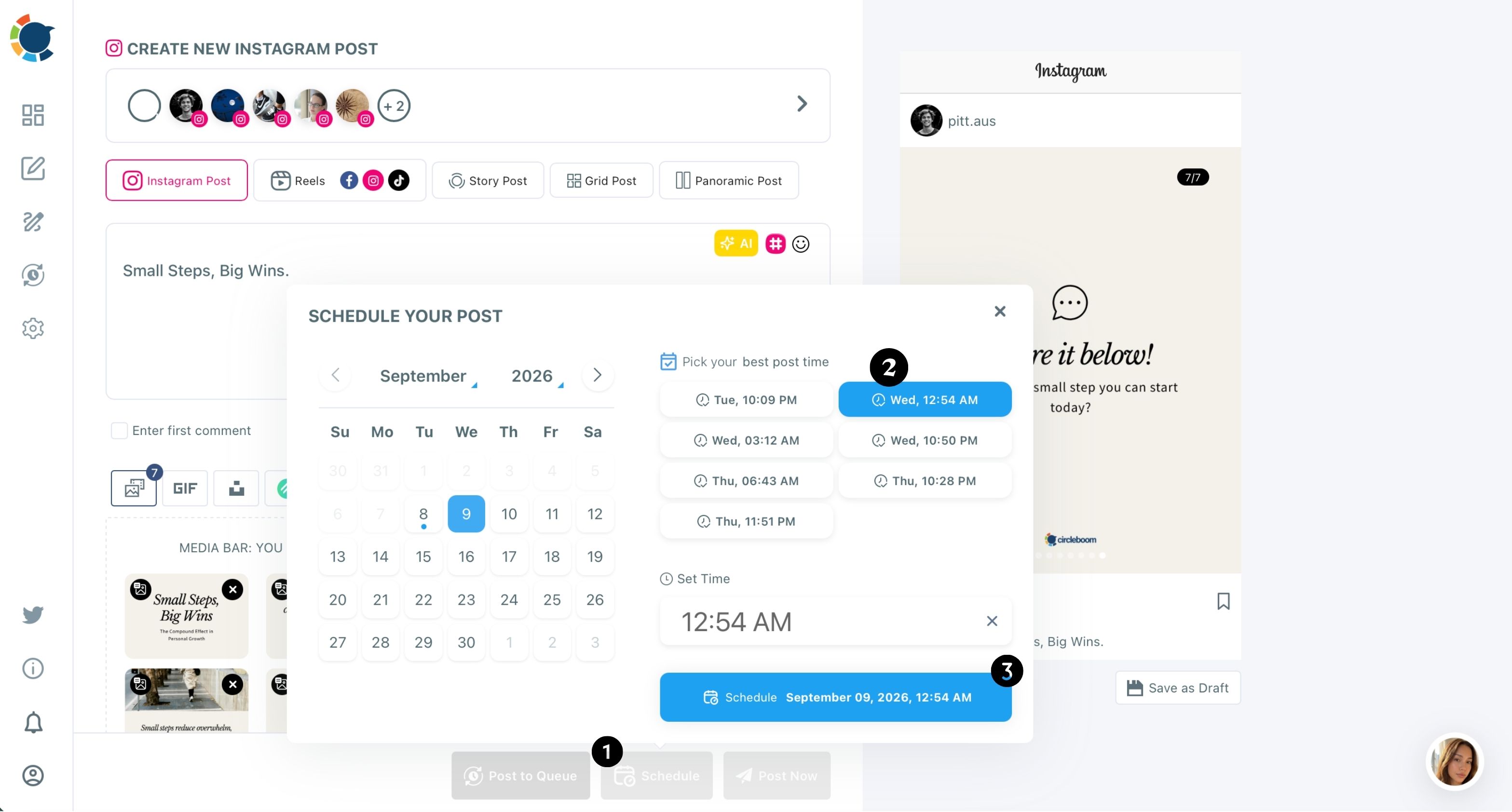
The location tag itself is added in Instagram. Here are three ways to get more out of it.
1. Pair the Instagram location tag with Google Business Profile
The location tag is half of local visibility. The other half is Google: when someone searches for a gym nearby, Google Search and Google Maps show the business's Google Business Profile, its storefront on Google.
With Circleboom Publish, Helen can send the same post to her Instagram account, her Facebook Page and her Google Business Profile in one action, instead of posting three times. Google posts tend to fade after about a week, so a steady rhythm helps here too; we explain how to schedule Google Business Profile posts in a separate guide, and the Google Business Profile Scheduler page shows the feature. If you run several Pages, see how to post to multiple Facebook Pages at once.
Tip: Use the same business name everywhere: the Facebook place, the Google Business Profile and your Instagram bio. People and search engines connect the dots more easily.
2. Add local hashtags in the first comment
A location tag says where; local hashtags help people who browse a topic in your city. In Circleboom Publish's Instagram Post Scheduler, the Enter first comment option opens a second text field that is scheduled together with the post.
Tip: Keep the caption for the message, and put a short set of local hashtags in the first comment: your city name combined with your niche (fitness, gym, workout), plus your neighborhood. Together with the location tag, the post shows up in more of the places locals look.
3. Schedule your Stories, then add the Location sticker in the app
Stories are where a gym shows daily life: classes, new equipment, opening hours on a holiday. We tested Instagram Story scheduling in Instagram, Circleboom Publish and Planable, and Circleboom published the Story at the scheduled minute.
One honest note from that test: the scheduling tools we tried, Circleboom Publish included, have no sticker options for Stories. The Location sticker is added in the Instagram app, as shown in Step 1 and Step 6. A simple routine: schedule the planned Stories ahead, and post the spontaneous ones with the Location sticker straight from the gym.
Do the Math
Say Helen wants to post five times a week at the hours her followers are most active (Circleboom's Best Time to Post on Instagram finds those hours from her own account).
By hand: she opens Instagram five times a week at the right moment, writes the caption, adds hashtags, and posts. At something like 10 minutes each, that is about 50 minutes a week, plus five interruptions in the middle of training sessions. Over a month, that is 20 interruptions.
With Circleboom: she sits down once a week for something like 40 minutes, prepares the five posts, and puts each one on a suggested time from Pick your best post time. Over a month, that is four planning sessions and no interruptions. If you have never done it, our guide shows how to schedule Instagram posts step by step.
It takes a few minutes to create a new location on Facebook, and you do it once. The routine is what keeps it in front of people.
Quick Recap: How to Create a New Location on Facebook
- Search for your place on Instagram, in a Story's Location sticker or a post's Add location field. If it is missing, Instagram cannot create it.
- Switch to the Facebook app on your phone (the website has no add option).
- Start a check in, search the exact name, and tap Add "name" at the bottom.
- Fill in the name, address and city.
- Drop the pin on the real spot and tap Save Custom Place.
- Wait from a few hours up to about 48 hours, then search again on Instagram and tag it on your post or Story.
Instagram shows the places Facebook knows. Make sure Facebook knows yours.
FAQ: Creating a Location on Facebook and Instagram
Can you create a location on Instagram?
No. Instagram has no option to create a location on Instagram itself; the Add location list only shows places that already exist on Facebook. Create the place in the Facebook app first, then search for it on Instagram.
How do you create a new location in Facebook?
Open the Facebook app, start a post, tap Check in, search for the exact name of your place, and tap Add "name" at the bottom of the results. Fill in the Create Custom Place form, drop the pin on the map and tap Save Custom Place.
Can you add a location on Facebook from a computer?
Not through check in. On the Facebook website, the Search for location window shows existing places only, with no option to add a new one. Use the Facebook mobile app instead.
Why is my location not showing on Instagram?
Usually it is too soon. A new Facebook place is often not in Instagram's location search right away, so wait and search again with the exact name you saved. If your location is still not found after a couple of days, check the spelling and look for a duplicate on Facebook before creating another one.
How do you add location to an Instagram Story?
Open the Story editor in the Instagram app, tap the sticker icon, choose the Location sticker and search for the place. If your place is missing there, create it on Facebook first, the same way as for a post, then search again later.
How long does a new Facebook location take to show on Instagram?
According to guides from HubSpot, Social Champ and EvergreenFeed, it can take from a few hours up to about 48 hours. Search again after a few hours and again the next day.