
You can find common followers between Twitter accounts without coding, but someone still has to do what the code would do: fetch every follower of both accounts and match the two lists. The question is whether that someone is you, with API keys and a script, or a tool that already reads X's data at Enterprise level.
Manual: get X API access, page through both follower lists, respect rate limits, store the results and write the matching logic, then repeat it for every pair. Circleboom: add the accounts to one competitor report and read the shared followers in its Common Audience section, built from X's official API at Enterprise level with no code at all.
→ Find common followers between Twitter accounts without coding
Then spend the time on what the overlap means.
What the coding route actually involves
Finding common followers with code is a four-part job, and only the last part is the matching.
- Access. You need a developer account and API credentials for the X API.
- Fetching. X's followers lookup returns followers page by page, so every list has to be collected through pagination.
- Rate limits. Each endpoint has rate limits, so a large list takes many requests spread out over time, and the script has to wait and resume.
- Matching. Once both lists are stored, the intersection is the easy step: keep the user IDs that appear in both.
The matching is a few lines of code. The fetching, waiting and storing are the real work, and they start over every time you want fresh numbers.
The hard part of finding common followers was never the math. It is collecting complete lists.
Why scraping is not a shortcut
Some no-code tools skip the API and scrape X's web pages instead. That route is quicker to build and weaker in exactly the place overlap counts depend on.
A scraped list can miss accounts, stop early or return partial fields. Every follower missing from either list is a common follower that never appears in the result, so the overlap comes out smaller than it is. X also does not permit scraping without its prior written consent.
An API-based tool reads the same records X's own developer platform documents in its follows endpoints. That is the difference worth checking before you trust any overlap number.
Code, scraper or report: what each gives you
| Route | Effort | Data source | What you get |
|---|---|---|---|
| Your own script | High, ongoing | X API | Raw overlap list |
| Scraping tool | Low | Web pages | Overlap that can miss records |
| Circleboom report | Low | X API at Enterprise level | Overlap plus full comparison |
The script gives you full control and full maintenance. The report gives you the overlap and the context around it, without either.
How Circleboom finds common followers without code
With Circleboom's X Competitor Analysis tool, you type handles into a form, and the fetching, paging and matching happen on Circleboom's side.
Circleboom pulls the followers, following and recent tweets of every account through X's official Enterprise APIs, not scraping. You get the completeness of the API route without writing or running anything.
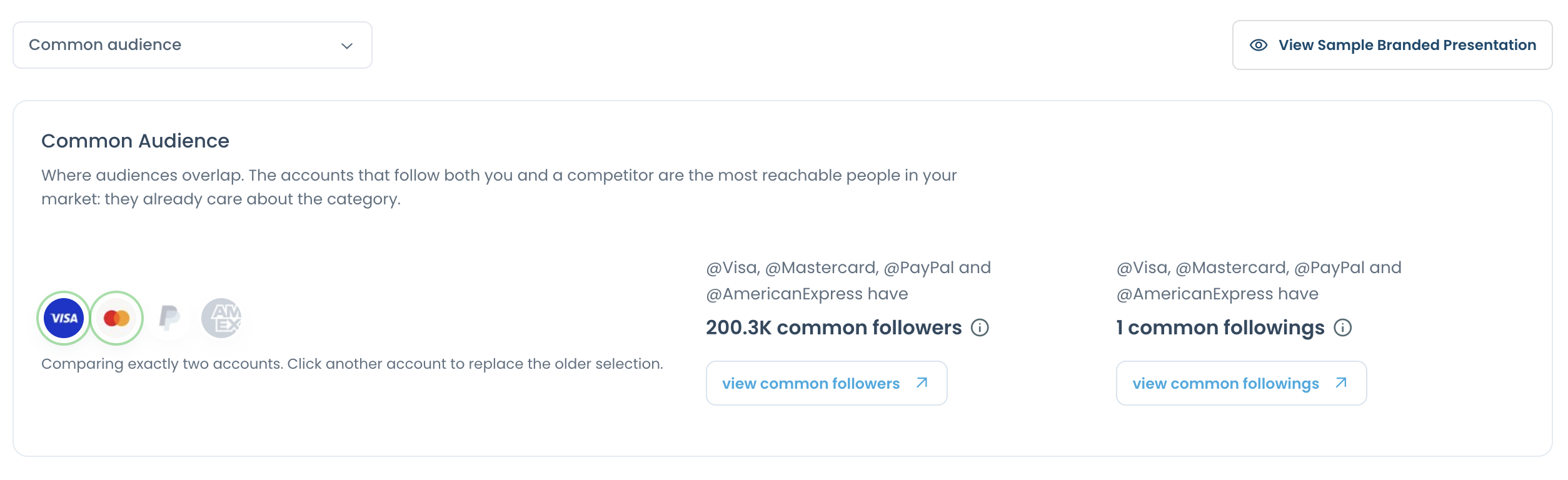
The overlap sits in the report's Common Audience section. It compares exactly two accounts at a time and prints their common followers and common followings, with view common followers and view common followings buttons that open the shared accounts.
How to find common followers between Twitter accounts without coding
Two phases: fill in the form, then read the overlap. Eight steps, no code.
Hands-on look: every section of the X competitor benchmark report, including Common Audience, in one podcast episode.
Fill in the form
- Log in to Circleboom Twitter and connect your X account. No developer account or API keys are needed.
- Open Monitoring and choose the X Competitor Benchmark Report.
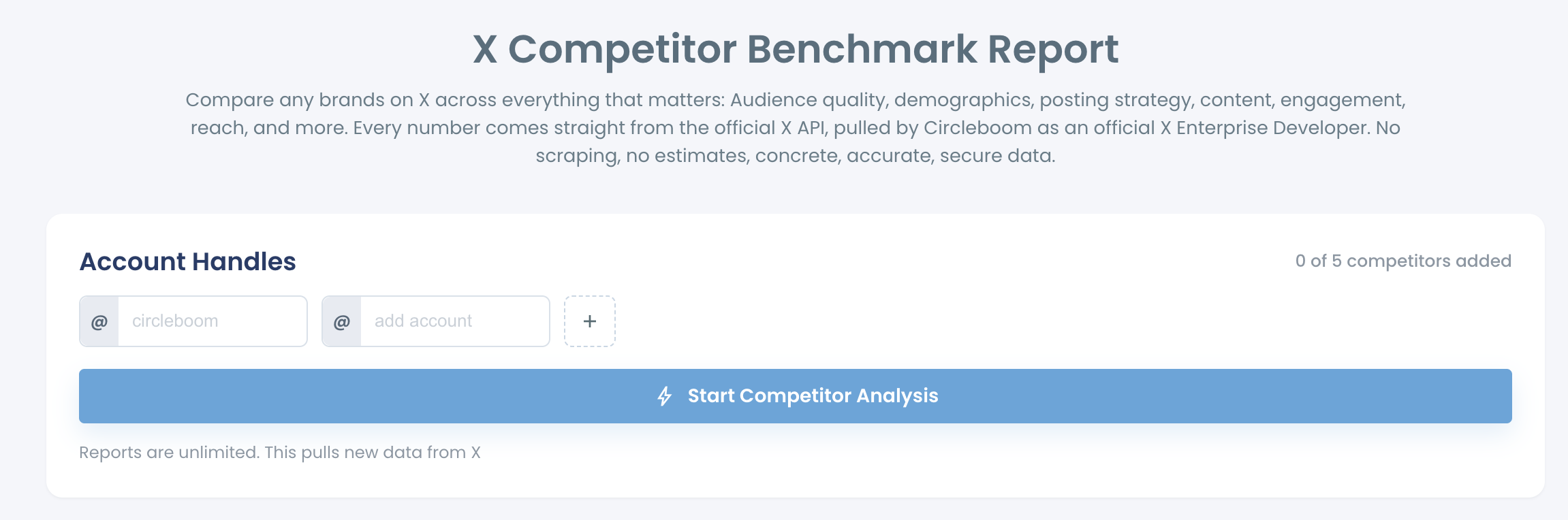
- Type the handles under Account Handles, one per @ field, with the + button for more. Your own account is optional.
- Click Start Competitor Analysis and choose Just this once or Keep it up to date every month.
Read the overlap
- Open the report with View report under Your saved analysis.
- Choose Common audience from the section menu.
- Click two accounts and read their common followers and common followings. Clicking a third account replaces the older selection.
- Open the shared accounts with view common followers or view common followings.
Keep it up to date every month replaces the part of the coding route that never ends: re-running the script. Each month brings a new dated report without anyone touching it.
In short: handles in, Common audience open, two clicks.
What you get that a script would not give you
A script returns a list of IDs. The report returns the overlap inside a full comparison of the accounts.
- Audience Quality shows each account's human versus fake/bot and active versus inactive shares, so you know whether the shared followers are likely to be real.
- Audience Demographics & Geography shows where each audience is and which language it uses.
- Engagement and Content Leaderboards show how each account's posts perform.
- Dated runs stay under Past Analyses, so you can compare this month's overlap with last month's.
Building that on top of a matching script would mean classifying every follower and every post yourself.
When writing code still makes sense
Code is the right call when the overlap is an input to something else you are building, such as a research pipeline that joins X data with your own records. In that case, you need raw IDs in your own database, and the API route is worth the setup.
For a marketing, research or campaign decision, the report is the faster path to the same answer, with the context already around it.
If you need any public account's full follower list as a file, Export Followers or Following gives you one without code, and Followers / Following Search lists it with filters.
A no-code overlap, worked through
Here is an illustrative run. A small agency wants to know whether two candidate creators share an audience before pitching them together.
On the coding route, the agency would need API access, a script that pages through 45,000 and 30,000 followers while waiting out rate limits, a place to store the IDs and the matching step. On the report route, someone types both handles into the form, opens Common Audience, clicks the two creators and reads the result: 9,000 common followers, which is 30% of the smaller audience.
The same report also shows that one creator's audience is 20% suspected fake/bot and the other's is 5%. A script would not have told them that without a classification step built on top.
Numbers you can put in a client report
Overlap numbers often end up in front of a client or a manager. They need a clear source and a date.
Every Circleboom report is dated, and every figure is calculated from official X API records. Create Branded Presentation builds a logo-carrying export of the report, so the overlap arrives with the rest of the comparison and the report date. The guide on how to do a Twitter competitor audit shows how to turn the report into a plan a client can act on, and how to get a monthly competitor report for X covers the recurring version.
X's own user lookup documentation is a useful reference when someone asks where account-level numbers come from: the same public metrics, read at Enterprise level.
A number with a source and a date survives a client meeting. A number from a script nobody else can run does not.
What about spreadsheets?
A spreadsheet is the middle route: no code, but still manual. You export both follower lists to files, put them in two columns and use a lookup formula to mark the names that appear in both.
It works for small lists. Export Followers or Following gives you any public account's list as a file, so the data part is solved.
The spreadsheet route breaks down in three places. Large lists make lookup formulas slow. Each new pair means a new sheet. And the result is a bare list of names, with no quality, location or engagement context around it, so you still need a way to research the audience you found.
Use a spreadsheet when you need the names in a file for another purpose. Use the report when you need the overlap for a decision.
Which route fits your need
- If you need the overlap for a decision, use the report and skip the setup.
- If you need raw data in your own system, use the X API directly and plan for paging and rate limits.
- If a tool cannot say where its data comes from, treat its overlap numbers as a lower bound.
- If you need the overlap every month, schedule the report instead of maintaining a script.
The answer is the same either way. The difference is how much of your time it costs.
→ Find common followers between Twitter accounts without coding
The overlap without the plumbing
Finding common followers is a data-collection problem disguised as a math problem. The matching is simple; complete lists are not.
Let the report collect them through X's official API, then read the overlap with the rest of the comparison around it. To see the whole report first, open the sample report, or read how to find common followers between two Twitter accounts for how to read the result.
→ See the common followers of two Twitter accounts
Common followers without coding: open questions
Do I need an X developer account?
No. You connect your X account to Circleboom and type handles into the report form. Circleboom handles the API side.
Can I compare more than two accounts?
Yes, pair by pair. Add them all to one report and click through the pairs in Common Audience. The guide on the common followers of multiple Twitter accounts shows how to read the result as a map.
Can I compare protected accounts?
No. Only public accounts can be compared, because protected accounts keep their content closed to anyone they have not approved, as X's page on public and protected posts explains.
Is the overlap complete?
The report reads both lists through X's official API at Enterprise level, so the overlap is built on full records, not on pages that a scraper happened to load.