To make a viral Instagram Reel, show the payoff in the first two seconds and cut the clip to 15 to 30 seconds. Then attach a track that fits its pace and schedule it into a slot when your own audience is online.
No formula guarantees virality, but those four levers decide whether Instagram has a reason to show the Reel to people who don't follow you.
What this guide gives you.A four-lever framework for hooks, length, sound and timing, each tied to an Instagram rule.The business-account music answer and the cover-photo rule that most Reels advice skips.A step-by-step routine for building and scheduling a Reel in one composer.
Circleboom Publish builds and schedules Instagram Reels with built-in music, AI captions and audience-based posting times. Upload, score and schedule Instagram Reels from one window.
Why an Instagram Reel stays inside your follower circle
A Reel stays inside your follower circle when early viewers stop watching, scroll past or never see it. Instagram decides how far to push a Reel from how people behave in its first stretch online: whether they finish it, share it and comment on it.
A weak opening, an overlong edit or a post that lands while your audience sleeps all send the same message.
The common mistakes are predictable:
- Opening on an intro card or a slow pan instead of the result.
- Letting the length follow the footage instead of the viewer's patience.
- Posting the moment editing ends rather than when followers are active.
The stakes are higher for Reels than for other formats. Reels are widely cited as Instagram's highest-average-reach format, so a Reel that never leaves the follower circle wastes the one post type built to travel.
Each of those can be fixed before the Reel goes live, which is why I treat going viral as a preparation problem. Circleboom Publish handles that preparation for Instagram Reels inside one Create Reels Post window. That window is where building a viral Instagram Reel becomes a repeatable routine instead of a lucky post.
The four levers of a viral Instagram Reel
A viral Instagram Reel pulls four levers at once: the hook, the length, the sound and the posting time. Circleboom Publish sets all four levers for Instagram Reels from the Reels tab of its Instagram composer. The table pairs each lever with the step that sets it and the Instagram rule that makes it matter.
| Lever | What to do | Where Circleboom sets it | Instagram rule behind it |
|---|---|---|---|
| Hook | Show the payoff in the first two seconds and on the cover | Edit cover Image control in Create Reels Post | Cover photo cannot be edited after upload |
| Length | Cut to 15 to 30 seconds | Upload the trimmed clip in the Reels tab | Reels up to 3 minutes can be recommended to people who do not follow you |
| Sound | Attach a track that matches the pace | Add Music library, filtered by Genre, Tempo and Mood | Certain business accounts lack the licensed music library |
| Timing | Post when your own followers are active | Suggested slots in the Schedule window | Ranking weighs how fast a Reel earns early engagement |
Miss any one lever and the other three have less to work with.
Hook: the first two seconds decide the scroll
The hook is what a stranger sees before deciding to stay: the opening frame and the cover. Put the result, the conflict or the surprise first, then explain. A renovation Reel opens on the finished room; a hair tutorial opens on the final look.
Two details make a hook work for strangers. Motion should start on the first frame, because a still opening reads as a loading screen. On-screen text should name the payoff, because many viewers start a Reel muted and decide before the sound ever reaches them.
Length: 15 to 30 seconds, under a 3-minute ceiling
In Circleboom's own testing of Reels lengths, 15 to 30 seconds earned the highest engagement in likes, comments and shares. Clips under 15 seconds led on views and likes because so many viewers finished them, while 30 to 90 seconds was hit or miss.
Instagram sets its outer limit separately. Reels up to 3 minutes are eligible to be recommended to non-followers in the Reels tab and Explore, so length beyond 3 minutes trades away discovery entirely.
The file itself has rules too. Instagram accepts Reels with an aspect ratio between 1.91:1 and 9:16, at a minimum of 30 frames per second and 720 pixels.
If the Reel will also go to TikTok, YouTube and Facebook from the same upload, Circleboom's cross-posting limits call for 60 seconds or less and under 300 MB, which a 15 to 30 second cut clears easily.
Timing: the account's own best-time slot
Your best Instagram posting time is different from anyone else's. Circleboom reads the connected account's followers and lists clickable suggested times in a "Pick your best post time" panel, built from when that audience is online and engaging rather than an industry average.
Instagram's ranking weighs how quickly a Reel earns likes, comments and shares after it goes live, so a suggested slot raises the odds of a strong early signal.
A weak hook will still lose viewers at any hour, which is why timing comes last in the routine below.
That is the case for timing a viral Instagram Reel with a scheduler instead of posting it whenever the edit is finished.
Can an Instagram business account use music on a Reel without losing it?
Yes, but not always from Instagram's licensed library. Instagram states that certain business accounts and certain types of posts do not have access to its licensed music library, to keep licensed music out of commercial use. It adds that licensed music may also be unavailable in some regions.
That explains why advice on this topic contradicts itself. A creator may find a popular song in the picker that some business accounts cannot use at all.
Instagram's own fallback for those accounts is Meta's Sound Collection, which it describes as over 14,000 royalty-free songs and sounds safe to use in Reels and Stories, including for commercial purposes.
Circleboom Publish adds a third route for Instagram Reels:
- Open Add Music inside the Create Reels Post window.
- Filter the built-in royalty-free library by Genre, Tempo and Mood, or search by keyword.
- Attach the track, and it travels with the video to every cross-post destination you select.
Sound is worth the effort on any account type. A Reel with the right track grabs attention faster and keeps viewers watching longer, and longer watch time is what the algorithm reads as a reason to recommend it to more people.
For a business account, choosing the track inside the scheduler removes the guesswork about which songs the in-app picker will offer.
Does the Instagram Reel cover matter, and when can you set it?
The cover matters because it is the first frame many viewers judge on your profile grid, and it has to be set before the Reel goes out. Instagram recommends a cover of 420 x 654 pixels (a 1:1.55 ratio) and says you can't edit the cover photo after you've uploaded it, per its Reel size and aspect ratio rules.
That one rule changes the workflow. A cover chosen in a hurry stays on your grid for good, so the cover decision belongs in the composing step, not after publishing.
In Circleboom's Create Reels Post window, the Edit cover Image control sits beside the upload, so the cover is picked while the clip is still open. For other Instagram thumbnails, see how to change thumbnails on Instagram.
I pick the cover from the same moment as the hook, so the grid and the first two seconds promise the same payoff.
A good cover frame is readable at thumbnail size: one subject, one clear action, and any text kept large enough to read on a phone grid. A frame chosen for beauty alone often loses to one chosen for clarity.
How to make a viral Instagram Reel step by step in Circleboom Publish
To make a viral Instagram Reel in Circleboom Publish, open the Reels tab of the Instagram composer and upload a 15 to 30 second clip. Set its cover, add a track, write the caption and schedule it into a suggested best-time slot. The routine below shows how to make a viral Instagram Reel in three phases, all in the Instagram Reels scheduler from upload to schedule.
Hands-on demo: a Reel uploaded in the Reels tab and scheduled ahead without leaving the composer.
Open the Reels tab for the right account
- Log in to Circleboom Publish with the Instagram account whose followers you want to reach, so the suggested times match that audience.
- Open the Instagram composer and choose the Reels tab to bring up the Create Reels Post window.
Build the Reel: clip, cover and sound
- Upload the trimmed clip and adjust the cover with the Edit cover Image control.
- Add a track from the Add Music library, filtering by Genre, Tempo or Mood until the pace matches the cut.
- Write the caption with the AI button, then add hashtags from the Hashtag icon and a first comment if needed.
Schedule it into the audience's window
- Preview the Reel, select Schedule, and click one of the suggested best-time slots before confirming.
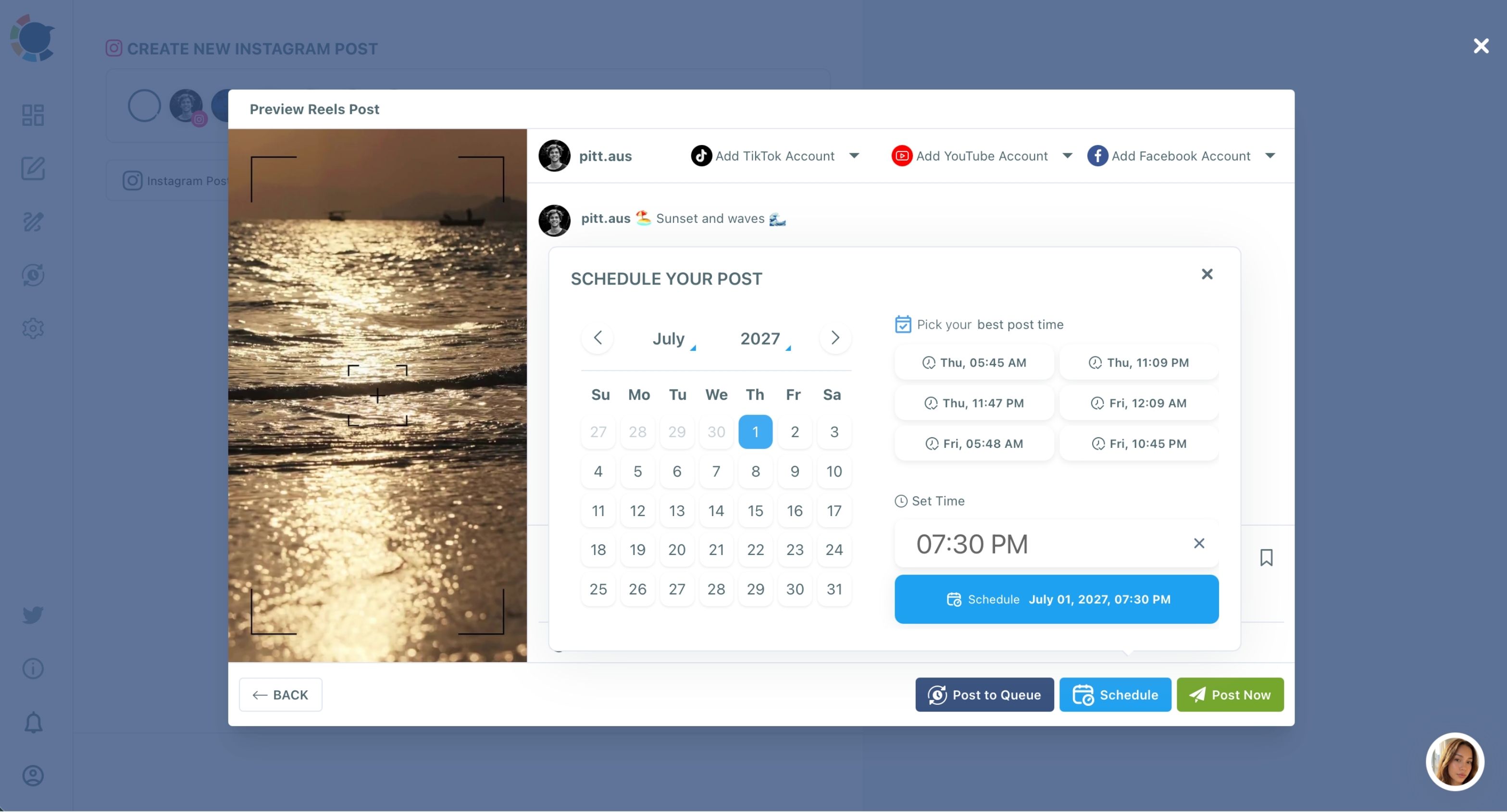
Each phase narrows what can still go wrong. Once the clip, cover and track are locked inside the composer, the caption describes a finished Reel, and the schedule step has only one question left: when is this audience online?
Writing the Instagram caption and hashtags for reach beyond followers
The caption's first line should restate the hook, because viewers who tap to read more are already deciding whether to share. The AI Instagram caption generator drafts that line from a short description of the clip and who it is for. You can then ask it for a shorter, funnier or more energetic version.
Hashtags belong at the end of the process. For a starting set based on the caption, the hashtag generator for Instagram suggests tags you can trim to the few that describe the Reel precisely.
The Add first comment field takes what the caption cannot hold: a product link, a price, a longer hashtag set. Writing that comment yourself also means your words sit in the top spot the moment the Reel goes live, instead of whoever happens to comment first.
When the same Reel goes to several platforms, let the AI write a fresh caption for each rather than pasting one everywhere.
Treat the caption's opening line as a second hook for viewers who tap to read.
Checking whether the Instagram Reel traveled
Once the Reel has been live for a while, compare how many people it reached with how many times it was shown. The difference between Instagram reach vs impressions tells you whether new people saw it or the same followers saw it twice.
Inside Circleboom's Instagram analytics, the Reels retention funnel adds the other half of the answer, showing where viewers left the clip.
The same clip may also be headed to TikTok from the Create Reels Post window. For that version, the lessons on how to get millions of views on TikTok fast apply.
Choosing your next move for a viral Instagram Reel
Your next step depends on where the Reel is right now:
- If the clip runs past 30 seconds, cut it before anything else, and keep it under 60 seconds if it will also go to TikTok, YouTube and Facebook.
- If you run a business account and the music picker looks thin, attach the track from Circleboom's Add Music library instead.
- If the cover is still the default frame, pick one that matches the hook before you upload, since Instagram won't let you change it later.
- If the Reel is ready, schedule it into one of the suggested slots rather than posting it the moment it is done.
- If the Reel already went out and stalled, read its retention funnel before changing anything, so you fix the lever that broke.
Whichever branch you are on, the levers stay the same.
→ Build and schedule a viral Instagram Reel
What to Know before you chase a viral Reel
What are trial Reels, and should I test a hook with them first?
Trial Reels are an Instagram feature that shows a Reel to non-followers first, so it does not appear in your followers' Feed or Reels tab while you test it. They are useful for comparing two hooks, and the guide to what trial Reels are on Instagram explains how to read the results. The trial option lives in Instagram's own app, not in Circleboom.
Can I repost a Reel that already went viral?
Yes, but change it first. Platforms dislike duplicate content, so swap three things before it goes out again: the hook, the caption and the track from Add Music. Those changes make the repost read as a new Reel built on a proven idea.
Will scheduling a Reel through Circleboom hurt its reach?
Scheduling changes when the Reel goes live, and timing is the part that affects reach. Instagram's ranking weighs how quickly a Reel earns likes, comments and shares once it is live, so scheduling into a suggested best-time slot works in your favor rather than against you.
The four levers of a viral Instagram Reel
A viral Instagram Reel pulls four levers at once: the hook, the length, the sound and the posting time. Circleboom Publish sets all four levers for Instagram Reels from the Reels tab of its Instagram composer. The table pairs each lever with the step that sets it and the Instagram rule that makes it matter.
The four levers of a viral Instagram Reel
A viral Instagram Reel pulls four levers at once: the hook, the length, the sound and the posting time. Circleboom Publish sets all four levers for Instagram Reels from the Reels tab of its Instagram composer. The table pairs each lever with the step that sets it and the Instagram rule that makes it matter.
Miss any one lever and the other three have less to work with.