Forty separate publishes can become twelve sends. In the composite case I use throughout this piece, that is the whole difference between a month where a small studio owner falls behind and a month she finishes early, and nothing about her ideas changes.
She posts to Instagram, Facebook, LinkedIn and X, one account each, and her plan is good.
What sinks it is the gap between the plan and the posts that go out, and that gap is where most content planning quietly dies.
Content planning works when one monthly goal turns into a fixed number of posts per platform per week, written in one sitting and scheduled before the month starts. Circleboom Publish sends each planned post to your X, Instagram, Facebook and LinkedIn accounts in one send, so a month of posts becomes a handful of sends instead of dozens of separate log-ins.
→ Turn your monthly content plan into scheduled posts in one sitting
Below is the post-count math the usual monthly calendar guides skip. After that comes the one-sitting workflow that turns the count into a full Outbox.
Why content plans stall between the calendar and the post
A typical content plan looks great on paper. A spreadsheet, thirty rows, one row per day, a theme in one column and a caption idea in the next.
By the second week the spreadsheet is still full and the accounts are quiet.
The failure is almost always the same. Every row means opening each platform, logging in, pasting, uploading the image again and picking a time.
Four platforms turn one idea into four small chores, and on a busy day all four get skipped. It is easy to call that a discipline problem.
It rarely is.
The useful check is a boring one: count the publishes instead of the ideas. Twelve ideas a month across four platforms is not twelve tasks. It is close to fifty.
A content plan does not fail at the idea stage. It fails at the handoff, where every idea multiplies into one publish per account.
That is the part a calendar template cannot fix, because a template only stores ideas. The work that kills the plan is the repeated publishing.
Once you see that, the fix is obvious. Batch the content you planned instead of posting it day by day, so each idea is written once and sent once.
The tool matters here too. Circleboom Publish schedules one post to X, Instagram, Facebook, LinkedIn and six more platforms from a single composer, so a planned post that belongs everywhere goes everywhere in one action.
Content planning starts with one monthly goal, not a list of post ideas
The second common mistake is starting with ideas. A list of ideas has no finish line, so it never tells you when the month is planned. A goal does.
A useful monthly goal is small, dated and countable: "fill the spring workshop with 30 sign-ups," "get 200 visits to the new menu page," "book five consultation calls." It names one thing the posts are for. Everything else in the plan exists to serve that one thing.
For the bigger picture, our guide to content marketing strategy shows how goals, audiences and channels connect above a single month.
Before I write a new goal, I look at what last month did. The post analytics view shows which posts earned engagement, so the next goal starts from what the audience responded to, not from what I hoped they would.
Consistency is the second half of the goal. LinkedIn reports that companies that post weekly see a 2x lift in engagement with their content.
That number is the reason my goal always comes with a cadence attached. A plan that posts every week, without gaps, beats a plan with better ideas that posts in bursts.
Turning one monthly goal into a post count you can schedule
This is the step most planning advice skips. Guides tell you to pick three to five content pillars and a monthly theme, then they hand you a calendar.
Nobody tells you how many posts the month actually needs, on which platform, and how long the publishing will take.
Pillars and platforms for one monthly goal
So I do the arithmetic before I write anything. Take the studio owner's goal: 30 workshop sign-ups in four weeks. She had three pillars:
- Teach: one tip from the workshop itself.
- Show: one behind-the-scenes photo of the studio.
- Ask: one sign-up reminder with the booking link.
One post per pillar per week is three planned posts a week, twelve for the month. Then each pillar gets its platforms and its text budget:
| Pillar | Posts per week | Platforms | Text budget |
|---|---|---|---|
| Teach | 1 | All four | 280 characters |
| Show | 1 | Instagram, Facebook | 2,200 characters |
| Ask | 1 | All four | 280 characters |
The text budget is the strictest limit among the platforms that pillar goes to. X allows 280 characters on a standard account, so any post that includes X is written to 280 from the start.
The Show post skips X and LinkedIn, so it can use Instagram's 2,200, and it needs an image because Instagram does not take text-only posts.
Where each pillar goes is a judgment call per platform. Our breakdown of the best content for each social media platform helps when a photo or a tip could go either way.
Counting the publishes, not the ideas
Now count the publishing. Teach and Ask each go to four accounts, Show goes to two. That is ten publishes a week, forty for the month.
Done natively, platform by platform, that is forty log-ins, forty uploads and forty times picking a time. With one composer, each planned post is one send, so the month is twelve sends.
The plan stops being a list of ideas and becomes a number: twelve sends, all written in one sitting.
The same math holds as the account count grows. The Circleboom feature notes walk through 4 posts going to 7 accounts across four platforms.
Done natively that is 28 separate publishes, close to an hour of signing in and out. Done from one composer it is 4 sends and about ten minutes.
Most businesses face this on more than one platform. DataReportal's global overview finds that the typical online adult uses 6.75 social platforms a month.
Pew's numbers for the US show the same spread. YouTube reaches 84% of US adults, Facebook 70% and Instagram 51%, so a plan built for one platform leaves most of the audience out.
What time should each planned post go out?
Each planned post should go out when that account's own followers are most active, which is rarely the same hour on every platform. Generic "best time" charts average millions of accounts that are not yours.
When I schedule a post in Circleboom Publish, the Schedule window shows a "Pick your best post time" list next to the calendar. The suggested slots are computed per account from that account's own followers, so the Instagram account and the LinkedIn page each get their own windows from one send.
For evergreen posts I skip picking times altogether. Each account can have recurring slots in Time and Queue Settings, and Add Best Times to Post fills those slots with the account's suggested times.
Post to Queue then drops the post into the next open slot for every selected account.
To plan the grid itself around activity, see our guide to a social media calendar based on follower activity.
My rule is simple: dated posts like the Ask reminder get Schedule with a suggested time, and pillar posts that can go out any day go to the Queue.
How I turn a month's content plan into scheduled posts in one sitting
Circleboom Publish is where the plan turns into posts. One composer covers ten platforms, and one post can go to any mix of connected accounts in a single send, from one account to dozens.
It is the step that lets you schedule a month of planned content at once instead of chipping away at it every day.
For the X side of the plan, safety matters as much as speed. Circleboom is an official X Enterprise developer, so posts reach X through approved access, never through a workaround that puts the account at risk.
Here is the workflow I use once the twelve posts are drafted in a notes file.
Set up the month before writing a single post
- Open Circleboom Publish and connect every account the plan names, one per platform for a plan like the studio's.

- Set recurring slots for each account in Time and Queue Settings, then use Add Best Times to Post so the slots follow each account's own audience.
- Click the pencil icon in the left sidebar and choose Create New Post on All Platforms.
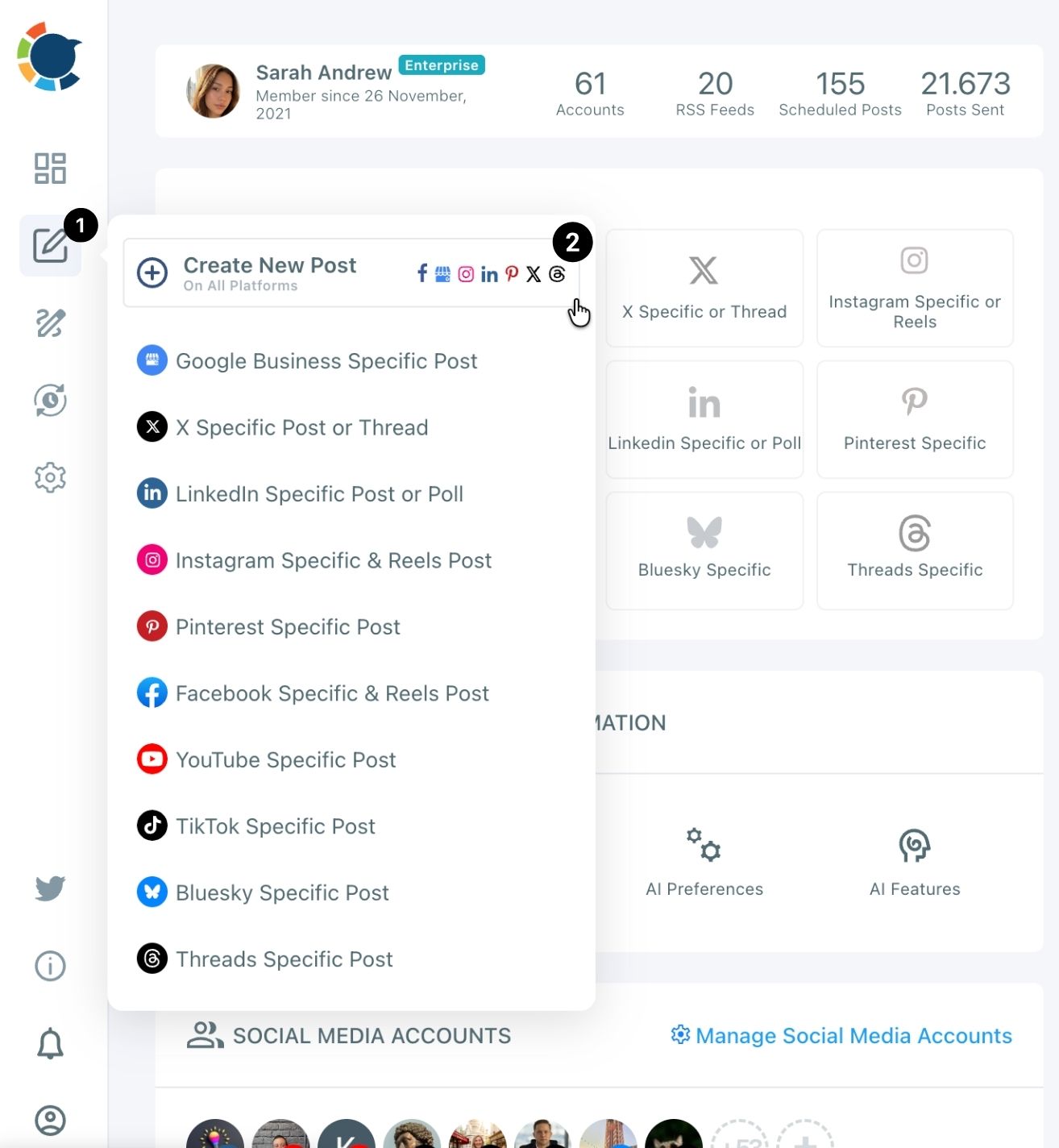
Write each planned post once and send it to every platform it belongs on
- Select the accounts for the pillar: all four for a Teach or Ask post, only Instagram and Facebook for a Show post. Save a combination you reuse as a Share Group so it becomes one click.
- Write the post or paste it in, and when you use the AI button, put the limit in the instruction ("keep it under 280 characters for X"). The AI writer does not apply platform limits on its own.
- Check every tab in the Post Preview panel, then choose Schedule for dated posts or Post to Queue for evergreen ones.
- Save as Draft any post that is not finished yet, so one stubborn caption does not stall the whole session.
That order is what keeps the sitting short. The slots exist before the first post, so Post to Queue never asks for a time, and the preview check catches a 300-character caption before it reaches X instead of after.
Hands-on demo: one batch session that takes a month's planned posts and lines them up in the queue.
Twelve sends is a light month. For several posts a day across many accounts, our walkthrough shows how to schedule more than 10 posts a day.
When I am done, the Outbox Calendar View shows the whole month in Week or Month view. That view is my last planning check.
A thin week or a platform with nothing on it stands out at a glance, and the "+" on an empty day opens a new post for that exact date.
What to post on the days your plan leaves empty
The days your plan leaves empty get covered by outside articles, an RSS feed or a proven post from your own history. You do not need to write something new for every gap.
A twelve-post month leaves gaps on purpose. On text-first platforms like X, Facebook, LinkedIn, Bluesky and Threads, the algorithms reward accounts that keep showing up, and a small business cannot write an original post every day.
For those days I use article curation. Discover Articles finds fresh articles on the topics you choose, and the good ones go to the Queue in one click, so the empty days fill without new writing.
For the studio, that meant articles about the craft itself between the Teach and Ask posts.
Once a source proves reliable, I connect it as an RSS feed and stop thinking about it. Our guide on how to use RSS feeds to save time on social media covers that setup.
In Circleboom Publish, RSS works for X, Facebook, LinkedIn, Google Business Profile, Bluesky and Threads, not Instagram.
The third option is the most underrated. Repost From Sent Items sends a post that already performed back out, as it is or lightly refreshed, because a good share of today's followers never saw it the first time.
Before I reuse one, I ask the AI writer to rephrase it, since platforms treat repeated identical text as duplicate content.
To let the whole baseline run on its own, see how to automate social media posts, where the Queue, RSS and scheduling fit together into one steady flow.
You do not need a perfect plan to start
You do not need a content calendar template, a pillar workshop or a full quarter mapped out to start content planning that holds. You need one goal for this month, three pillars and the number of sends they add up to.
A first month done this way will probably have rough captions and one pillar that flops. It still goes out every week, which a beautiful spreadsheet on its own never manages. The next month starts from what the post analytics show, and the plan gets better because it exists.
Write the twelve posts, open the composer once, and let the queue carry the month.
→ Start your content planning with a batch session
Still wondering how to plan content?
Do I need every account connected before I plan content?
You can write the plan without them, but a post can only be scheduled to accounts already connected in Circleboom Publish. The platform-by-platform steps are in connecting your social accounts.
Can I send the same planned post to every account?
Yes, across different platforms one send reaches every selected account. When several selected accounts sit on the same platform, give each its own wording with the AI writer, because identical posts count as duplicate content.
Circleboom already blocks the same tweet from going out again within a week on X. The rules are in can I post duplicate content.
What if a planned post is too long for X or Bluesky?
Shorten it with the AI writer's Condense option and send one version everywhere, or leave X and Bluesky out of that send and post a shorter version from their own Specific Post composers. X allows 280 characters on a standard account and Bluesky allows 300, so those two set the budget for any post that goes everywhere.