Launch a campaign with plain links and you give up the one answer the campaign was supposed to deliver: which platform and which post brought people to your site. Likes and impressions stay visible, but the visits land in Google Analytics as generic social traffic, and analyzing social media campaign effectiveness turns into guesswork.
That loss is permanent, because a link that goes out untagged can never be tagged afterward.
What this guide gives you.
• A goal-to-metric map that separates likes from clicks, signups and sales.
• A naming pattern that keeps one campaign as one line in Google Analytics.
• Circleboom Publish builds the UTM-tagged link inside the composer, before the post goes out to X, Facebook, LinkedIn or Pinterest.
• A worked example of 400 visits split by platform once every link is tagged.
Tag the links, time the posts, and measure your social media campaign's effectiveness post by post.
Why likes alone cannot prove a social media campaign worked
A like or an impression says a post was seen. It says nothing about whether anyone clicked the link inside it, or whether that click turned into a visit, a signup or a sale on your site.
For a business that sells through social media, that second half is the part the campaign was paid for.
The problem shows up the moment a campaign runs on more than one platform. Say the same product link goes out on Facebook, LinkedIn, Pinterest and X. Traffic rises that week, but Google Analytics files most of it under a broad "social" or "referral" source.
You know the campaign did something. You cannot tell which platform, which post or which version did the work.
So the goal of analyzing social media campaign effectiveness is not a bigger dashboard. It is a link that reports where each visitor came from, set up before the first post goes live.
That is why the measurement has to start in the composer, not in the report. If you want both halves in one place, you can analyze campaign performance on every platform from the same tool that sends the posts.
What UTM is in social media, and do you need a separate tool?
A UTM link is an ordinary URL with a few tracking parameters added to the end. Google Analytics reads those parameters to learn which platform, which campaign and which piece of content sent the visitor.
For the longer definition with examples, our explainer on what UTM is in social media covers the basics.
Google's own guide to collecting campaign data with custom URLs names the parameters you should always use and the one that tells versions apart:
- utm_source: the platform or placement, such as facebook-feed.
- utm_medium: the type of traffic, such as social.
- utm_campaign: the promotion name, such as spring-launch.
- utm_content: optional, to separate two versions of one post.
You do not need a separate tool to build them. The usual route is a builder in another browser tab: write the post, leave the composer, build the link, copy it back, then repeat for every platform.
That detour is exactly the step that gets skipped under deadline pressure. Circleboom Publish puts the builder inside the composer, so the tag is added in the same sitting as the copy.
Set the campaign goal before you tag a single link
Every campaign needs one primary goal, and the goal decides which number counts as success. A launch measured on reach and a launch measured on sales can both "work" and still tell you opposite things about where to post next month.
Map the goal to two signals before anything goes live, one on the platform and one after the click:
| Campaign goal | On-platform signal | After-click signal |
|---|---|---|
| Awareness | Impressions, reach | New visitors |
| Traffic | Link clicks | Sessions by source |
| Signups or leads | Saves, shares | Signups by campaign |
| Sales | Comments, replies | Purchases by source |
The on-platform column tells you a post was seen; the after-click column tells you it was worth sending.
The planning side matters as much as the tracking side. Our list of dos and don'ts of a successful Twitter campaign covers the setup decisions that shape what you can measure later. Most of them carry over to other platforms.
Write the goal and its two signals at the top of the campaign brief. When the results come in, you read the row you chose, not the metric that happens to look best.
How to name UTM parameters so Google Analytics keeps one campaign together
Naming is where most campaign reports fall apart. Google's guide states that UTM values are case sensitive, so "Spring-Launch" and "spring-launch" arrive as two separate campaigns. A parameter left empty shows up as "(not set)," which tells you nothing.
This is the reason a report can show one campaign twice, with the visits split between the two spellings.
A consistent pattern fixes it. Decide it once per campaign and use it on every post:
- One campaign name, lowercase, used on every platform for the same promotion.
- One source per platform, such as facebook-feed, linkedin-page, pinterest and x.
- One medium for organic posts, such as social, kept the same across the campaign.
- A content tag only when you compare versions, such as hook-a and hook-b.
The pattern is what makes platforms comparable side by side. With the same campaign name everywhere and a distinct source per platform, one report shows the whole campaign broken down by where the visitors came from.
Write the pattern into the campaign brief next to the goal. Anyone on the team who schedules a post then tags it the same way, and the report stays clean.
Circleboom Publish puts the UTM builder inside the composer
Circleboom Publish tags campaign links with UTM parameters in the composer, before the post goes out to X, Facebook, LinkedIn, Pinterest or any other connected platform. You paste the link, open the builder from the link icon, fill in the fields, and the tagged URL replaces the original link in the post.
That removes the round trip that makes people stop tagging.
The same scheduling screen also suggests posting times from each account's own followers, through the "Pick your best post time" panel. A tagged post that goes out while the audience is offline still underperforms, so timing and tracking belong in one step.
On the measurement side, each platform's content performance analytics shows the on-platform half: impressions and engagement per post. Google Analytics shows the after-click half. Read together, they track which campaign posts sent visitors, not only which ones collected likes.
For the X part of a campaign, the access question matters too. Circleboom is an official X Enterprise Developer company, so campaign posts reach your X account through approved access rather than a shared password or an unofficial workaround.
How to analyze social media campaign effectiveness with UTM links
The workflow below runs from the first draft to the report in three phases: write the post, tag the link, then schedule and read the results.
Watch the flow: a campaign link tagged inside the composer so Google Analytics splits the visits by platform.
The steps that work, in order.
Write the campaign post with its destination link
- Log in to Circleboom Publish and make sure every account in the campaign is connected.
- Write the post and paste the destination link into the text, such as the product page or the landing page for the offer.
Tag the link before it leaves the composer
- Click the link icon next to the pasted link to open the built-in UTM builder.
- Fill in Campaign Source, Campaign Medium and Campaign Name, using the naming pattern from your brief, and add Campaign Content only when you are comparing two versions.
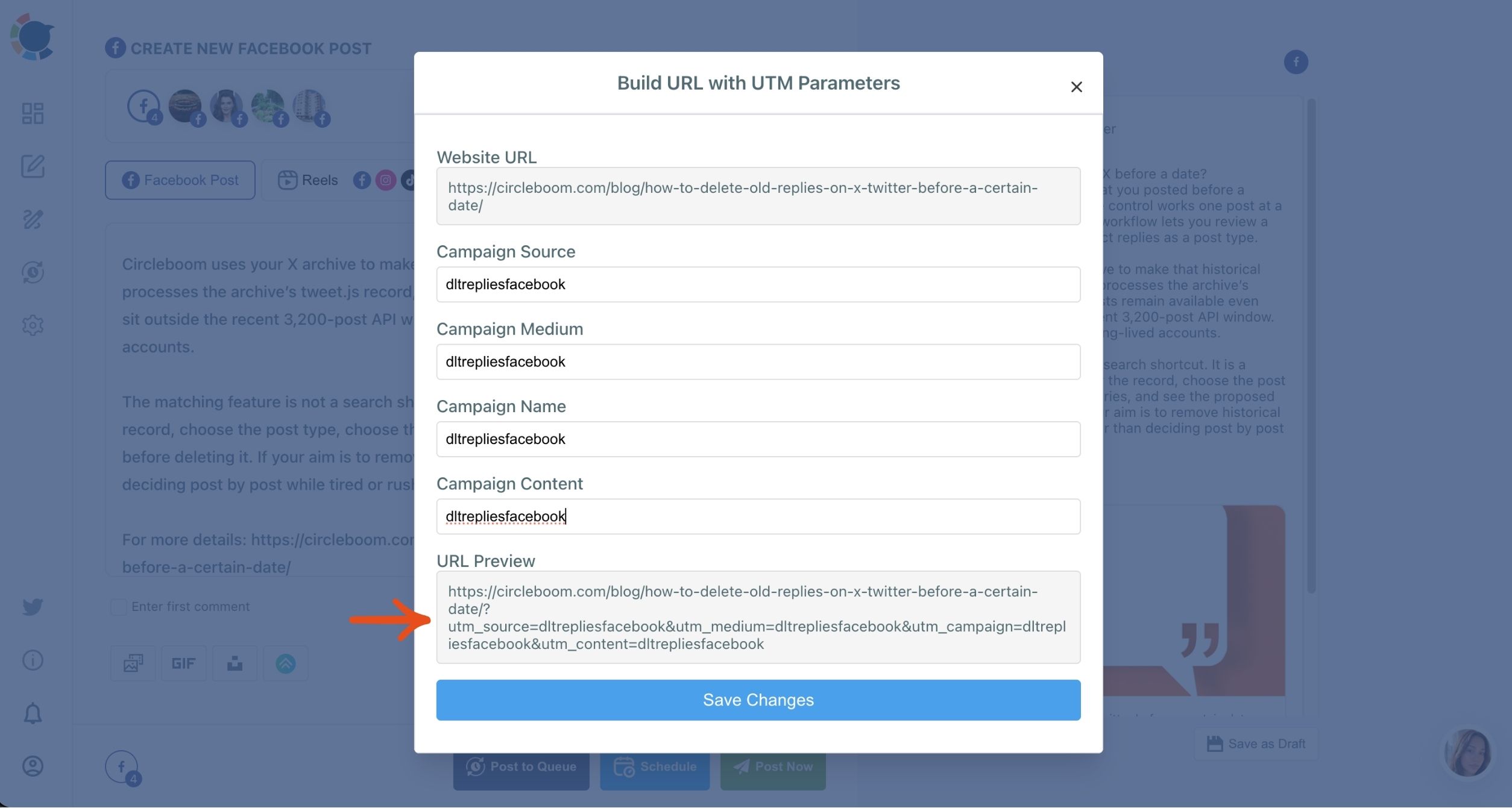
- Check the URL Preview and save, so the tagged link replaces the plain one in the post.
Schedule at the best time and read the results
- Publish, Schedule or Post to Queue as normal, picking a slot from "Pick your best post time" when you schedule.
- Read the visits in Google Analytics under the Traffic acquisition report, filtered by your campaign name, and compare them with each post's on-platform numbers.
That order holds up because the tag is set before the post can leave, so no campaign link goes out untraceable. Using one naming pattern at the tagging step keeps the report to one campaign, and reading both halves side by side stops a high-engagement, low-click post from passing as a winner.
Quick recap:
- Write the post and paste the link.
- Tag it with one lowercase campaign name and a source per platform.
- Schedule at a suggested time, then read Traffic acquisition by campaign.
Once the steps are habit, analyzing social media campaign effectiveness stops being a month-end project. The data is already sorted by the time you open the report.
How 400 visits split by platform once the links are tagged
Here is what the tagging buys you, using an illustrative example. Say the same product link goes out on X, Facebook, LinkedIn and Pinterest, and the product page gets 400 visits that week.
Without tags, Google Analytics shows most of it as generic social traffic. With one campaign name and a source per platform, the same 400 visits split like this:
| Platform | Visits (illustrative) | Share of visits |
|---|---|---|
| 220 | 55% | |
| 110 | 27.5% | |
| 50 | 12.5% | |
| X | 20 | 5% |
One campaign, four very different answers, and none of them visible without the tags.
In this example, Pinterest sent more than half the visits. If the follower counts pointed the other way, the account with the biggest audience would have looked like the obvious place to spend next month's effort, and the numbers say otherwise.
What a low number on one platform does and does not mean
A small number is not an automatic verdict. X sending 20 visits can mean the post went out at a weak time, or that the link sat below a long text.
Our guide to how you track link clicks on X shows where to check the platform's own click count before you cut a channel.
The next question is which posts inside each platform did the work. When you tag two versions of one post with different content tags, the click data picks the winner, not the like count.
Our breakdown of which tweets get the most clicks covers the patterns behind posts that earn clicks rather than reactions.
In Circleboom Publish, Duplicate makes that test practical: copy a finished post, change one variable, give each version its own Campaign Content value, and schedule both.
Reading the on-platform half next to the after-click half
The after-click numbers answer "did it send visitors." The on-platform numbers answer "did people see it and react." A campaign review needs both, read for the same posts and the same dates.
Each platform has its own analytics screen for the on-platform half. LinkedIn's help page on LinkedIn Page analytics describes a Content tab for how individual posts performed and a Visitors tab for where Page visitors came from, available to all Page admins.
Timing is the variable people forget to check. When one platform's posts underperform on both halves, look at when they went out before you blame the copy.
For Facebook, our page on the best time to post on Facebook covers how Circleboom suggests times from your own Page's audience.
Put the two halves into one short review per post:
- Seen: impressions and reach from the platform.
- Reacted: likes, comments and shares from the platform.
- Clicked: visits from Google Analytics, by source.
- Converted: signups or sales from Google Analytics, by campaign.
A post that wins on the first two lines and loses on the last two was entertainment. A post that wins on the last two is the one worth repeating.
Turning the winning post into next month's plan
A finished review should change what you do next, or it was only a report. Three decisions come out of it.
Move effort toward the platforms that sent visits and sales, not the ones with the most followers. Keep the platforms that sent few visits but strong reactions for awareness goals, where reach is the point.
Then rerun what won. The posts with real clicks behind them are candidates for a second run, because most of today's audience likely never saw them the first time.
Circleboom's social media reposting workflow sends a proven post again from Sent Items, as it was or with a refreshed hook.
Last, aim the next campaign at the click. If X sent the fewest visits, the fix is often in how the post asks for the click.
Our guide on how to drive Twitter traffic to your website covers the post formats and link placements that send more readers off the platform.
What the next 30 days of tagged posting will show you
Over the next 30 days, tag every campaign link with one naming pattern and read the report once a week. By the end of the month you will know which platform sends visitors, which post format earns clicks, and which posting times hold up on both halves.
That is a month of evidence instead of a month of guesses.
The second month is where it pays off. You move effort toward the platforms that sold, rerun the posts that won, and test one variable at a time with tagged versions.
Each campaign starts from the last one's numbers rather than from a blank page.
None of it works retroactively, so the habit has to start with the next post you schedule.
→ Start analyzing social media campaign effectiveness
Campaign measurement FAQ
Can I add UTM tags to a link I already posted?
No. A link only reports its source if it was tagged before it was shared, so an untagged post's traffic stays in the generic social bucket. Tag the next post instead, and use the same campaign name so the rest of the campaign stays together.
Do UTM results show inside Circleboom Publish?
No. Circleboom Publish builds the tagged link and sends the post, but the visits, signups and sales appear in Google Analytics. The on-platform half, impressions and engagement per post, is what Circleboom's analytics shows.
What does "(not set)" mean in my campaign report?
It means a UTM parameter was left empty on some links, so Google Analytics had no value to record for those visits. Filling Source, Medium and Name on every link, in the same lowercase pattern, keeps the row from appearing.