Most agencies believe their scaling problem is content: more clients means more posts, so they hire more writers. I think that diagnosis is wrong.
Content scales fine with a calendar and a few good people. What breaks first in agency SMM is access: who can post to which client's account, who checked the post, and who still holds a password they should have lost months ago.
Agency social media management scales when every client lives in its own workspace and every staff post passes one approval step. Circleboom Publish gives each client a separate Team workspace, with staff added as Users whose scheduled posts wait for an Admin's approval before they go live on Facebook, Instagram, LinkedIn or Google Business Profile. Nobody on staff ever needs a client's password.
→ Run agency SMM with a separate workspace for every client
Below is the workflow, the math behind it, and the parts most agencies skip.
That is the whole argument in three lines. The rest of this piece is why I hold it, and what the setup looks like when you build it on purpose instead of letting it grow by accident.
The agency SMM problem nobody budgets for
The problem nobody budgets for in agency SMM is the login. A new client signs, and the first thing that happens is not strategy.
Someone emails over a password, someone else saves it in a shared sheet, and a third person logs in from a laptop nobody has audited.
With two clients, that works. With six, it is a liability that grows with every hire.
Our guide on how to manage social media accounts of over 20 clients shows where the strain usually starts.
The usual first fix is a better spreadsheet. A tab per client, a column for the password, a column for "who has access," and a rule that nobody shares the sheet. It feels organized for about a month.
Then the questions start, and they are always the same ones:
- Who posted that, and did anyone review it first?
- Is someone else logged in to this client's Page right now?
- Does the freelancer who left in spring still have the password?
None of those questions has an answer in a spreadsheet.
The moment the problem becomes undeniable is usually small. A caption meant for one client's Facebook Page lands on another client's Page because both were open in the same browser.
Nobody is fired over it. But the client asks how it happened, and "we share logins" is not an answer an agency wants to give.
The fix is not a stricter password policy. It is to stop sharing client passwords at all. If you want to stop sharing client passwords across your agency SMM team, the structure below is where that starts.
Six clients, one login: the math of a workspace per client
The math of a workspace per client is the clearest way I know to show why access, not content, is the bottleneck. This is an illustrative calculation taken from the Team Management feature's own example, not a measured case.
Say your agency handles six clients with four social accounts each. That is 24 accounts, and three staff members write the posts.
Without separate workspaces, that is 24 passwords passed around. Every post you need to check arrives by email or chat, and each client's review takes about an hour of back-and-forth every month.
With a workspace per client, the same month looks different:
| Question | Shared logins | Workspace per client |
|---|---|---|
| Passwords shared | 24 | 0 |
| Accounts each writer sees | All 24 | Only their assigned ones |
| Where posts get reviewed | Email and chat | One approval queue |
| Monthly review per client | About an hour | About 10 minutes |
The last row is where the hours come back. Six clients at an hour each is a full working day of review a month; at ten minutes each, it is one hour.
The row I care about more is the first one. Zero shared passwords means removing a person ends their access the moment you click remove, instead of the day someone remembers to change 24 passwords.
The audit gets easier too. The Social Accounts tab of each Team has an Assignees column that shows which members can post to each account, so checking who touches a client's Instagram account takes one look instead of a memory test.
What access do you need from each client's accounts?
You need each client to let you connect their accounts with a role that can publish, and nothing more than that. The cleanest setup connects every account to the agency's dashboard once, so nobody on staff ever needs the client's own password again.
Circleboom Publish lets you manage multiple social media accounts across Facebook, Instagram, LinkedIn, Pinterest, Threads, Bluesky, TikTok, YouTube and Google Business Profile from one login. Circleboom is also an official X (Twitter) Enterprise API partner, so client accounts connect through approved, policy-compliant access.
LinkedIn is where agencies most often get stuck, because a Company Page has its own role system. LinkedIn's help page on Page admin roles lists super admin, content admin and analyst, and content admins create and manage Page content.
Ask the client for a posting role before the kickoff call, not after.
Facebook Pages are where agencies feel the scale. In the feature's own real example, one composer send reached 30 Facebook Pages at once, which is the kind of reach a multi-Page client expects from an agency.
How to set up agency SMM so every client stays separate
Circleboom Publish solves the access problem with Team Management: each Team is a separate workspace with its own connected accounts, members, post history and stats, and a login switches between workspaces from the profile avatar's "Switch Workspace" popup. Only two roles exist.
An Admin acts immediately and sees every account in the Team; a User sees only assigned accounts, and everything a User schedules waits for approval.
That two-role model sounds thin until you run it. In my view, it is the right amount of structure for most agencies, because every extra role is another thing to audit.
When you are ready to give each agency client its own workspace and approval queue, this is the page you start from.
See it in practice: switching between several client Instagram accounts from one login, without signing out of anything.
The setup I recommend, end to end:
Build the client's workspace before anyone posts
- Create one Team per client from Manage Teams (BETA) in the gear-icon Settings menu, using "+ Create New Team," a team name and the email addresses of the staff you want to invite.
- Connect that client's accounts to the Team, so Company A's Pages, posts, history and stats never sit next to Company B's.
- Assign each staff member the User role once they accept the invitation, and pick the client's accounts they work on under Assigned Networks.
That third step is where the scoping happens. A writer assigned to one client's Facebook Page and Instagram account sees those two accounts and nothing else, which is the opposite of the shared sheet.
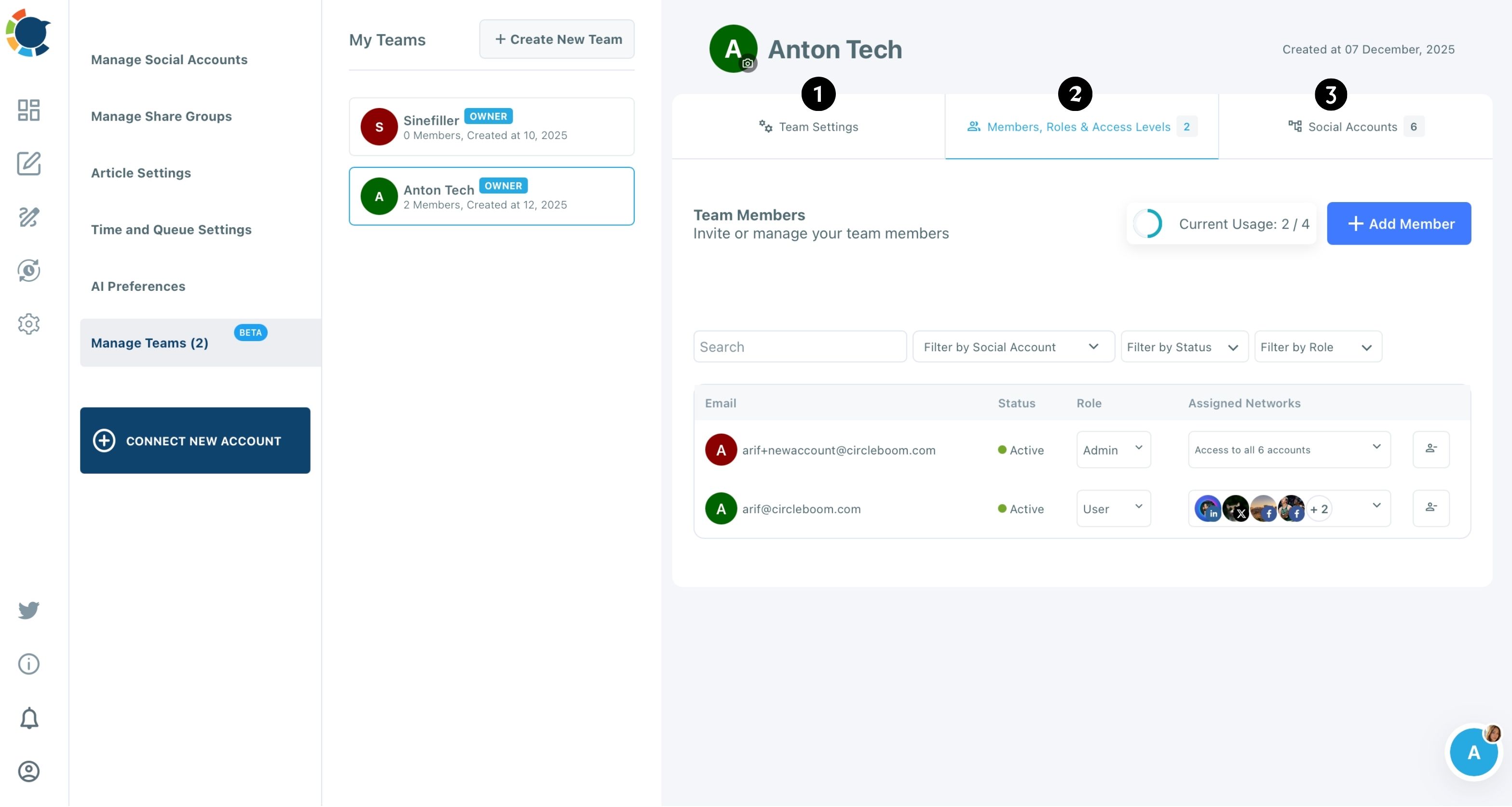
You can also watch this short clip to see how a Team gets its members, roles and accounts.
Route every staff post through one approval queue
- Save the client's accounts as a Share Group inside the Team, so whoever posts for that client selects the full bundle in one click.
- Clear Waiting for Approval regularly: preview each post, approve it so it publishes as scheduled, or reject it with a comment so the User fixes it and sends it back.
At the end of the month, Approve All Posts for [Month] clears a client's queue in one action once you have spot-checked it.
The order matters because access comes before speed. Build the workspace and the roles first, and the Share Group and the approval queue only ever handle accounts the right people can touch.
Skip to the Share Group, and you have a fast way to post to the wrong client.
Share Group or Team: which one does the job?
A Share Group and a Team do different jobs, and agencies need both. A Share Group is a one-click bundle of accounts for composing; it grants no one any access.
A Team is what gives a person a role over a specific set of accounts. One Team per client, with the client's accounts saved as a Share Group inside it, covers both.
How do you show clients the work is paying off?
You show clients results with per-post numbers and tracked links, not with a screenshot of a busy calendar. Post analytics in Circleboom Publish gives each workspace the numbers behind its posts, so the report a client sees comes from the same place the posts went out.
Links are the other half of the report. Paste a client's link into the composer, add source, medium and campaign with the UTM Link Builder, and the clicks from each post show up in Google Analytics.
Our walkthrough on how to use UTM parameters to track social media success covers the naming rules that keep a client's reports readable.
Some clients bring a reporting problem of their own: twenty locations, each with its own profile. For a franchise or retail client, it pays to manage multiple Google Business Profiles inside that client's workspace.
Our guide on how to manage 20 Google Business Profiles for multiple locations walks through that setup.
The approval step is not a formality
The approval step is what makes delegation safe enough to hand off. Some agency owners call it friction.
I see it the other way: without it, the only safe way to delegate is to read every post before it is written, which is the job you hired staff to take off your plate.
It matters most for influencer and paid-partner clients. The FTC's guidance on its Endorsement Guides says hiring an outside agency does not remove the advertiser's responsibility, and it recommends pre-approving paid posts.
An agency that already routes every staff post through one queue has that pre-approval in place before the client asks for it.
There is a second benefit that is easy to miss. A rejection in Circleboom Publish can carry a comment explaining why, and over a few months those comments add up to the real style guide for each client. They record the words they never use, the claims legal will not approve, the tone that works on their Page.
New writers learn the client faster from that trail than from any onboarding document, because every note is tied to a real post.
Choosing an agency SMM tool by what a seat costs
Tooling choice follows the same logic. Our roundup of social media management tools for agencies is a good place to compare options.
The question I would ask of any of them is not "how many features" but "what happens to the bill when I add a teammate."
That question has a whole guide behind it on affordable tools with team collaboration, because seats, not features, are what an agency pays for as it grows.
The agency that scales is not the one with the most writers. It is the one where every writer can work without the owner holding every password.
What the first quarter with client workspaces looks like
Planned this way, the first quarter moves through three stages:
- Month one: every client gets its own Team, its accounts are connected once, and the shared password sheet is deleted.
- Month two: staff work as Users on their assigned clients, and review moves out of chat into one approval queue per client.
- Month three: a new client becomes a new workspace and a new Share Group, not a new set of passwords and a new review habit.
Over the next 90 days, the number to watch is not posts published. It is the hours you spend reviewing per client, because that is the number that decides how many clients one owner can carry.
Start with the client who has the most accounts, since that is where shared logins cost you most. You can set up your agency's client workspaces this week.
Questions agency teams ask
Is there a limit on how many teams or members I can add?
Yes. In Circleboom Publish, both the number of Teams and the number of members per Team are capped by plan, and a usage counter such as "2 / 4" shows where you stand when you create a Team or add a member.
Can a client log in to approve their own posts?
Yes. Invite the client to the Team workspace for their own accounts, and they see only that client's accounts, never your other clients. As an Admin of that Team they can preview, approve or reject what your staff schedules.
What happens to scheduled posts if a client leaves and I delete their workspace?
They will not be sent. Circleboom Publish warns about this in the Delete Team flow, so check the Team's scheduled posts before you delete a departing client's workspace.