What should one app for all your social media actually do? It should end the daily round of logging in to each network, which means writing, scheduling, sharing and measuring posts for every account from a single screen.
What should an all in one social media app actually do?
It should let you write one post, fit it to each network and send it to every account at once, and Circleboom Publish does exactly that for Facebook, Instagram, X, LinkedIn and six more platforms from one dashboard.
→ Run all your social media accounts from one app
Search for that phrase and you get two very different products mixed together. Below, I separate them, then walk through the six jobs a dashboard has to pass before it can replace your separate apps.
Two kinds of all in one social media app
An all in one social media app is one of two things: an aggregator that bundles your feeds and messengers behind one login, or a management dashboard that publishes to all your accounts from one place. Both promise "everything in one app," but they solve different problems.
An aggregator is a reading tool. It opens your networks in tabs inside a single window so you can scroll and chat without switching between apps on your phone. That helps a person keep up; it does nothing for a business that needs to post.
A management dashboard is a publishing tool. You connect each account once, then write, schedule and track posts for all of them without opening the networks at all.
Our guide on how to manage all social media in one place covers the basic setup.
The split matters because of how many networks people use.
According to DataReportal's Digital 2026 Global Overview Report, the average online adult uses 6.75 social platforms every month.
A business that wants to be found where those people scroll has to post on several of them, and an aggregator only helps you read.
If the app cannot publish, schedule and measure, it is a browser with extra tabs, not a dashboard.
Why logging in to each network breaks down
Every major network now has its own scheduler, but each one posts to one account on one platform at a time. That is fine for a single Instagram account.
It falls apart the moment you run a Facebook Page, an Instagram account, a LinkedIn Company Page and a Google Business Profile for the same brand.
Here is the arithmetic, taken from Circleboom's own worked example. Four posts going to seven accounts on four platforms are 28 separate log-ins, uploads and publishes when done natively.
From one composer, the same week is four sends and about ten minutes.
The hidden cost is not the time. It is the posts that never go out, because the fourth platform always gets dropped when the week gets busy.
If that sounds like your week, you can manage every social media account in one app and stop rationing your attention by network.
Before you pick a tool, it helps to know what the category looks like. Our overview of social media management tools compares the main types side by side.
The six jobs a single dashboard should do
A single dashboard earns its place when it handles six jobs end to end, without sending you back to a network's own app for any of them. Here they are, with the last two paired in one line:
- Connect every account on every platform you use.
- Write the post once, with AI help built in.
- Fit each platform's character and media limits.
- Schedule, queue or publish to every account in one send.
- Share access with a team, then measure every platform's results.
Use this as a checklist when you compare apps. A tool that passes four of the six still leaves you logging in somewhere every day.
Connect every account on every platform
The first job is coverage: the dashboard has to hold every network your customers use. Circleboom Publish connects X, Instagram, Pinterest, Facebook, LinkedIn, Google Business Profile, Threads, Bluesky, YouTube and TikTok, so one login covers all ten.
Coverage matters more than it looks. Pew Research Center's 2026 fact sheet on Americans' use of social media shows how spread out an audience is:
- 84% of U.S. adults use YouTube.
- 70% use Facebook.
- 51% use Instagram.
- 37% use Pinterest.
- 33% use LinkedIn.
No single network reaches everyone, which is why a dashboard that skips two of your platforms is not all in one for you.
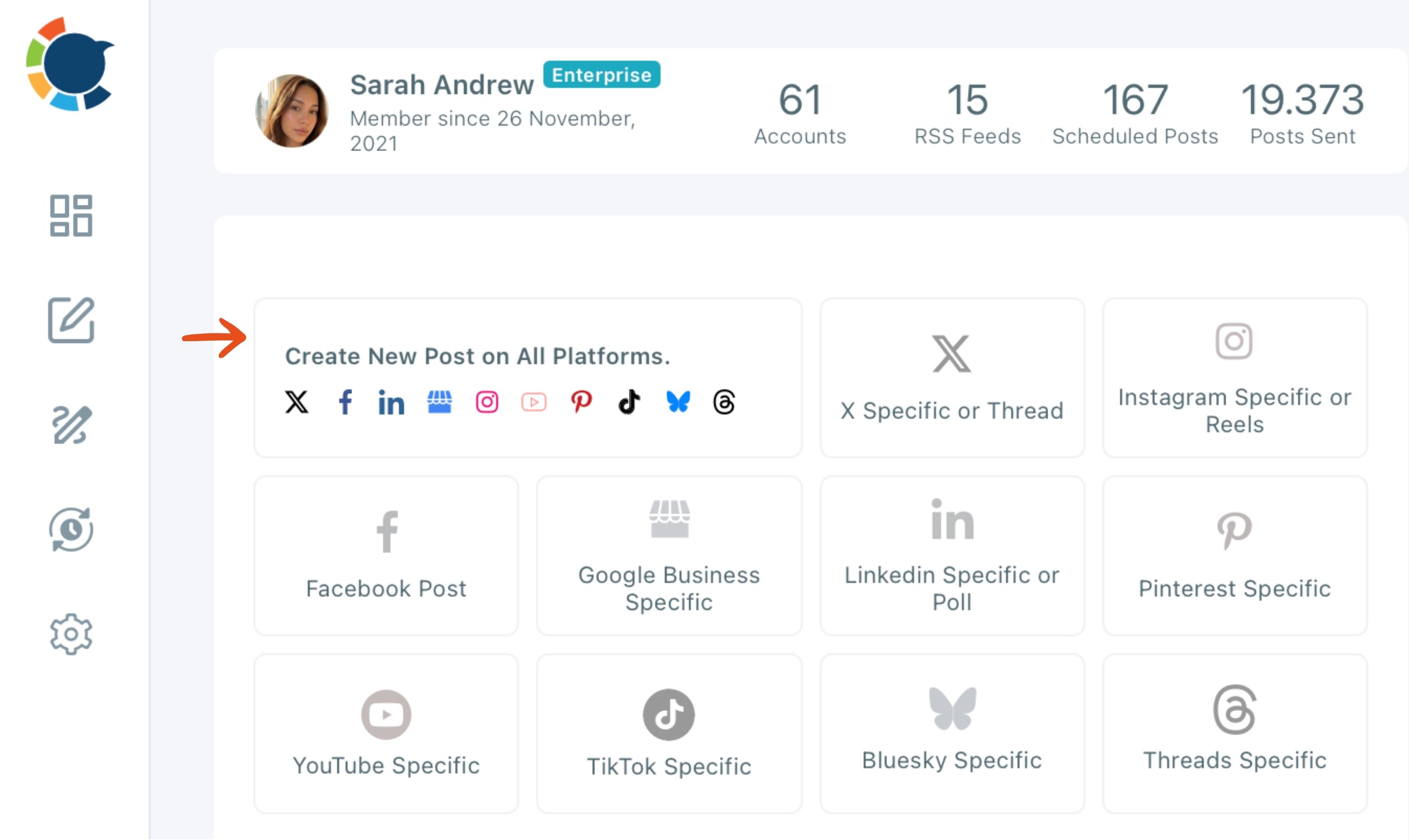
The Circleboom Publish dashboard puts this coverage on one screen. The "Create New Post on All Platforms" card opens the universal composer, and ten platform-specific cards sit next to it for posts meant for one network only.
Coverage also means scale inside one platform. A restaurant group with a Page and a profile for every branch has the same problem as a brand on ten networks.
Our list of tools for managing multiple restaurant social media accounts shows what that looks like in practice.
Write the post once, with AI built in
The second job is writing without a second subscription. In Circleboom Publish, the gold AI button in the composer writes a draft from a prompt ("Ask the AI anything...").
It also reworks text you already have with one-click shortcuts such as More Punchier, Condense, Fix Grammar, Add Hashtags and Rephrase for Clarity.
The AI Social Media Post Generator is included with a Circleboom membership. There is no separate ChatGPT or Gemini plan to pay for just to write captions.
The Hashtag button adds 20 to 30 relevant hashtags in bulk, and the media bar holds Canva, Unsplash, Giphy, Google Photos and the AI Carousel Generator.
One honest limit: the AI writer does not check platform limits on its own. If an X account is in your selection, tell it so ("make it max 280 characters") and it rewrites the draft to fit.
Fit each platform's limits
The third job is fitting one post to ten sets of rules. One post sent to several platforms has to respect the strictest limit among them, and the gap between networks is wide:
| Platform | Text limit | Images per post |
|---|---|---|
| X | 280 characters | Up to 4 |
| Bluesky | 300 characters | Up to 4 |
| 500 characters | 1 per pin | |
| 2,200 characters | Up to 10, media required | |
| 5,000 characters | Up to 10 |
A 500-character post fits Facebook, Instagram and LinkedIn but not X or Bluesky. Instagram also needs at least one image or video, while X accepts text alone.
The Post Preview panel shows how the post renders on each selected network before you send it, so a truncated caption or a missing image shows up while you can still fix it.
Will one post fit every platform? Only when you write to the strictest limit in your selection, which is X at 280 characters whenever X is included.
Schedule, queue or publish to every account in one send
The fourth job is the one that saves the hours: one send that reaches every account. Circleboom Publish gives you three buttons at the bottom of the composer, and each shows how many accounts on each network are about to receive the post:
- Post to Queue drops the post into the next open recurring slot of each selected account.
- Schedule picks a date and offers "Pick your best post time" suggestions for each account.
- Post Now publishes to every selected account at once.
The suggested times come from each account's own followers' activity, not a generic chart. "Add Best Times to Post" fills an account's queue slots with those times, so posting at the right hour stops being a daily decision.
One post can reach any mix of accounts. The feature's own real example is 30 Facebook Pages in a single send, and the same behavior applies on every platform the composer supports.
When you want to automate social media posts for a whole month, the queue is the part that keeps running without you.
X is one of the ten networks in that send. Circleboom is an official X Enterprise Developer, so your X posts go out through an approved connection instead of a workaround.
If you have ever wondered how to post on Facebook and Twitter at once, this is that move, extended to every account you run.
Share access with a team
The fifth job is access. An app that only works for one person stops being all in one the day you hire help. Team Management in Circleboom Publish gives each client or brand its own workspace.
It has exactly two roles: an Admin who publishes directly, and a User who sees only assigned accounts and whose posts wait for approval.
Share Groups sit next to this. A Share Group saves a recurring bundle of accounts, such as one client's Facebook Page, Instagram account and Google Business Profile, for one-click selection, but it grants no one access on its own.
Regulated teams take this further, and our guide to social media software for banks shows how review steps fit a compliance workflow.
Measure every platform
The sixth job closes the loop: seeing what worked on each network without opening ten analytics screens. Post analytics in Circleboom Publish measures posts across the platforms you publish to, so the same dashboard that sent the post shows how it did.
Links need their own tracking. Paste a link into the composer, click the link icon next to it, fill in source, medium and campaign, and the UTM Link Builder swaps in a tagged URL whose clicks show up in Google Analytics.
Our piece on Circleboom Publish and analytics explains how the two halves work together.
When should you use a platform's own composer instead?
Use a platform's own composer when the post is for exactly one network and needs a format only that network has, such as an X thread, an Instagram Reel, a LinkedIn poll or a Pinterest board. The universal composer sends the same content to every selected account, so it skips those network-specific tools on purpose.
The deciding question is always the same: how many platforms does this post need to reach? More than one, and the universal composer is the right place. Exactly one, and that platform's Specific composer gives you its own tools.
Both live inside the same app. The pencil-icon menu in the Circleboom Publish sidebar lists the universal option first, then ten platform-specific composers, so even a single-network post never sends you back to the network itself.
That is the quiet point most comparisons miss. An all in one social media app is not one composer; it is one place that holds both the shared composer and every network's own.
How to run all your social media from one app
To run every account from one app, connect each account once, write the post in the universal composer, check it against each network's limits and send it to every account together. In Circleboom Publish, that whole loop takes four moves from the dashboard, and it is the same for a weekly update or a product launch.
If you are ready to use one all in one social media app for ten platforms, this is what you land on.
See it in practice: a batch of posts written once and sent to X, Instagram and LinkedIn from a single dashboard, the X-centred view of the same one-app idea.
The four moves, in order:
- Open "Create New Post on All Platforms" from the Circleboom Publish dashboard, or click "+" on an empty day in the Outbox calendar to start a post for that date.
- Select every account the post should reach, by clicking a platform icon to select all of that network's accounts at once, or by picking a saved Share Group for a mixed bundle.
- Write the post and check Post Preview for each network, keeping X under 280 characters and adding an image whenever Instagram is selected.
- Click Post to Queue, Schedule or Post Now, depending on whether the post should take the next open slot, a set time or go out right away.
That order puts the account selection before the writing, so you know the strictest limit before you type the first word. Skip it, and you end up rewriting a long caption after X rejects it.
At a glance: connect once, select by platform or Share Group, write to the strictest limit, then send everywhere together.
What an all in one social media app will not do for you
A publishing dashboard covers creation, scheduling, team access and measurement; it is not a feed reader or a messaging inbox. Circleboom Publish is built to publish, not to read or answer comments and direct messages, so conversations still happen in each network's own app.
That is a fair trade for most businesses. Publishing is where the repeated work lives, and replying to people is the part that should feel personal anyway.
Two more limits are worth knowing before you send at scale:
- Identical posts on several accounts of the same platform can limit reach, so let the AI give each account its own version.
- Every platform's own posting-rate caps still apply underneath the queue, even when one send reaches 30 Pages.
Circleboom also blocks the same tweet from going out again on X within a week, which keeps an X account from repeating itself by accident.
The short version of what one app should do
An all in one social media app has to pass six jobs: connect every account, write once with AI, fit each platform's limits, send to every account in one action, share access with a team and measure the results. An aggregator that only bundles feeds passes none of them.
Circleboom Publish covers all six across X, Instagram, Facebook, LinkedIn, Pinterest, Threads, Bluesky, TikTok, YouTube and Google Business Profile. A couple of hours of batch scheduling once a week buys you a daily presence on every network your customers use.
→ Bring all your social media into one dashboard
Frequently asked questions about one-app management
Which account types can I connect to Circleboom Publish?
Circleboom Publish connects accounts on ten platforms, including Facebook Pages, LinkedIn Company Pages, Instagram accounts and Google Business Profile locations. The full list of account types each platform allows is on the help page for supported platforms and account types.
Can my team use the same app with limited access?
Yes. In Circleboom Publish, add teammates to a Team workspace as Users, assign them only the accounts they work on, and every post they schedule waits in Waiting for Approval until an Admin approves it.
Does every account get the exact same post?
Yes, the universal composer sends the same content to every selected account. To give each account its own version, rephrase it with the AI writer before sending, or use that platform's Specific composer for a network-only format.