
Six clinic Pages posting once a day is 42 separate publishes a week if you do them Page by Page. At roughly six minutes each (open the Page, paste the text, upload the photo, publish), that is more than four hours of copying the same message into different boxes.
The fix is to write the update once and send it to every Page in one action.
Can you post to multiple Facebook Pages at once without logging in to each one?
Yes. Circleboom Publish sends one Facebook post to every selected Page in a single send, so all six clinic Pages get the update from one composer and one click.
→ Post to multiple Facebook Pages at once from one composer
Why six dental clinic Pages turn into a daily chore on Facebook
A dental group with six locations usually ends up with six Facebook Pages, because patients search for the clinic near them, not for the brand. Each Page needs the same core updates: holiday hours, a new hygienist, a whitening offer, a reminder that check-up slots open on Saturdays.
The trouble starts with repetition. The marketing lead writes one announcement, then logs in to the first Page, posts it, switches to the second, posts it again, and keeps going. By the fourth Page, someone pastes last week's text by mistake or forgets the photo on Page five.
Most of the lost time goes into switching between Pages.
The same pattern shows up at most multi-location practices. The posts that matter (closures, emergency hours, recalls) are the ones most likely to land late on one Page, because they come up suddenly and nobody wants to repeat the routine six times.
When one clinic Page says "open Monday" and another says nothing, patients call the front desk to ask, and the front desk pays for the gap.
That is why the first habit to break is posting Page by Page. Once you send one post to multiple Facebook Pages at once, the six-Page routine becomes one task. The time goes back into writing better posts.
For the wider argument behind this setup, the overview of the best productivity tool for Facebook Pages covers how teams stop losing hours to manual Page switching.
Which Facebook accounts can a dental group post to at once?
Circleboom Publish posts to Facebook Pages only. Personal Facebook profiles are not supported, and Facebook Groups were removed after Meta restricted third-party access, so a clinic's patient group cannot be included in a multi-Page send.
For a dental group, that rule is good news. Every clinic should run as a Page anyway: a Page has no follower ceiling, lets patients follow without approval, opens Insights and leaves room for paid promotion later.
Before you start, check three things:
- Each clinic has its own Facebook Page, not a personal profile acting as one.
- The person connecting the Pages holds an admin or editor role on each of them.
- Any patient Group you run stays a manual job inside Facebook.
With the Pages in place and the roles confirmed, you are ready to post to multiple Facebook Pages at once, and the setup behind it happens only one time.
How Circleboom Publish sends one post to every clinic Facebook Page
Circleboom Publish is a multi-platform publishing suite covering ten networks, and its Facebook composer is built for exactly this job: pick several Pages, write one post and publish or schedule it to all of them together.
Circleboom is also an official X Enterprise API partner, the same approved-access standard it applies to every account you connect, Facebook Pages included.
The composer is scoped to Facebook. It opens under the title "CREATE NEW FACEBOOK POST" and offers three post types: Facebook Post, Reels and Story Post. For clinic announcements you will mostly use Facebook Post, which carries text up to 5,000 characters, up to 10 images of 4 MB each, or one video.
The part that saves the hours is account selection. Circleboom Publish lets you post to multiple Facebook Pages at once from a single send, and the product has been run at real scale with 30 Pages selected together, so six clinic Pages is a light load.
To post to multiple Facebook Pages at once, click the Facebook icon to select every connected Page, or choose a saved Share Group.
The math is plain. Six Pages at about six minutes each is 36 minutes per announcement; one multi-Page send takes about five. Over a week of daily posts, that is roughly three and a half hours back for the marketing lead.
How to post to multiple Facebook Pages at once
The full setup is seven steps in two phases, and the first phase runs only once.
Connect the six clinic Pages a single time
- Log in to Circleboom Publish with the account that will manage the dental group's Pages.

- Open Settings and choose Manage Social Accounts, click CONNECT NEW ACCOUNT, and approve the six clinic Pages when Facebook asks which Pages to share. The usage indicator shows how many accounts your plan still allows.
- Create a Share Group under Settings → Manage Share Groups named something like "All clinics," and add the six Pages. Add a second group per region if two clinics share a city and often run the same local offer.
Write the update once and send it to all six
- Open the Facebook composer from the Facebook Post card and keep the Facebook Post tab selected.
- Click Select by Share Group and pick "All clinics", or click the Facebook platform icon to select every connected Page in one move.
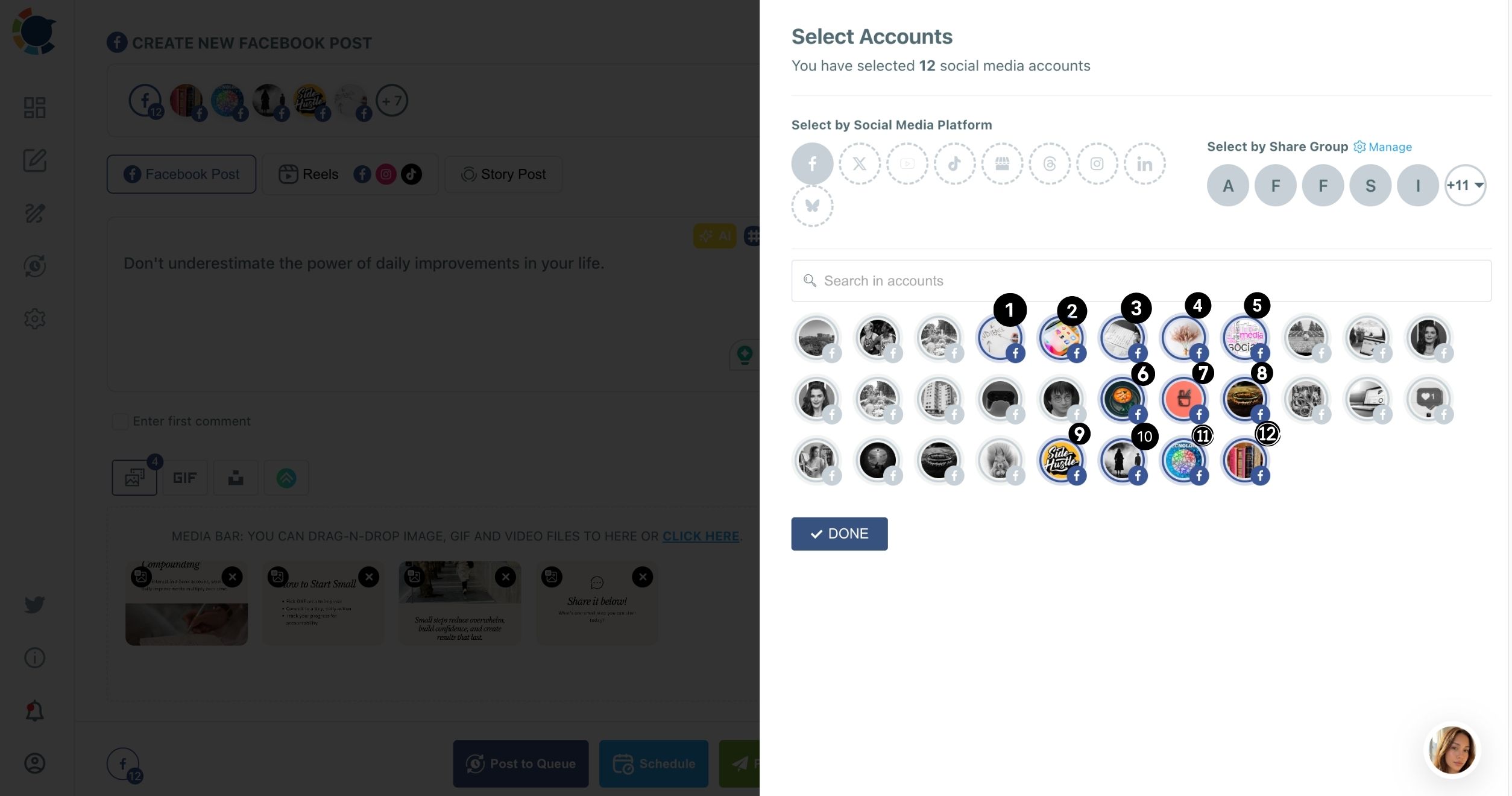
- Write the post and attach the photo, then tick Enter first comment and add the booking link there, so the caption stays short and every Page gets the link under its post.
- Choose Schedule and pick a slot from "Pick your best post time," or use Post Now for urgent news and Post to Queue for routine content.
Fixing the Pages and the Share Group before any writing begins leaves one decision at send time: the content. A mis-selected Page is the most common multi-Page mistake, and a saved group removes it.
Does the same post on six Facebook Pages hurt reach?
It can, which is why the text should change slightly per clinic. Facebook favors original posts, and the same text pasted unchanged across many Pages can cost reach and, in serious cases, get Pages restricted.
Meta draws the line clearly. Its creator guidance says you can share the same content across any of your Pages or profiles, and it also says duplicate videos detected by its systems get reduced distribution.
Sharing is allowed; identical copies are the risk.
There is one product rule to plan around: one multi-Page send carries one version of the content. Circleboom Publish does not hold a different caption per Page inside the same send. So when a post deserves local flavor, split the six Pages into two or three sends:
- Rephrase the opening line with the AI Facebook post generator for each group.
- Add one local detail per version (the street, the parking note, the Saturday dentist's name).
- Keep the brand-wide facts, prices and dates identical across every version.
For pure facts such as holiday hours, a single send to all six Pages is fine, because patients follow their own clinic, not all six. For promotional posts, two or three short variations are worth the extra minute.
How to time posts across six clinic Facebook Pages
Each clinic Page has its own audience with its own active hours, so the "best" time differs from Page to Page. Circleboom computes its best time to post on Facebook suggestions from each Page's own followers. The Schedule modal shows six suggested slots in its "Pick your best post time" panel.
When you schedule one send to all six Pages, the post goes out at the time you set. If the clinics' suggested windows are close, one shared slot works well. If a downtown clinic peaks at lunch and a suburban one peaks in the evening, put them in separate Share Groups and schedule each group at its own suggested slot.
Posting at a suggested time removes timing as a reason a post underperforms; it does not guarantee more engagement.
Before you set a whole month of clinic posts, read up on finding the best time to post on Facebook.
What to check before you post to multiple Facebook Pages at once
Photo size is the check that catches most multi-Page sends. Facebook accepts images up to 4 MB each, and modern phone photos often weigh 5 to 8 MB, so a picture of the new treatment room taken on a phone can fail before it reaches a single Page. Export or compress it under 4 MB before you upload.
Run through a short list before every send that goes to all six clinics:
- The image is under 4 MB, and there are no more than 10 of them.
- The selected Pages match the Share Group you meant to use.
- Dates and prices in the text are the same for every clinic.
- The first comment carries the booking link, not the caption.
The reason to check up front is simple. When you post to multiple Facebook Pages at once, one mistake is copied six times, and six corrections take longer than one careful review.
A two-minute check before the send beats six edits after it.
Who should approve posts before they reach six Facebook Pages?
A group practice often lets clinic managers suggest posts while head office keeps final say. Team Management handles that split inside Circleboom Publish.
Admins get immediate access to every Page in the workspace. Users get access only to the Pages assigned to them, and every post they schedule waits in a Waiting for Approval queue until an Admin clears it. A clinic manager at the north location can then draft a post about a new hygienist for the north Page only, and nothing reaches patients until the marketing lead approves it.
Pair this with one Share Group per clinic and the setup stays tidy: the group decides where a post can go, and the team role decides who may send it.
Selection speed comes from Share Groups; safety comes from Team Management.
What to plan for a full month of clinic posts on Facebook
Once single announcements are easy, the next step is batching. Bulk scheduling in Circleboom Publish means preparing several posts in one sitting, giving each its own date and time, and reviewing the spread in the Outbox's List or Calendar View.
A practical month for a six-clinic group might look like this:
- Two brand-wide posts a week, sent to all six Pages (oral health tips, offers).
- One local post per clinic a week, sent to that clinic's group only.
- A booking link in the first comment of every promotional post.
- A monthly review of Sent Items and Failed Items to catch anything that did not publish.
If you are still deciding whether scheduling is worth the setup time, the case for it is laid out in the benefits of using social media scheduling tools.
For dental groups, the payoff is simple: the posts go out even on the days the front desk is overwhelmed.
Which setup fits your clinic Facebook Pages
Pick the path that matches how your group works today:
- If every clinic shares the same message, select all six Pages with one Share Group and send once.
- If clinics need local wording, split them into two or three groups and give each group its own rephrased version.
- If audiences peak at different hours, schedule each group at its own suggested best time.
- If clinic managers draft their own posts, add them as Users in Team Management so head office approves before anything goes live.
Whichever branch fits, the rule underneath stays the same: connect once, write once per version, and let the send reach every Page. For a deeper look at the mechanics of multi-Page publishing, posting to multiple Facebook Pages walks through more scenarios beyond healthcare.
→ Post to all your Facebook Pages at once with Circleboom Publish
Facebook multi-Page posting questions for dental groups
Is there a limit on how many Facebook Pages I can select in one send?
Circleboom Publish has been used with 30 Facebook Pages selected and posted to in one send, and that figure is not presented as a hard ceiling. The practical limit is your plan's account allowance, shown in Manage Social Accounts.
What happens if one clinic Page fails to publish?
The failed post appears under Failed Items with the specific error reason, while the other Pages publish normally. Fix the cause, often a lost Page connection, then use Share Again to resend it to that Page.
Can I edit a multi-Page post after scheduling it?
Yes. A scheduled post sits in the Outbox, where you can edit or delete it before it publishes.
Can the booking link go in the first comment on all six Pages?
Yes. A first comment written in the composer is scheduled with the post, so it lands under the post on every selected Page. The overview of scheduling a first comment on Facebook explains why the link works better there than in the caption.