
Can one workout Reel go out on all ten of your club Pages without Facebook pushing the copies down?
Yes, as long as the ten posts are not identical copies landing at the same minute.
What this answer gives you.
• Meta's own position on sharing one video across Pages you run.
• The two reach risks: duplicate copies and members who follow several clubs.
• A batch-and-vary workflow for ten Pages that keeps every version distinct.
Circleboom Publish schedules a Facebook Reel to several Pages from its Reels tab, with music, cover and caption set per send. Schedule one Reel across all ten club Pages in varied batches.
Does Facebook allow one Reel on several Pages you own?
Facebook allows it. Meta's guidance on unoriginal content says you can share the same content across any of your Pages or profiles, and its crackdown targets accounts that repost other creators' videos without permission.
The same guidance carries the catch. When Meta's systems detect duplicate videos, they reduce the distribution of the copies, and Pages get the widest distribution when they consist mainly of original content they filmed or created. So the answer has two halves:
- Sharing your own Reel across your own club Pages is permitted.
- Ten identical copies are the version most likely to be treated as duplicates.
Circleboom's own product guidance says the same in practical terms: the same text or video pasted unchanged across many Pages can cost reach and, in serious cases, get Pages restricted.
Permission is not the problem; sameness is.
Nobody outside Meta can tell you how much reach an identical copy loses. Meta publishes no percentage, and any article that quotes one is guessing.
Why ten identical Facebook Reels can cost a fitness chain reach
A fitness chain has a reach problem most single brands never face: its audiences overlap. A member who trains at the downtown club and sometimes drops into the riverside club follows both Pages, and probably the brand Page too.
Post the same Reel to all ten Pages at 7:00 AM and that member sees one video three times in one scroll. Three things follow:
- The second and third copies earn almost no new watch time from that member.
- Weak early engagement on those copies is the signal Facebook's ranking weighs when deciding how far a post travels.
- The member learns that your club Pages repeat each other, and starts scrolling past them.
That is why I treat ten Pages as ten small audiences that partly share members, rather than ten megaphones. The goal is a version each club can call its own. The practical way to get there is to post Reels to multiple Facebook Pages in separate batches instead of one blast.
Is repetition itself the issue? The reasoning behind whether you should repeat posts on a Facebook Page applies to Reels as well. Reuse works when it is spaced out and reframed.
What ten club Facebook Pages need before the first Reel batch
Set up the accounts and the groups first, because a batch plan only works when selecting three or four Pages takes one click.
Circleboom Publish comes from Circleboom, an official X Enterprise developer, and it brings the brand Page and every club Page into one dashboard and one calendar.
Three things belong in place before you post Reels to multiple Facebook Pages:
- Every club runs a Facebook Page. Circleboom Publish connects Pages only, so a club that still posts from a personal profile needs a Page first.
- One Share Group per batch. Create "North clubs," "Central clubs" and "South clubs" under Settings → Manage Share Groups, plus one "All clubs" group for urgent news.
- Clear roles for club managers. If managers draft their own local versions, give them access to their own Page only through Team Management, where their posts wait for an Admin's approval.
Groups decide where a Reel can go; roles decide who may send it. With both fixed, the weekly work to post Reels to multiple Facebook Pages shrinks to filming once and writing three captions.
How to post Reels to multiple Facebook Pages without identical copies
To post Reels to multiple Facebook Pages safely, split the ten Pages into batches, give each batch its own caption, cover and track, and schedule each batch on a different day or time slot. Circleboom Publish handles every batch from the Reels tab of its Facebook composer, so you can schedule Reels for multiple Facebook Pages without leaving one window. The four steps below run once per batch.
- Log in to Circleboom and confirm all ten club Pages are connected under Settings → Manage Social Accounts.

- Open the Facebook composer, choose the Reels tab, and select the first batch of three or four Pages from Select Accounts (a saved Share Group per region makes this one click).
- Upload the Reel, then make this batch's version: edit the cover image, pick a track with ADD MUSIC, write a caption that names those clubs, and use Add first comment for the local class times.
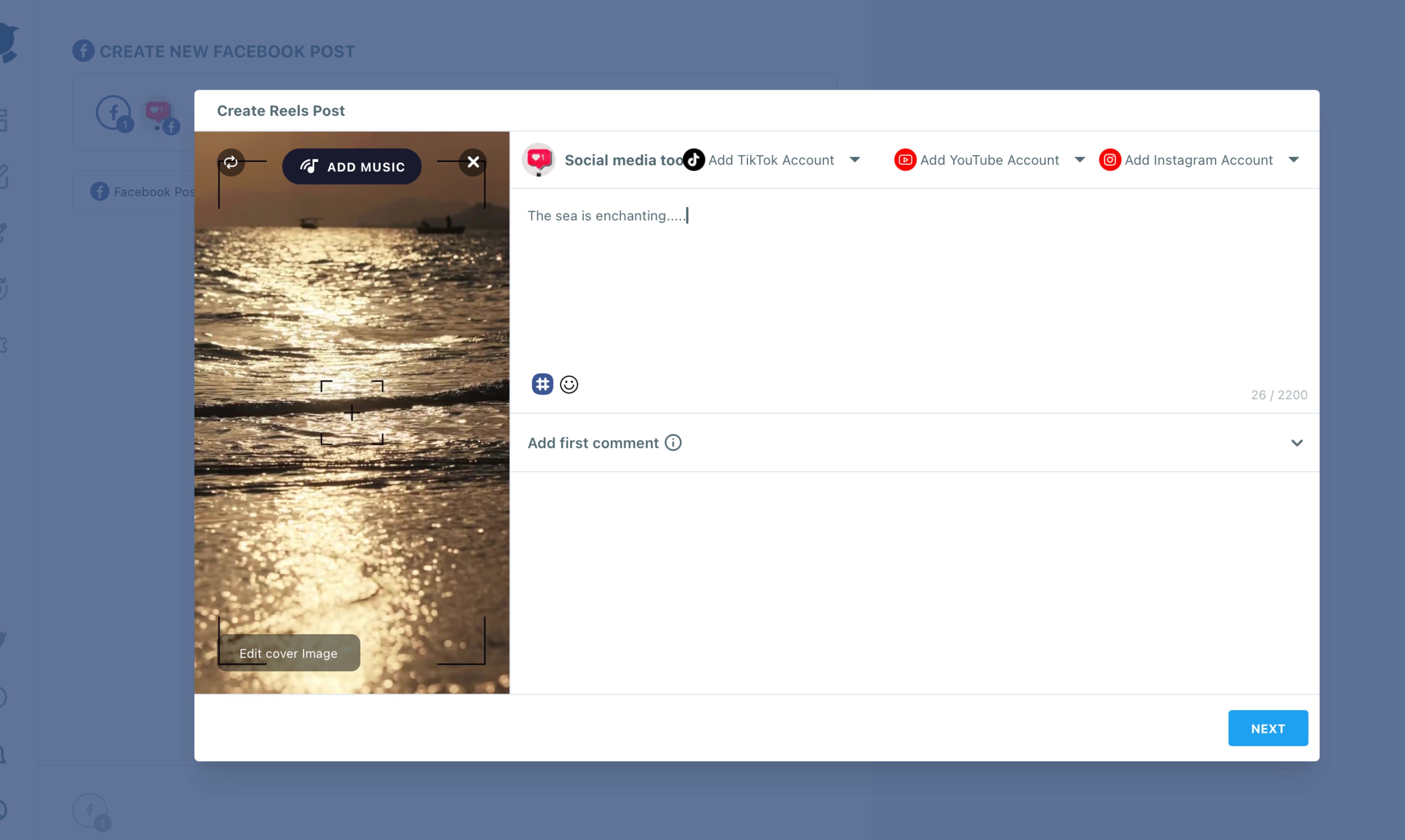
- Preview the Reel and schedule it into a suggested slot, then repeat steps 2 to 4 for the next batch on another day, with a new caption, a different cover and, if you like, a different track.
Batching works because each send can only carry one version. Circleboom Publish sends the same composed content to every Page selected in a single send, so variety has to come from separate sends, and separate sends also spread the timing naturally.
The recording below walks through the same scheduler from the Facebook side, one Reel at a time.
Scheduling a Facebook Reel in Circleboom, from upload to a set date and time.
What should change between club versions of the same Facebook Reel?
Change the parts a member notices first, and keep the workout itself the same. The video is the expensive part to produce; the frame around it is cheap to vary.
The elements I vary, in order of impact:
- Caption opening line: name the club, the coach or the street ("6 AM crew at Riverside, this one's yours").
- Cover image: pick a different frame with Edit cover image, so the thumbnail looks different in a scroll.
- First comment: post that club's class times or booking link, which is local by nature.
- Soundtrack: choose another track from the Genre, Tempo and Mood filters for the second batch.
- Day and hour: no two batches on the same morning.
Captions are the slowest part to rewrite ten ways. Draft the variants beforehand with the AI Facebook post generator. Paste each one into its batch, and check that prices and dates stay identical.
For more caption ideas that invite replies, the examples in Facebook engagement posts translate well to club Pages.
The strongest variant costs one extra filming minute: a five-second intro from that club's own coach before the shared workout. That turns a copy into a local video.
How should ten Facebook Pages be staggered over a week?
When you post Reels to multiple Facebook Pages, spread the ten Pages across at least three days, so no member sees the same Reel twice in one session. A simple pattern for a ten-club chain:
| Batch | Pages | Day | Version |
|---|---|---|---|
| North clubs | 3 | Monday | Caption A, cover 1 |
| Central clubs | 4 | Wednesday | Caption B, cover 2 |
| South clubs | 3 | Friday | Caption C, cover 3 |
Within each day, use the suggested slots in the Schedule modal. Circleboom computes the best time to post on Facebook from each Page's own followers. A club full of early risers and a club full of after-work members will show different windows.
A one-send schedule carries one time for every Page in it. When two clubs in the same batch peak hours apart, move one of them to the next batch rather than forcing a shared slot.
The scheduling mechanics for a single Reel, before any multi-Page planning, are covered step by step in how to schedule Reels on Facebook.
Is the brand Facebook Page the better home for the main Reel?
For brand-wide content, yes. A fitness chain usually runs one brand Page plus one Page per club, and the brand Page is the natural home for the polished version of a campaign Reel.
The club Pages then carry the local versions a day or two later. That ordering gives the original a head start on the Page with the broadest audience, and it gives each club a reason to post something its own members have not already seen word for word.
When a Reel was filmed for Instagram first, the reverse route matters too. The guide on how to share Instagram Reels to Facebook explains what changes when Facebook is the second stop.
Can the same Reel reach Instagram, TikTok and YouTube from one upload?
Yes, and those platforms add audiences rather than repeating one. From the Facebook Reels tab, the Add Instagram Account, Add TikTok Account and Add YouTube Account dropdowns let one upload publish to all four platforms, with several accounts checkable on each.
That is the multiplier worth using. A member on Facebook and a teenager on TikTok are rarely the same person, so cross-posting reaches new viewers instead of showing the same viewer a copy.
Circleboom's video cross-posting covers the four-platform route in detail.
Mind the strictest limit. A Reel sent to all four platforms has to fit YouTube Shorts and Instagram at once: 60 seconds or less, under 300 MB. Facebook alone takes far larger files, but the cross-post follows the tightest rule. Full specs per network are listed in the media limitations for social platforms.
Circleboom's own testing of Reel lengths found 15 to 30 seconds to be the sweet spot, long enough to say something and short enough that people watch to the end. That range clears every cross-post limit too.
How to reuse a club Facebook Reel months later without posting a copy
A good workout Reel deserves a second run, and reusing it is fine when the second run looks new. Circleboom's guidance for reposting an older Reel is specific: rewrite the caption and change the track with Add Music, so the repost is not a copy of the first.
Every Reel you published sits in Sent Items, and Share Again opens it as an editable version instead of rebuilding it from scratch. That makes a seasonal rerun quick:
- Open the original in Sent Items and choose Share Again.
- Write a fresh caption tied to the moment ("January reset," "summer shred week").
- Pick a different cover frame and a new soundtrack.
- Send it to a different batch order than last time, so the Pages that went first before go last now.
The same logic that lets you post Reels to multiple Facebook Pages safely applies across time: distance and reframing are what separate a rerun from a duplicate.
A rerun three months later, with new words and new sound, reaches members who joined since the first post and gives longtime members a reason to watch again.
Space it out, reframe it, and the same footage can work for a full year.
What ten club Facebook Pages lose without a Reels plan
Ten Pages posting the same Reel at the same minute risk exactly what you set out to avoid: copies treated as duplicates, members seeing one video three times, and club Pages that train people to scroll past.
When you post Reels to multiple Facebook Pages as varied versions in staggered batches, each Page keeps the reach it earns on its own. The workout is filmed once. The caption, cover, track and timing change per batch, and the brand Page gets the first, polished version.
One filming session, three batches, ten distinct posts: that is the trade worth making.
If you also want ideas for tools that speed up caption variants, the round-up of the best AI tools for Facebook is a useful companion.
→ Post Reels to multiple Facebook Pages in staggered, varied batches
Facebook Reels questions for multi-club fitness brands
Can I post Reels to a Facebook Group or a personal profile?
No. Circleboom Publish posts Reels to Facebook Pages only; personal profiles are not supported, and Facebook Groups were removed after Meta restricted third-party access.
What happens if one club Page has lost its connection?
That Page's post fails and appears under Failed Items with the error reason, while the other Pages in the send publish normally. Reconnect the Page in Manage Social Accounts, then use Share Again to resend it.
How do I see which version won after I post Reels to multiple Facebook Pages?
Compare the Reels side by side in each Page's results after a week or two. I check which caption opening and which posting day earned the strongest early engagement, then reuse that pattern for the next campaign Reel.