
A walkaround video sells a car before the customer ever reaches the lot.
The problem is that our dealership runs four Facebook Pages, and for a long time every walkaround I filmed had to be uploaded four separate times, one Page after another.
Four uploads per car, five cars a week, is twenty uploads. Each one meant waiting while Facebook processed the file, rewriting the caption and checking the link. I was spending more time moving one video around than filming it.
I now upload each walkaround once and send it to all four dealership Pages in a single post. Circleboom Publish lets me select every Facebook Page we run, attach the video one time and schedule it for all of them together.
→ Cross post video to multiple Facebook Pages from one upload
The part that took me longest to learn came after the upload: deciding which Pages should get the same version.
Why four Facebook Pages made every walkaround video a chore
Our four Pages exist for good reasons. There is the main store, the used and certified pre-owned lot, the service department, and our second location across town. Customers follow the one that matches what they need, so each Page has its own crowd.
The walkaround, though, belongs on at least three of them. A 2-minute video of a certified SUV, front grille to cargo space, is as useful to the used-lot followers as it is to people browsing the main store's Page.
So the routine went like this. Film on the phone, upload to Page one, write the caption, wait for processing, then log in to the next Page and do it again.
By the third upload I was copying captions with the wrong mileage, and once the second location got a video with the main store's phone number in it.
What I kept telling myself was that this was just part of the job. It is an easy task, just a slow one.
The moment it stopped feeling normal was a Saturday sale.
We had eight cars to post. Eight walkarounds times four Pages is thirty-two uploads in one morning, and I posted to two Pages instead of four because there was no time left. The second location's Page sat empty on the busiest weekend of the month.
The real cost of manual posting on several Pages is the Pages that quietly get skipped when the week gets busy. Once I learned to share one walkaround across multiple Facebook Pages in one send, the skipping stopped.
What I tried on Facebook before I found a real fix
My first workaround was sharing. I posted the walkaround on the main store Page, then shared that post to the other three. It took seconds.
On the other Pages, though, it showed up as a share with the main store's name stacked on top, and it read like a hand-me-down rather than something that Page had made for its own followers.
My second workaround was a shared folder and a sticky note of captions, so I could at least copy faster. It cut the typing. It did nothing about the four uploads and the four waits.
Facebook processes every video on its own servers before it goes live. Circleboom's note on why Facebook video posts take time before getting published puts processing at more than 10 minutes. MP4 files speed it up.
Multiply that wait by four Pages and the problem was obvious: I was paying the processing wait once per Page, by hand.
What I needed was a way to cross post video to multiple Facebook Pages: one upload, one caption and one send that reached every Page.
How I cross post video to multiple Facebook Pages now
Circleboom Publish is a publishing suite for ten social networks, and its Facebook composer is built to send one post, video included, to several Pages at once.
Circleboom is also listed on X's Enterprise customer directory, so it connects accounts through approved access. That matters when a tool is about to post on four business Pages.
Here is what changed in practice: I now cross post video to multiple Facebook Pages from a single upload, and the composer handles the rest. Circleboom documents single sends to 30 Pages at once, so four dealership Pages is a small job. If you want to cross post video to multiple Facebook Pages the same way, the setup takes one sitting.
My routine now runs in two phases, and the first one happened only once.
Set up the four dealership Pages once
- Open Circleboom Publish and sign in with the account that manages the dealership's Pages.
- Go to Settings → Manage Social Accounts, click CONNECT NEW ACCOUNT and approve the four Pages, then save them as a Share Group under Settings → Manage Share Groups.
Upload the walkaround once and send it to every Page
- Open the Facebook composer from the Facebook Post card, keep the Facebook Post tab, and choose the group under Select by Share Group.
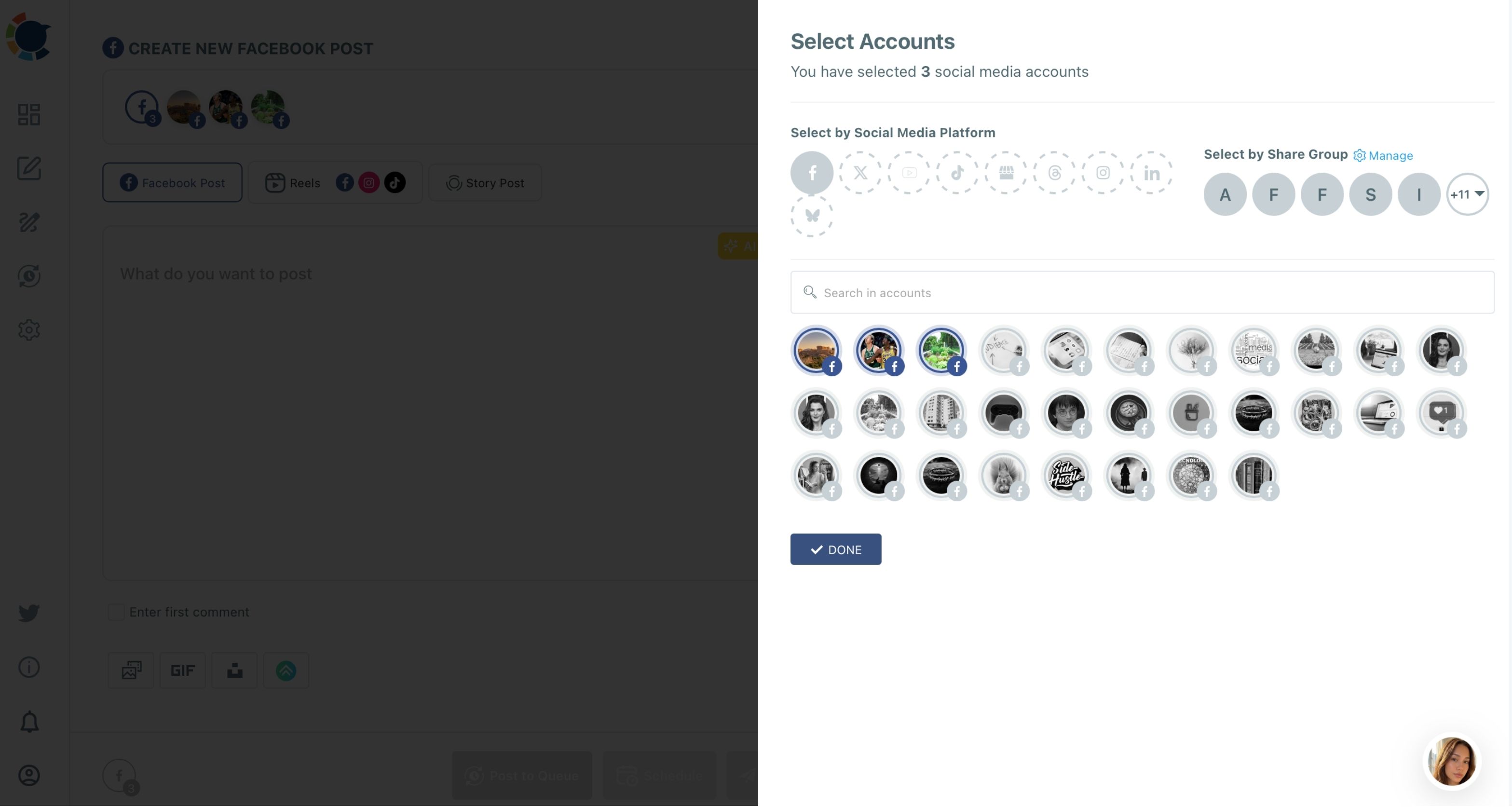
- Attach the walkaround video one time, ideally as an MP4, and write a caption with the model, mileage and price.
- Tick Enter first comment and put the listing link or test drive booking link there, so it lands under the post on every Page.
- Schedule it from "Pick your best post time," or send it with Post to Queue if the week is already full.
Doing the Page selection before the writing is what keeps the mistakes out. The group is saved, so I never pick the wrong Page while rushing, and the caption is typed once, so the mileage cannot drift between versions.
Should every dealership Facebook Page get the same video post?
Not always, and this was the insight I did not expect. Learning to cross post video to multiple Facebook Pages fixed the upload problem; the harder question was which Pages actually want the same words.
The main store, the used lot and the second location share an audience of car shoppers. A walkaround with one caption fits all three.
The service Page is different: its followers are people who already own a car and want oil-change reminders and tire deals. A sales pitch for a certified SUV on that Page looks out of place.
There is a product rule that shapes this too. One multi-Page send carries one version of the content, so different captions for different Pages mean separate sends. In practice I run two:
- Sales send: main store, used lot and second location, with the price-led caption.
- Service send: the service Page only, with a caption about the vehicle's maintenance history and what our technicians inspected.
Variety also protects reach. Meta's guidance says you may share the same content across your Pages, and it also reduces distribution of duplicate videos its systems detect. Circleboom's own advice goes further: the same post pasted unchanged across many Pages can cost reach and, in serious cases, get Pages restricted.
Rewording the opening line for each group is cheap insurance.
One upload, two honest versions, four Pages covered.
When the same walkaround should reach each Facebook Page at a different time
Timing was the last thing I fixed. Our four Pages do not peak at the same hour: the used-lot followers browse late in the evening, while the service Page gets its attention around lunch, when owners think about booking an appointment.
A single send goes out at the one time I set for every Page in it. That suits the sales send, because the main store, the used lot and the second location share similar shoppers. The service send gets its own slot.
Circleboom suggests six posting slots per Page in the Schedule modal, computed from that Page's own followers, which is how I spotted the gap. The best time to post on Facebook suggestions do not promise more views; they stop timing from being the reason a good walkaround gets ignored.
So when I cross post video to multiple Facebook Pages now, I schedule the sales send for the evening window and the service send for midday. Two clicks, two slots, no guessing.
What the walkaround video can do beyond Facebook
The walkaround is a long video, made for shoppers who want the full tour. A 45-second cut of the same car, though, works as a short vertical clip, and that is where the next saving sits.
From the Facebook Reels scheduler, one short clip can go out as a Facebook Reel. In the same window, the Add Instagram Account, Add TikTok Account and Add YouTube Account dropdowns send it to those platforms too. The Reels tab also has an Add Music library, so the clip does not go out silent.
There is one limit to respect. A clip sent to all four platforms has to fit the strictest rules: 60 seconds or less and under 300 MB. Our full 2-minute walkaround stays a Facebook Post; the short cut becomes the Reel. Circleboom's video cross-posting page covers that four-platform route.
Stories are the third format I use for the same car. A 15-second "just arrived" Story keeps the Page active between full posts, and scheduling Facebook Stories ahead of time means they keep going out on busy days.
For ideas on what to put in them, the guide to Facebook Stories for business is a solid starting point.
How my Facebook week looks with one upload instead of four
The arithmetic is what convinced my sales manager. Before, each car took about fifteen minutes per Page: upload, wait, caption, link, check. Four Pages made that an hour per car, five hours for a five-car week.
Now, when I cross post video to multiple Facebook Pages, each car takes roughly fifteen minutes in total: one upload, two caption versions, two sends. That is about four hours back every normal week, and far more on a sale weekend.
I spend that time on what moves cars: filming better walkarounds and answering the comments. A quick guide on how to schedule Facebook posts helped me plan a week of posts in one sitting, so Monday morning now covers the whole week.
There is a broader lesson for anyone running several Pages for one business. The Pages that get skipped are always the smaller ones, and the smaller ones are often where the next buyer is looking. Our second location's Page now posts as often as the main store's.
If you are still deciding whether automation fits a dealership, the overview of automated Facebook posting covers the options from scheduling to fully automatic feeds.
Which dealership Facebook accounts can and cannot be connected
Circleboom Publish posts to Facebook Pages only. Personal profiles are not supported, and Facebook Groups were removed after Meta restricted third-party access, so a local car-club Group stays a manual job.
For a dealership that is the right shape anyway. The comparison of Facebook Page vs Group for your business makes the point well. A Page is the public storefront every shopper can follow.
Every Page you connect counts toward your plan's account allowance, which Manage Social Accounts shows next to the CONNECT NEW ACCOUNT button. Four Pages plus an Instagram account fits comfortably in a small plan.
You do not need a social media team to run four Facebook Pages
I used to think a dealership with four Pages needed a dedicated social person.
It does not. It needs one upload per car, a saved group of Pages, two honest caption versions and a schedule.
You can start with the car on the lot today. Film the walkaround, connect the Pages once, and cross post video to multiple Facebook Pages in a single send.
If you want to see how other teams organize their tools around the same idea, the round-up of social media management tools is worth a look.
→ Start sharing one video to every Facebook Page you run
Dealership video posting questions on Facebook
How large can a walkaround video be for a Facebook Page post?
A Facebook Page post in Circleboom Publish takes one video of up to 10 GB and up to 4 hours, in MP4 or MOV. MP4 files also process faster on Facebook's side.
Can I post the walkaround to a salesperson's personal Facebook profile too?
No. Circleboom Publish supports Facebook Pages only, so personal profiles cannot be selected in the composer.
What if one of the four Pages fails to publish the video?
The post shows up under Failed Items with the specific error reason, while the other Pages publish normally. Fix the cause, often a lost Page connection, and use Share Again to resend it.