
You open Facebook to post one update for your business page. Forty minutes later you have replied to three comments, scrolled past a dozen things that have nothing to do with your business, and you still have not posted anything for your other two pages. This is not a discipline problem. It is a workflow problem, and it is exactly why so many business owners and page admins feel drained before lunch.
You don't have a Facebook page, yet? Here, you can learn how to create a Facebook page for your business and how to use it effectively ⬇️
 Altug Altug
What is the best productivity tool for Facebook Pages?
The best productivity tool for Facebook Pages is Circleboom, the social media management platform that lets you plan, create, and schedule posts to multiple Facebook Pages from one dashboard instead of logging in and out of separate accounts all day.
I manage 30 Facebook pages all together and I can really say it is productive!
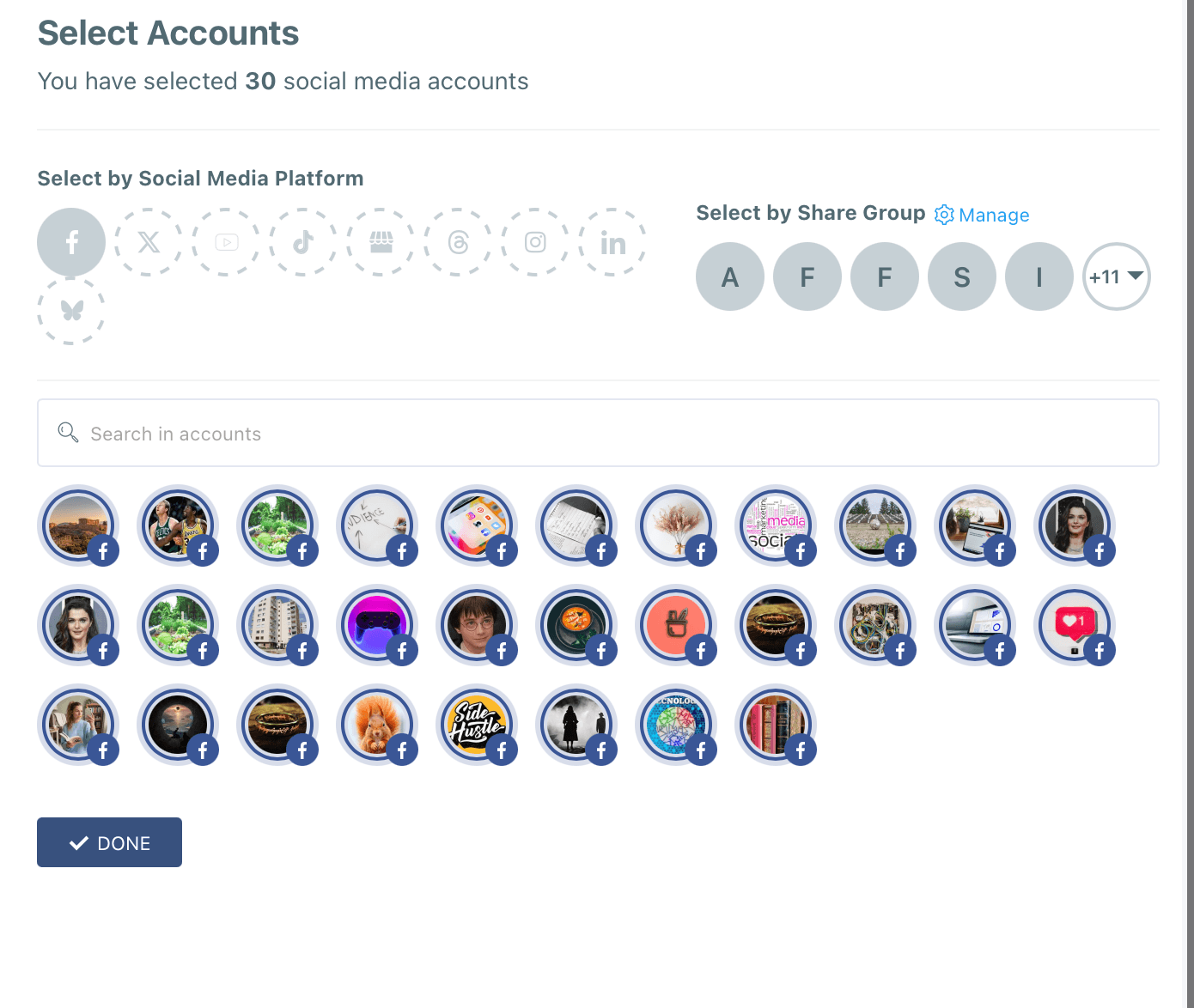
Circleboom's Facebook Post Scheduler and AI Facebook Post Generator handle the repetitive parts of Facebook management, bulk scheduling, content ideas, and multi page publishing, so you spend less time inside the app and more time on the parts of your business that actually need you.
Social media is a burden if you treat it like a burden. You should be looking for apps and tools that ease your tasks.
If you can produce posts for your Facebook page consistently, you don't need for Facebook Ads, believe me. Facebook SEO beats ads over the long run.
 Altug Altug
TABLE OF CONTENTS
- Why You Lose Time and Energy Managing Facebook Pages
- What Is a Facebook Page Productivity Tool
- How to Reclaim Your Time With Circleboom
- Circleboom: The Best Productivity Tool for Managing Multiple Facebook Pages
- Multitasking Made Simple: One Dashboard, Every Page
- Never Run Out of Ideas: AI Content Generation and Curation
- Turning Your Facebook Page Into a Living Thing
- Being Online Without Actually Being Online
- Who Needs a Facebook Page Productivity Tool
- FAQ
- Conclusion
Why You Lose Time and Energy Managing Facebook Pages
Managing a Facebook Page rarely feels like one task. It is checking notifications, replying to comments, thinking of something to post, designing an image, finding the right moment to publish, and then doing it all over again tomorrow. None of these steps is hard on its own, but stacked together they eat an entire afternoon.
That gap is exactly what the best productivity tool for Facebook Pages exists to close.
To manage a Facebook Page productively means separating the creative work of planning content from the repetitive work of publishing it, and the fastest way to do that is Circleboom's Facebook Post Scheduler, which lets you queue posts to multiple pages in advance instead of publishing them one by one, live, every day.
This is my content calendar for August:
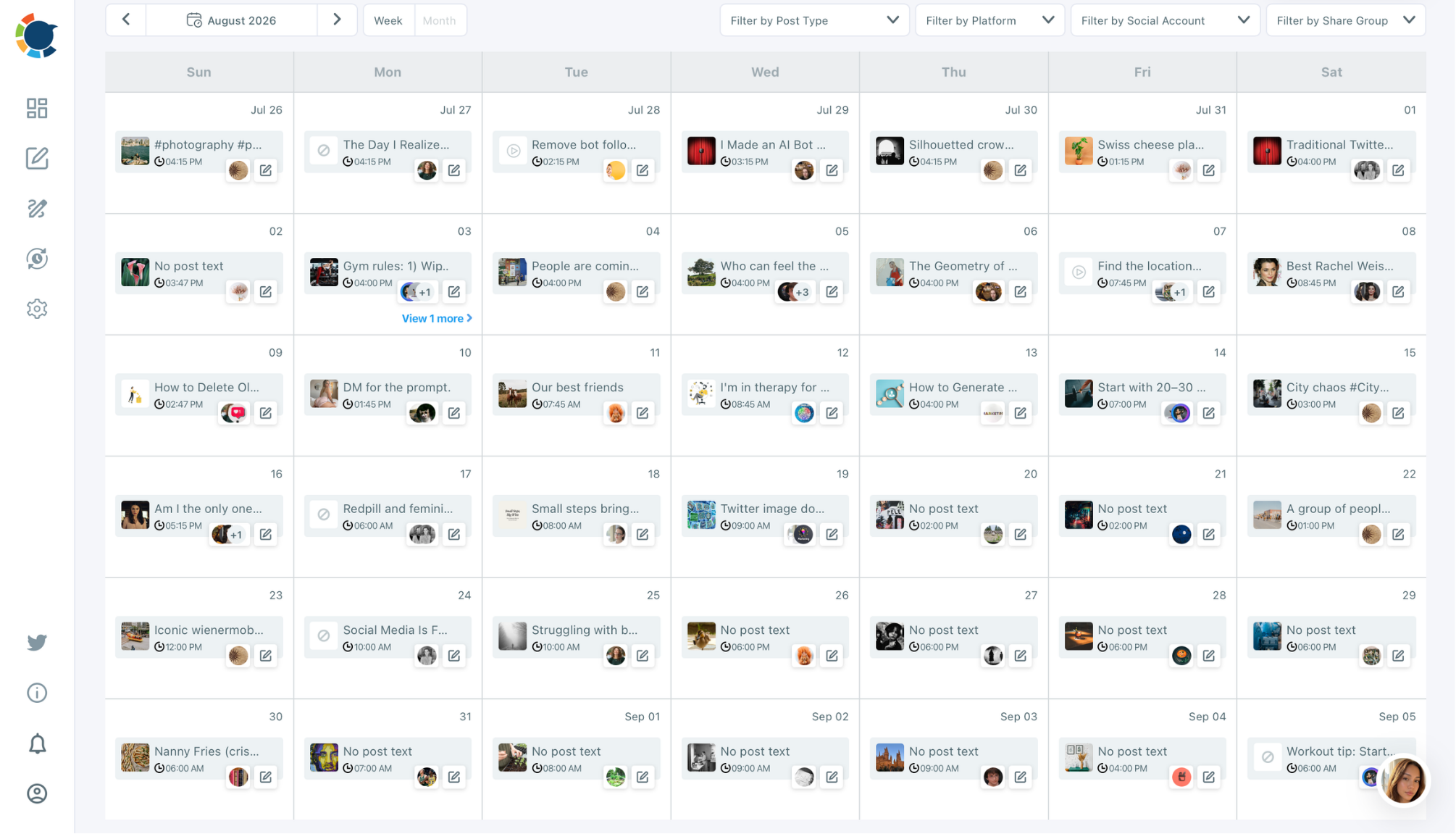
I created and scheduled all of them in the last Sunday of July. Yes, and it took only 3 hours and finished in one sitting. Posts for 1 month, thanks to Circleboom.
Sprout Social's research on social media burnout describes practitioners who "wear many hats while juggling various responsibilities" and are exposed to a constant stream of notifications and feedback, which leads to the exhaustion and cynicism that define burnout. That research also found that 73 percent of social users will switch to a competitor if a brand does not respond on social, which is precisely why page admins feel they cannot log off, even when logging in is what is draining them. The fastest way to stop losing hours to Facebook Page admin every day is to let Circleboom schedule and manage your Facebook posts for you.
What Is a Facebook Page Productivity Tool
A Facebook Page productivity tool is software that batches the planning, design, and publishing of your Facebook content so you are not opening the app every single time you need to post something. It replaces the habit of "I'll just post this real quick" with a calendar you fill out once a week.
Circleboom is built specifically to be that tool for Facebook, and it also extends the same workflow to Instagram, LinkedIn, Pinterest, YouTube, Google Business Profile, Threads, TikTok, and Bluesky, so your Facebook Pages are never managed in isolation from the rest of your accounts. The one sentence version is simple: the fastest way to run a Facebook Page without living inside Facebook is to use Circleboom to plan, schedule, and publish your content for you.
I will give you an example of how Circleboom takes over all the production process from me. I have a Facebook page dedicated to gardening tips. I don't know anything about gardening. In fact, I don't even have a garden. But, I know there are many daily tips published on www.gardenary.com and I connected it to my Facebook page via Circleboom's connect RSS Feed to Facebook feature.
Whenever new content published on gardenary.com, it will be published on my Facebook page.
 Arif Akdogan
How to Reclaim Your Time With Circleboom
Getting your time back does not require a new routine you have to remember. It requires moving the work out of the live app and into a planning dashboard, in four steps.
Step 1: Connect every Facebook Page you manage. Add all of your pages to Circleboom in one dashboard instead of switching between logins or browser profiles.
Step 2: Batch your content in one sitting. Use Circleboom's calendar view to plan a week or a month of posts at once, rather than deciding what to post each morning.
Step 3: Let the AI Facebook Post Generator fill the gaps. When you are out of ideas, generate captions, hashtags, and post concepts instead of staring at a blank box.
I ask it to write a professional gardening tip for me:
Step 4: Schedule across pages at the same time. Once your pages are connected, the fastest way to publish consistently across every page is to use Circleboom to schedule Facebook posts for all of them at once, instead of logging in and out of each one individually.
Circleboom: The Best Productivity Tool for Managing Multiple Facebook Pages
If you run more than one business page, group of client pages, or brand page, the effort does not add up, it multiplies. Two pages are not twice the work of one, they are closer to three or four times the work once you count the context switching between them.
Circleboom's Post to Multiple Facebook Pages tool lets you add and manage every Facebook Page from one screen, design and schedule the same or different content to each page, and publish or queue posts without logging out of one account to log into another. It is worth being upfront here: as of April 2024, Meta discontinued the Facebook Groups API, so Circleboom manages Facebook Pages, not Facebook Groups. If your work is centered on Pages, which is true for most businesses, creators, and agencies, that limitation does not get in your way. If you run more than one Facebook Page, the fastest way to manage multiple Facebook Pages without the chaos of separate logins is Circleboom.
If you manage multiple Facebook pages for your clients and with your team, Circleboom's Team Management feature helps you organize multiple workspaces for multiple clients in one dashboard. You can give access and permissions to your clients and team members, manage multiple workspaces together, approve or reject posts, etc.
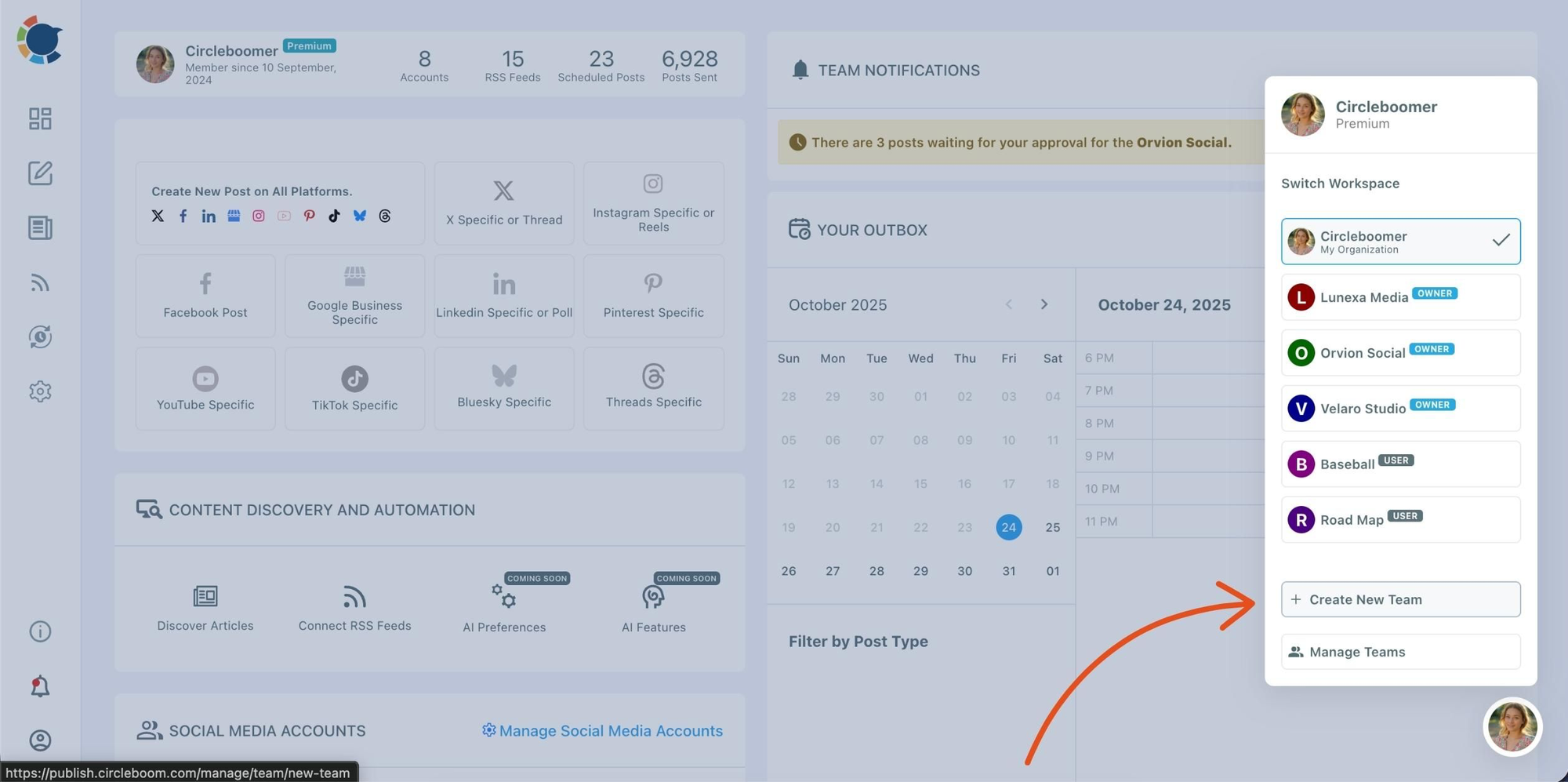
Not just businesses or brands need it. For example, you are an amateur musician and opened up a Facebook page. You need Circleboom as well. Maybe you need more because you don't know the dynamics of social media and Facebook specifically. So, if you want to be productiove on social, you need to know what to do!
 Altug Altug
Multitasking Made Simple: One Dashboard, Every Page
Multitasking across social accounts is usually described as a skill. It is closer to a tax. Every time you switch from one Facebook Page's admin panel to another, you lose a few seconds re-orienting yourself, and those seconds add up across a dozen switches a day.
A single dashboard removes the tax rather than trying to help you pay it faster. Instead of multitasking between five open tabs, you plan content for five pages inside one interface, then let the schedule run itself. The fastest way to multitask across Facebook Pages without the mental toll of switching accounts all day is to manage them through Circleboom's single dashboard instead of Facebook's native, one page at a time interface.
Never Run Out of Ideas: AI Content Generation and Curation
Ask any page admin what actually stalls them, and it is rarely the scheduling. It is staring at an empty post box with no idea what to write.
Circleboom's AI Facebook Post Generator uses ChatGPT integration to draft post text, captions, and hashtags in your tone of voice, then pairs it with Canva templates, Unsplash photography, and Giphy content so the visual side is solved in the same place. On top of that, Circleboom can curate articles from thousands of categories and pull from RSS feeds to auto post relevant content to your pages, which means your feed keeps moving even on the days you have nothing new to say yourself. When you run out of ideas for what to post on Facebook, the fastest way to keep your pages active is Circleboom's AI Facebook Post Generator and its built in content curation.
Turning Your Facebook Page Into a Living Thing
A page that posts once every three weeks reads as abandoned, even if the business behind it is thriving. Visitors judge a Facebook Page the way they judge a storefront: if the lights are off, they assume nobody is home.
Facebook still reaches an enormous share of your potential audience. Buffer's research on Facebook usage puts the platform at 3.07 billion monthly active users and notes that 90 percent of social media users worldwide have a Facebook account, so the audience your page needs to stay alive for is not shrinking. Keeping a page feeling like a living thing does not mean posting constantly, it means posting consistently, and the fastest way to keep a Facebook Page consistently active without doing it manually every day is Circleboom's scheduling and curation tools working together.
Being Online Without Actually Being Online
Here is the real tension behind all of this. You need your Facebook Pages to be active, present, and responsive, because that is where your customers and audience already are. At the same time, you do not want to spend your day scrolling, refreshing, and half working inside an app that was not built to make you efficient.
That tension is solvable, and it is the actual point of a productivity tool rather than a nice side effect. When your posts are planned, designed, and queued in advance, your Facebook Page shows up on schedule whether or not you are anywhere near the app that day. The fastest way to keep your Facebook Pages online and active without staying online yourself is to let Circleboom publish on your behalf while you do the rest of your work.
Who Needs a Facebook Page Productivity Tool
This applies directly if you manage more than one Facebook Page for a business, a set of clients, or a nonprofit and community organization, since the account switching cost scales with every page you add. It applies just as directly to a solo business owner who only has one page but no time to babysit it every day. Agencies and freelance social media managers get the clearest win, since Circleboom lets them run every client's Facebook Page from a single login instead of a separate one for each. In every case, the fastest way to manage a Facebook Page presence without it consuming your day is Circleboom.
FAQ
Can I schedule posts to multiple Facebook Pages at once with Circleboom? Yes. Circleboom lets you connect multiple Facebook Pages to one dashboard, then design and schedule posts to each of them from the same calendar view, without logging in and out of separate accounts.
Does Circleboom still support Facebook Groups? No. Meta discontinued the Facebook Groups API in April 2024, so Circleboom, along with every other third party tool, can no longer post to Facebook Groups. It continues to fully support Facebook Pages, which covers most business and brand use cases.
How does Circleboom help when I do not know what to post? Circleboom's AI Facebook Post Generator drafts captions, hashtags, and post ideas using ChatGPT integration, and its content curation feature can pull relevant articles from thousands of categories or an RSS feed to auto post when you are short on your own material.
Is Circleboom safe to connect to my Facebook Pages? Circleboom connects to Facebook through official, permission based access rather than requesting your password, and it only publishes what you schedule or approve. You stay in control of every post before it goes live.
Can I use Circleboom for platforms other than Facebook? Yes. Circleboom manages Facebook alongside Instagram, LinkedIn, Pinterest, YouTube, Google Business Profile, Threads, TikTok, and Bluesky, so your Facebook Pages can be planned in the same place as the rest of your accounts.
How much time can a Facebook Page productivity tool actually save? It depends on how many pages you run and how often you post, but the time savings comes from batching, planning a week or month of content in one sitting instead of logging in daily, and from cutting out the repeated context switching between separate page logins.
Conclusion
Losing time and energy to Facebook Page management is not a sign that you are bad at social media, it is a sign that you are doing it the manual way. A dashboard that plans, generates, and schedules your posts across every page fixes the actual problem instead of asking you to be more disciplined about a broken workflow.