
You rank higher on Google My Business by feeding the two local ranking factors you can change, relevance and prominence, with a steady stream of posts, because distance is fixed and Google sells no better rank. A weekly routine run from a per-profile queue keeps that stream going without daily effort.
Posting by hand: a burst of updates after setup, then weeks of silence while the shop gets busy. Posting with Circleboom Publish: a Google Business Profile post scheduler that queues each week's posts into recurring time slots for every location and publishes them on its own.
→ Automate posts to rank higher on Google My Business
How to rank higher on Google My Business: the factor map and the queue setup follow below.
Why weekly posts help you rank higher on Google My Business
Weekly posts help because they keep your profile relevant to new searches and visibly active, two things Google's local ranking rewards. Google's own guide to improving your local ranking names the three factors behind local results:
- Relevance: how well your profile matches what someone searched for.
- Distance: how far your business is from the person searching.
- Prominence: how well known your business is, which includes links to it and its reviews.
Google is direct about the rest: there is no way to request or pay for a better local ranking. Distance cannot change, because your business is where it is.
That leaves relevance and prominence, and both respond to what you post.
Circleboom Publish is a social media publishing suite that writes, schedules and automates Google Business Profile posts for one or many locations. It does not edit your profile, and it does not need to.
Your profile's categories, hours and photos are set inside Google, and a complete listing is the starting point. The complete list of Google Business Profile categories helps you confirm the primary and secondary categories before the posting starts.
How often a profile needs to post
Cadence matters more than any single post. In Circleboom's experience, a Google Business post tends to fade within about a week, after which few people see it, so a profile that posts monthly spends most of each month looking idle.
Circleboom offers about six posts a week, mostly on weekdays, as a friendly target rather than a rule.
Customers read the same signal Google does. A profile whose newest post is a year old makes people wonder whether the business is still open and whether the prices still hold. A post from this week answers both questions before anyone asks them.
Circleboom saw this on its own listing. It is a software company, not a place people visit daily, yet regular posting helped its Google Business Profile reach 5,000+ Google Maps views a month. If steady posting can do that for a business few people would think to look up on Maps, it can do more for a clinic, a salon or a repair shop that people search for every day.
Google Business Profile can schedule a post in its own dashboard, and a single location can get by that way for a while.
The gap appears when you want a rhythm that runs every week across several locations. That gap is where ranking higher on Google My Business stops being a setup question and becomes a routine of automated Google Business Profile posts.
Which ranking factor each weekly post feeds
Each kind of weekly post feeds a specific factor, and knowing which one tells you what to post next. Most guides treat posting as a single checkbox. Circleboom Publish builds all three Google Business Profile post types in one composer, so each job below can be planned for the same week.
Mapped against Google's factors, posting splits into distinct jobs:
| Weekly post | Factor it feeds | Why |
|---|---|---|
| Standard post built around a customer question | Relevance | It matches searches beyond your business name |
| Event post with dates and a button | Prominence | It draws visits, and visits bring reviews |
| Offer post with a coupon and terms | Prominence | It turns searchers into customers who come in |
| The same news shared on Facebook or Instagram | Prominence | It builds the online mentions and later searches that prominence counts |
| Any post at all | Neither distance nor paid rank | Neither one can be moved by posting or by money |
Standard posts carry relevance. A pet groomer that posts "how often should you groom a long-haired dog" can reach a dog owner who has never heard of it. A tax advisor posting about documents to prepare before filing season can surface for exactly that search.
Write posts around what customers ask, and you give Google more searches to match you with.
Events and Offers carry prominence. They give people a reason to visit this week, and a profile that sends real traffic to a business looks more established over time. More visits also mean more chances at honest reviews, which Google counts directly.
Details that make event and offer posts count
Two details make these posts work harder. Publish an Event several days to a couple of weeks before it happens, so Google has time to show it while people are still making plans, and always fill in its start and end times.
Give every Offer a coupon code, complete terms and a real end date, so it reads as a deal someone can redeem today rather than a vague promise. Both details are part of how to rank higher on Google My Business with posts that bring people through the door.
What a balanced posting week looks like
A balanced week leans on Standard posts for reach and adds an Event or Offer whenever the business has something real to promote. For a dental clinic aiming at about six posts, it could look like this:
- Monday to Thursday: four Standard posts, each answering one question patients ask, such as what to expect at a first visit.
- Friday: an Offer, for example a seasonal whitening discount with a coupon code and clear terms.
- Sunday: one Standard post or an Event for an upcoming open day, since weekend browsing still happens.
The mix is the point. Four relevance posts widen the searches the clinic can appear for, and the Offer or Event gives the people who find it a reason to book now.
A week of only Offers reads like advertising; a week of only tips never asks anyone to come in.
Do you have to set up the queue for each location?
Yes. In Circleboom Publish, queue configuration is per profile, not global, so every Google Business Profile you connect needs its own posting times before Post to Queue can publish to it on schedule. This is the limit most write-ups on posting cadence never mention, and it catches multi-location businesses that set up one profile and assume the rest follow.
The settings live in Time and Queue Settings, where you pick one connected account at a time. The help article on setting your time zone and queue describes two models:
- Basic: a daily start time, an end time and an interval, with queued posts spread across that window.
- Advanced: specific posting times you add one by one with Add Posting Time, for schedules that vary by day.
Either way, Save queue settings applies to that one account only.
You repeat the process for each location, which is also a chance to give each branch times that suit its own customers. Each profile also keeps its own time zone, so a chain spread across regions posts on local time.
Setting the queue across a multi-location chain
Picture a dental chain with eight clinics. Setting up one clinic's queue and then posting to all eight leaves seven profiles without slots of their own, which defeats the point of a queue. Setting each clinic once closes that gap for good.
A Share Group that bundles all eight profiles then makes the weekly send a single click, and Team Management can limit each branch manager to their own location.
The same rule holds for automation beyond the queue. If you connect a blog feed, each profile needs its own RSS connection too.
This per-profile setup is the unglamorous part of how to rank higher on Google My Business across several locations, and it is the part that decides whether every branch keeps posting or only the first one does.
Will posting the same update every week hurt your Google ranking?
It can. Google tends to reward original, current posts, and copies of one update can hold a profile back, even when the copies go to different locations.
The fix is to rewrite, not to stop: a recurring special or a returning Event can run every week as long as each version reads as new.
Circleboom Publish does not block repeated text on Google Business Profile the way it does on some networks. The help page on whether you can post duplicate content lists no duplicate limit for it. That freedom puts the judgment on you.
Take a café that runs the same deal every week: free coffee with any dessert on weekday afternoons.
The offer can stay identical. The post should not.
One week it leads with the quiet-afternoon seat by the window, the next with a new dessert on the counter, the one after with a reminder that the deal starts at noon.
The practical method is to let the AI writer produce a fresh version for each send, with a neighborhood detail or what is new this time. The broader reasoning on how often to post duplicate content on social media applies here as well.
Repeating an idea is fine; repeating identical text is the risk.
How to rank higher on Google My Business with a weekly queue
To rank higher on Google My Business with a weekly routine, set recurring queue slots for each profile once, then write the week's posts in one sitting and send each one to the queue. Circleboom Publish publishes every post in that profile's next open slot, so the profile stays active all week. One-off posts that need a fixed date go through Google My Business scheduling instead.
This is a dependable way to auto post to Google Business Profile from a queue. If you want the wider context first, the overview of how to auto post to Google Business Profile walks through the same automation from the publishing side.
Queue settings in motion: adding posting times to one profile and saving them for that account only.
The procedure runs in three phases: connect, schedule, then fill.
Connect the Google Business Profile you want to rank
- Log in to Circleboom Publish with the account that manages your business, so every location you plan to post for sits in one place.

- Connect each Google Business Profile from Manage Social Accounts, one per location you want to keep active.
Give each profile its own weekly slots
- Open Time and Queue Settings, select one profile and add its posting times, or choose Add Best Times to Post so the slots follow the best time to post on Google Business Profile for that location's customers. Repeat for every profile.
Fill the queue with the week's posts
- Open the Google Business Specific Post composer and set the "Is this a Google My Business Event or Offer?" dropdown: No for a Standard post, or Event or Offer.
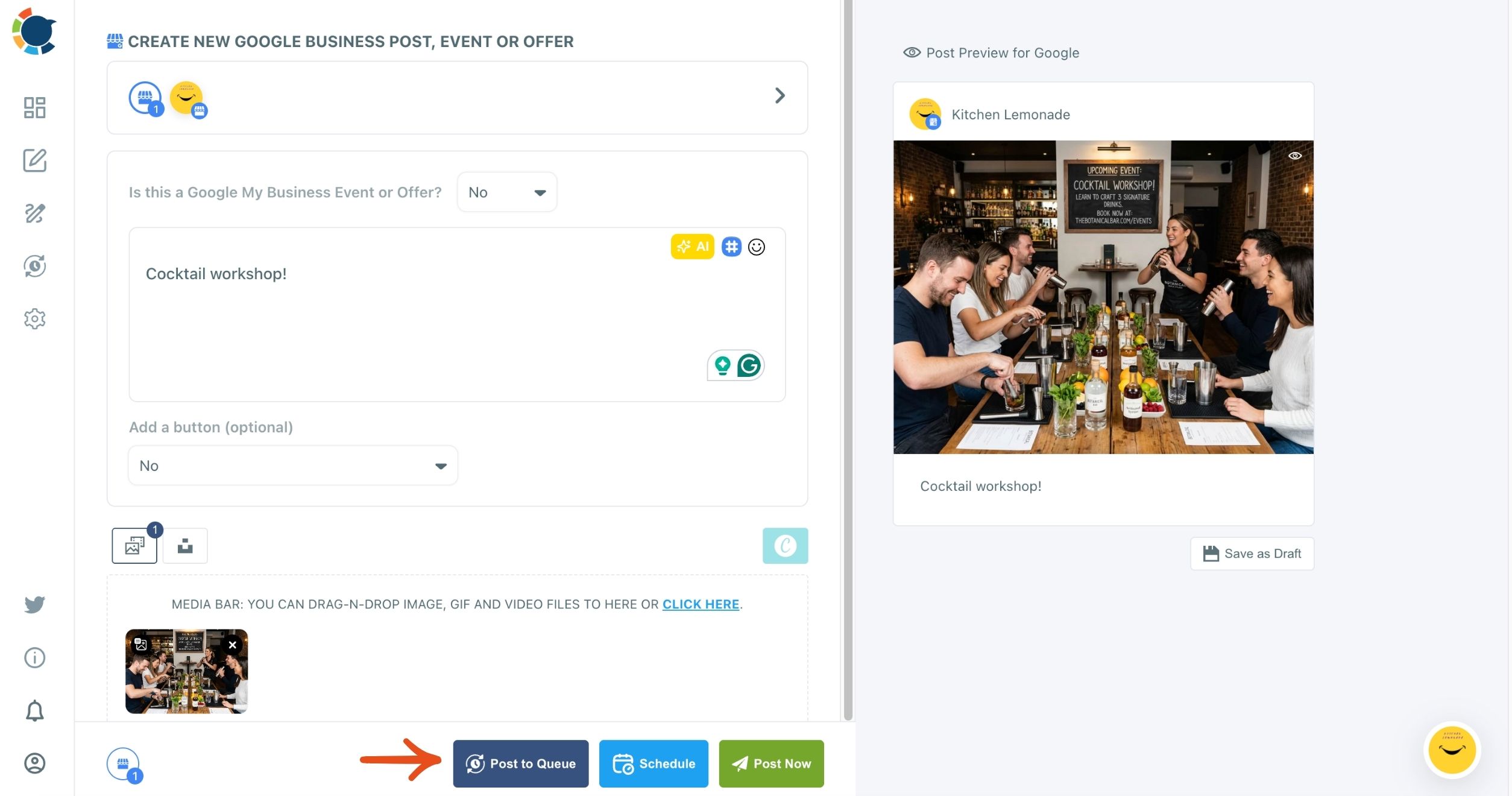
- Write the post, add a photo and, for a Standard post or Event, a button, then click Post to Queue so it lands in the next open slot for each selected profile.
The slots come first because they hold the rhythm; the composer only supplies the words. With times saved per profile, every post you queue lands at a sensible moment for that location, and a busy week no longer means a silent profile.
Once the routine runs, judge it by customer actions rather than likes. Calls and direction requests come first, because they are the closest thing to a customer walking in.
Circleboom's post performance analytics for Google Business Profile read each post by views, clicks, calls and direction requests.
And if your business already publishes a blog, its feed can post every new article to the profile on its own, which holds a baseline on weeks you cannot write.
Your weekly Google posting checklist
The routine fits on one card. Run it each week and the profile never goes quiet:
- Confirm every location has its own queue slots before you queue anything.
- Write at least one Standard post around a question customers type into Google.
- Add an Event or Offer whenever there is something real to promote.
- Rewrite any repeated update so each profile gets an original version.
- Check calls, clicks and direction requests once a month, not every morning.
None of these steps needs more than one sitting a week, and most of the setup happens once. That is how to rank higher on Google My Business without making it a daily job: a profile that keeps posting gives Google more to match and customers more reasons to choose you.
→ Begin your weekly Google My Business posting routine
Google My Business ranking FAQ
Can I offer a discount in exchange for Google reviews?
No. Google's policy on incentivized reviews prohibits reviews influenced by payment, discounts, free goods or any other benefit. Let an Offer reward the visit, then ask every customer for an honest review with nothing attached.
Does posting the same news on Instagram and Facebook improve my Google ranking?
It helps prominence indirectly, by spreading the news to people who later look the business up on Google. Rewrite each version for its platform, which is the core idea of content repurposing across platforms, rather than pasting one text everywhere.
Do Google Business posts disappear after a week?
No. The week is about visibility: in Circleboom's experience a post drops out of view within about a week, but it stays on the profile. Google's Create & manage posts help page says posts older than six months are archived unless a date range is set.