A plumbing company with a profile in each of seven towns loses calls in every town whose listing goes quiet. Searchers comparing plumbers in Search and Maps read a months-old last post as a business that may not answer the phone. The fix is a weekly routine to post to multiple Google Business Profiles at once from one place, without seven separate sessions.
One profile at a time: 7 towns at about 10 minutes each is roughly 70 minutes a week, and the town you forget goes silent. Circleboom Publish: select all 7 Google Business Profiles in one composer and send the same Standard, Event or Offer post to every town in a single action.
→ Post to multiple Google Business Profiles at once from one composer
The setup takes one sitting; the weekly send takes minutes.
Why seven quiet Google Business Profiles cost a plumber calls
A Google Business Profile is found through search, not through followers. Someone types "emergency plumber" or "water heater repair" in their town, and Google shows the nearby profiles that look current and relevant.
That is why posting matters more here than on a social feed. A post about winter pipe protection gives Google one more reason to show the profile for a related search, and it tells the person comparing three plumbers that this one is open and working this week.
The trouble starts when the business has more than one location. The pattern is common in multi-town trade businesses: the head office town gets posts, the newest town gets a post at launch, and the other five drift.
Nobody decides to neglect them. There is simply no fixed moment in the week when all seven get touched.
A town without recent posts is a town where the competitor's profile looks more alive.
How often is enough? Circleboom's own guidance is a friendly target of about six posts a week per profile. The reasoning is covered in the post on how often you should post on Google My Business.
Six a week across seven towns is 42 posts. Done one profile at a time, that is a part-time job.
The way out is to write once and post to multiple Google Business Profiles at once. The weekly tip, the seasonal Offer and the free inspection Event then go to every town in the same send.
Circleboom Publish is the multi-platform publishing suite built for this kind of job. Circleboom is also an official X (Twitter) Enterprise API partner, which tells you the company works through approved platform access rather than workarounds.
For Google, that means Circleboom Publish connects through Google's own sign-in and publishes posts to your profiles. It does not touch your hours, categories or phone number.
What Google's own editor already does for multiple profiles
Google's post editor is better than its reputation. Google's own page on how to create and manage posts on your Business Profile lists three things that matter here:
- "Schedule this post" picks a publish date and time.
- The "Repeats" menu sets a weekly, monthly or custom schedule.
- Selecting several Business Profiles before you press Post shares one post across them.
So if all you need is the same Google-only update on seven profiles, Google can do it, and you should know that before paying for anything.
Where a plumbing company outgrows it is the rest of the week:
- The same leak-season tip should also go to the company's Facebook page and Instagram, not just Google.
- Each town profile has its own audience timing, and picking a good slot per profile takes data.
- Office staff in different towns need to prepare posts that someone approves before they go live.
- A month of Events and Offers is easier to plan on one calendar than inside each listing.
Circleboom Publish keeps Google's multi-profile post and adds the other platforms, the per-profile timing and the team layer around it.
That combination is the reason to send one update to all seven Google Business Profiles from Circleboom Publish instead of from inside Google.
The Google post, the Facebook version and the Instagram version sit on one Outbox calendar, filtered by platform, account or Share Group, so the office manager can see on Monday which towns have nothing planned for Thursday.
Before you start: connect all seven Google Business Profiles
Every profile you want to post to has to be connected first. That is the one prerequisite most people skip, and it decides whether the multi-profile send reaches seven towns or five.
Circleboom's help page on adding a Google Business account walks through it. Sign in with the Google account linked to the profiles, and tick the listings permission box, which Google leaves unchecked by default.
Google's wording for that permission is broad ("see, edit, create and delete your Google business listings"), but Circleboom Publish uses it to publish posts, nothing else.
If a town's profile was set up years ago by a former office manager, you may not be a manager on it yet. The guide on how to request admin access to a Google Business Profile covers that step, and it is worth finishing before you build any posting routine.
Cost is the other upfront check. Circleboom Publish is $34 a month for 10 accounts with one team member, so seven town profiles plus the company's Facebook page and Instagram still fit, compared with roughly $100 for a 10-channel Buffer plan. The current tiers are on the Circleboom Publish plans and pricing page.
Video tour: connecting several Google Business Profiles and sending one post to all of them from the Circleboom Publish dashboard.
The setup splits into two sittings: one to connect and group the towns, one to write and send.
Connect the seven towns and group them once
- Log in to Circleboom Publish with the account that will manage the company's profiles.
- Open Settings and go to Manage Social Accounts, then click CONNECT NEW ACCOUNT and authorize Google until all seven town profiles appear in the list.
- Create a Share Group under Settings, Manage Share Groups. Name one "All 7 towns" and, if two crews cover the north and south ends, add "North crew" and "South crew" with their towns.
Write once and post to all seven Google Business Profiles at once
- Open the Google Business Specific Post composer from the Create New Post menu in the sidebar or the dashboard card.
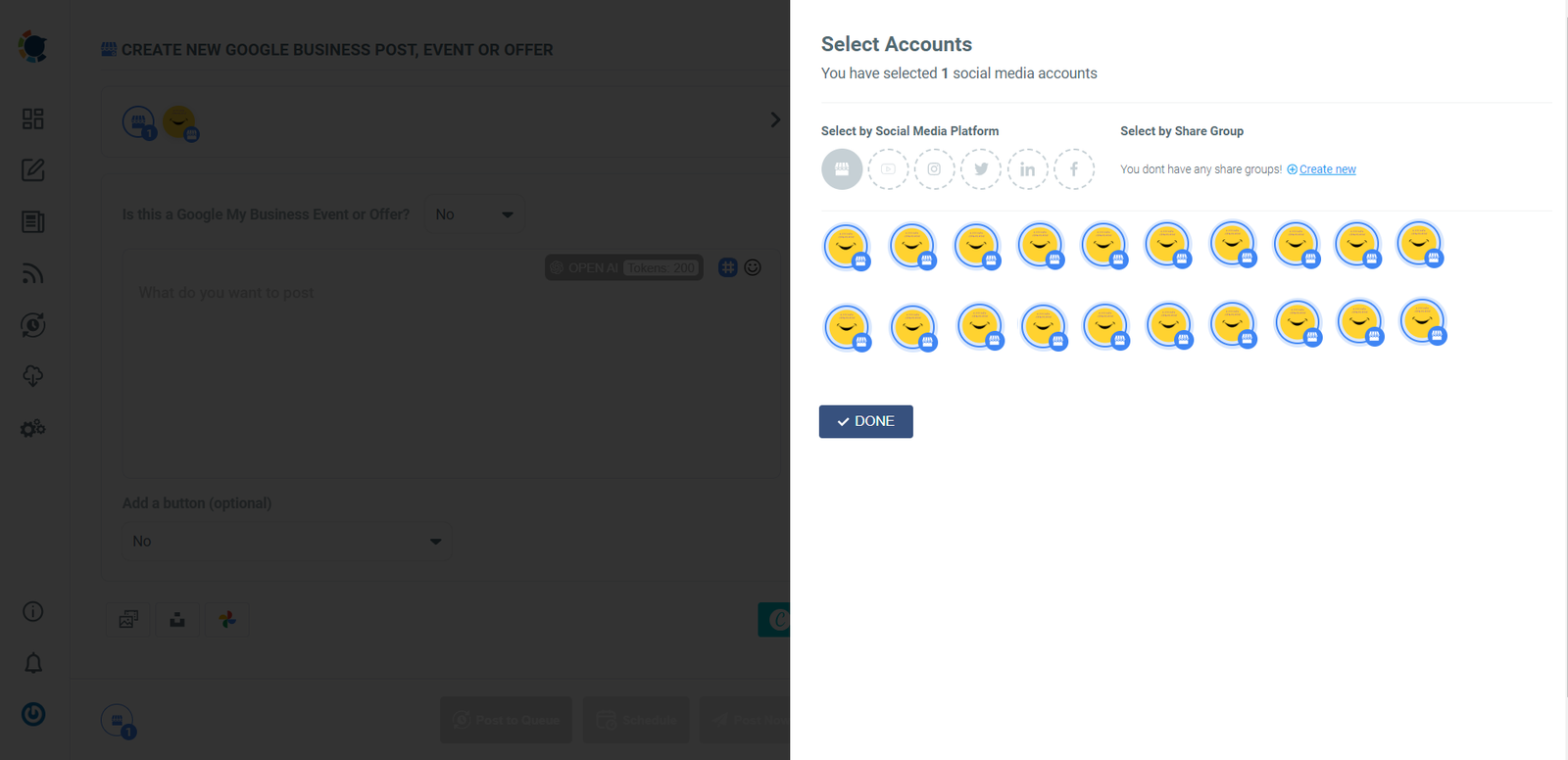
- Click Select by Share Group and pick "All 7 towns", or tick the profiles one by one in the Select Accounts panel. With only one profile connected, the composer selects it for you; with seven, you choose.
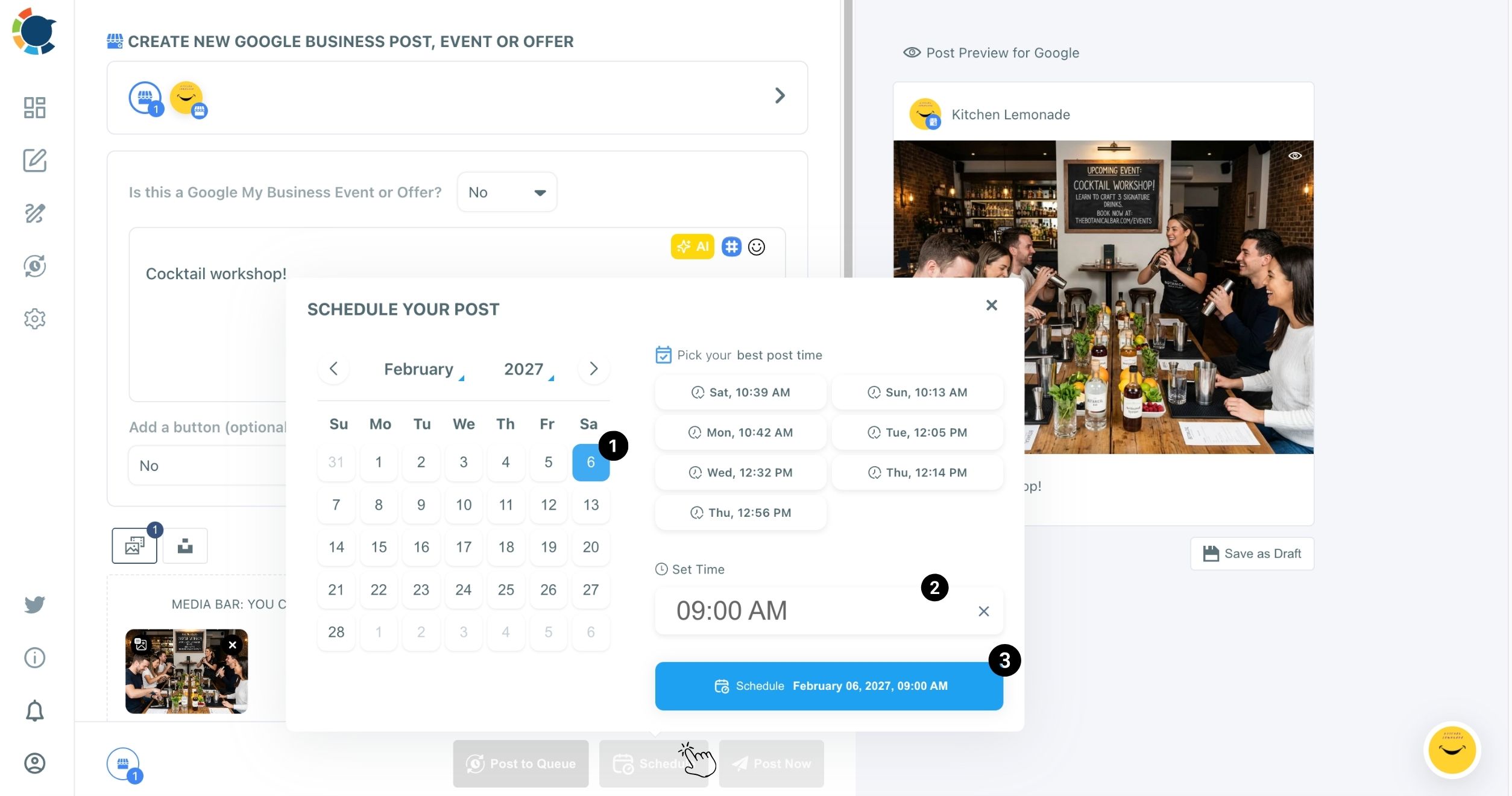
- Choose the post type in the "Is this a Google My Business Event or Offer?" dropdown, write the text, attach a photo with alt text, and add a Call Now button to a Standard post.
- Click Schedule, pick the date on the calendar, set the time, and confirm with the Schedule button.
Grouping the towns before writing anything is what keeps the routine reliable: the Share Group does the remembering.
Once "All 7 towns" exists, no town can be left out of a send by a tired click, and every new post starts from the full list.
Should all seven Google Business Profiles get the exact same words?
For a company-wide message, yes: posting to multiple Google Business Profiles at once is the right tool. A winter pipe tip, a holiday closure notice or a spring water heater Offer reads the same in every town.
The limit is that when you post to multiple Google Business Profiles at once, the send carries identical content to every selected profile. Circleboom Publish does not support different text per location inside one send.
So anything town-specific, a street address, a local phone number, "serving Millbrook since 2009", has to stay out of shared posts or go out as its own send.
Shared posts carry the company message; town posts carry the local proof.
For the local version, the AI Google Business post generator helps most. Write the base post once, ask the AI writer for a version that mentions the town or a nearby landmark, and send each version to its own profile.
It takes a few extra minutes and keeps seven listings from reading like seven copies.
Agencies that run 20 or more locations face the same choice at a larger scale. The walkthrough on how to manage 20 Google Business Profiles for multiple locations shows how the split between shared and local posts scales up.
Which post types and buttons work for a plumbing company
The three post types do different jobs, and a plumber should use all of them across a month:
- Standard update: a seasonal tip ("3 signs your water heater is failing") with a Call Now button.
- Event: a free leak inspection day with start and end dates and a Book button.
- Offer: a drain-cleaning discount with a coupon code, terms and a validity window.
Call Now is the button that fits most plumbing posts, because the person reading has a problem today. The post on how to add a Call Now button to Google My Business posts covers when it beats Book or Learn More.
Two cautions from the feature's own rules. An Offer has no button: the coupon code, the Redeem Online link and the terms take its place.
Never tie an Offer to a review ("leave five stars, get 10% off"), because Google prohibits incentivized reviews. Reward the visit, then ask every customer for an honest review.
Google's side adds one more rule: its page says an Offer requires a title, dates and time, so always fill the optional time fields in the Circleboom Publish composer when you build one.
Keep seven Google Business Profiles active with the Queue
Once you can post to multiple Google Business Profiles at once, the next job is keeping the rhythm without a weekly scramble.
The Queue handles that. Each profile gets recurring day-and-time slots, and Post to Queue drops a new post into the next open slot.
Queue settings are per profile, not global, so each town can run its own rhythm. Turn on Add Best Times to Post in Time and Queue Settings, and each connected location fills with its own six suggested slots.
The best time to post on Google Business Profile suggestions follow when that profile's customers search, call and ask for directions. There are no followers to measure, so customer activity is the signal.
If each town has an office coordinator, team management lets them draft posts for their own town only, with an admin approving before anything goes live.
The broader picture of running several listings, from access to reporting, is in the guide on how to manage multiple Google My Business accounts.
Your seven-town Google Business Profile posting checklist
One plumbing company, seven towns, one weekly routine. The checklist:
- Connect all seven profiles and confirm each one appears in Manage Social Accounts.
- Build an "All 7 towns" Share Group plus any crew or region groups.
- Send company-wide posts to the group, and town-specific posts to single profiles.
- Plan one Event and one Offer a month, each with its dates filled in.
- Fill each profile's Queue with its suggested best times so tips go out on their own.
Thirty minutes on a Monday keeps seven listings looking open for business all week.
→ Schedule your next update for all seven Google Business Profiles in one send
Plumber FAQ on multi-town Google Business Profile posting
Does Circleboom Publish change my hours or phone number on Google?
No. Circleboom Publish publishes posts to your Google Business Profiles; hours, categories, phone numbers and photos in the listing itself are managed inside Google Business Profile.
What happens if one town's profile fails to publish?
Any scheduled post that does not publish appears under Failed Items in the Outbox with the specific error reason, so you can fix the connection and send it again with Share Again.
How long does a Google Business Profile post stay on the listing?
Google says posts older than six months are archived unless a date range is set, which is why Events and Offers with real dates are worth the extra fields.