Yes. A hotel group can bulk post Google Business Profile updates in two ways: send one Offer or Event to all 12 profiles in a single action, or schedule a whole season of posts in one sitting. Most groups need both.
What a hotel group gets from this guide.
• The two meanings of bulk posting on Google Business Profile, and which one a hotel group needs when.
• A four-step setup that sends one Offer or Event to 12 hotel listings at once.
• The fields Google requires for Offers and Events, so a scheduled post does not go out incomplete.
Circleboom Publish publishes Standard, Event and Offer posts to many Google Business Profiles from one composer and schedules them weeks ahead. Bulk post Google Business Profile Offers and Events to all 12 hotels.
What bulk posting means on Google Business Profile
Bulk posting on Google Business Profile means one of two things, and they solve different problems.
The first is a multi-profile send: one post, written once, published to many profiles at the same time. A summer rate Offer that applies at every property goes to all 12 listings in one action.
The second is bulk scheduling: many posts, prepared in one sitting, each with its own future date. A hotel plans its whole autumn of Events and Offers in an afternoon, and the posts go live on their dates without anyone remembering them.
| Need | Bulk type | Example |
|---|---|---|
| Same message, every hotel | Multi-profile send | Group-wide winter rate |
| Many dates, one sitting | Bulk scheduling | A season of rooftop nights |
| Both at once | Send plus schedule | Monthly Offer for all 12 |
A hotel group needs both: the send covers the properties, the schedule covers the calendar.
Why a 12-hotel group cannot post profile by profile
A Google Business Profile is how a traveler finds a hotel on Search and Maps at the moment of choosing. Twelve properties means twelve listings, each needing fresh posts to look open, current and worth booking.
Done one listing at a time, a modest rhythm of two posts a week becomes 24 separate posts every week, about 100 a month.
That is the arithmetic that makes most hotel groups post at launch and then go quiet on half their properties.
Google gives its own reason to keep posting. Its page on creating and managing Business Profile posts says posts older than six months are archived unless a date range is set.
A listing that posted in spring has nothing left to show by late autumn.
The way out is to bulk post Google Business Profile updates from one composer, so the group-wide message is written once and the season is planned once.
The broader case for steady posting, and how it feeds local ranking, is in the post on how Google My Business posts help SEO.
What Google's own editor can and cannot cover
Google's native editor handles more than many hotel teams realize. The same Google page describes:
- A "Schedule this post" switch.
- A "Repeats" menu for weekly, monthly or custom repetition.
- The option to select several Business Profiles before pressing Post to share one post across them.
For a single recurring Google-only update across a few listings, that is enough.
A hotel group usually needs more around it:
- Offers and Events planned across 12 properties on one calendar, filtered by property or region.
- The same news sent to the hotels' Facebook and Instagram accounts alongside Google.
- Suggested posting times per property, based on when each listing's customers search and call.
- Property managers who draft posts for their own hotel, with head office approving.
Google's editor posts to Google; Circleboom Publish plans the whole group's publishing around it.
Circleboom Publish is the publishing suite that covers Google Business Profile and nine other platforms. Circleboom, the company behind it, is a verified Enterprise partner of X, the same approved-access standard it applies when it connects to Google through Google's own sign-in. It publishes posts only; room rates in the listing, opening hours, categories and amenities stay inside Google Business Profile.
That split is the practical reason to plan and bulk post Google Business Profile campaigns in Circleboom Publish. The listing data stays where Google manages it, and the posting calendar for all 12 hotels lives in one Outbox.
How to bulk post Google Business Profile Offers and Events for 12 hotels
To bulk post on Google Business Profile, connect every hotel's listing, group the listings, build each Offer or Event once with all of Google's required fields, and either send it to the group now or schedule it for its date. Circleboom Publish runs both kinds of bulk posting from the same Google Business Specific composer. The four steps below set up a season.
Event builder clip, about three minutes on the Circleboom channel: a Google Business Profile Event built with a title, start and end dates and a button.
- Log in to Circleboom and connect all 12 hotel profiles under Settings, Manage Social Accounts, with CONNECT NEW ACCOUNT.
- Create Share Groups under Settings, Manage Share Groups: one with all 12 hotels, one per city, and one per brand if the group runs more than one.
- Build the post in the Google Business Specific Post composer: Select by Share Group, choose Event or Offer in the "Is this a Google My Business Event or Offer?" dropdown, and fill every field.
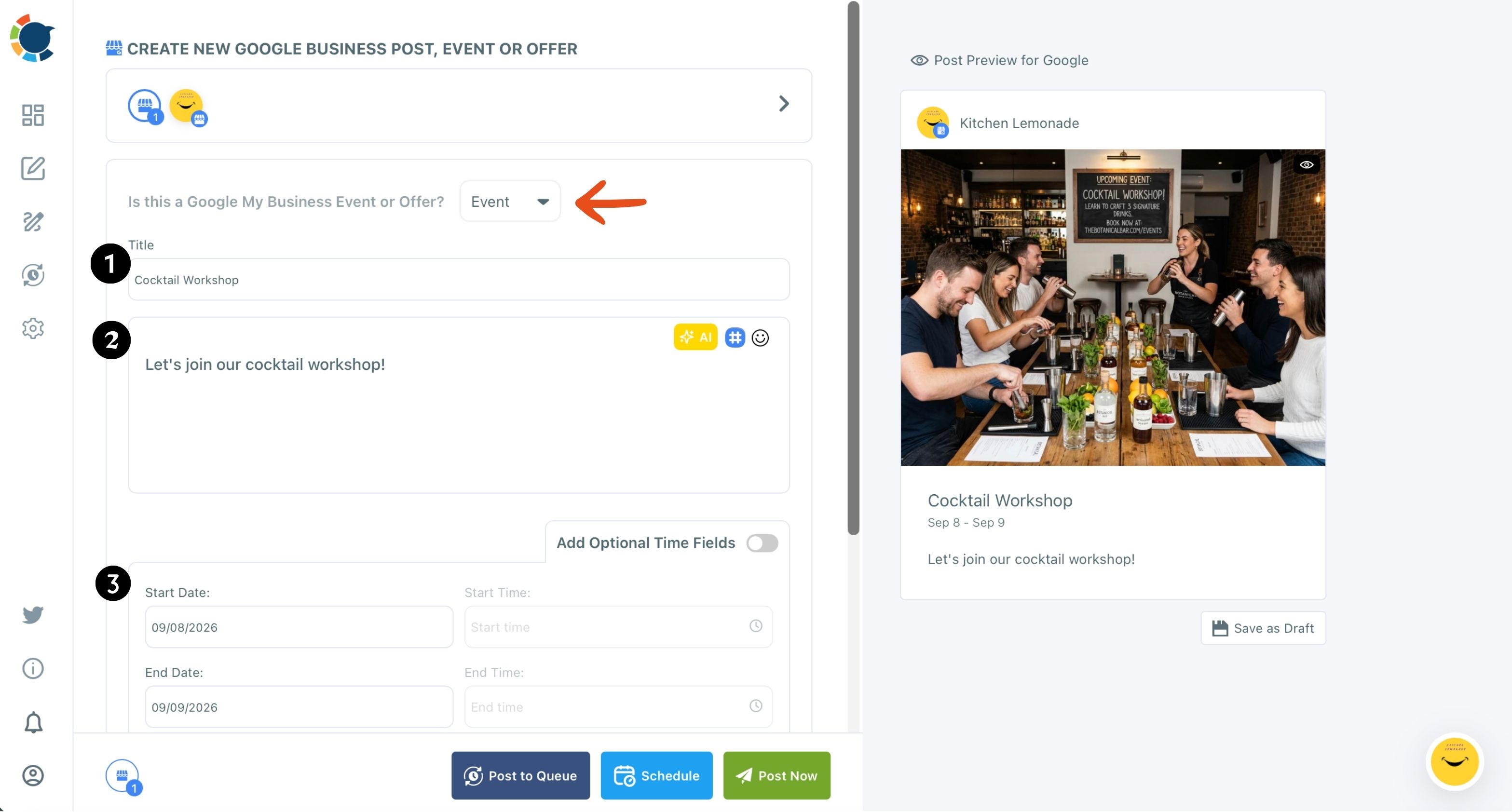
- Send or schedule it: Post Now for an immediate group-wide message, or Schedule with a date, a time or one of the "Pick your best post time" slots. Repeat steps 3 and 4 for each date in the season.
Fixing the audience with a Share Group before any writing starts means no hotel misses a send, and filling the required fields before setting the date means no scheduled Event goes live without its dates.
In short: connect, group, build complete posts, then send or schedule.
Which fields Google requires for hotel Offers and Events
Google's page lists the minimum for each type, and a scheduled post should meet it before it is queued.
An Event needs a title and start and end dates. Google adds that if no start or end time is given, the event shows as lasting 24 hours on its dates, so a rooftop music night from 8 pm to midnight should always carry its times.
In the Circleboom Publish composer, turn on Add Optional Time Fields and add a Book or Sign Up button. The walkthrough on how to schedule Google My Business Event posts covers each field in order.
An Offer requires a title, dates and time, according to Google. In the composer it also takes a coupon code, a Redeem Online link and terms, and it replaces the button with those fields.
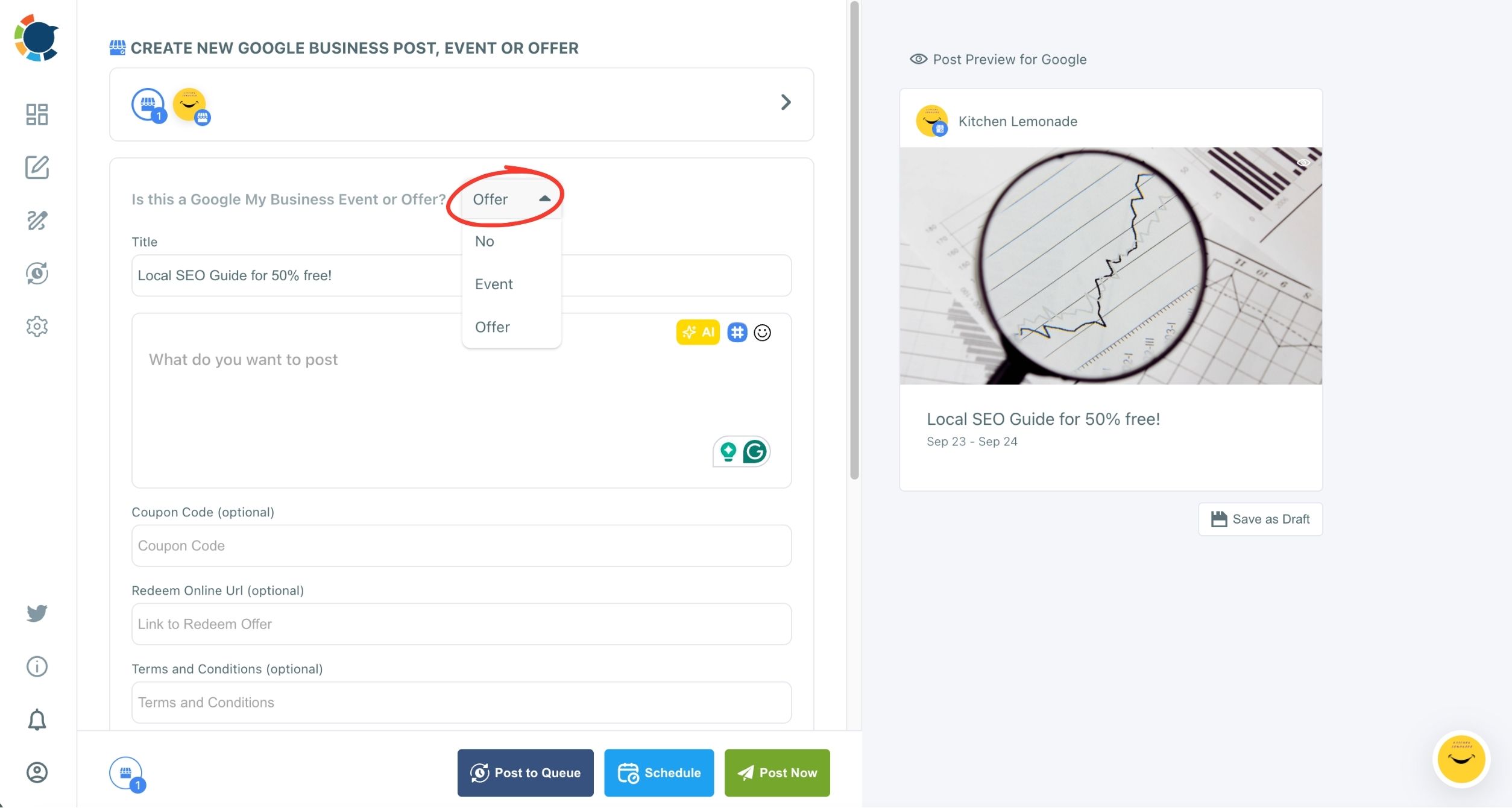
For a hotel, a strong Offer reads like a desk clerk would say it: "Stay two nights midweek, the third night is 30% off", with a code, a booking link and short, complete terms.
Tag that Redeem Online link with UTM parameters so direct bookings from each hotel's listing show up in Google Analytics.
Event posts sell the reason to visit; Offer posts sell the reason to book now.
Is the same Offer on 12 hotel listings a good idea?
Yes for group-wide messages, with one rule: a multi-profile send carries identical content to every selected profile. Circleboom Publish does not support different text per location within one send.
So the shared post carries only what is true at every property, the rate, the dates, the booking link. Anything property-specific, an address, a local event, a pool that is closed for the season, goes in a separate send to that hotel or its city group.
When the same promotion should read differently per city, the composer's AI writer can rewrite the base text for each one, mentioning the neighborhood, and each version goes to its own listing.
That keeps 12 listings from showing 12 identical paragraphs to a traveler comparing two of your properties in the same city.
How to plan a hotel season in one sitting
Bulk scheduling is the part that saves the most hours. Circleboom's own guidance is regular posting, around six posts a week per profile as a friendly target, and a hotel group reaches that only by planning in batches.
A practical season plan for a 12-hotel group:
- One group-wide Offer a month, sent to all 12 hotels.
- One Event per property a month, sent to that hotel or its city group.
- Two or three Standard posts a week per property, room photos and local guides.
Prepare them one after another in the composer, give each its own date in the Schedule modal, and review the spread in the Outbox Calendar View, filtered by Share Group to spot a thin week at one property.
The batch social media content page shows the same one-sitting approach across platforms.
The post on how to schedule GMB posts covers the single-post scheduling details underneath it.
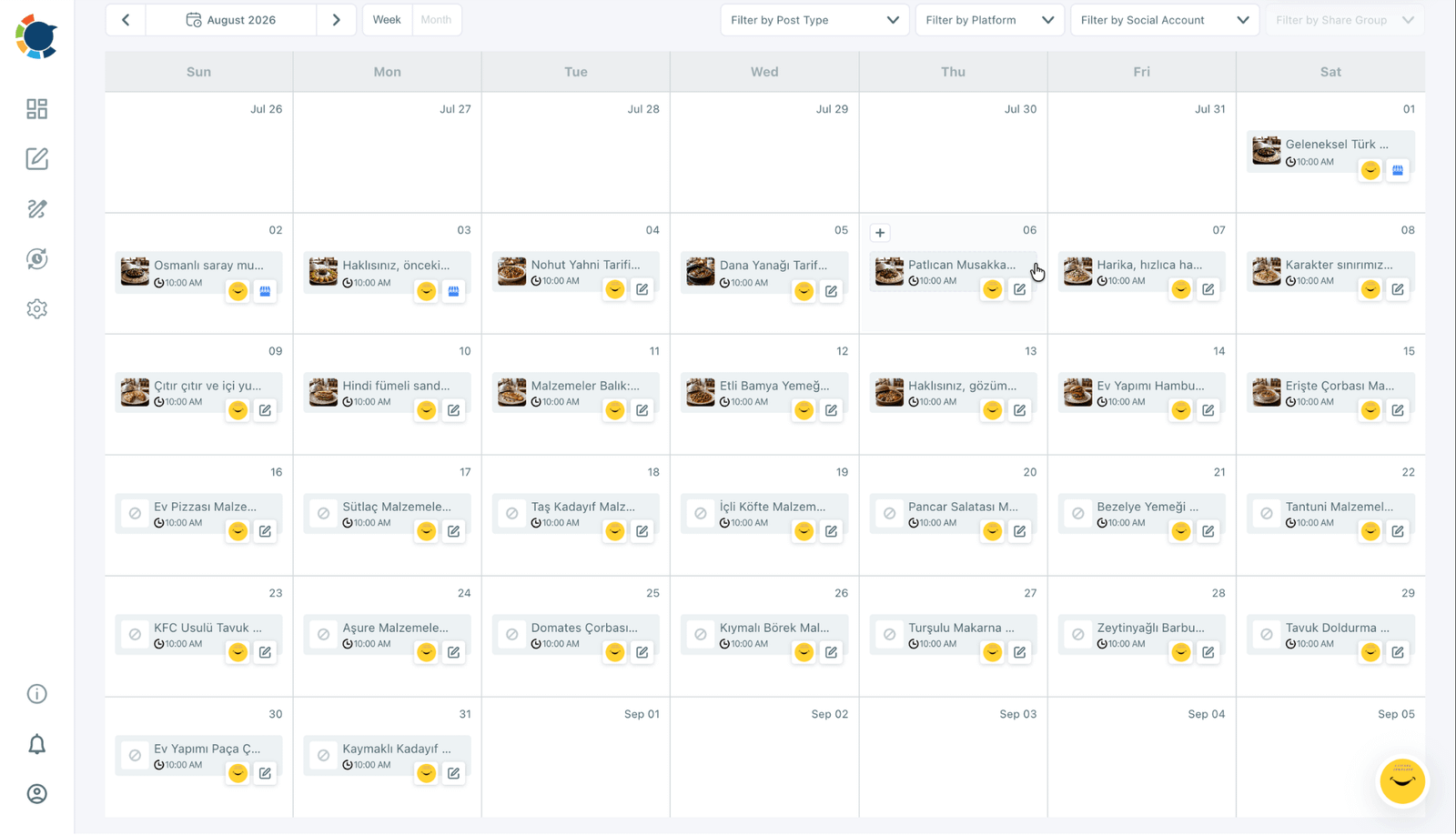
Each hotel profile can also run its own Queue: recurring time slots per profile, filled by Post to Queue, with Add Best Times to Post giving every property its own suggested slots.
The guide to auto post to Google Business Profile explains how the Queue keeps posting between planning sessions.
Photo specs matter for room shots. Circleboom's help page on media limitations for social platforms lists the Google limits:
- A 58-character title and a 1,500-character description.
- Up to 10 photos and videos per post.
- JPG or PNG images up to 5 MB each.
- Video up to 75 MB, between 3 and 30 seconds.
Google Business Profile has no carousel option in Circleboom Publish, so plan room galleries as separate posts.
Keeping 12 hotel listings active between campaigns
Offers and Events carry the big moments, but the quiet weeks decide whether a listing looks current. A hotel group with a blog can connect it once with RSS feed to Google Business Profile. Each new local guide then posts automatically as a Standard post.
RSS-sourced posts are not reviewed by a person before they go out unless the rule is paused, so connect only a feed you trust.
The article on how to post to Google My Business from an RSS feed covers the setup. It includes the Begin with and End with text that frames each item in the hotel's own voice.
Some one-off posts need more design than a photo. For those, create Google Business Profile posts with Canva templates already sized for Google, then send them through the same Share Groups.
Pick your bulk posting path for the hotel group
Which path fits depends on what the group is posting this month:
- If the message is the same at every hotel, send it once to the "All 12 hotels" Share Group.
- If each hotel has its own dates, build each Event once and send it to that hotel or its city group.
- If the season is known in advance, schedule every Offer and Event in one sitting and check the Outbox calendar.
- If the quiet weeks keep slipping, fill each profile's Queue with its suggested times and connect the hotel blog by RSS.
Most groups end up doing all four within the first month, and the planning time stays at an afternoon.
→ Schedule a season of Google Business Profile Offers and Events for every hotel
Bulk Google Business Profile posting questions from hotel groups
Can each hotel manager post only for their own hotel?
Yes. With Team Management, each property can run as its own Team workspace, so a manager sees and posts only for their hotel, and posts can wait for head office approval before going live.
Can a post from the RSS feed go out as an Offer or Event?
No. RSS items post to Google Business Profile as Standard posts, so Offers and Events are built in the composer and scheduled there.
What is the most common mistake when bulk posting to many hotel listings?
Putting property-specific details, like a pool schedule or a lobby renovation, into a group-wide send, so 11 listings show something untrue. Keep shared posts to what holds at every hotel.