
Every unfollow you cannot explain is feedback you never got to read. X shows your follower count going down, but it never tells you who left or after which post, so the post that cost you followers can go out again next week.
How do you reduce unfollows on Twitter?
Find out who left and when, match those dates to what you posted, then post more of what your followers already talk about on a steady schedule. Circleboom lists every account that unfollowed you on Twitter by time period, through approved X Enterprise API access, and can email you a Weekly or Monthly unfollower summary.
→ Reduce unfollows on Twitter, starting with a dated list of who left
Why unfollows on Twitter are so hard to read
X gives you one number and no names. The platform sends no notification when someone unfollows you and has no screen that lists who left, so a drop of 40 followers looks the same whether 40 bots were cleared out or 40 of your best readers lost patience.
That missing detail is why most advice on how to reduce unfollows on Twitter stays vague. "Post better content" is not a plan when you cannot tell which content pushed people away.
Your net follower growth can hide the problem completely. Say you gained 50 followers this week and lost 32. The graph still points up, and nobody worries.
But 32 people walked away, and the gain of 18 is all you kept. The real signal sits on the unfollow side, and it stays invisible until you look at it directly.
The first fix is visibility, and it is a small one. Track who unfollowed you on Twitter by date with Circleboom, and each drop turns into a short list of real accounts. Patterns start to show within a few weeks.
I treat unfollows as a lagging signal. They tell you, a few days late, that something in your topics, tone or posting rhythm stopped matching the people who followed you.
The rest of this guide is about reading that signal correctly and then changing the right thing.
Is X removing bots, or are real followers leaving?
Look at the accounts that left: a bot purge and a real audience loss look different, and they need opposite responses. X periodically removes large numbers of fake and spam accounts, and that cleanup can drop follower counts across many accounts on the same day.
If you rewrite your content strategy after a purge, you fix something that was never broken.
The accounts that left tell you which case you are in. The table below is the triage I run on every noticeable drop:
| What the unfollowers look like | Likely cause | What to do |
|---|---|---|
| New accounts, no photo, odd follow ratios | Platform bot cleanup | Nothing, the loss was not real |
| Accounts you followed back, then left | Follow-for-follow churn | Unfollow back if you choose |
| Active, niche-relevant followers in one window | A post, topic or rhythm change | Find the cause window and adjust |
| A few scattered accounts over weeks | Normal churn | Keep watching, no action |
Only the third row is a content problem. That row is where reducing unfollows on Twitter starts, and it is usually a much smaller group than the raw drop suggested.
The timing check matters as much as the account type. If unfollows spike in the 48 hours after one specific post and the people leaving had followed you for a long time, that post or the change behind it is the strong suspect. If the losses spread evenly with no link to anything you published, it is ordinary churn.
The explainer on why you keep losing followers on Twitter covers more of the general causes behind a slow decline.
What actually reduces unfollows on X
Three habits cut unfollows on X, and each one maps to a Circleboom feature that works on its own:
- See who left and when, so you know which posts or changes coincide with losses.
- Post on the topics your followers already talk about, so your feed keeps matching why they followed.
- Keep a steady, planned posting rhythm, so followers neither forget you nor feel flooded.
Circleboom tracks unfollow events on Twitter by storing snapshots of your follower list and comparing them over time, so each account that leaves shows up with its profile details.
X names Circleboom among its official Enterprise API customers, which means those snapshots come from approved X data, not from scraping or a password you hand over.
The second habit runs on Interest Cloud, which reads your followers' tweets and draws the topics they mention most as a word cloud. The guide on how interest targeting can increase engagement on Twitter explains why relevance keeps people reacting instead of drifting off.
The third habit lives in X Post Planner, where you write in batches, schedule into your audience's active hours and stop posting only when you happen to have time.
Together these let you reduce unfollows on Twitter by reading who left first and changing your content second, which is the right order.
Can you track Twitter unfollows by comparing follower lists yourself?
You can, but only for a tiny account and only for a short time. The manual method means saving your full follower list, saving it again a week later and checking line by line which names disappeared. At a few hundred followers that is already slow, error-prone work, and you still get no account details to judge whether the loss mattered.
A tracker does the same comparison on a schedule. Circleboom updates your follower data once a day and keeps the history, so you pick a window such as Last 4 weeks and read the result instead of building it.
The walkthrough on how to track your Twitter unfollowers in 3 easy steps shows the same idea from the setup side.
The bigger difference is context. Each row in the Who Unfollowed Me list carries the account's:
- Tweet count
- Join date
- Following and follower counts
- Follow ratio
- An Active and Inactive label
Those columns are what let you run the bot-or-real triage above in minutes.
A saved list of usernames cannot tell you whether the person who left was a loyal reader or an empty account created last month.
Video tour: finding your Twitter unfollowers by time period, then turning on the email alert so the next drop reaches you first.
How to reduce unfollows on Twitter, step by step
The process below runs in three phases: find who left, match your topics, then fix your rhythm.
Find out who left and what they have in common
- Log in to Circleboom Twitter and connect the X account you want to protect from churn.
- Open the Followers and Following menu from the left sidebar, where the follower tools sit under Followers.
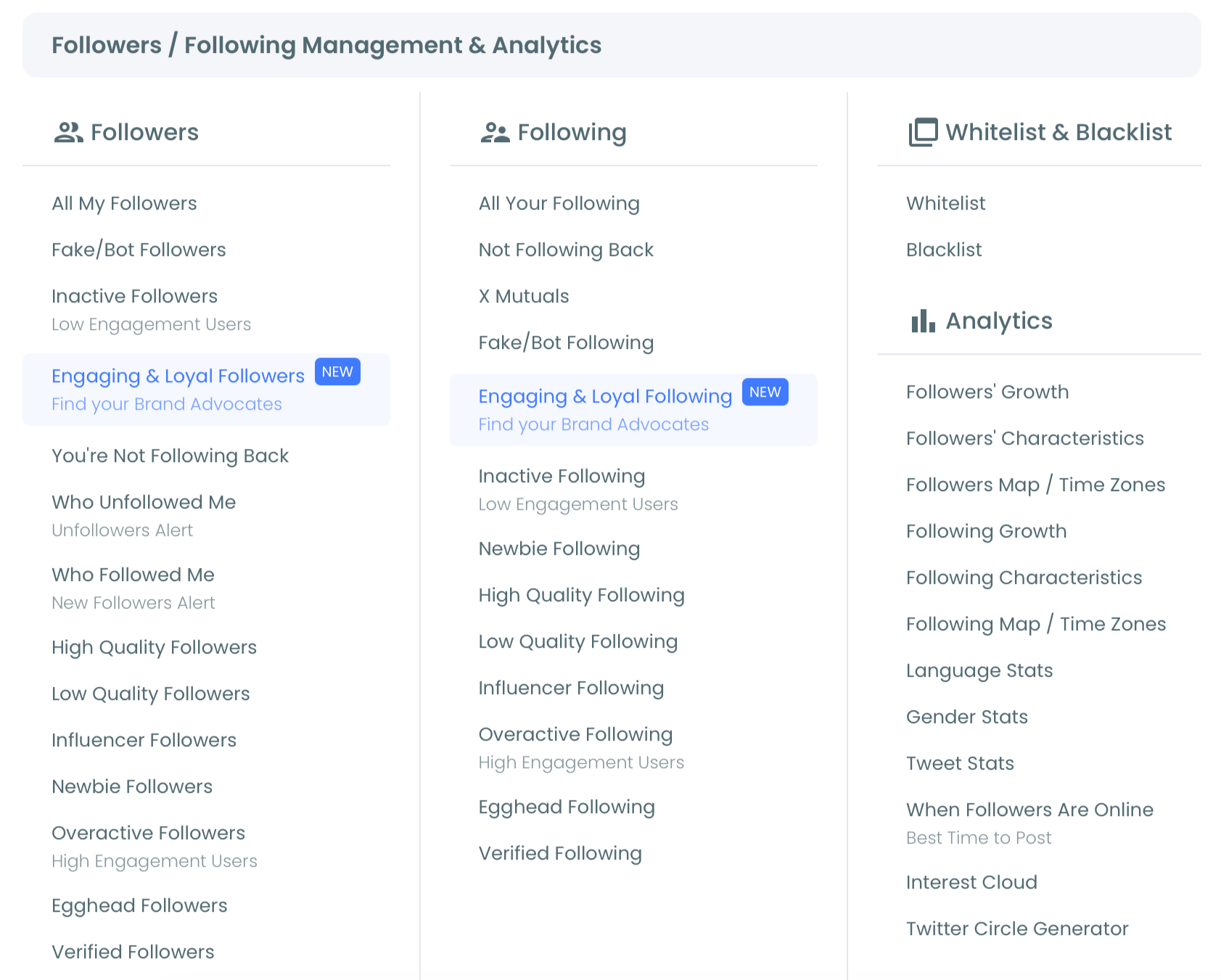
- Select Who Unfollowed Me and set the period dropdown above the list. The default is Last 1 day; switch to Last Week or Last 4 weeks to see a pattern instead of a single event.
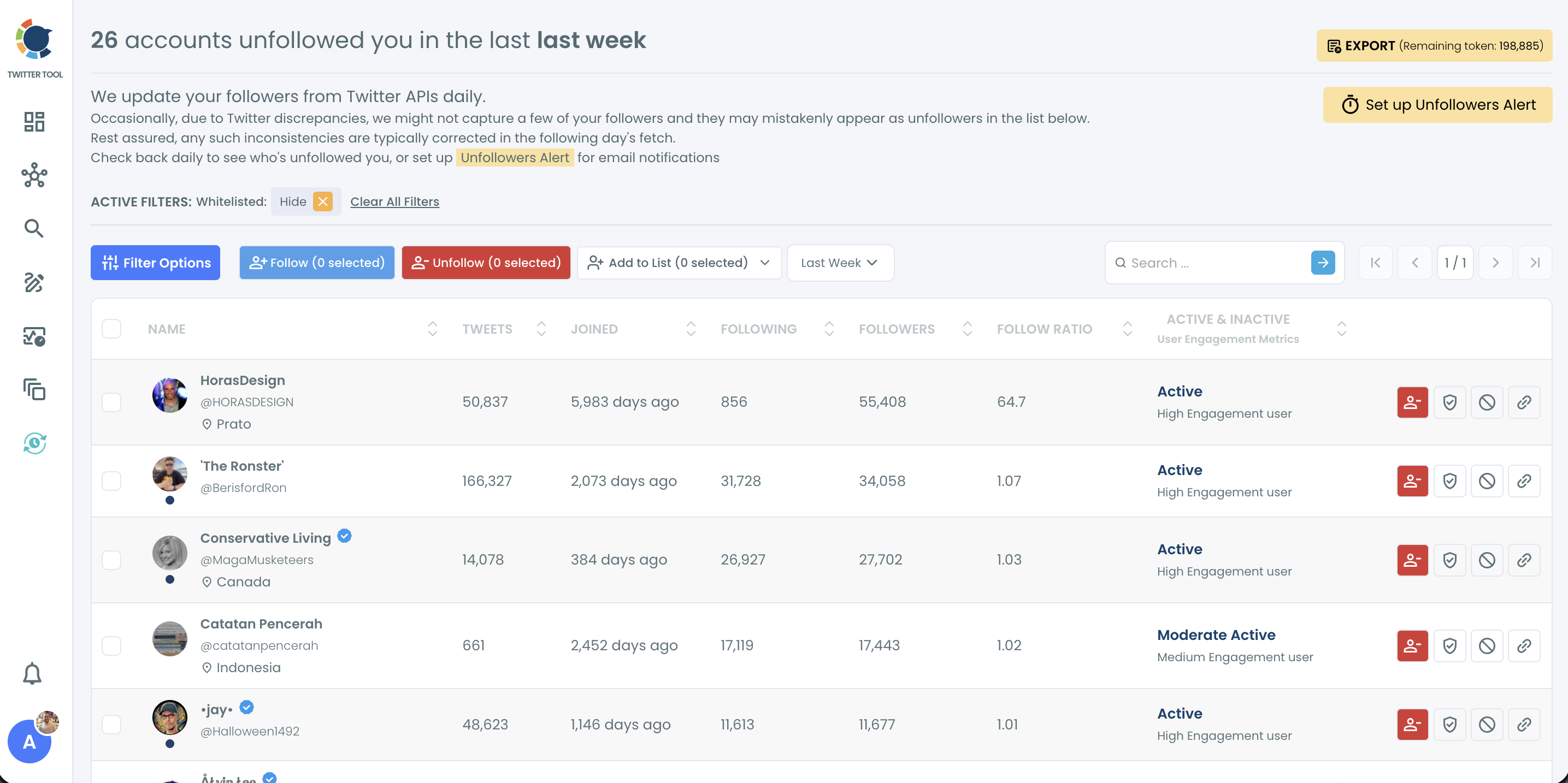
- Sort and filter the list with Filter Options: Fake/Bot and Inactive under Follower Quality, then Engagement, Language and Location. Note whether the people who left were active, niche-relevant followers or low-quality accounts.
- Set up the Unfollowers Alert with the button at the top right of the page. Choose Weekly or Monthly, add your email and activate it, so the next spike lands in your inbox without a login.
Match your posts to what followers talk about
- Open Interest Cloud under Analytics in the same Followers and Following menu. Start with the largest words, then read the smaller, specific terms such as tool names, job titles and community hashtags.
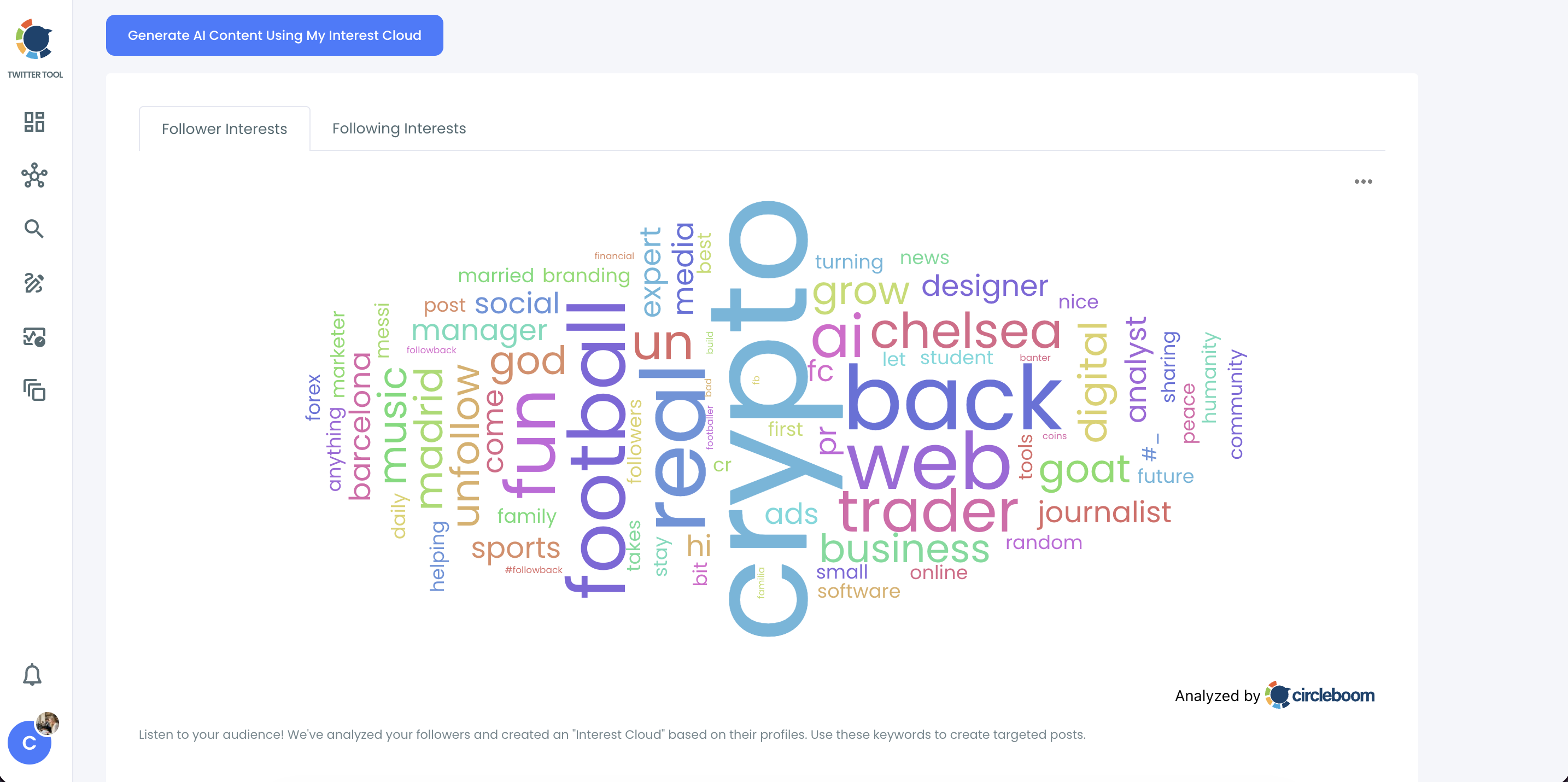
- Compare the top topics with your last month of posts. Mark the topics that dominate the cloud but rarely appear in your feed, and the topics you post often that the cloud barely shows.
Post on a steadier rhythm
- Write the next two weeks in X Post Planner around your two or three strongest overlap topics, and use Find your best posting time in the Schedule panel to drop each post into an active window.
- Review the Who Unfollowed Me list again after two weeks with the same period setting, and compare the new unfollowers with the ones from step 4.
Changing one thing at a time is what keeps this sequence readable. You confirm the loss is real before you touch content, you pick topics from your own audience instead of guesses, and you fix timing last so you can see which change moved the numbers.
The clip below shows the Who Unfollowed Me list in use. It also shows the unfollow-back confirmation, which you only need for one-sided follows you no longer want to keep.
A quick note on the alert from step 5: the Twitter unfollow alert is what turns this from a monthly chore into something that runs in the background. You can preview the setting on the Twitter Unfollowers Alert page first.
Resurface your best X posts so fewer followers miss them
Some unfollows come from silence, not from bad posts.
When most followers are offline at the moment you publish, they see little of you for weeks, and the account starts to feel inactive to them. Resurfacing a strong post gives the same content a second and third window without writing anything new.
Auto Retweet, inside X Post Planner, reposts a tweet after a delay you set, can remove that repost after another delay (Un-RePost), and repeats the cycle as many times as you choose. You configure it in the post editor while scheduling, through the cycle icon in the toolbar. The Auto Retweeter page shows the panel.
Two rules keep resurfacing from causing the very unfollows you are trying to stop:
- Pick evergreen posts that already earned engagement, and skip anything time-bound such as "live now" or an expired offer.
- Space the cycles. Three cycles spread across a day work better than six reposts inside three hours to the same people.
The point of resurfacing is reach, not repetition. Turn on Un-RePost so a visitor scrolling your profile sees each post once, not three copies in a row.
Once the new rhythm has run for a few weeks, check whether the posts built on your follower interests earn more replies and reposts than the old ones. Twitter engagement analytics sorts your tweets by engagement, which makes that comparison quick. Put it side by side with your unfollow list for the same weeks and you know whether the change worked.
Fewer unfollows on Twitter come from three readable signals
Reducing unfollows on Twitter is less about chasing every person who leaves and more about reading the group that leaves together. Check who left and when, set aside bot cleanups and follow-for-follow churn, and treat the active, relevant followers who leave in one window as your real feedback. Then post more of what your followers already talk about, on a schedule they can count on.
I would start with the list, because every other decision depends on it. Ten minutes with the last four weeks of unfollowers usually shows whether you have a content problem, a rhythm problem or no problem at all.
→ Start cutting unfollows on Twitter with your own unfollower list
Twitter unfollow tracking: questions after your first check
Why doesn't someone who just unfollowed me appear in the list yet?
Circleboom updates follower data from X once a day, so an unfollow from the last few hours appears after the next daily update. The help page on how to set up or change your Unfollowers Alert also suggests a longer period in the dropdown.
Can someone show up as an unfollower by mistake?
Yes, occasionally. Inconsistencies in X's API data can make a few accounts look like unfollowers when they have not left. Circleboom notes that these are usually corrected in the next day's fetch, so review the list before any bulk action.
Can auto-retweeting my posts make people unfollow me?
It can if the cycles are too close together. Reposting the same tweet to the same followers within a short span lowers engagement and can feel like spam, so space the cycles, use Un-RePost and save resurfacing for evergreen posts that already performed.
Should I unfollow back everyone who unfollowed me?
Not by default. Unfollowing back makes sense for one-sided follows you kept only because the follow was mutual, not for customers, partners or journalists you still want to see. Circleboom paces unfollows at 50 every 15 minutes, up to 800 a day, and you can unfollow Twitter accounts in bulk for broader cleanups.