
Can you search someone's following list on Twitter? Not on X itself: the Following tab gives you a scroll with no search box, no filter and no sort, and it stops loading long before a big list ends. You can still find the founders, local accounts or verified voices inside that list, with a different tool and a few minutes of setup.
Where this walkthrough takes you.
• How to load another account's complete following list into one table.
• How to narrow that list by bio keyword, location, follower count and verification.
• What to do with the accounts you find: list them, export them or follow a few.
Circleboom pulls the full following list of any public X account through X's Enterprise API access and makes every column filterable. Search someone's following list on Twitter with the filters X leaves out.
Why you can't search a following list on X itself
X lets you open another account's following list, and that is where its help ends. The list loads in the order X chooses, it stops loading after a point, and it cannot be filtered, sorted or exported.
If the account follows 1,800 people and you want the 40 investors among them, X expects you to read every row.
That is a problem because a following list is one of the most honest documents on the platform.
A follower list shows who chose an account; a following list shows who that account chose.
An investor's following tab is their watch list. A top creator's following tab shows who they learn from. A competitor's following tab maps the partners, suppliers and peers they keep an eye on.
When I research a new niche, the first list I want is who its best-known account follows, and the second thing I want is a search box inside it.
Viewing the list is a separate problem, and the post on a Twitter following list viewer covers that part. This guide is about the step after viewing: finding the specific rows you need.
Circleboom closes that gap. On Circleboom you can search inside someone's following list on X by the words in each bio, the location field, follower ranges and verification. The matching accounts land in one table.
Which account's following list is worth searching on Twitter?
The best following list to search belongs to an account that sits close to the niche you care about and follows people on purpose. A specialist who follows 900 accounts in their field gives you a sharper list than a celebrity who follows 12,000 accounts for every reason under the sun.
Circleboom's own guidance for this search treats source quality as the first filter: if the account is too broad, celebrity-like or off-topic, its following list will be noisy no matter how well you filter it.
Different accounts answer different questions:
| Account you search | What its following list shows | Filter to start with |
|---|---|---|
| Niche expert | Who they learn from | Bio keyword |
| Investor | Who they are watching | Verified or follower count |
| Competitor | Partners, peers, suppliers | Bio keyword and location |
| Industry newsletter | Sources they read | Tweet count and activity |
Search three to five similar accounts, not one
One following list reflects one person's habits. Search three to five similar accounts and the accounts that appear in several of those lists are the ones the whole niche pays attention to. Those overlaps are often stronger prospects than any single list can show you.
To check overlap between two accounts directly, you can compare Twitter X accounts side by side instead of exporting both lists.
Keep one caveat in mind while you read results.
A follow is not proof of a partnership, an endorsement or a purchase. It is a signal of attention, and it deserves a second look at the profile before you treat it as anything more.
What Circleboom adds to a following list on X
Circleboom's Followers / Following Search takes any public username, retrieves its complete following list and shows it as a structured table you can search, filter, sort and act on.
Circleboom sits on X's published roster of Enterprise developers. The list you search is X's own record of that account, not a scraped copy that can skip rows when a page fails to load.
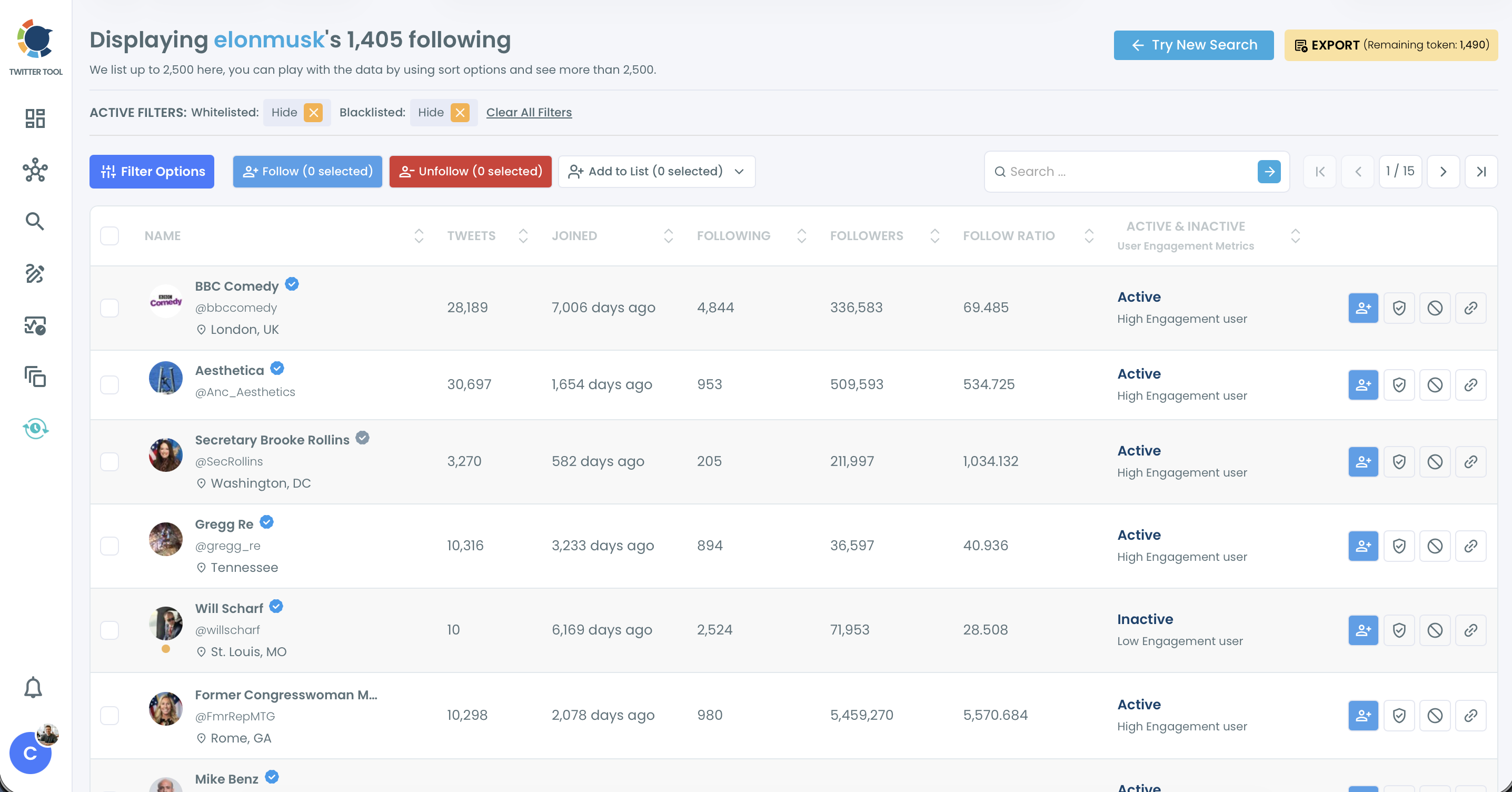
Every row shows the name, handle, verification badge and location, plus tweet count, account age, following and follower counts, follow ratio and an engagement label (Active, Moderate Active or Inactive). The table lists up to 2,500 accounts at a time, and the sort options let you reach rows beyond that first 2,500.
That cap only matters for very large following lists. A niche expert who follows 900 people fits in one view with room to spare.
When an account follows more, the page itself tells you to play with the sort options. Sort the same list by a different column and a different slice of it comes into view. Filter first, and the rows you care about are far more likely to sit inside the visible set.
Where the search and the filters live
The search itself happens in two places. A search bar above the table finds a name or handle fast. The Filter Options drawer holds the real controls:
- Find in Bio & Name: a word in the display name or bio, such as "founder" or "podcast".
- Filter by Location: free text matched against the profile's location field.
- Follower Count, Following Count and Tweet Count, each with a minimum and maximum.
- Verification Status and Follow Ratio.
- Follower Quality (Eggheads, Protected, Fake/Bot, Inactive, Overactive), Join Date and Language.
Every filter you add narrows the same list, because a row has to match all active filters at once. One keyword plus one location plus a follower floor is often enough to turn 1,800 rows into a page.
If you have read about tools that scrape a Twitter following list, the difference here is the source, and it decides whether the rows you filter are complete.
Ready to try it on a real account? You can filter any account's Twitter following list by bio, location and follower count in the same session you read this.
Watch this first: the following list of a public account loading, getting filtered, then turned into follows, a list and a CSV.
How to search someone's following list on Twitter, step by step
The search runs in three short phases, and the middle one is where a long list becomes a short one.
Load the account's full following list
- Log in to Circleboom Twitter and connect the X account you do your research from.

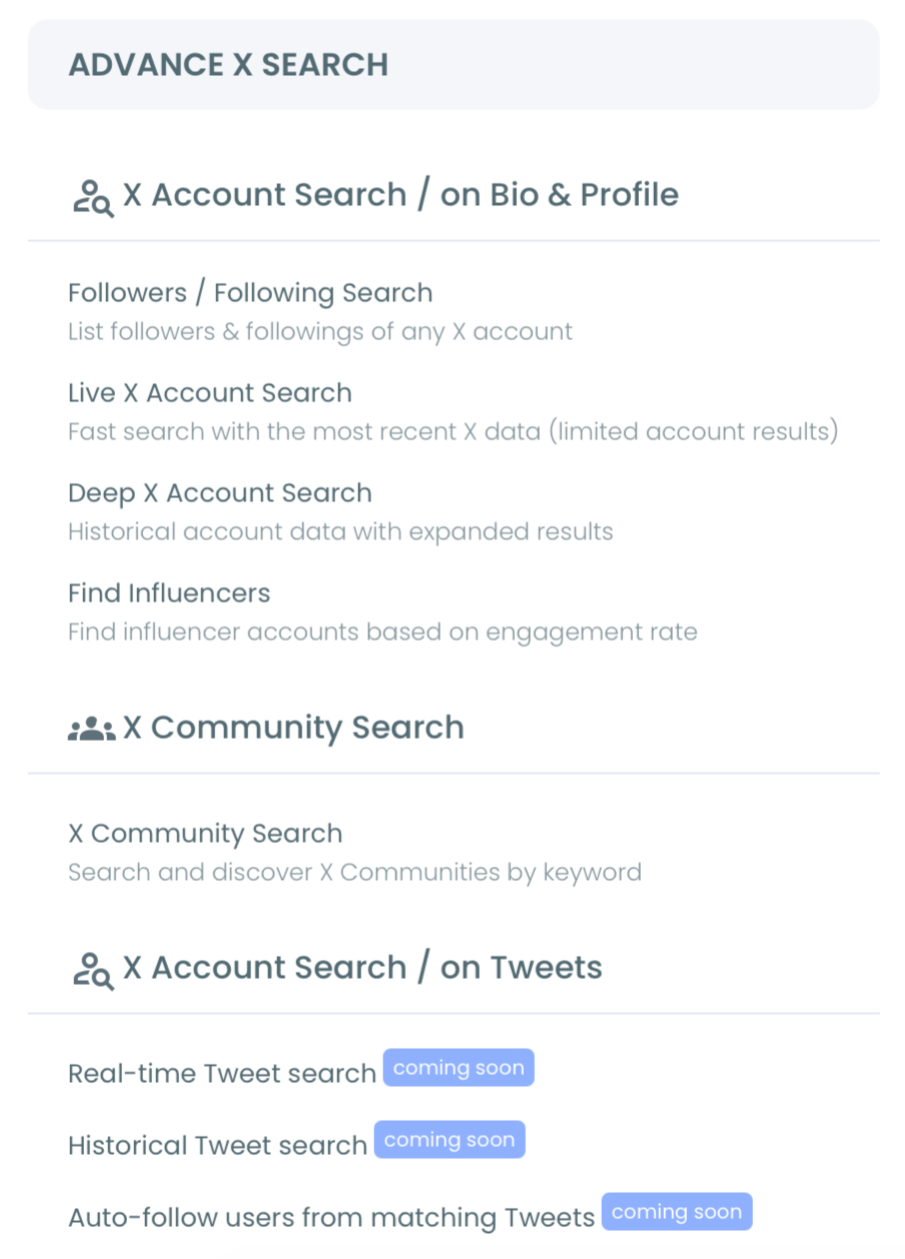
- Open the Advanced X Search menu and choose Followers / Following Search.
- Switch the toggle to Display Following, type the username and click Show Following. The field accepts letters, numbers and underscores only, so leave out the @ sign.
Narrow the list with search and filters
- Type a name or handle into the search bar above the table when you only want to confirm one account is there.
- Click Filter Options and type your keyword into Find in Bio & Name, for example "investor" or "VC".
- Add a location, a follower range or a verification setting to tighten the match. Join Date works the same way if you want older accounts, the logic behind a Twitter following list with accounts created before 2020.
- Click Apply Filters and read the Active Filters bar at the top of the list. Each active filter shows as a tag you can remove, and Clear All Filters resets them.
Sort, review and act on what is left
- Sort by a column header such as Followers or Follow Ratio. Click once for ascending order and again for descending.
- Select the accounts you want to keep with the checkboxes, then choose Add to List, Export or Follow from the buttons above the table.
Filtering before sorting is the habit that saves the most time: sorting 1,800 rows still leaves you scrolling, while sorting the 60 rows that survived your filters puts the answer on the first page.
A worked example makes the filters concrete. Say a fintech founder follows 1,800 accounts and you want the London investors among them. Type "investor" into Find in Bio & Name, put "London" in the location field and set a minimum of 1,000 followers. The table now shows only rows that match all three, and you can sort them by follower count to see the most followed first.
How to save the accounts you found to a list on X
The cleanest next step for most research is an X List, because it keeps the accounts you found in one feed without changing who you follow. Select the rows, open Add to List and choose Twitter List.
You can add them to a list you already have or create a new one with a name, a description and a public or private setting, and all selected accounts go in at once.
On X, adding accounts to a list happens one profile at a time. From a filtered following list, it is one action for the whole selection, which is why lists are the natural home for the accounts a search turns up.
A private list works well for competitor research: the competitor never sees your list, and your own following count does not move. If you build several lists from different searches, the Twitter List Manager keeps them organized in one place.
Can you export someone's following list from X?
X has no export for another account's following list, but Circleboom does.
The Export button sits at the top right of the results table and shows your remaining search token balance, because exports use search tokens. A confirmation pop-up tells you how many profiles are about to be exported before anything downloads.
The CSV carries one row per account with these fields:
- ProfileId, Username and Name.
- Location and Bio.
- Tweet, following and follower counts.
- Quality flags: IsProtected, IsVerified, IsEgghead, IsFake, IsInactive and IsOveractive.
- Verified_Type and the account's CreatedAt date.
An export is useful when the research leaves Circleboom: a CRM import, a team review or a partnership shortlist. The export Twitter following list page covers this route on its own if a full download is all you need.
One more option sits next to Export. If the search turns up accounts you want in your own feed, the Follow button queues them through bulk follow.
Follows are paced at 50 every 15 minutes with a daily safety limit of 400. Anything left in the queue continues automatically the next day, after you confirm the selection.
Which next step fits what you found on X
The search is the same for everyone; what you do with the result depends on why you opened the list.
If you are researching an expert or an investor, save the matching accounts to a private X List and read that feed for a week before you decide who to follow.
If you are building a prospect list, export the filtered rows and work the CSV in your CRM, where you can add notes the list itself cannot hold.
If you are checking a possible partner, search their following list for the accounts you would expect a serious player to follow, and treat missing names as a question to ask, not a verdict.
If you want to grow your own network, follow a small, filtered selection at Circleboom's paced daily limit rather than the whole list.
I start every new niche with the second case, because a clean CSV of who the leaders follow tells me more about the market than a week of reading their tweets.
→ Open and filter someone's following list on Twitter
Questions about searching an X following list
Can I search the following list of a protected account?
No. Circleboom can only retrieve the following lists of public accounts, and a protected or private account returns no data. The post on whether a protected Twitter X account hides your following list explains what protection changes on X.
Will the account know I searched its following list?
The search reads the account's public following list and takes no action on it. Nothing is followed, listed or exported unless you select rows and click one of those buttons yourself.
How do I see who they follow after today?
The search shows the following list as it is when you run it, and it keeps no history of changes. To watch an account's new follows over time, set up track someone's X followers and followings in the Monitoring menu.