
A business account that posts Reels in bursts gives Instagram nothing to recommend in the quiet weeks, and those quiet weeks are when new customers stop finding you.
The fix is not more filming. It is a plan that spreads a few filming sessions across 30 days and keeps the Reels going out while you run the business.
This guide lays out that plan week by week, then shows how to schedule it.
A 30-day Reels plan for a business is three to five Reels a week, filmed in batches and scheduled ahead, with each Reel doing one job: show the work, teach something, or make an offer. Circleboom Publish schedules Instagram Reels from a dedicated Reels tab, where each clip gets a cover, a track from Add Music, an AI caption and a first comment before it is queued.
→ Plan 30 days of Instagram Reels for business
Here is how to use Instagram Reels for business: the weekly grid first, then the scheduling steps.
What breaks an Instagram Reels plan for a busy business
A business Reels plan usually breaks at the posting step. It depends on someone posting at the right moment every day, and a business does not have that moment to spare.
The usual pattern runs like this:
- A burst of three or four Reels in the first week, each filmed and posted on the same day.
- A busy week where posting slips behind customers, deliveries and admin.
- A gap long enough that the account starts to look inactive.
Instagram rewards the opposite. Its creators team asks for original content posted consistently, so a plan that cannot survive a busy week is not a plan.
If the account is brand new, or still a personal profile, it helps to read Instagram for beginners first and switch to a business account inside the Instagram app before you schedule anything.
The length trap that costs new viewers
The other common mistake is length. Instagram lets you record a Reel of up to 20 minutes, but its help page on how to record a reel says Reels over three minutes will not be recommended to new audiences. For a business chasing new customers, a long Reel quietly gives up the reach it was made for.
A Reels plan that brings customers is a schedule first and a creative brief second.
That is why the plan below starts from the calendar. You can plan Instagram Reels for business the same way, with the filming fitted around the slots instead of the slots fitted around the filming.
How many Reels a week should a business post?
Three to five Reels a week is the cadence that holds up for most business accounts, and consistency matters more than hitting five. Three Reels every week for a month beats five in week one and none in week three.
The rhythm that keeps an Instagram account healthy is three to five Reels a week, next to three to five feed posts a week and a few Stories a day. Two rules sit on top of it: consistency beats frequency, and quality beats quantity. Flooding followers can backfire, wearing them out and pulling post quality down with it.
The practical way to hold the number is to decide it before you film. Pick the count for each week, film exactly that many in one session, and schedule them all before the week starts.
A number decided in advance survives a busy week. A number decided each morning does not.
Start at three. Move to four or five only when three feels easy to film.
The 30-day Instagram Reels grid for a business
The grid below turns that cadence into a month. Each week has a lead Reel early in the week, a tip mid-week, and an offer at the end, with extra slots added as the month gains momentum.
| Week | Reels | Early in the week | Mid-week | End of week |
|---|---|---|---|---|
| Week 1 | 3 | Behind the scenes: how a product is made or a service is done | Tip: one useful thing a customer can do today | Offer: one product with its price in the first comment |
| Week 2 | 4 | Behind the scenes, plus a customer question answered | Tip | Offer |
| Week 3 | 4 | Repeat the type that earned the most saves in weeks 1 and 2 | Tip | Offer |
| Week 4 | 4 | Behind the scenes of the offer itself | Tip tied to the offer | Offer with a clear deadline |
That is 15 Reels in 30 days, filmed in four short sessions. Each session covers one week, so no single day has to produce the whole month.
The grid borrows its rhythm from a simple pattern: film a week of Reels in one sitting, add music to each, and schedule them for the account's best times through the end of the week. A holiday week works the same way, just with every slot pointing at the holiday offer.
Week 3 is the most important row. It is where the plan stops guessing and starts repeating what your own audience saved and shared.
Why behind-the-scenes Reels lead each week
Behind-the-scenes Reels carry the early slot for a reason. They show the business to people who have never heard of it, which is the job Reels, widely cited as Instagram's highest-reach format, are built for. The tip builds trust. The offer turns that trust into a reason to buy.
What to film for each slot
The slots stay the same whatever the business sells. Only the footage changes:
- A café: latte art for the early slot, a home-brewing tip mid-week, the weekend pastry offer at the end.
- A coach: a session warm-up behind the scenes, the tip of the day, a free intro call as the offer.
- A real estate agent: a 20-second house tour early, a buyer tip mid-week, an open-house date as the offer.
- A shop: packing an order, a care tip for a product, a new arrival with its price.
Match the track to the slot as well. A warm, mid-tempo track suits a house tour, and something quicker suits a fast product showcase. The Add Music library is searchable by keyword and filterable by genre, tempo and mood, so the right sound takes a minute to find.
Pick the four clip types once and the filming session writes itself. That is most of what it takes to use Instagram Reels for business without a content team.
Circleboom Publish keeps this grid running because one Reels panel handles the upload, the soundtrack, the caption and the first comment, so a week of Reels for a business is one sitting, not five. The panel lives on the business Reels scheduler for Instagram page if you want to see it before you start.
How to use Instagram Reels for business with a 30 day posting plan
The process below covers one weekly sitting, start to finish.
A full Instagram Reels scheduling run in Circleboom Publish, from the Reels tab to the Schedule button.
Set up the Reels panel for the week
- Log in to Circleboom Publish and pick the business Instagram account the week's Reels belong to, so every clip lands on the right profile.
- Open the Instagram composer and select the Reels tab to bring up the Create Reels Post panel.
Build each Reel with sound, caption and offer
- Upload the first clip from the batch and adjust the cover image so the grid shows a clear frame of the product or the work.
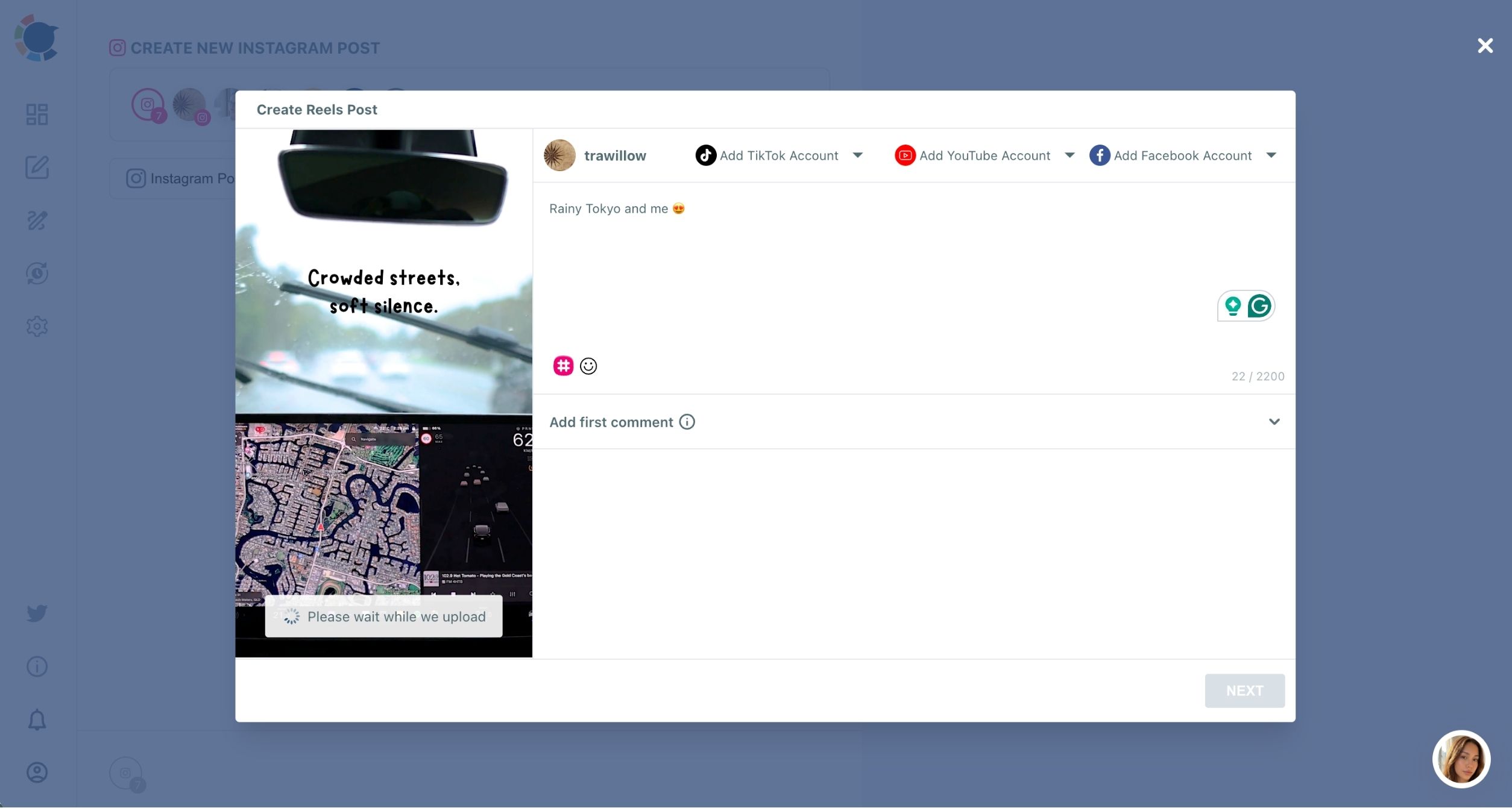
- Add a track with Add Music, filtering by genre, tempo or mood until the sound matches the clip.
- Write the caption with the AI button, describing the clip and its audience, then add hashtags with the toolbar. In the offer slot, put the product link and price in Add first comment, because a Reel caption cannot hold a clickable link.
Place the week on the calendar
- Preview the Reel and send it to its slot, using Schedule with one of the suggested best-time slots for a fixed-date Reel, or Post to Queue for the rest.
- Repeat steps 3 to 6 for every clip filmed that session, following the grid's order for the week.
- Open the Outbox calendar and confirm the week shows the right count, with the offer Reel at the end.
The suggested times come from the account's own followers, which is a deeper topic of its own. For hands-off posting beyond Reels, the auto poster for Instagram runs the same Queue for feed posts.
Two small habits make the sitting faster. Ask the AI for a shorter, funnier or more energetic version of the caption rather than rewriting it yourself, and pick the track before anything else, since the music choice shapes the tone of the caption. Over four weeks, those habits are the difference between a one-hour sitting and an afternoon.
Building in this sequence keeps the grid in charge. You decide what each Reel is for when you film it, so by the time you reach the Schedule modal the slot is already known, and the only job left is matching the clip to its row.
The month in four moves:
- Film one week of Reels per session.
- Build each Reel in the Reels tab with music, caption and first comment.
- Queue or schedule each one into the grid.
- Check the Outbox, then repeat next week.
Meta Business Suite, the Instagram app or a Reels scheduler?
You can post a Reel straight from the Instagram app, and many owners try Meta's own tools first. The question is which route keeps a 30-day plan alive. If Meta Business Suite will not schedule a Reel for you, the explainer on why you can't schedule Instagram Reels on Meta Business Suite goes through the reasons.
The table compares posting live from the app with the Reels tab in Circleboom Publish, the two routes most owners end up choosing between:
| What the plan needs | Posting live from the Instagram app | Circleboom Publish Reels tab |
|---|---|---|
| Reels go out on schedule | Only when someone is free to post | Scheduled ahead or queued into weekly slots |
| Music on every Reel | Instagram's library, which some business accounts cannot use | Add Music library inside the same panel |
| Caption help | Written by hand each time | AI button drafts the caption |
| Offer and link | Typed into the comments after posting | Add first comment, scheduled with the Reel |
| TikTok, YouTube and Facebook | A separate upload in each app | Same upload, three extra destinations |
The music row matters more than it looks. To keep licensed songs out of commercial use, Instagram withholds its music library for Reels and Stories from some business accounts and post types. Its alternative is Meta's Sound Collection, with over 14,000 royalty-free songs and sounds cleared for commercial use.
For a business, the deciding row is the first one. A plan that only runs when someone is free to post is the plan that stalls in week two.
Where the Reels tab fits in the rest of your Instagram
Once the month is running, the same Reel can also go to a Facebook Page, TikTok and YouTube from one upload, as long as it stays at 60 seconds or less and under 300 MB.
The Reels tab sits inside the wider Instagram post scheduler, so feed posts and carousels for the same month live in the same calendar.
Captions for those posts can come from the AI Instagram caption generator, which keeps the tone of the feed in line with the Reels.
Turning a month of Instagram Reels into sales
A plan that brings customers needs somewhere for those customers to go. The offer slot at the end of each week is that place: one product, one price, one link in the first comment.
This is where Instagram Reels for business stops being a visibility exercise.
Watch the messages and comments in the days after each offer Reel. Questions about stock, size or booking are the clearest sign that a Reel did its job. Those signals are worth more than views when you decide what to film next.
Write that first comment yourself in the Add first comment field. Viewers read a Reel's first comment right after watching, and if the slot is left open it goes to whoever comments first. Scheduled together with the Reel, your offer is already in the top spot the moment the Reel goes live, with room for the price and a call to action.
Give the week 4 offer a real deadline. A Reel that says "this week only" gives a viewer a reason to message now rather than save it and forget. Keep the deadline honest and the same across the Reel, the caption and the first comment, so nobody arrives at the counter expecting a different price.
If the account is part of a wider plan to make money on Instagram, Reels are the top of that funnel. They reach people who do not follow you yet, and the feed, Stories and DMs carry them the rest of the way.
What a month without a Reels plan costs
Without a plan, Reels arrive in bursts, the quiet weeks give Instagram nothing to recommend, and the customers who would have found you through a Reel find someone else. With a 30-day grid and a weekly scheduling sitting, the account posts three to five Reels every week, each one built to show, teach or sell.
The cost of the plan is four filming sessions and four scheduling sittings. The cost of skipping it is a month of reach you cannot get back.
Many small businesses sell straight from Instagram, and the guide to sell on Instagram without a website shows how the orders side works once the Reels are bringing people in.
→ Build your Instagram Reels for business schedule
Reels plan FAQ for busy owners
How do I tell which Reels worked after 30 days, and can I run them again?
Sort the month's Reels by saves and shares in Circleboom's Instagram content analytics, since those signals point to Reels people valued, not just watched. Run a winner again with a new hook, a new caption and a different track from Add Music instead of filming from scratch.
Do I have to pick a date and time for every Reel in the month?
No. Set up recurring Queue slots once in Time and Queue Settings and turn on Add Best Times to Post, and every Reel sent with Post to Queue takes the next open slot at a time the account's followers are active.
How long should a business Reel be in this plan?
Between 15 and 30 seconds for most slots. Clips that short are long enough to show one product or one tip and short enough to be watched to the end, and they stay inside the 60-second YouTube Shorts limit if you later send the same Reel there.