Google has not announced that Business Profile Q&A is gone; it shut down the My Business Q&A API on November 3, 2025 while it updates the feature. For owners, the working replacement is the answer post they publish themselves.
What Google has said, and where answers go now.
• Google discontinued the My Business Q&A API on November 3, 2025, saying it is updating Q&A.
• Google's page on owner and manager roles still lists responding to Q&A as an owner and manager task.
• Recurring customer answers hold up best as Standard posts with a button, refreshed on a schedule.
Circleboom Publish drafts, schedules and re-shares those answer posts on Google Business Profile for one location or many. Move your customer answers into scheduled Google Business Profile posts.
What Google has said about Business Profile Q&A
The clearest statement Google has published on Google Business Profile Q&A sits in a developer document, not in an announcement to owners. Google's Q&A API change log records two entries that matter.
The first, dated September 15, 2025, announced the shutdown. Its stated reason: "as we are in the process of updating the Q&A functionality and user experience." The second, dated November 3, 2025, confirmed it: questions and answers can no longer be read or posted through the API.
On the owner side, Google's help page on how to manage Business Profile owners and managers still lists "Respond to Q&A" in its capability table. The row is ticked for both owners and managers.
Put together, the two pages say three things:
- Third-party tools can no longer post or read Q&A through Google's API.
- Google describes Q&A as being updated, not as deleted.
- Owners and managers are still described as able to respond to Q&A.
Google's own pages do not say whether the public Q&A box shows on your profile today.
The only reliable check is your own listing.
How to check Google Business Profile Q&A on your own listing
Look at the profile the way a customer would, not from the owner dashboard:
- Search your business name on Google Search and open the profile.
- Open the same profile in Google Maps.
- Repeat both on a phone and on a computer, since layouts differ.
If you find a place where customers ask and you can answer, keep replying there. If you do not, the answers need a new home.
One more consequence of the API change: any service that answered Q&A for you through Google's API lost that route on November 3, 2025. Where the section still shows, replies now happen by hand inside Google.
Circleboom Publish does not answer Q&A either; it creates and schedules Google Business Profile posts, which is where the rest of this guide goes.
That uncertainty is the real problem for a salon owner or a clinic manager. Whether or not Google Business Profile Q&A is still available in 2026 on your listing, plan for both results at once with answer posts in the Google Business Profile manager.
The answer post works in both cases, and Circleboom Publish builds it for Google Business Profile: AI-written, timed and sent to every location you manage.
Where customer answers live now
An answer to "is the entrance step-free?" can live in four places on or around a Google listing. They differ on where people see the answer, whether it can carry a button, how it stays current, and how much room it has:
| Where the answer lives | Where people see it | Action button | How it stays current | Room for text |
|---|---|---|---|---|
| Q&A, where it still shows | On the profile, if Google displays the section | A text reply | Edited by hand in Google; no API access since November 3, 2025 | No limit stated on the pages cited here |
| Business description | On the profile, as one block about the business | None | Written once in Google, with no date shown | One block for the whole business |
| Website FAQ page | Only after someone clicks through to your site | Your own site's links | Whenever you edit the site | As long as you want |
| Standard post | On the profile in Google Search and Google Maps | Call Now, Learn More, Book, Sign Up, Order Online or Buy | Fades in about a week, then gets re-shared or rewritten | Up to 1,500 characters |
Why the answer post wins on Google Maps
Read the table by the moment of decision. A person looking at your listing on Maps is deciding in seconds whether to call, book or walk in. The description tells them who you are, the website FAQ sits one click away, and a Q&A reply, where it still appears, answers but cannot act.
Only the Standard post answers the ask and offers the next step in the same place.
That is why the post took over from Google Business Profile Q&A. It is the one home on the list that carries a button, can be scheduled for the hours when people search, and can be brought back when it fades.
The four homes work best together
The table is not a vote for one row. Each home has a job:
- The description says what the business is, once, in Google.
- The website FAQ holds the long version of every answer.
- The answer post puts the short version on the listing, with a button.
- Q&A, wherever it still shows, gets a reply like any other channel.
The strongest pairing is post plus website. A post that answers "do you offer bridal packages?" in two sentences can carry a Learn More button pointing at the full FAQ page, so the reader who wants detail gets it in one tap.
A fifth place answers end up: the review
Some asks never arrive as asks. A customer who could not find out whether you open on Sundays writes it into a review instead. Answer those in Google's own review reply, since a reply there is public and Circleboom Publish does not manage reviews.
If a review breaks the rules rather than asking for help, the guide to removing bad reviews from Google My Business covers what Google allows.
What replaced Google Business Profile Q&A for owners: the answer post
An answer post is a Standard Google Business Profile post that answers one recurring ask, adds a photo, and carries the button that matches the reader's next move. Circleboom Publish is the composer where these posts get written, scheduled and refreshed for a single profile or a whole chain of them.
To start, log in to Circleboom Publish and open the Google Business Specific composer. If only one profile is connected, it is selected automatically; with several, you tick the locations that should receive the answer.
Leave the dropdown "Is this a Google My Business Event or Offer?" on No. That keeps the post a Standard update and shows the "Add a button (optional)" field, which is where the answer post earns its place. The guide to Google Business Profile post creation walks through all three structures if you want to compare them.
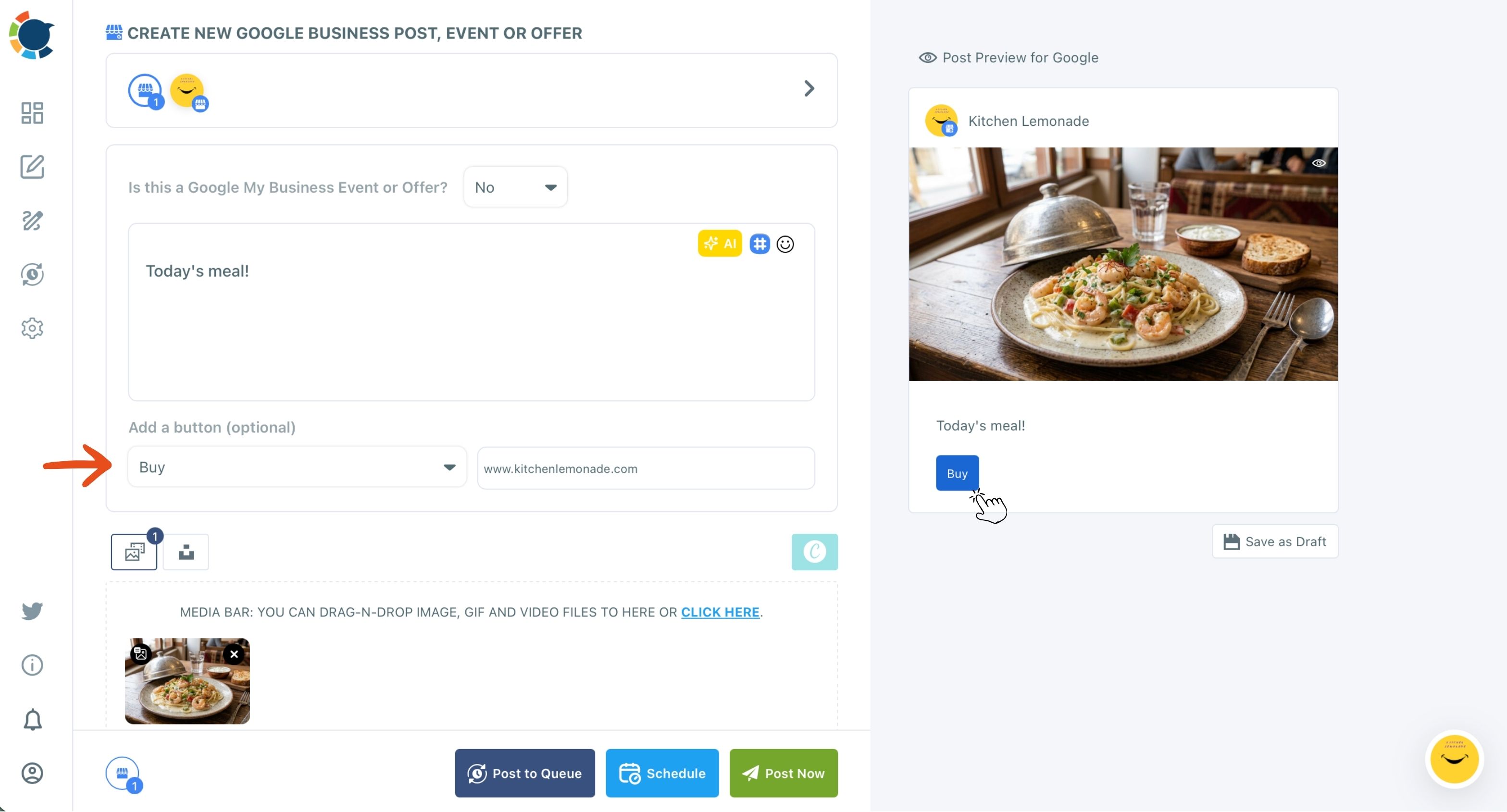
The reader's next move picks the button. Call Now and Order Online suit people who are nearby and ready, while Book and Sign Up suit anything with a slot or a list.
Writing the answer with AI, then checking it
The writing is where most owners stall, and the AI Google Business Post Generator handles that part. Type the ask and the facts, for example "the side entrance is step-free and the lift reaches every floor." It returns a finished answer you can tighten with quick edits like Condense.
Check every date and detail before it goes out, since searchers will act on what the post says.
If you would rather see the whole picture first, the Google Business Profile manager shows how owners run answer posts in place of Q&A.
Answers you already wrote elsewhere are a head start. If your team posts how-tos on its LinkedIn page, see how to share a LinkedIn company page post on Google My Business. One answer can then serve both audiences.
How long should an answer post on Google Business Profile be?
A Google Business Profile post holds up to 1,500 characters, but an answer post works best at a few short sentences. People read these on a phone, standing on your listing, deciding whether to come in.
The composer's limits for this platform are:
- Description: up to 1,500 characters.
- Title, for Event and Offer posts only: up to 58 characters.
- Images: up to 10 per post, 5 MB each.
The full rules for other platforms sit in Circleboom Publish's text and media limits.
The trap is reusing copy from a channel with a longer allowance. Say your Instagram caption about the new opening hours runs 2,000 characters. Cut it to the essentials for Google: what, when, where, and the button.
A nearby searcher scans; they do not read.
Add alt text to the photo as well. Google Business Profile is one of the platforms where Circleboom Publish supports custom alt text, and a described image can be found in image search, which gives the answer one more way to be seen.
I keep a simple test for every answer. If the first sentence alone would satisfy the person asking, the post is the right length. Everything after it is for the reader who wants detail, and the button does the rest.
When an answer has a date: dated post types on Google
Some answers expire. "Are you open on the holiday weekend?" is true for three days, and "is there a student discount?" may be true only for a season. Those answers fit Google's dated post types better than a Standard post:
| The answer is about | Post type in the composer | What the reader sees |
|---|---|---|
| Something permanent: parking, walk-ins, accessibility | Standard, with a button | The answer and one action |
| A dated happening: holiday hours, a workshop, a tasting | Event, with start and end times filled in | A title and a visible date range |
| A deal with an end date: a seasonal discount, a bundle | Offer, with coupon code, redeem link and terms | A coupon box and a validity window |
The three are mutually exclusive in the composer: one post is exactly one structure. An Offer drops the button dropdown and uses its coupon fields as the call to action instead.
Two habits for dated answers on your Google listing
Fill in the Event time fields every time, because a specific window reads as real while a vague "this month" does not. And schedule dated posts several days to a couple of weeks ahead, so Google has time to show them before the date arrives.
Google's own help page on posts adds a detail worth knowing: an Event without a start or end time shows as lasting 24 hours on the event dates. For holiday hours, set the real times so the window matches what the business is actually doing.
The profile's opening hours themselves are still changed inside Google. A holiday Event tells people what is happening; the hours on the listing should match it.
Google's own dashboard or a scheduler for answer posts?
Both can schedule. Google's Business Profile dashboard has a "Schedule this post" option and a "Repeats" setting, and it lets you share one post across several profiles you manage. For one location and a handful of answers, that may be all you need.
A scheduler earns its place when the answers become a routine. Circleboom Publish adds four things that matter for answer posts:
- Suggested times per location, shown under "Pick your best post time."
- A Queue that drops each new answer into the next open slot.
- AI writing, Canva designs and Google Photos inside one composer.
- The same news sent to Facebook, Instagram and other platforms in one send.
The suggestions follow when each profile's customers search, view and call. The Best Time to Post on Google Business Profile page explains them. An opening-hours answer for a lunch spot lands better late in the morning than at midnight.
Where a scheduler pulls ahead for chains on Google
For chains, the difference grows. Share Groups bundle locations by district or brand for one-click selection, and Team Management lets a branch manager post only for their own location, with posts held for approval if needed.
Owners comparing schedulers can read how Circleboom and Buffer compare for Google Business Profile scheduling, which sets the two side by side for this platform.
The practical gain is batching. A whole month of answer posts can be written and dated in one sitting, then reviewed in the Outbox calendar instead of being remembered one by one.
The short version for your Google listing
Google has ended Q&A access for tools and says the feature is being updated. Whether your profile shows a Google Business Profile Q&A box today is something only your listing can tell you.
The answers customers need now live best in Standard posts with a button, with Event or Offer for anything dated, refreshed before they fade. Circleboom Publish keeps that routine running across every location from one composer, so your answers stay in front of people at the moment they decide.
→ Build the answer posts that replaced Google Business Profile Q&A
What people ask now that Q&A is changing
Do I have to post an answer again once it fades?
Yes. A Google Business post tends to fade within about a week, so bring each answer back with Share Again from Sent Items and an AI rewrite, never as an exact copy. A Queue with automatic posting to Google Business Profile keeps those returns on a steady rhythm.
Should my business description still carry the common answers?
Keep the description for what the business does and what sets it apart, written once inside Google. Answers that need a button, a date or a refresh belong in posts, which the description cannot offer.
Should every location get the identical answer post?
No. Fresh, original posts do better than duplicates, so let the AI writer adjust each location's version with a local detail. A multi-location send carries the same text to every profile, so check that addresses, phone details and hours in it are right for all of them.