
How do you register a business so Google Assistant, Siri or Alexa names it when someone asks out loud? You don't fill in a form; you make sure the listings those assistants read are claimed, exact and kept active.
Is there a voice search registration for businesses?
No: assistants answer from business listings, so how to register my business for voice search comes down to a claimed, accurate Google Business Profile (and an Apple place card for Siri) that keeps posting. Circleboom Publish schedules and automates those Google Business Profile posts so the listing stays active between your edits.
→ Keep your business listing ready for voice search
Why no voice search form exists for Google, Siri or Alexa
There is no single sign-up because each assistant reads from a listing its owner already keeps. A spoken "dentist near me" is a local search with a voice on top, and the answer comes from the same business data that powers a typed search on a map.
That changes what "registering" means. You register your business for voice search by registering it where the listings live, then keeping those listings right.
It also explains why the question is asked so often. Owners hear that customers "ask their phone" and assume the phone has a directory of its own.
It does not; it borrows the directories that already exist, and the business that does well by voice is usually the one that does well on the map.
Most guides stop at "claim your profile." That covers the first link of the chain and skips the rest:
- Listed: the business exists in the assistant's source.
- Exact: name, category, hours, address and phone match the real business.
- Active: the listing keeps getting new content Google can match.
- Checked: you confirm the business actually comes up.
Which link of the chain Circleboom Publish covers
Circleboom Publish covers the active link for Google: it writes, schedules and queues Google Business Profile posts. The listed and exact links happen inside Google and Apple.
A paid "voice search registration" offer that promises all four for a fee is selling something that does not exist. The honest answer costs nothing but setup time and a posting habit, and the habit runs from a Google Business Profile manager.
In one line, Circleboom Publish is the scheduling and automation layer for Google Business Profile posts, not a directory and not a listing service.
Where each assistant gets your details
Each assistant reads a business listing, but only two of the three owners publish where theirs comes from. The table sticks to what the owners themselves state.
| Assistant | Where the business data comes from | What you control |
|---|---|---|
| Google Assistant | Google Business Profile, which Google compiles from public web information, licensed third-party data, contributions from users and owners, and Google's own interactions with the business | Claiming and verifying the profile, its facts, and the posts it publishes |
| Siri | Apple's place card, which a business claims and edits through Apple's free business tool | Claiming the place card and keeping its details current |
| Alexa | Not stated by the owner: Amazon does not publish where Alexa's local business answers come from | Keeping your other listings accurate, since no source is documented |
Google's own explanation of how Business Profile information is sourced adds one more detail worth knowing. Profiles appear on Search and Maps and also reach third-party websites and apps through APIs, so one accurate profile feeds more surfaces than Google's own.
On Apple's side, the introduction of Apple Business Connect describes a free tool for claiming a place card. Once claimed, the business can update how it appears across Apple Maps, Messages, Wallet, Siri and other apps. Apple's current guide names the tool Apple Business.
Why an idle profile only answers to its own name
Here is the part the table cannot show. A connected profile that never posts tends to come up only when someone asks for the business by name.
Ask an assistant for "the dentist on Main Street" and an idle profile can answer. Ask for "a dentist open on Saturday near me" and that same profile has given Google nothing beyond the basics every competitor also filled in.
Activity is a visibility input.
Google's local algorithm favors profiles that stay active, and every post is one more piece of content the profile can be matched to.
Which posts to write is its own topic: in short, one post per question customers actually ask, written in their words.
Is your business on Google and Maps yet?
Check this before anything else, because every later step assumes a claimed profile exists. Search the business name on Google Maps while signed in to the Google Account you think owns it, and look for the profile and its manage options.
If nothing comes up, the business has to be added or claimed in Google Business Profile and then verified. The walkthrough on how to register my business on Google Maps covers that path from the start.
None of this happens in a posting tool. Setup, verification and every profile field belong to Google, and Circleboom Publish only connects to a profile that already exists.
For Siri, the matching check is whether the Apple place card has been claimed. Until the card is claimed, the business has no say over what it shows.
Which facts Google and Siri read aloud, and which must be exact
Spoken answers lean on a short list of fields, and each one has to match the real business word for word:
- The business name, as it appears on the sign, with no added keywords or taglines.
- The primary category and the fewest extra categories that describe the core business.
- Regular hours, plus special hours for holidays.
- The address or service area, written precisely.
- A phone number that reaches this location, not a distant call center.
The category matters most for spoken "near me" questions. It now carries far more weight than an exact-match keyword in the business name, so a café named "Best Coffee Downtown" gains little from the name and risks breaking Google's rules for it.
All five fields are edited in Google Business Profile itself, and again on the Apple place card. A practical tour of the Google My Business listing shows where each field sits.
Why exact facts matter more when they are spoken
A typed search shows a list. A spoken answer usually names one business and reads one set of details, so there is no second result on screen to correct a wrong first one.
That raises the cost of a small error. Hours that are an hour off on a holiday send a caller to a locked door, and the assistant said it with confidence.
Check the special hours most of all. Regular hours rarely change, but the holiday that falls on a Monday is exactly when someone asks "is the bakery open today" out loud.
One trap catches multi-location businesses. When the same post goes to several locations, any address, phone or hours written into the text must be right for every one of them, or kept out of the post entirely.
What to check when your Google listing still does not come up
Start with visibility, then completeness, then activity. A profile that is unverified or suspended does not show to other people at all, so a spoken search cannot find it either.
The guide for when my Google Business is not publicly visible walks through those causes one by one.
If the profile is live and complete but still missing from spoken answers, look at what it competes on. Google ranks local results on relevance, distance and prominence, and distance cannot be changed. Relevance grows with a precise category and with posts about the services people ask for; prominence grows with reviews, mentions and links.
Paying does not shortcut this. Google says there is no way to pay for a better local ranking, and whether Google Ads help SEO is a separate question from the free listing an assistant reads.
A business that is verified, exact and posting has done everything an owner can do; the rest is distance and time.
How to test whether the business now comes up
Test with the words customers use, not the business name. A name search proves the profile exists; a category search like "emergency dentist near me" proves it competes.
Run the same spoken question on Google and on an Apple device, since each reads its own listing. Expect results to change with where you stand, because distance is one of the three ranking factors and moves with the person asking.
Repeat the test after a few weeks of posting rather than after every edit. Changes to a profile and to rankings take time to show, and daily checks mostly measure noise.
How the posting side works in Circleboom Publish
The active link of the chain is a weekly routine, and it runs in three parts.
Write each post around a spoken question
To start, open Circleboom Publish and choose the Google Business Specific composer. If only one profile is connected, it is selected automatically.
Picture a café whose customers keep asking two things at the counter: whether it has oat milk and whether it stays open late on Fridays. Each of those is a spoken search waiting to happen, and each becomes a short post in the café's own words.
The AI Google Business Profile Post Writer sits above the text field. Type a customer question as an instruction, such as "write a post on how often to replace a toothbrush", and refine the draft with a second instruction until it reads like your business.
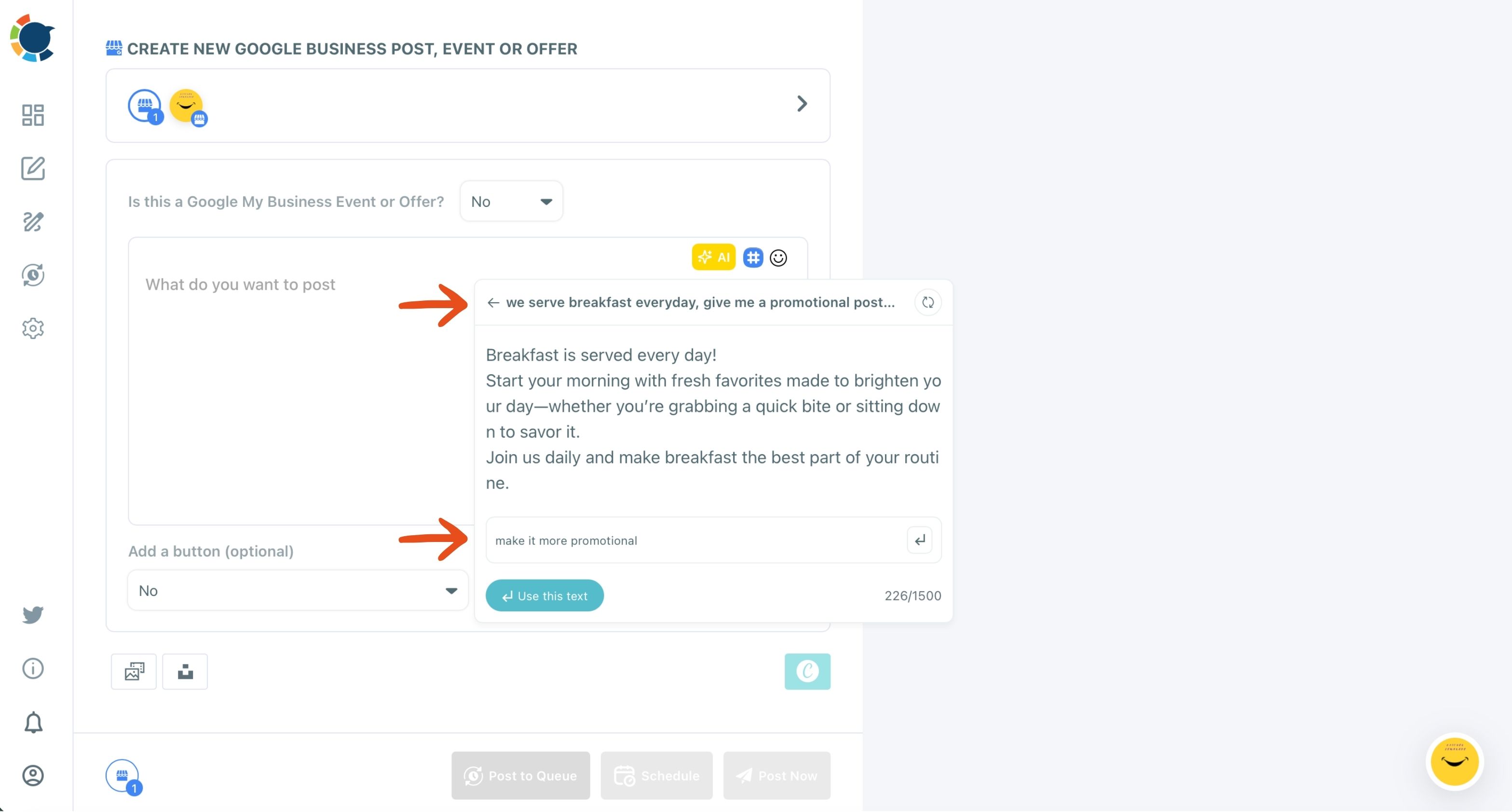
The screen above shows that refinement step: the first draft on top, and "make it more promotional" typed into the box that improves it.
A Standard post can carry a Call Now, Book or Order Online button, so the person who asked out loud has one tap to act.
Schedule the week in one sitting
Each finished post goes to its own date and time, ideally one of the six suggested best times for that profile. Since a Google Business Profile has no followers, those suggestions follow when that profile's customers are searching, viewing and calling.
Scheduling exists in Google's dashboard as well, so the reason to batch here is the AI drafting and having the whole week in view at once.
The Google My Business Scheduler handles the date-by-date version of that week.
Rhythm matters more than volume here. One post every few days keeps the profile looking current, while a burst of ten posts followed by a silent month does not.
Let the queue keep the Google profile active
For a steady rhythm without daily attention, set recurring day-and-time slots for the profile once. Every post sent with Post to Queue takes the next open slot.
The Auto Post to Google Business Profile setup goes one step further. It can feed new blog items from an RSS feed into the same profile.
That is the whole active link: questions in, posts scheduled, Queue running. It is also the part of voice search that never ends, which is why it is worth automating your Google Business Profile posts.
Which voice search step to take first on Google and Apple
Your first move to register your business for voice search depends on where the chain breaks for you:
- If the business is not on Google Maps under your account, add or claim it and finish verification before anything else.
- If it is live but Siri shows old details, claim the Apple place card and correct it.
- If the name, category, hours, address or phone differ anywhere, fix them in Google and Apple until they match word for word.
- If everything is exact but the business only appears when someone says its name, start a weekly posting routine built on customer questions.
- If it is posting and still missing, check verification and visibility, then give relevance and reviews time to build.
Every branch ends at the same state: a verified listing whose facts match and whose posts keep coming. That is the version of voice search registration that exists.
→ Start the posting side of voice search for your Google Business Profile
What people ask about voice assistants and business listings
Can a business with no storefront be found by voice search?
Yes. Google has a setup for businesses that serve customers at the customer's location rather than at a storefront, so a mobile groomer or a home tutor can still have a profile. Once the profile exists, posting keeps it as visible to spoken searches as any shop.
Should I pay a listing service to register me everywhere, or do it myself?
Most owners can do it themselves: the Google and Apple setup is done once, inside those two tools. What a business usually lacks is time for the part that never ends, the regular posting, and that is the part worth automating rather than outsourcing.
Does Google Assistant have its own sign-up for local businesses?
Google runs a separate program in the United States that lists local service providers on the Google Assistant, with an application and a screening review, and approved businesses are listed as Google Guaranteed providers. Google says it does not charge for it for now. It is a provider program for certain services, not a general voice search registration.
Can I keep several locations ready for voice search at once?
Yes. Each location needs its own verified profile with its own exact details. Circleboom Publish lets you manage multiple Google Business Profiles and send one post to all of them in a single action. Check that nothing in the shared post is specific to one branch.