What does it take to optimize your Google Business Profile in 2026 when you only have a couple of hours a month? A checklist that says, for every item, where it is done and how often it comes back.
What this checklist gives you.
• A table of every item, where it is done and how often it repeats.
• A rule for filling a quiet month from RSS, Discover Articles or Share Again.
• A clear line between running it yourself and paying a service.
Circleboom Publish schedules, automates and measures Google Business Profile posts, the monthly half of the list. Schedule the monthly half in the Google Business Profile manager.
The 2026 Google Business Profile checklist in one table
The 2026 checklist has nine items: five you handle inside Google and four you repeat every month in a scheduler.
| Item | Where it is done | How often |
|---|---|---|
| Verification | Google Business Profile | Once, and again after a name or address change |
| Name and primary category | Google Business Profile | Once; recheck when your services change |
| Hours and special hours | Google Business Profile | Monthly check before holidays |
| Logo, photos and description | Google Business Profile | Once; new photos when something changes |
| Review replies | Google Business Profile | Every time a review arrives |
| Planned posts: Standard, Event, Offer | Circleboom Publish | One planning session a month |
| Quiet-week fill | Circleboom Publish | Whenever the calendar shows a gap |
| Timing | Circleboom Publish | Every post |
| Measurement | Circleboom Publish and Google Analytics | End of every month |
Five rows live in Google and mostly stay done; four rows are a monthly habit, and the monthly rows are where most listings stall.
Circleboom Publish covers those four monthly rows by creating, scheduling and measuring Google Business Profile posts, while the five Google rows stay in Google's own dashboard.
That split is the whole method. If you want to start on the monthly half today, schedule Google Business Profile posts in the post composer.
What Google weighs, and why its items are done once
Relevance, distance and prominence are the three factors behind Google's local results. Its page with tips to improve your local ranking says complete, accurate information helps a profile show up and that more reviews and positive ratings can help. Paying for a higher local position, or asking Google for one, is not possible, according to the same page.
Distance is fixed. Relevance and prominence are the two you can move, and the Google rows of the table feed them directly.
Google's guidelines for representing your business set the rules for those rows. The business should appear the way it is known in the real world, across signage and branding, and you should choose the fewest categories it takes to describe your core business.
Those rules explain why the Google rows are one-time work. Once the name, category, hours and photos match reality, editing them again changes nothing until the business itself changes.
For the broader setup side, the post on optimizing Google My Business goes through it.
Review replies are the exception on the Google side, since new reviews keep arriving; reply to them in Google Business Profile itself as they come in.
What Circleboom Publish does for the four monthly items
Circleboom Publish is a Google Business Profile manager that plans, AI-writes, schedules and automates Standard updates, Events and Offers, then shows which posts led to calls and direction requests.
Google's own dashboard can schedule posts natively, repeat them and share one post across several managed profiles, so the scheduler is not what is missing from most listings.
What is missing is a month: planned slots, written posts, timed sends and a look back at the end.
Circleboom Publish puts those in one place:
- A composer with a dropdown for Standard, Event and Offer posts, and an AI button above the text.
- Canva, Unsplash, Giphy and Google Photos in the media bar, with alt text on images.
- Six suggested posting times per profile, and a Queue that can fill itself with them.
- An Outbox with List and Calendar views, filterable by post type, account and Share Group.
- Analytics read in calls, direction requests, clicks and views.
Compared with building each post in Google's dashboard, the month sits in one calendar where a missing Offer or an empty week is visible at a glance. The Google Business Profile Post Scheduler handles the dates.
One send for every Google Business Profile location
For a business with several locations, one more detail changes the workload. Selecting several profiles sends the same post to all of them in one action, and a Share Group saves that selection for next month. Because every location receives the same text, keep branch-specific addresses and phone numbers out of shared posts.
Every monthly row ties to that one composer in the Google Business Profile post manager, whether it serves one listing or twenty.
How to optimize your Google Business Profile in 2026 each month in Circleboom Publish
To run the monthly half of the checklist, open the Google Business Specific composer, build the month's Standard, Event and Offer posts in one sitting, and time each one at a suggested slot or send it to the Queue. The four steps below take about two hours for a month of posts once the routine is set, and they never touch the profile's Google-side settings.
- Open Circleboom Publish and go to the Google Business Specific card on the dashboard to start a new month of posts.
- Choose the profile, or a Share Group of locations, in the account panel. A single connected profile is selected automatically; with several, one selection sends each post to all of them.
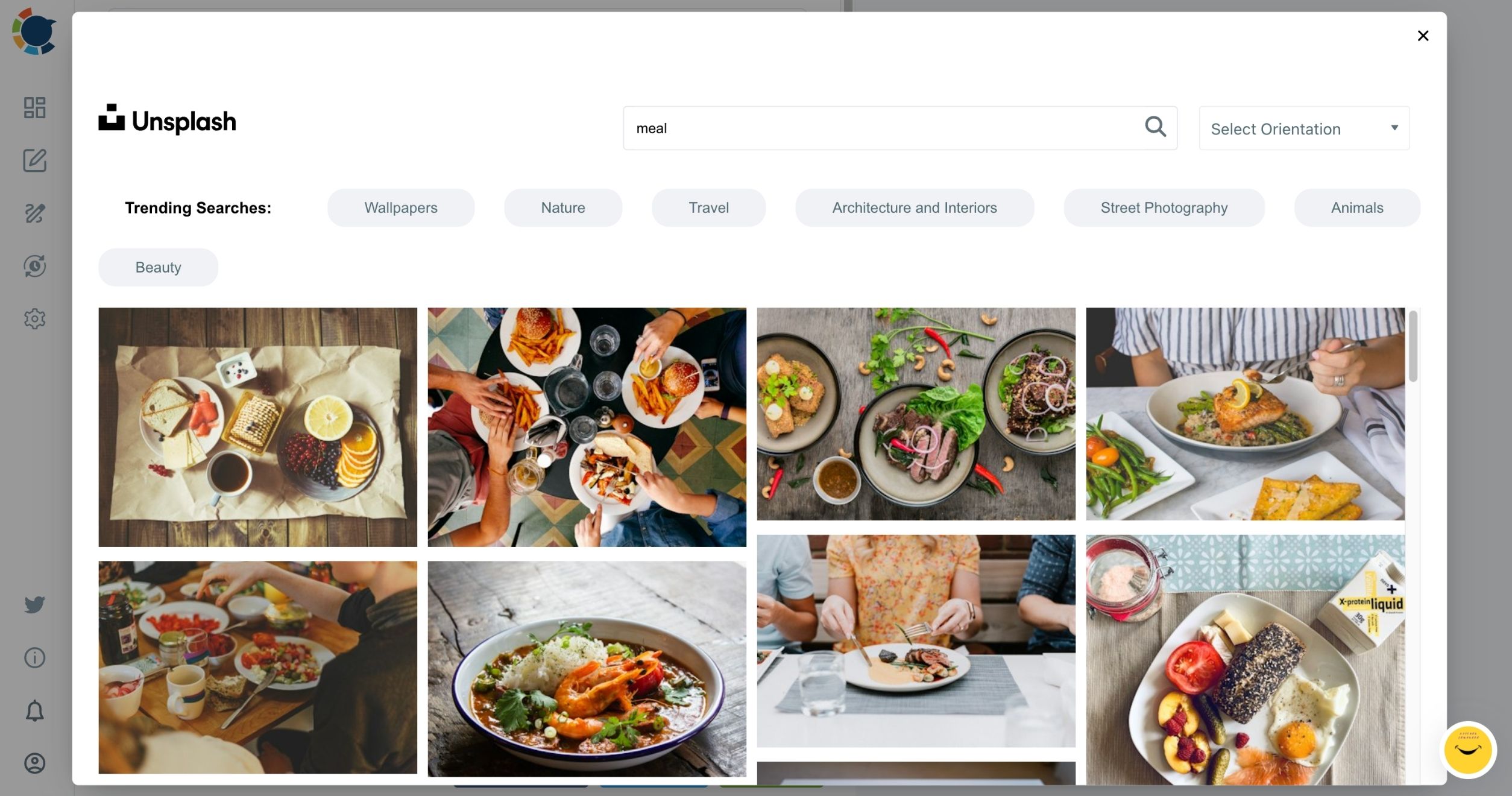
- Build the month's posts by picking Standard, Event or Offer in the dropdown, drafting the text with the AI button, and attaching an image from Unsplash, Canva or Google Photos with alt text. Save each one as a draft until the month is complete.
- Schedule each post at a suggested time or send it to the Queue, then check the month in Calendar View. The suggested times follow when the profile's customers are active, since a Google Business Profile has no followers.
The month is built before it is timed, so every slot gets a finished post instead of whatever was ready that morning, and the calendar check catches a thin week while there is still time to fill it.
How to fill a quiet month on your Google Business Profile
Fill a quiet month from what you already produce: a blog means RSS, no blog means Discover Articles, and a post that already brought calls means Share Again.
| Your situation | Use this | What it does | Watch for |
|---|---|---|---|
| You publish a blog or news page | RSS Feed to Google Business Profile | Posts every new item on its own | Not reviewed by a person unless paused |
| No blog, but trusted sources in your field | Discover Articles | Sends matched articles to the Queue in one click | Pick sources your local customers care about |
| Last month had a post that worked | Share Again on Sent Items | Copies it into an editable version | Rewrite it with AI before it goes out |
| One article deserves its own post | AI Content Generator | Turns a URL or text into a new post | Check every fact it carries over |
Pick the source by what you already have, not by what you wish you had time to write.
Choosing the right source for your Google listing
RSS is the one I would set up first if a blog exists, because it keeps posting after the setup without a calendar slot. Every location needs its own RSS connection, so a business with several profiles sets up one feed per profile.
RSS setup: a blog feed connected so a Google Business Profile keeps posting through a quiet month.
With no blog, Article Curation is the route: set your interests once, then send the articles that fit your customers to the Queue.
A proven post can come back too, through Share Again, as long as it is rewritten so the profile never shows the same text twice.
As an illustration, a café that publishes one blog article a week gets four RSS posts a month with no extra writing. That leaves the composer free for the month's Offer, an Event and two rewritten re-runs, which is a far lighter planning session than writing every slot from scratch.
That is how a quiet month still counts toward Google Business Profile optimization.
How do you measure whether the month worked on Google?
Measure the month in customer actions, not in a ranking number: calls, direction requests, website clicks and views per post.
The end-of-month review uses four sources:
- Content Performance Analytics, for calls, direction requests, clicks and views per post.
- Audience Analytics, for profile views and the search queries that found the listing.
- Button and Redeem Online links carrying UTM tags, tracked in Google Analytics.
- Duplicated posts with one change, compared to see which version brought more actions.
The Post Analytics view is where those per-post numbers live in Circleboom Publish.
Reading the results across several locations
Read each location on its own, because every branch has its own local audience. A profile near an office district and one in a residential street can respond to the same Offer in different ways, and the per-profile view shows that before you copy one branch's plan to the rest.
What you do with the numbers matters more than the numbers. Repeat the post types that brought calls, drop the topics that only collected views, and move an Offer to the slot where it drew the most direction requests.
Say, as an illustration, a hair salon's month had eight Standard updates, four Offers and two Events, and the Offers drew most of the calls while the updates mostly collected views. Next month's plan shifts toward Offers, with a UTM-tagged booking link to show the website side.
That feedback loop is what keeps Google Business Profile optimization moving from one month to the next.
For a wider view of the numbers behind local search, these Google Business Profile statistics and optimization strategies make a useful companion read.
Should you run the checklist yourself or hire a Google Business Profile service?
Run it yourself when one person can give it about two hours a month, and hire a service when nobody in the business can own the monthly plan. The table shows where the two routes differ:
| Factor | Yourself, in Circleboom Publish | A management service |
|---|---|---|
| Your time | About two hours a month for a month of posts | Briefing the service and checking its work |
| Google-side rows | You edit them in Google Business Profile | The service needs access to your profile |
| Several locations | Select all profiles, or one Share Group | Depends on the service's own process |
| Approval | Team Management routes staff posts to an Admin | Depends on the agreement |
| AI copy | Included in the Circleboom membership | Written by the service |
The middle route agencies use
There is a middle route as well. An agency can run its clients from Circleboom Publish too: one Share Group per client, and Team Management so each client's accounts stay separate and staff see only the profiles they handle.
Before you sign with a service, ask three questions that map to the table:
- How many posts a week, and which mix of Standard, Event and Offer posts?
- Who replies to reviews and keeps hours current inside Google?
- What does the month-end report show: calls and direction requests, or only views?
If you are weighing a Google My Business management service, compare its monthly plan with the four monthly rows of the checklist. If the plan is just "we post for you," you can run the same rows yourself.
The one rule behind the 2026 Google Business Profile checklist
Finish Google's half once, then never let the monthly half skip a month.
→ Run your monthly Google Business Profile posts from one composer
FAQ on optimizing a Google Business Profile in 2026
Should every month include an offer and an event?
Yes, plan both as fixed calendar slots, because they are the two post types built to make a nearby searcher act. Write a season's Offers and Events in one sitting, and post each Event several days to a couple of weeks ahead. For the Event side, see how to schedule Event posts on Google My Business.
When is the one-time Google setup actually finished?
It is finished when the five Google rows of the table match the business as it exists today: verified, named as on the storefront, a specific primary category, current special hours, recent photos and a description about the business itself. A new name or address can mean verifying again, so treat any change to the business as a reason to reopen those rows.
Can keywords in my business name get my profile suspended?
Yes. Google's guidelines say including unnecessary information in the business name is not permitted and could result in suspension, so use the name customers see on your storefront and let the category carry the keyword.
How often should I update my Google Business Profile?
About six posts a week works well for many profiles, as a tip rather than a requirement. The Google-side details only need updating when the business changes, plus a monthly check of special hours.
Do RSS posts on Google Business Profile become events or offers?
No. Items from an RSS feed publish as Standard posts, because Events and Offers need their own fields, such as dates and coupon codes. Write those in the composer and let RSS carry the regular updates.