The best social media campaign examples for a small brand are the ones you can run with your own photos, a handful of posts and the accounts you already have. Below are 15 of them, each with the kit it needs and the schedule shape that makes it work.
What a copyable small-brand campaign gives you.
• A clear idea that needs your own product, place or customers, not a celebrity.
• A short run of posts, usually 3 to 10, spread over one to four weeks.
• One launch moment that goes live on every account at the same time.
Circleboom Publish schedules each campaign post to Instagram, Facebook, X, LinkedIn and six more platforms in one send. Pick the example that fits your budget, then schedule your social media campaign on every account in one send.
Most lists of campaign examples are built from famous brand work. That is useful for inspiration and useless as a plan, so every example here is a pattern a two-person team can repeat.
Why big-brand social media campaign examples rarely fit a small business
Big-brand social media campaign examples depend on things a small business does not have: a media budget, a celebrity face, an agency team and a year of planning. Copy the look of those campaigns and you get the hashtag without the reach.
A small brand wins with a different set of advantages. You know your customers by name, you can photograph your own product today, and your story is specific in a way a global brand's cannot be.
The small business branding examples we collected show how far a consistent local identity carries.
The hard part is rarely the idea. It is the posting: a five-post campaign on four platforms is twenty separate publishes if you do it account by account, and most small teams give up halfway through week two.
That is why every example below is sized in posts and platforms. It is also why it helps to automate the posts behind a social media campaign before the first one goes out.
Pick your platforms by where your customers already are. Pew Research Center's 2026 survey of how Americans use social media shows the spread:
- YouTube is used by 84% of U.S. adults.
- Facebook is used by 70% of U.S. adults.
- Instagram is used by 51% of U.S. adults.
Those numbers come from Pew Research Center's social media fact sheet, and they are a reminder that one platform alone rarely reaches everyone a small brand serves.
15 social media campaign examples small brands can copy
These 15 campaign examples are grouped by what they ask of you: an offer, your community, or a short piece of video or a partner. Every one is a pattern, not a case study, so the numbers are yours to set.
Launch and offer campaigns
Offer campaigns have a start, a peak and an end date. That shape makes them the easiest to schedule in advance.
- Launch-day countdown. Post three teasers over the week before a product goes live, then one launch post that appears on every account at the same minute. A spring sale that starts Monday at 9 a.m. is the classic shape: write it once, schedule it once, and the whole launch lands together.
- Weekend flash sale. Announce on Thursday, remind on Saturday morning, and post a "last hours" note on Sunday afternoon. Three posts, one clear deadline, and a code that only lives on social media so you can see where buyers came from.
- Giveaway or contest. Ask people to follow, comment or share a photo for a chance to win a product you already sell. Write the entry rules into the first post, and read how to run a successful Twitter contest before you pick a winner on X.
- Bundle of the month. Pair two products that customers already buy together, give the bundle a name, and post it four times across the month with a new photo each time. The repeat is the campaign, so change the angle, not the offer.
- Anniversary thank-you. Mark your shop's birthday with a week of posts: a throwback photo, a staff thank-you, a customer shout-out and a small discount on the day itself.
Community and content campaigns
Community campaigns run on what your customers and your team already make. They cost time more than money, and much of the secret behind viral marketing is the same loop: people share what features them.
- Customer photo campaign. Invite buyers to post your product with one branded hashtag, then repost the best ones with credit each week. Every repost invites the next buyer to post their own photo.
- Behind-the-scenes week. Five posts, one per working day: sourcing, making, packing, a team member, and the finished product in a customer's hands. It suits any business with a process people never get to see.
- Local event week. Tie a menu item, a class or an in-store event to a date in your town, and post daily in the run-up. Our list of restaurant promotion ideas works for cafes, bakeries and any shop with a counter.
- Tip series. Turn what you know into five short lessons, one per post, ideally as carousels: a florist's care tips, a bike shop's maintenance checks, a bookkeeper's tax reminders. Each post earns a save, and saves keep the account in front of people.
- Founder story. Three posts on why the business exists: the problem you noticed, the first version, and what changed. Keep it to facts you can stand behind, and end the last post with what you sell today.
Video and partnership campaigns
Video and partner campaigns borrow reach: from a format the platforms push, or from someone else's audience.
- One-clip video series. Film one 30-second clip a week and post the same file to Instagram, Facebook, TikTok and YouTube at once. Circleboom's page on how to cross-post videos covers the one-upload, four-platform flow.
- Creator collab. Send your product to a local creator with a few thousand engaged followers and agree on one post plus one story. If you pay them or give the product free, the FTC's disclosures guidance for influencers says the connection has to be obvious in the post.
- Neighbor brand swap. Two local businesses with the same customers each post about the other for a week, with a joint offer at the end. A coffee shop and a bookshop, or a gym and a juice bar, are natural pairs.
- X conversation campaign. Run a weekly question, a poll or a short opinion thread on X and reply to every answer for an hour after posting. The brands to learn Twitter marketing from show how far a consistent voice goes on X.
- Seasonal countdown. Pick one season or holiday your customers care about and post a themed product or tip every few days for three weeks. Plan all the posts in one sitting, since the dates are known months ahead.
The idea is the easy part of all fifteen; the schedule is what decides whether the campaign finishes.
What each campaign needs before you copy it
Each of the 15 social media campaign examples needs four things before it can run: assets, a post count, a set of platforms and a schedule shape. This is the copy kit for each one.
| Campaign | Assets you need | Posts and platforms | Schedule shape |
|---|---|---|---|
| Launch countdown | Product photos, one launch image | 4 posts, every account | 3 teasers, 1 timed launch |
| Weekend flash sale | Offer image, discount code | 3 posts, 3 to 4 platforms | Thursday, Saturday, Sunday |
| Giveaway | Prize photo, written rules | 2 to 3 posts, 1 to 2 platforms | Open, reminder, winner |
| Bundle of the month | 4 bundle photos | 4 posts, 2 to 3 platforms | Weekly |
| Anniversary thank-you | Old photos, team photo | 5 posts, every account | Daily for one week |
| Customer photos | One hashtag, reposts | 4 or more posts, Instagram first | Weekly reposts |
| Behind the scenes | 5 process photos or clips | 5 posts, 2 to 3 platforms | Daily for one week |
| Local event week | Event image, menu or class photo | 5 to 7 posts, local accounts | Daily run-up |
| Tip series | 5 carousels | 5 posts, Instagram and LinkedIn | Twice a week |
| Founder story | 3 photos, a short script | 3 posts, every account | Every other day |
| Video series | One clip a week | 4 posts per clip, 4 video platforms | Weekly, same time |
| Creator collab | Product sample, brief | 1 to 2 creator posts, 1 repost | One day plus repost |
| Brand swap | Partner photos, joint offer | 3 to 5 posts each, both brands | Same days for both |
| X conversation | Questions or polls | 1 post a week, X | Weekly, then replies |
| Seasonal countdown | Themed product photos | 6 to 8 posts, every account | Every few days |
Read the last column first. A campaign with one timed moment, such as a launch or a sale, needs scheduling more than it needs content, while a weekly series needs a queue that keeps going without you.
Do you need design or video skills to copy these campaigns?
No, you need photos of your own product and a composer that fills the gaps. Circleboom Publish puts Canva, Unsplash stock photos, Giphy and Google Photos in the media bar of the post composer, so a missing image never stops a campaign post.
The tip series and the bundle campaign both run best as carousels. The AI Carousel Generator turns a short instruction into templated slides with editable fonts and colors, so a five-lesson series does not need a designer.
Video is simpler than it looks for small brands. One vertical clip shot on a phone covers the video series, the behind-the-scenes week and the launch teaser, and the composer's music library adds a track that fits the mood before you share it.
See it in practice: one short clip uploaded once and published to Instagram, TikTok, YouTube and Facebook together, the move behind the video-series campaign.
Captions are the last gap. The gold AI button in the composer writes a draft from a prompt or rewrites one you already have.
The AI Social Media Post Generator gives each account its own version of the same campaign message. That matters, because identical posts on several accounts of one platform can limit reach.
How to launch a small-brand campaign on every account at once
To launch a campaign everywhere at the same moment, write the post once, select every account it should reach and schedule one send for the launch time. Circleboom Publish does this from one composer for X, Instagram, Facebook, LinkedIn, Pinterest, Threads, Bluesky, TikTok, YouTube and Google Business Profile.
Native schedulers post to one account on one platform at a time, which turns a four-platform launch into a morning of logging in and out.
Circleboom is an official X Enterprise Developer, so the X side of the launch runs through an approved connection while the same send reaches your other platforms. Use it to queue a whole campaign's posts across your accounts in one sitting.
The four-move launch flow in the Circleboom Publish composer
The universal Create New Post composer is where the launch happens. It holds the accounts, the text, the media and the three publish buttons on one screen.
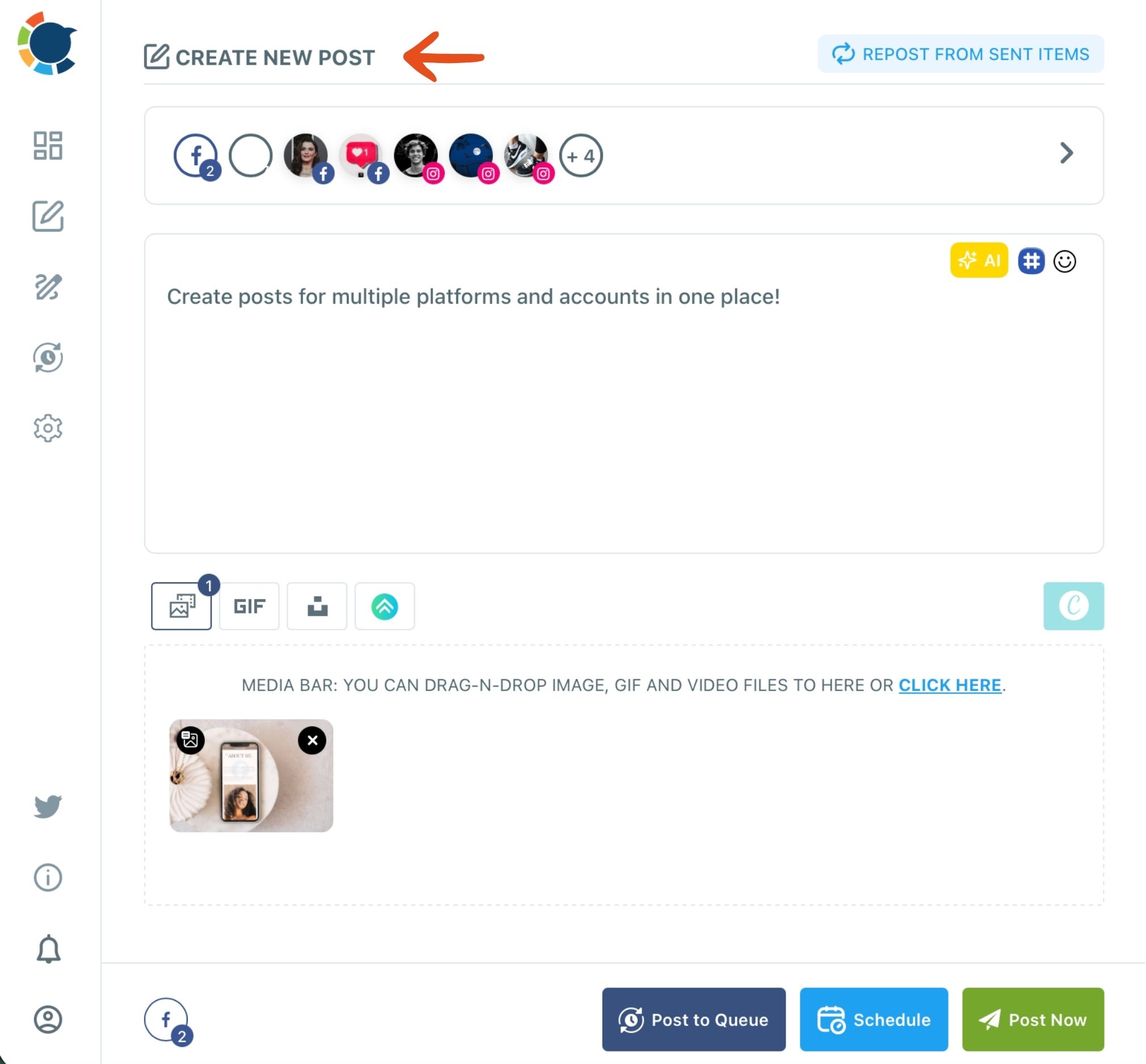
The launch flow takes four moves, and it is the same for a flash sale, a countdown or a seasonal post:
- Open Create New Post on All Platforms from the Circleboom Publish dashboard, or click the "+" on an empty day in the Outbox calendar to start a post for that date.
- Select every account the campaign should reach, by platform icon, by search, or with a saved Share Group that holds all of your brand's accounts.
- Write the post and check Post Preview for each network, keeping X under 280 characters and Bluesky under 300, and adding an image for Instagram.
- Click Schedule and pick the launch time, or Post to Queue for a weekly series that should fill each account's next open slot.
That order puts the strictest platform check before the send, so one post can go everywhere without a broken version on X or a missing image on Instagram.
The time math is what makes a campaign finish. As an illustration from the feature's own example, four campaign posts going to seven accounts on four platforms are 28 separate publishes by hand, and four sends of about ten minutes in total from one composer.
The checklist before your first campaign goes live
Copying one of these social media campaign examples takes five decisions you can make in one sitting:
- Pick one of the 15 examples that uses assets you can make this week.
- Write down the post count and the platforms from the copy-kit table.
- Choose the schedule shape: one timed launch, a daily week or a weekly series.
- Write each post once, then let the AI give each account its own version.
- Schedule the whole run, check the preview for X, Bluesky and Instagram, and tag every link.
With those five done, the campaign runs on its own while you answer the comments it brings in.
→ Schedule your next social media campaign
Questions about copying a small-brand campaign
How do I know which campaign post worked?
Tag every link in the campaign with a UTM code before it goes out. In Circleboom Publish, click the link icon next to a pasted link, fill in source, medium and campaign, and the clicks from each post show up separately in Google Analytics.
Can I post the same campaign post on every account?
You can send one post to every account, but identical text on several accounts of the same platform can limit reach. Ask the AI writer in the composer to rephrase the post for each account, and Circleboom also blocks the same tweet from going out again within a week on X.
Can I run these campaigns on Instagram without images?
No, Instagram needs at least one image or video in every post, while X accepts text alone. If a campaign post goes to both, attach an image from Canva, Unsplash or your own photos before you schedule it.