

The search box on X is the worst place to look for an event that already happened, because it is built to show what is popular or new today. The posts are still there; the route to them is what has to change.
Where do the tweets from a past event live, and how do you pull them?
They stay on X as public posts, but X's search ranks them or buries them under newer ones, so the reliable route is a date-bounded search of the event's own words. Circleboom pulls the public tweets of a past event window on X through X's official Enterprise APIs and lists the accounts that posted them.
→ tweets during an event
Where do tweets from a past event go on X?
They go nowhere. Public posts from a conference, a match, a launch or a news moment remain on X after the event ends, unless their authors delete them or make their accounts private.
What changes is how findable they are. X's search tabs either rank posts or order them from the newest backwards, so an event from last month sits under everything posted since.
The tweets during an event are present; the default view simply does not point at them.
I think of it as a filing problem rather than a missing-data problem. A ranked tab files posts by how much attention they got, and a time-ordered tab files them by how recently they arrived.
Neither files them by the event they belonged to, and that is the only filing system an event review needs.
Circleboom retrieves the public tweets posted on X inside a date window you set and shows them with their engagement counts and their authors. That makes the event a closed set again, with a first day and a last day.
You can pull the tweets posted during an event without guessing how far to scroll.
For readers who want to stay inside X's own filters first, the guide on how to use Twitter advanced search covers the built-in route.
What each route returns for a past event on X
Four routes can reach a past event's posts, and each returns a different slice. The table compares them on the four points that decide whether you can use the result.
| Route | How results are ordered | How far back it reaches | Can you keep the set or list the people? |
|---|---|---|---|
| Top tab in X search | Ranked by relevance, so popular posts lead | Not tied to a window you control | No export, no author list |
| Latest tab in X search | Newest first, starting from today | Back through everything newer before the event appears | No export, no author list |
| since: and until: operators on X | Inside the dates you set, still shown in Top or Latest | As far as the dates you type | No export, no author list |
| Circleboom Historical Tweet Search | Inside the window you set, sortable by any column | Presets up to one year, or any custom range | CSV export and a deduplicated Profiles view |
The ordering of a view decides what you see first. The window decides what you see at all.
X documents the operators in its Pro help pages: since: and until: operators return posts on or after a date and on or before a date. They are the closest X gets to a window, but the results still land in the same ranked or time-ordered views.
Why X's own API splits recent and archive search
X draws the same line in its developer platform. Its Search Posts documentation separates recent search, which covers the last 7 days, from full-archive search. The archive reaches back to March 2006 and is open to pay-per-use and Enterprise customers.
That split is why event research needs archive-grade access. A week after the event, a recent-only route has already lost it.
Which X route fits which reader
The table maps to readers more than to tools. A fan rechecking one moment from a match gets what they need from the Top tab in a minute.
A journalist who needs the original posts with their timestamps needs a window and a Created At column, because the order of posts is part of the story.
A brand or agency writing a recap needs the set itself: the posts to quote, the counts to report, and the accounts to thank or follow up with. That reader is the one the operators leave stranded, since nothing on X turns a filtered page into a file or a contact list.
The words an event leaves behind on Twitter
An event leaves more than one hashtag behind. People post with the official tag, without it, with the event name spelled their own way, with speaker names and with the campaign line copied from the organiser's announcement.
A historical search should cover that whole vocabulary:
- the official hashtag and any second tag the crowd adopted
- the event or product name, with and without the hashtag
- the names of speakers, players or hosts
- the launch keyword or campaign phrase
- the words to exclude, so unrelated uses of a common term drop out
Circleboom's start screen helps when you are not sure which tag won. It shows trending hashtag chips and example searches under the search box, and the Hashtags filter narrows a run to tagged posts only.
Match types and the verified toggle on X
Two more controls matter for event words. Keyword Match Type switches between an exact phrase, contains and partial matching, which is how a search catches the shortened or misspelled versions of an event name.
The From Verified Accounts toggle narrows the set to verified posters when you want the official voices first, though it hides most of the crowd, so I treat it as a second pass.
Hashtags also point to people, not only posts. The approach to Twitter hashtag search to find relevant accounts shows that side of tag research.
For a standing watch on a tag beyond one event, there is a separate Keyword & Hashtag Tracker.
Coverage limits: what a past event search on X will not return
A historical search returns the public tweets that X's Enterprise API has indexed for the window. Everything outside that boundary stays out, and knowing the boundary keeps a report honest.
How far back you can go is set by the window. The presets are Last 30, 60 and 90 Days and Last 1 Year, and a custom range takes older dates when the event sits further back. Inside that window, these posts never appear:
- tweets from private or protected accounts
- tweets deleted before the search ran
- very old content or quickly deleted posts the index never held, which can leave gaps
Some posts appear in a form that needs a caveat. Edited tweets may show their original or their edited text, depending on when they were indexed. Accounts suspended or made private after the event may still show their old tweets, while their current state differs.
The numbers carry a timestamp too. Likes, retweets and impressions reflect the moment of retrieval, not the event day.
Broad wording is its own limit. A short, common event name returns a large set with lower average relevance, so exclude terms, engagement minimums and the Language filter do more for accuracy than a larger tweet count.
Every gap in an event set gets checked against this list first. Only then do I write a sentence about what people did or did not say.
How Circleboom reads an event window on X
Circleboom's Historical Tweet Search finds public tweets by what was said, inside the date window you choose, and returns them in two views: the matching tweets and the unique accounts behind them. The request is written in plain words; the system turns it into keywords, filters and AI suggestions you can accept or edit.
The tweet count needs one clarification. It sets how many tweets are collected, up to 10,000 per search, not how many accounts you will find, because one prolific author can fill many rows of the Tweets view and still appear once among the profiles.
An event with a few prolific posters returns a short people list, and that shape is itself a finding.
Circleboom is a verified Enterprise partner of X, so the records come from X's own data. Scraping-based collection can miss records or return incomplete fields, and an event report built on a partial scrape has holes nobody can see.
Unlike scrolling X's Latest tab back through weeks of newer posts, a search here starts and ends on the event's dates. To search the tweets from an event window, the process takes four steps.
How to pull tweets during an event on X
To pull tweets during an event on X, describe the event in its own words, fence it with a custom date range and collect a set number of tweets through a historical search. The result is a sortable list of the event's public posts plus a list of everyone who wrote them. The four steps below run that in order.
- Log in to Circleboom Twitter and authorize the X account whose name any list or export should carry.
- Select Advanced X Search, then Historical Tweet search in the X Account Search on Tweets group.

- Type the event's vocabulary into the search box, add exclusions, and accept or edit the AI suggestions.
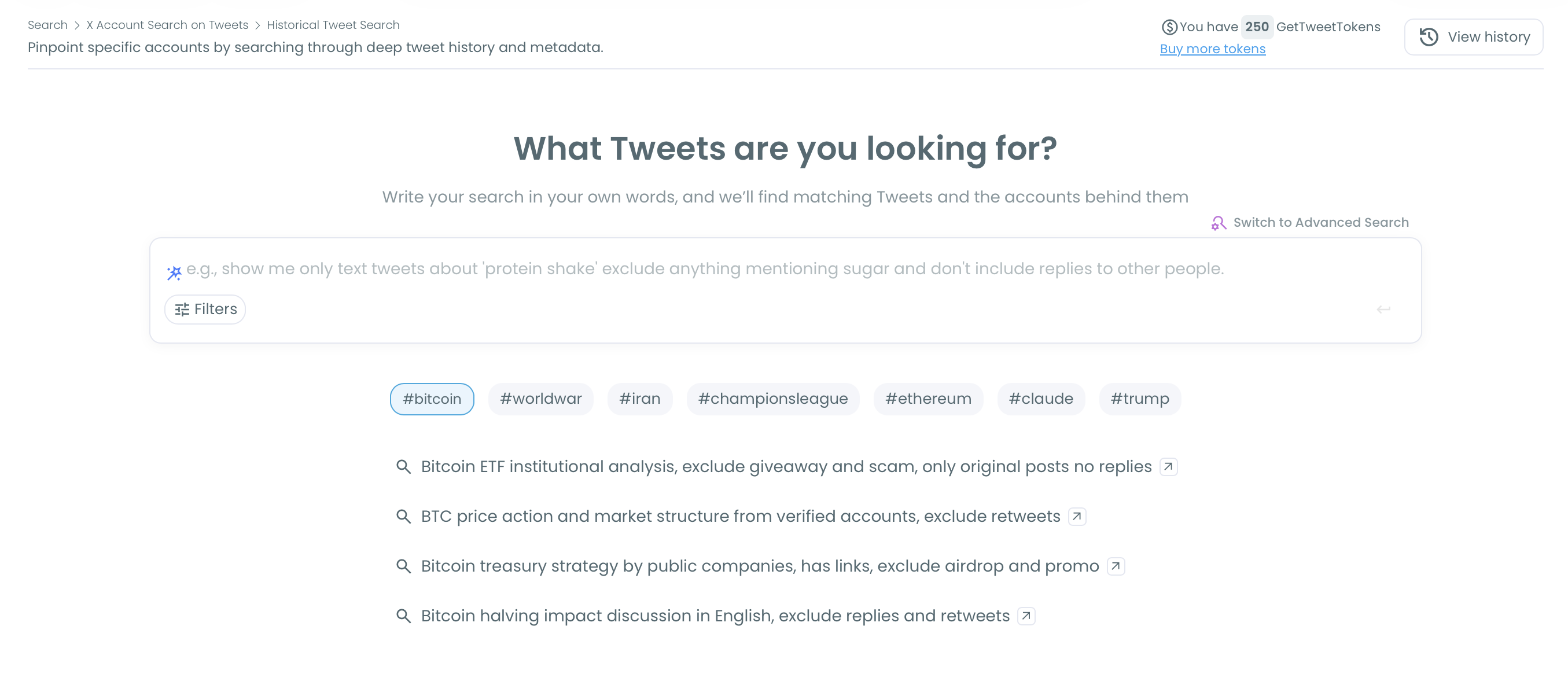
- Set a custom date range and a tweet count, then read the Tweets view and switch to Display Profiles of this search for the people.
Run them in this sequence and each setting inherits a cleaner input. A precise vocabulary keeps off-topic posts out of the window, and a tight window keeps the tweet count, along with the GetTweetTokens it uses, spent on the event itself.
Four inputs go in and two views of one result set come out.
A past window answers what was said. Whether people are still talking about the event is a live question, and that belongs to tools that monitor Twitter activity as it happens.
When the check needs a current feed of the same query, you can track tweets in real time and compare it with the archive.
The event's Twitter Space: where its audio lives
A Twitter Space is audio, so a tweet search does not return it. What Historical Tweet Search finds are the public posts around it: the announcement, the links people shared, and the reactions posted while it ran.
The audio survives only when the host recorded the Space. For a recorded Space, Circleboom's Twitter Spaces Downloader retrieves the audio of a publicly accessible recording. An inline player lets you preview it before you save it.
That pairing gives an event full coverage: the audio from the stage and the tweets from the room.
For more on replay options, see how to listen to Twitter Spaces later.
Saving a recorded Space from an event, from finding the recording to keeping the audio file for later.
The tweets during an event and the Space recording together cover what was said in public. Neither one covers what was said in private messages or closed rooms, and no tool on X should claim it does.
The short version for X event research
An event ends on the calendar, but its tweets stay on X until someone deletes them, so the only thing you need to bring is the event's dates.
→ Search your event's tweets by date
Frequently asked about past event tweets
How do I save the event tweets as a spreadsheet?
Use the Export button on the Tweets view, which downloads the set as a CSV. Export uses GetTweetTokens separately from the search, so filter and sort first and export only the subset you will use.
Can I put everyone who tweeted at the event into one Twitter list?
Yes. Open the Profiles view, select the accounts, choose Add to List and then Twitter List, and add them to an existing list or create a new public or private one in the same step.
Does the search include replies posted during the event?
Only if you want them. The Replies filter includes or excludes replies, so you can read the original posts alone or the full back-and-forth around them.
Can I limit an event search to one language?
Yes. The Language filter keeps the set to posts in the language you pick, which helps when an international event drew conversation in several languages.




)
