
Most people hear "dark post" and assume something sneaky is going on. It is an ordinary ad that skips the brand's Page, and a small brand can run the same kind of quiet test without buying one.
Dark posts in three lines.
A dark post is a Page post created to run only as an ad, so it never appears on the brand's Page.
A boosted post is the opposite case: a normal Page post with ad money added afterwards.
Brands use dark posts to test creative without filling their feed with near-copies.
Circleboom Publish runs the free version of that test on Facebook and Instagram by publishing two tagged organic posts and showing which one earns the clicks. Test two tagged organic posts before you pay for a dark post.
What a dark post is on Facebook and Instagram
A dark post is an ad built from a Page post that is never published to the Page itself. People see it only when the ad reaches them in their feed. Anyone who visits the brand's Page will not find it there.
Meta describes the mechanism in its Business Help Center as promoting a Page post without posting it to your Page's timeline. The post exists purely as an ad. That lets a business test different ad creative without filling its Page with similar posts.
The word "dark" is marketing slang for this kind of post. It describes where the post does not appear.
Ad-only posts beyond Meta
Ad-only posts exist outside Meta too. Other ad platforms let brands run sponsored content that never sits on the company page, and the same testing logic applies when you work to optimize LinkedIn ads.
So when someone asks what a dark post on social media is, the short answer is: an ad without a public home, whose message you can check for free first in post analytics.
The longer answer is about why brands want one, and whether a small team needs to pay for that privilege at all. That second question is where dark post testing gets practical for anyone without a big ad budget.
Circleboom Publish is a social media publishing suite that posts to Facebook, Instagram, LinkedIn and seven other platforms from one composer. It creates no ads and no dark posts. Its part in this story is the organic route: two versions, tagged links, a clear winner.
Boosted posts vs dark posts vs an organic two-version test
The three ways to put a message in front of people differ on four points: where the post appears, who sees it, what it costs, and what decides the winner. A boosted post and a dark post are both paid. The organic test is the free one.
| Boosted post | Dark post (ad only) | Organic two version test | |
|---|---|---|---|
| Where it appears | On the Page, plus in paid placements | Only in the feeds the ad reaches; never on the Page | On your Page and profiles as two normal posts |
| Who sees it | Your followers plus the paid audience | Only the audience the advertiser targets | Your existing followers and their usual reach |
| Budget | Paid | Paid | None |
| What decides the winner | Ad results in Meta's reporting | Ad results in Meta's reporting | Tagged link clicks in Google Analytics, with on platform engagement as context |
The first two columns differ in one way that matters for testing. A boosted post begins as a published post. Meta's guide on creating ads from existing posts in Ads Manager shows that an already published Page post can be turned into an ad. A dark post, by contrast, is built as an ad from the start.
Choosing between the paid routes
If you are also comparing the software behind paid campaigns, a roundup of Facebook ads tools covers that side.
The "who sees it" row is the honest trade-off. The paid columns can reach strangers; the organic column reaches people who already chose to follow you. That makes the organic result a warmer, smaller signal, which is exactly why it suits a first round of testing rather than a final verdict.
The third column is the one most guides skip, and it is the one a small brand can run this week.
Why brands test ads quietly
Brands test quietly because a public test is a messy one. Four versions of the same offer on a Page look like spam to followers. They also leave a permanent record of every weak headline the team tried.
There is also the first impression to think about. A new visitor who lands on the Page from a search sees the latest posts first. If those are three near-identical promotions, the brand looks unsure of its own message.
A dark post removes that cost. The brand can try several hooks, images or offers, read the ad results, and keep only the winner in public view. Nobody scrolling the Page sees the drafts.
The catch is that every one of those quiet versions costs money. For a small business that boosts a few posts a month, paying to find out that a hook does not work is an expensive way to learn something its own followers could have told it.
That is the gap the organic test fills. It is not a replacement for paid testing. It is the cheaper question asked first.
Can you test two versions of a post without paying for ads?
Yes. Publish two versions of the same post as normal organic posts, change exactly one thing between them, tag each link so its clicks are counted separately, and compare. No ad account is involved.
Circleboom Publish makes that test practical with its Duplicate action, which appears as Share Again on Sent Items. It copies a finished post into a new editable version, so version B starts as an exact copy of version A and you change only the one variable you chose.
That variable can be:
- The opening line of the caption.
- An image against a short video.
- A benefit-led offer against a price-led one.
- A question hook against a statement hook.
Change one thing, or the result explains nothing. If version B has a new image and a new headline, you cannot say which change won.
The two limits of an organic test
Two practical limits apply. First, organic reach is your own audience, not the cold audience an ad would find. Second, some followers may see both versions, which a paid split test can avoid.
Neither limit ruins the test. They just mean you treat the winner as "proven with my audience" before you pay to take it further.
Whether paid ads are worth it for your business at all is a separate decision, and the organic test does not answer it. It only makes sure that if you do pay, you pay behind a message that already works. Circleboom Publish keeps the reading side next to the posting side, so you can compare two dark post versions without switching tools.
Aiming a test at people in one city is the one thing that stays with the ad platform. An organic test reaches the audience you already have.
What a paid test can tell you that an organic test cannot
A paid test answers questions an organic test cannot reach. It shows each version to separate groups of people, so nobody sees both. It reaches people who have never heard of the brand. And it lets the advertiser choose the audience and placement for each version.
Meta has its own A/B testing feature for exactly this, built around changing one variable at a time. That is the right tool once you know which message deserves the budget.
The organic test sits one step earlier. It answers a narrower question, "does my own audience click this version more than that one?", at no cost. Run it first, and the paid test starts from a shortlist of one instead of a pile of guesses.
Which format to test first on Facebook and LinkedIn
Test the format before the wording when you have never compared formats on your account. A carousel against a single image is the most common first test, because format often changes how far people get into a post.
Circleboom Publish treats a carousel as one of the highest-engagement post formats, and its composer can generate one from a short instruction. Wondering what a multi-slide version can look like on LinkedIn? The set of LinkedIn carousel and document ad examples is a useful reference before you build version B.
Keep everything else identical: same caption, same link, same posting window. Only the format changes.
How to run a quiet dark post test on your own feed
A quiet organic test runs in five steps: open Circleboom Publish, confirm the accounts, open the universal composer, publish version A with a tagged link, then duplicate it into version B with one change and a different tag. Both versions go out as normal posts in comparable time slots. The tagged clicks then show which message to promote.
Get the accounts and the composer ready
- Open Circleboom Publish and sign in with the profile that already holds your business Page and the other accounts in the test.
- Confirm the test accounts are connected under Manage Social Accounts in Settings, so both versions reach the same audience.
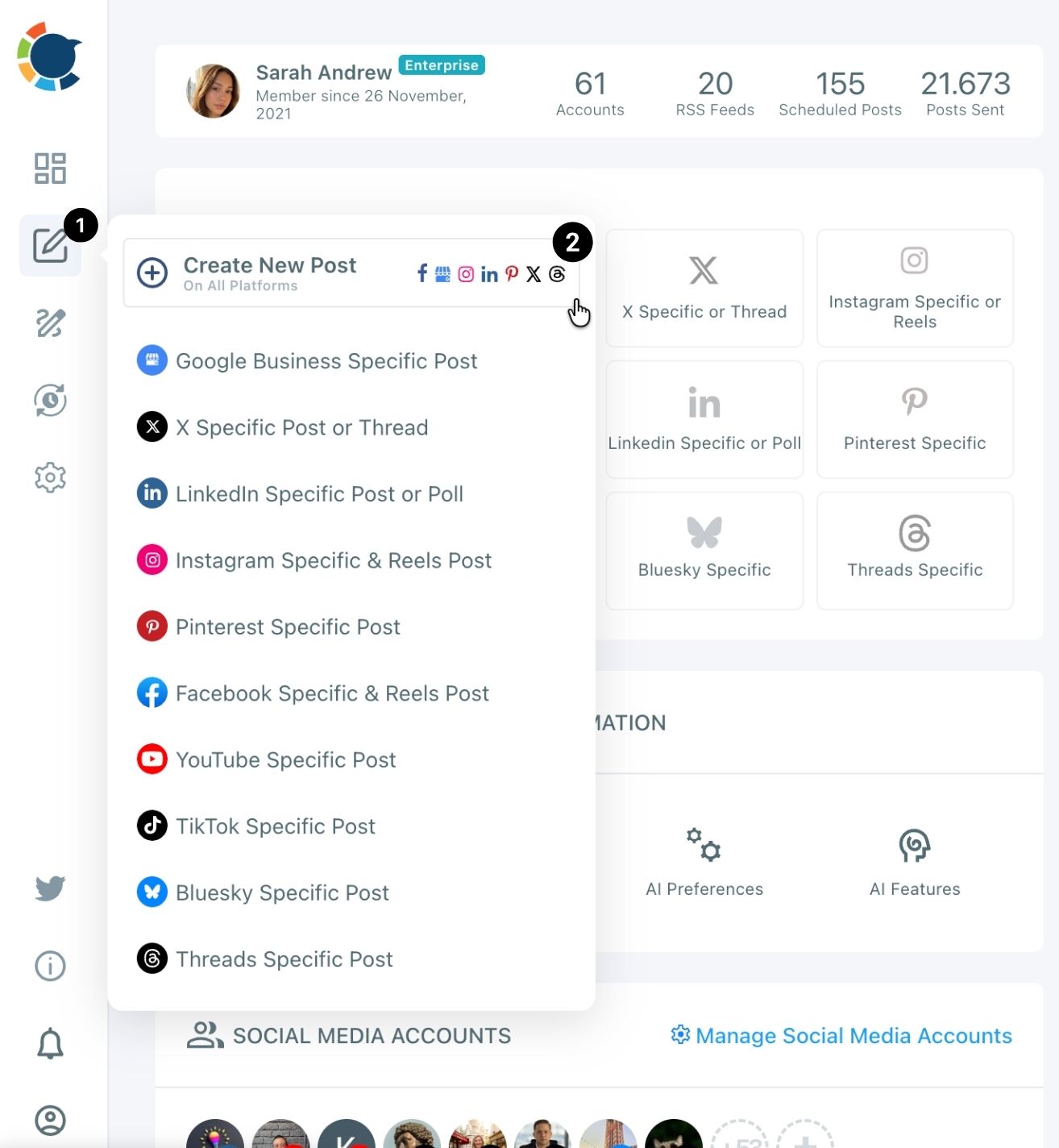
- Select Create New Post on All Platforms in the flyout that the pencil icon in the left sidebar opens.
Publish the two versions
- Write version A and tag its link through the link icon, then schedule it in a suggested slot under "Pick your best post time." Fill the fields the same way every time:
- Campaign Source and Medium: the platform and "social".
- Campaign Name: the promotion, such as spring-offer.
- Campaign Content: the version label, a or b.
- Duplicate version A once it is published, change the single variable, re-tag the link with Campaign Content "b," and schedule it in a comparable slot.
The sequence works because the tags exist before either post is public, and the duplicate guarantees that nothing changes except the variable you picked. Comparable time slots keep the clock from deciding the result for you.
The short version: two posts, one difference, two tags, then read the clicks.
Publishing the winning version everywhere as a normal post
Once a version wins, publish it as an ordinary post on every account where it fits. In Circleboom Publish that is one send: select every account across Facebook, Instagram, LinkedIn and the rest, and the same post goes to all of them at once. Multi-account social media management from a single composer is what turns a test result into a rollout in minutes.
One proven post, every platform: this clip shows a single upload going to Facebook and Instagram in the same action.
Rollout habits that keep the winner working
Two habits make the rollout count:
- Check the per-platform preview, because the winning caption may be too long for one network: a caption that fits Facebook's 5,000 characters can be far over Bluesky's 300.
- Let each account's queue take the post, so it lands in that account's own best slot.
The Queue handles the second habit. Each account keeps recurring time slots. Post to Queue drops the winner into the next open one, which is how you automate social media posts without picking a time for every account.
The winner should also keep doing its job after the rollout. Tag the rollout links too, then follow what the visits do on your site; the piece on website conversions with social media campaigns covers that next stage.
If the same group of accounts carries every test, save them as a Share Group in Settings. The next test and the next rollout then start with one click on that group instead of picking each account by hand.
Only after the organic rollout do you decide whether the winner deserves a paid push. If it does, that is the moment to build the dark post, now with a message you have evidence for.
Your dark post testing checklist
Run through these before your next promotion:
- Define the one variable you want to test, and freeze everything else.
- Tag each version's link with its own Campaign Content value before publishing.
- Schedule both versions in comparable, suggested time slots.
- Read clicks first and likes second, then roll the winner out to every account.
- Pay to promote only the version that already won with your own followers.
→ Measure your dark post test results
Dark posts FAQ for small brands
How do I tag each version's link so the clicks stay separate?
Give both links the same Campaign Source, Medium and Name. Then give each version its own Campaign Content value, such as "a" and "b." In Circleboom Publish you click the link icon next to the pasted link and fill in those fields.
How do I know which version won?
The version with more tagged clicks in Google Analytics won, even if the other one collected more likes. Circleboom Publish's Content Performance Analytics shows each post's impressions and engagement on the platform, which explains the result but does not decide it.
Can my followers see a dark post?
A dark post never appears on your Page, so followers browsing the Page will not find it. They see it only if the ad's audience includes them and it reaches their feed.
Does Circleboom Publish create dark posts or ads?
No. Circleboom Publish publishes, schedules and queues organic posts, and tags their links for tracking. Dark posts and other ads are built in the ad platform itself, ideally with the version your organic test already proved.
What if version A already went out without a tag?
Its clicks cannot be recovered, because a link that goes out untagged cannot be tagged afterwards. Treat that post as a warm-up and start again with two new versions, each tagged with its own Campaign Content value before it is published.