

Put keywords in your Google Business page's category, description, services list and regular posts, and keep them out of the business name, where Google's guidelines say extra words can get the profile suspended.
Where your keywords belong, in short.
• The category, description and services fields, written once inside Google.
• Posts, image alt text and a few local hashtags, refreshed every week.
• Never the business name, which must stay your real-world name.
Circleboom Publish writes and schedules keyword-bearing Google Business Profile posts with its AI post writer, which covers the weekly half. Draft keyword-bearing Google Business Profile posts with AI for the weekly half.
The two-part map of keyword places on a Google Business Profile
When you add keywords to your Google Business page, every spot you can use falls into one of two groups. Some are written once inside Google and changed rarely. Others are written every week in a post composer.
Most checklists mix the two, so owners finish in an afternoon and stop.
| Field | Keywords? | Where you edit it | How often |
|---|---|---|---|
| Business name | No, real-world name only | Google Business Profile | Once |
| Primary and extra categories | Yes, a direct ranking factor | Google Business Profile | Once, then review |
| Business description | Yes, in plain customer words | Google Business Profile | Once, then review |
| Services list | Yes, one service per entry | Google Business Profile | When services change |
| Posts (Standard, Event, Offer) | Yes, built around searches | Circleboom Publish composer | Every week |
| Image alt text | Only where the photo shows it | Circleboom Publish composer | Every post with an image |
| Hashtags | A few local ones | Circleboom Publish composer | Every post, lightly |
The first four rows are a one-time job in Google. The last three are a routine, and that is where most profiles go quiet.
Circleboom Publish is a Google Business Profile publishing suite: it writes posts with AI, schedules them and sends them to one location or many.
It does not edit the profile fields themselves. Those stay in Google's dashboard.
If the weekly half is what you are missing, add keywords to your Google Business page through AI-written posts.
Where keywords do not go: the business name
The business name is the one field that must not carry keywords. Google's business representation guidelines say your name should reflect your real-world name, as used on your storefront, website and stationery. Including unnecessary information in the name isn't permitted and could result in the suspension of your Business Profile.
That rules out the familiar patterns:
- A service tacked on, like "Rivera Dental Implants and Whitening".
- A city or neighborhood added, like "Rivera Dental Queens".
- A slogan or rating, like "Rivera Dental, Best in Town".
If the words are part of your legal, painted-on-the-sign name, they can stay. If they were added for search, they are a risk to the whole listing, reviews and photos included.
Google's same page asks for the extra details (address, service area, hours, category) to go in their own sections instead.
Every keyword the name could hold has a safer home somewhere else in the table above.
Does the category count more than keywords in the business name?
Yes. Google states that the categories you select affect your local ranking. Its page to manage your business category shows how a primary category like "Pizza restaurant" can place a business in searches for related terms, with no keyword in the name needed.
A quick test shows it on Google Maps: search "pub London" and look at how few top results have "pub" in their name. The category did that work.
Google's guidelines add two limits:
- Choose the fewest categories that describe your core business, as specific as possible.
- Do not use categories only as keywords or to describe attributes.
The category is chosen inside Google Business Profile, never through Circleboom Publish.
A law office shows the split well. Practice areas like "family law" belong in the category and services, while the firm's name stays the name on the door. The guide to law firm SEO walks through that pattern for legal practices.
The category is also only one part of ranking. Google weighs relevance, distance and prominence together, so a well-chosen category makes the profile eligible for the right searches, and the rest of the table decides how often it is picked.
Description and services: the keyword fields you write once
The business description is where you explain, in customers' words, what you do and what sets the business apart. Google asks that it stay useful and honest, and it does not allow links or copy built around sales and prices there. Write the services you offer the way people search for them ("chipped tooth repair", not "restorative dental procedures").
The services list works one entry at a time. Each service can carry its own short description, which gives you room for the specific phrases that do not fit in a single paragraph. Keep custom service names clean: no prices, no phone numbers, no stuffed phrases.
To find the words, list the services customers ask about on the phone and the exact phrases they use. Those phrases, not industry terms, are what people type into Google Maps. Review both fields whenever you add or drop a service, since an outdated services list sends the wrong customers and wastes their call.
Both fields reward plain language over density. A description that repeats "dentist Queens" five times reads like spam to a customer before Google ever weighs it. For more angles on legal and professional listings, the law firm marketing ideas and SEO tips cover how service firms phrase what they do.
Posts: the Google Business keyword field you refill every week
Posts are the only keyword place on the profile that keeps changing, and they are the half most owners skip. A post written around a question customers search for gives the profile a chance to appear for that search, even for people who have never heard the business name.
Turning customer questions into Google Business posts
The best keyword posts start as questions a business already hears every week:
- A dental clinic posting "how to care for a new filling".
- A locksmith posting "what to do when a key snaps in the lock".
- A florist posting "how long cut tulips last in a vase".
- A family law office posting "what to bring to a first divorce consultation".
Each of these reaches a person who was searching for an answer, not for the business. That reader is exactly the customer a quiet profile never meets.
Writing the posts with the AI Google Business Profile post writer
Circleboom Publish handles that half. Its AI Google Business Profile post writer turns a one-line instruction into a finished post across all three post types: Standard, Event and Offer. You then refine it with "Improve this response" or quick edits such as Condense and Fix Grammar, and check every date and fact before it goes live.
To start, log in to Circleboom Publish, open the Google Business Specific composer and click the gold AI button above the text field. This is where you write keyword-rich Google Business posts with AI instead of drafting each one from scratch.

A second instruction refines the draft rather than replacing it. Ask for a more promotional tone, a shorter version or a stronger call to action, and the writer reworks the same post. The character counter keeps you inside the 1,500 characters a Google Business post can hold.
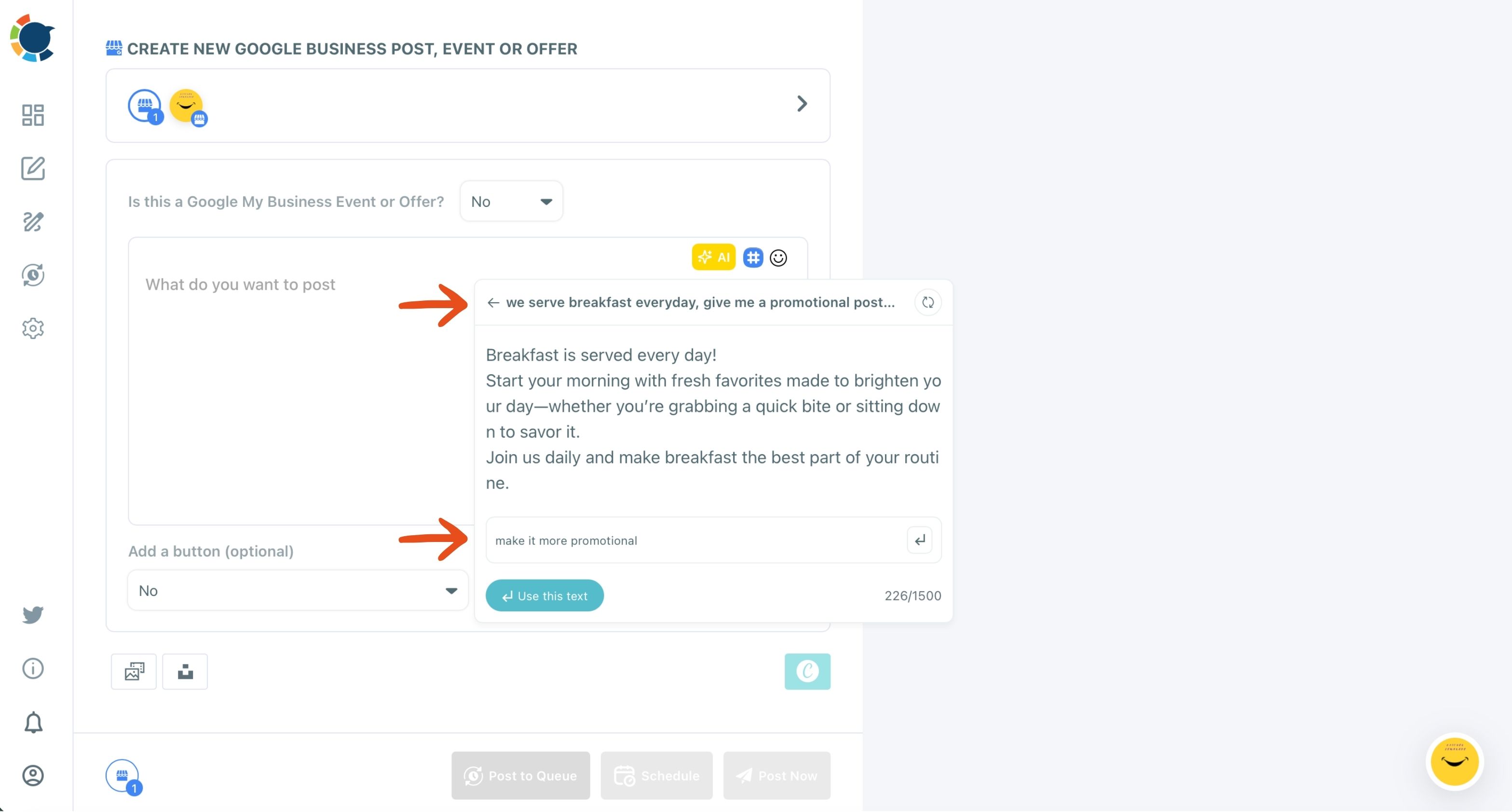
The full flow, from the typed instruction to the refined post sitting in the composer, takes the place of a blank text box.
Sending keyword posts to several locations
For owners running several locations, the Google Business Profile Manager sends one composed post to every selected profile in a single action. Have the AI write a version per location, naming the neighborhood, so no two profiles carry identical text.
Whether posts lift ranking on their own is a separate question: they add searchable content that feeds relevance, which is the part Google says depends on how well a profile matches the search, not a guaranteed position.
Which Google Business post type carries keywords best?
Each of the three post types holds keywords in a different place, so the choice depends on what the customer is searching for:
- Standard posts suit evergreen questions and services, with an optional button such as Call Now, Book or Order Online.
- Event posts add a title of up to 58 characters and a date window, so "Free gutter inspection day" names the service and the occasion at once.
- Offer posts add a title, a coupon code and terms, so the title can name the exact service on discount.
For keyword work, Standard posts do most of the lifting week to week. Events and Offers give a time-bound search ("free check-up this weekend") a specific post to land on, with the date visible in Search and Maps.
Where else keywords backfire: repeated and stuffed posts
Keyword posts can go wrong in two ways that have nothing to do with the name.
The first is repetition. Google rewards fresh, original posts, so the same update pasted to every location, or last season's post re-sent word for word, can hold a profile back. Rewrite it per location or per season instead.
The second is stuffing. A post that reads like a list of search terms loses the customer in the first line, and the customer is the one who calls. Write the post as an answer, then check that the main phrase appears once in a natural sentence.
That single mention is enough.
Is image alt text a keyword place on Google Business Profile?
Yes, when the keyword describes what the photo shows. Google's image index cannot see a picture and has to be told what it contains, and a blank alt text field leaves the image out of Google Image search entirely.
Google Business Profile is one of the five platforms in Circleboom Publish that support custom alt text on images. Write a short, true description: "A dentist fitting a clear aligner for a patient" works; "best dentist Queens cheap aligners invisible braces" does not.
A simple test helps. If a stranger heard the alt text read aloud, would they picture the photo? If yes, it is good alt text, and a keyword inside it is earned. The step-by-step guide on how to add alt text to images on social media covers the writing side across platforms.
How often keyword posts need to go out on your Google listing
Google posts lose most of their reach after roughly a week, so keyword posts need a steady rhythm to keep working. A common tip is about six posts a week, offered as a starting point rather than a rule.
Few owners can write that often, so batching does the work:
- Prepare weeks of Standard updates, Events and Offers in one sitting, each scheduled to its own date.
- Use "Pick your best post time" in the Schedule modal, which offers suggested slots for when that profile's customers are active.
- Set up the Queue's recurring time slots once, with Add Best Times to Post, and drop each new post into the next open slot.
Event and Offer posts need a little more lead time. Schedule them several days to a couple of weeks before the date, so Google has time to show them while people are still making plans. Fill in the start and end times so the date range appears with the post.
That rhythm turns the weekly rows of the map into an hour or two of work instead of a daily chore. The broader local playbook in 6 practices to master local online marketing shows where posting fits among the other local habits.
Checking which keyword posts paid off
To see which keyword posts paid off, Post Analytics shows the views, clicks, calls and direction requests each Google Business post brought in.
None of the above counts until the profile itself is claimed, verified and complete in Google.
Summary of where your Google Business keywords go
Keywords on a Google Business page have two homes. The once-written fields (category, description, services) live in Google's own dashboard. The weekly fields (posts, image alt text, a few local hashtags) live in your post composer.
The business name stays out of it entirely, because Google can suspend a profile over extra words there.
Get the once-written fields right, then keep the weekly ones moving, and the profile answers more searches than its name alone ever could.
→ Begin with AI-written keyword posts for your Google Business page
Keyword placement questions, answered briefly
Do hashtags work as keywords on a Google Business post?
Only lightly. Google Business Profile is not a hashtag-driven network, so the words in the post matter more for Search and Maps than the tags. Keep it to a few relevant local tags, like the service and the area, which the hashtag generator for social media adds from the composer toolbar.
Should I write keyword posts myself or let AI write them?
Write them yourself if you have the time and the words; use the AI writer if you know your customers' questions but not the copywriting. The AI Google Business Profile post writer is included in a Circleboom membership at no extra cost, and every draft still needs your check on facts, dates and prices.
How many keywords should my business description have?
Google publishes no keyword count for the description. It asks for useful, honest information about your services and business, so name your main services once in the words customers use and stop there.




)


