

At the beginning, everything feels normal, even encouraging.
Your tweets are getting healthy impressions, likes arrive naturally, replies turn into conversations, and some posts even outperform your usual averages. You can clearly see that your content is landing on timelines and reaching real people. Growth feels organic, and engagement feels earned.
Then, slowly and quietly, things begin to change.
Impressions start dropping without any obvious reason. Tweets that would normally receive interaction stay unusually quiet. Replies don’t spark discussions anymore. At first, it’s easy to dismiss this as a temporary dip, after all, everyone has slow days on Twitter.
But then the messages begin to arrive, and they all sound strangely similar.
- “Hey, I don’t see your tweet on my timeline anymore.”
- “I searched your username, but your account didn’t show up at all.”
- “Your reply isn’t visible unless I click directly into your profile.”
That’s usually the moment when concern turns into certainty.
This is no longer just a fluctuation in engagement, it’s a visibility problem.
If your Twitter (X) account technically exists but feels invisible to others, there is a very strong chance that your account has been shadowbanned or is very close to a visibility restriction.
 Altug Altug
What Does “Account Not Found” Actually Mean on Twitter (X)?
When someone tells you your account is “not found,” it almost never means your account has been deleted or suspended.
In most cases, Twitter applies subtle visibility limitations that affect how your account appears to others. This can include situations where:
- Your username no longer appears in Twitter search results
- Your tweets fail to show up on followers’ home timelines
- Your replies are hidden behind “Show more replies” sections
- Your posts technically exist, but impressions suddenly drop to unusually low levels
This state is commonly referred to as a shadowban.
 Fatih Kemal Oksuzoglu
Your account remains active, and you can still post as usual, but Twitter quietly limits how discoverable your content is. To you, everything looks normal. To everyone else, your presence slowly fades.
Why Twitter (X) Never Tells You This Directly
One of the most frustrating aspects of shadowbans is the complete lack of transparency.
Twitter does not send:
- Warning messages
- System notifications
- Clear explanations about reduced visibility
Instead, these limitations are categorized internally using vague terms such as:
- Quality filters
- Safety adjustments
- Spam-prevention or trust signals
- Temporary label ⬇️
 Fatih Kemal Oksuzoglu
From the user’s perspective, it feels like your account suddenly stopped working, even though you didn’t intentionally break any rules.
That’s why guessing is dangerous.
If your account is no longer visible, you have to actively check its status instead of waiting for Twitter to explain it.
First Step: Check If You’re Shadowbanned (Free and Reliable)
The fastest and most reliable way to understand what’s happening is to use Circleboom Shadowban Test.
This step is critical because:
- Twitter does not display shadowban status anywhere in its interface
- Circleboom is an official X Enterprise Customer.
- The shadowban test is completely free to use
- It removes uncertainty and replaces assumptions with real signals
The tool analyzes multiple visibility factors, including:
- Whether your account appears in search results
- Whether your replies are being hidden
- Whether your overall account discoverability is limited
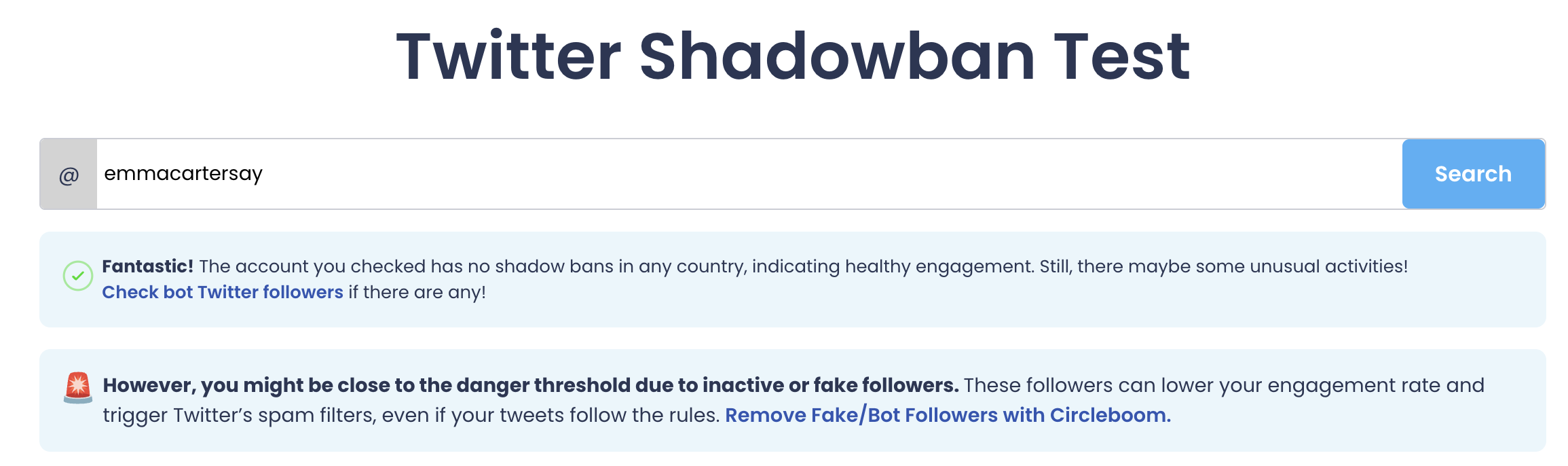
Within seconds, you can clearly see whether your account is fully visible or partially restricted.
How to Check Your Shadowban Status Step by Step
The process is intentionally simple and requires no technical knowledge:
1. Open the Circleboom Shadowban Test
 infocircleboom.com
2. Enter your Twitter (X) username
3. Run the test
4. Review the results immediately
Once you see the result, the confusion disappears. You’re no longer guessing, you’re working with facts.
Why Twitter Accounts Usually Get Shadowbanned
Shadowbans are rarely caused by a single tweet or one isolated action.
They almost always result from overall account health signals building up over time.
Common contributing factors include:
➡️ Fake or bot followers reducing trust signals
➡️ Consistently low engagement across many tweets
➡️ Aggressive follow/unfollow behavior that looks automated
➡️ Following large numbers of inactive or low-quality accounts
➡️ Repetitive, low-effort, or engagement-farming content patterns
Even accounts with good intentions can slowly accumulate negative signals without realizing it.
How to Make Your Twitter Account Visible Again
Once you confirm a shadowban or visibility restriction, the goal is not panic, it’s account cleanup and stabilization.
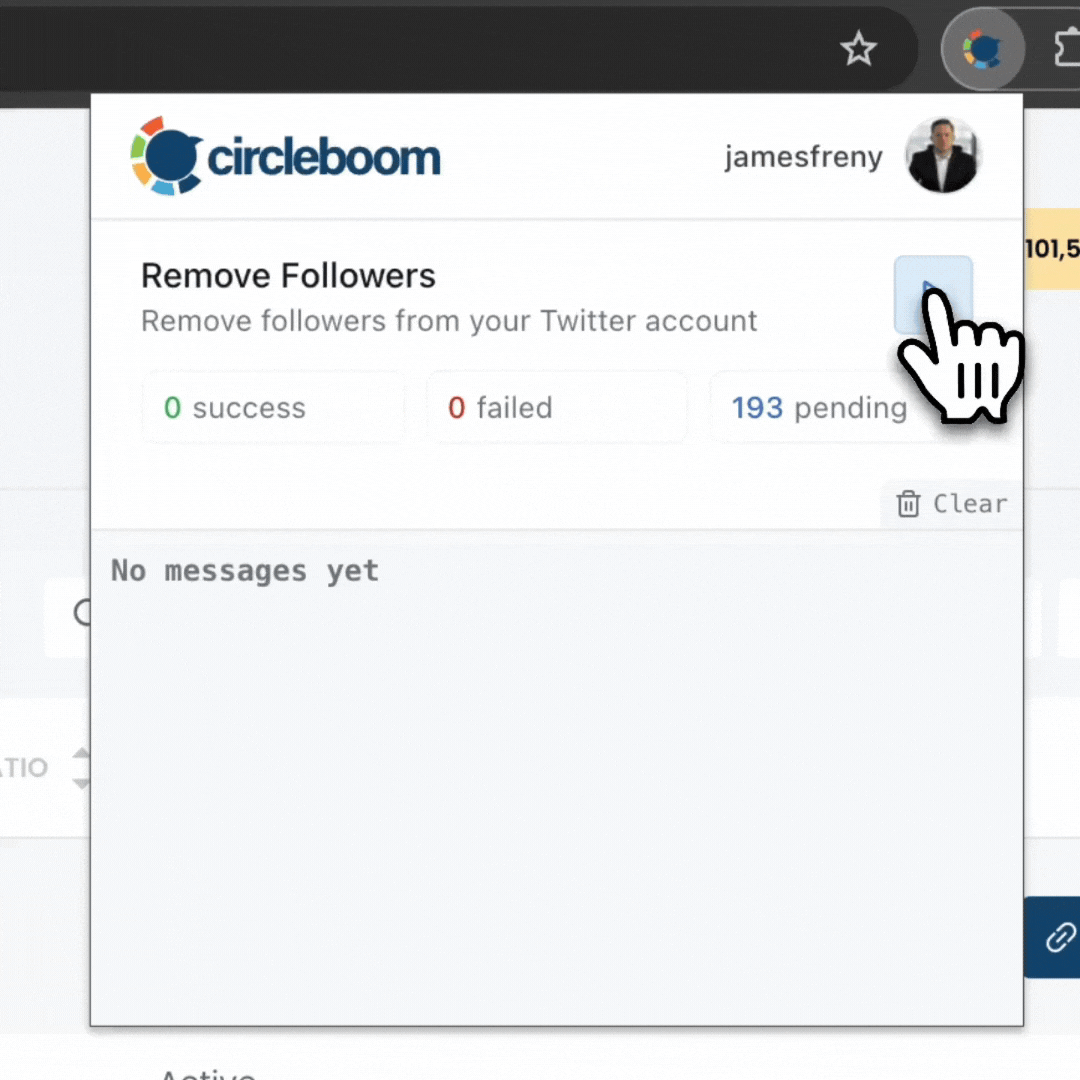
1. Remove Fake Followers
Fake and bot followers are among the strongest negative signals on Twitter.
They:
- Drag down engagement ratios
- Reduce account credibility
- Make growth appear artificial rather than organic
Removing fake followers helps Twitter reassess your account as genuine and actively maintained.
 Arif Akdogan
This process can be handled safely using Circleboom Twitter, which detects fake and bot accounts and allows you to remove them without risky mass actions.
2. Delete Low-Engagement Tweets
Tweets with little or no engagement don’t simply disappear over time, they continue to affect your account’s overall quality profile.
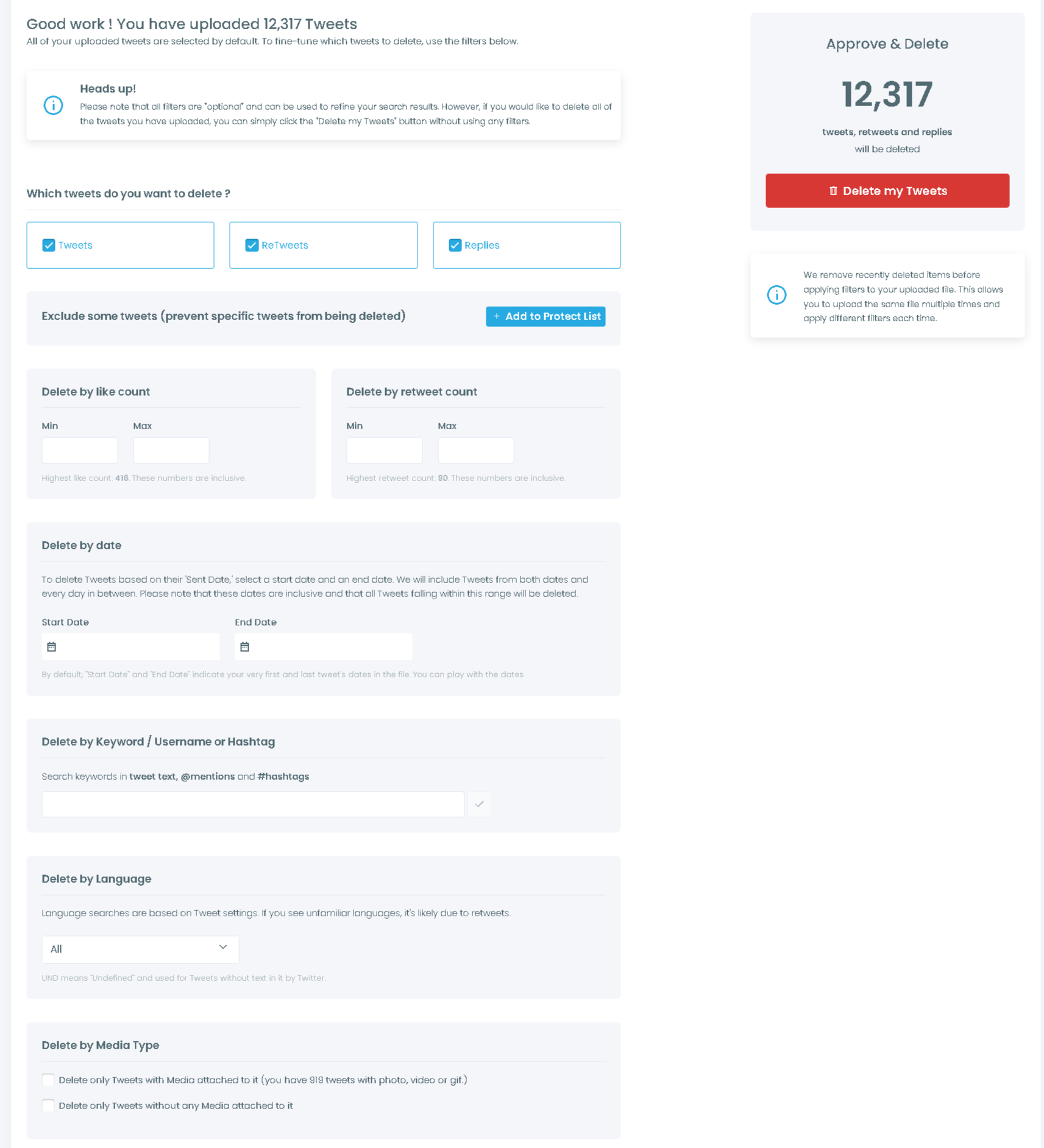
Tweets that receive:
- Zero likes
- No replies
- Extremely low impressions
can silently pull down your engagement averages.
Deleting low-engagement tweets:
- Improves engagement ratios
- Cleans up your public timeline
- Signals that your account is actively maintained and curated
This step is especially effective if you posted heavily during periods when your audience was inactive.
 infocircleboom.com
3. Unfollow Inactive Followings
Following accounts that rarely or never tweet creates another hidden issue.
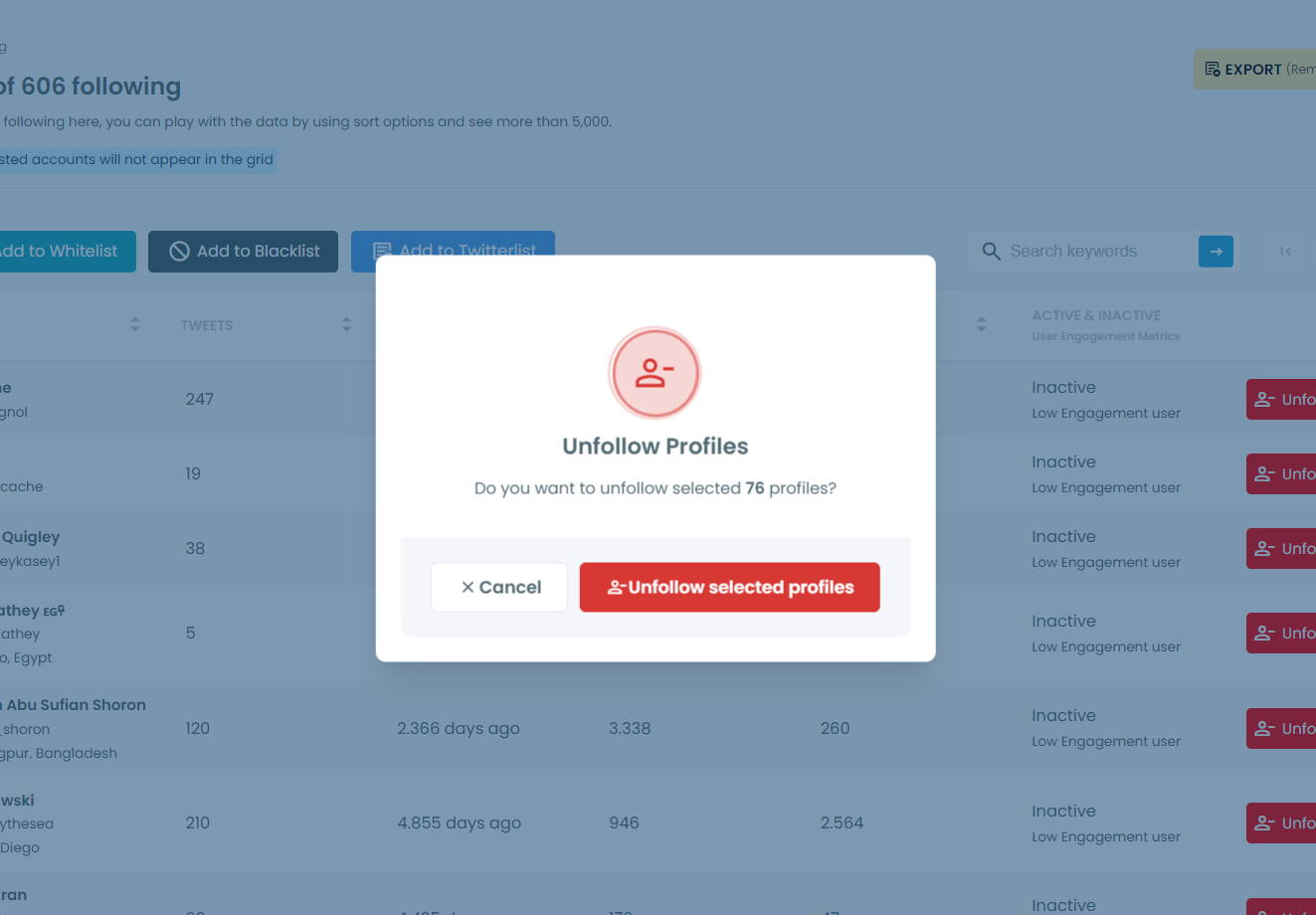
Inactive followings:
- Limit interaction opportunities
- Reduce the quality of your network
- Signal poor account curation
Unfollowing inactive accounts helps rebalance your following list and strengthens overall activity signals.
 Arif Akdogan
Why These Cleanup Steps Actually Work
Twitter evaluates accounts holistically, not post by post.
It looks at long-term patterns such as:
- Follower quality
- Engagement consistency
- Network activity
- Content maintenance habits
When you remove fake followers, clean up low-performing tweets, and focus on active connections, you send strong signals that your account is:
- Real
- Actively managed
- Valuable to the community
Over time, these signals increase the likelihood that visibility restrictions will be lifted.
How to Stay Safe After Visibility Returns
Once your reach begins improving, prevention becomes just as important as recovery.
To avoid future restrictions:
- Avoid aggressive follow/unfollow cycles
- Focus on genuine engagement instead of shortcuts
- Post consistently, but not excessively
- Re-check shadowban status from time to time
- Keep your followers and followings healthy and relevant
Account health on Twitter works much like SEO, it requires ongoing attention, not one-time fixes.
 Arif Akdogan
Final Thoughts: “Account Not Found” Is an Early Warning Sign
If people tell you they can’t find your Twitter (X) account, it’s not something to ignore.
In most cases, it’s:
- Not permanent
- Not a full suspension
- But a clear early warning
Checking your status early, cleaning up your account, and acting quickly makes recovery far easier, before limited visibility turns into a much bigger problem.




%20Account%20Not%20Found%20Anymore%3F)

)
%20shadowban%3F)