My before-and-after grooming clips did well on TikTok and went nowhere on Instagram Reels. Same doodle, same reveal, same music.
The difference was a small bouncing TikTok logo in the corner, and it took me far too long to see that the logo pointed to a bigger problem: the way I was moving videos between apps.
If you groom dogs, or run any small business that films short clips, you probably do what I did. You post to TikTok first, tap Save, and reupload that saved copy to Reels and Shorts.
Three things this groomer's fix covers.
• Why a TikTok watermark costs you reach on Instagram Reels and YouTube Shorts.
• The one-upload habit that never creates a watermark at all.
• The file specs that let one clip pass TikTok, Reels and Shorts together.
Circleboom Publish takes one clean video and publishes it to TikTok, Instagram Reels, YouTube Shorts and Facebook Reels in a single action. Cross post TikTok to Reels without the watermark in one upload.
The TikTok watermark was a symptom of my upload habit
For two years my routine looked efficient. I filmed a groom on my phone, edited it in TikTok, posted it, and then saved the finished video from TikTok to my camera roll. That saved copy is what went to Instagram and YouTube.
The catch is in that Save button. A video downloaded from TikTok carries the TikTok watermark and username, baked into the file.
Every Reel and every Short I posted that way, my early attempt to cross-post TikTok to Reels, was, to Instagram and YouTube, a video that visibly came from somewhere else.
I kept thinking the content was the issue. Maybe Instagram's audience did not care about matted poodles. Maybe Shorts viewers wanted faster cuts.
The audience was fine. The file was marked.
Instagram says this outright in its guidance for creators. Its page on how Instagram recommendations work for creators tells creators not to post reels that contain watermarks and to avoid visibly recycled content.
Content that goes against its recommendation guidelines can still be distributed normally to your followers, but Instagram tries not to recommend it to people who don't follow you.
That sentence explained my numbers. My Reels reached the people who already followed the shop. They never reached the dog owners down the road who had never heard of me, which is the whole point of posting a Reel.
If you want to cross post TikTok to Reels without watermark trouble, the fix is to keep the logo off the file in the first place. A tool that can cross post one video to Reels and Shorts without a watermark starts from the clean file you filmed, not the copy TikTok hands back.
What I tried before fixing the TikTok watermark at the source
I did not get there directly. I tried the obvious workarounds first, and each one cost me something.
Cropping was the first attempt. I zoomed in until the logo fell outside the frame.
On a vertical grooming clip that cut off the dog's ears in the reveal shot, which is the shot the whole video builds to.
Watermark-remover apps came next. They blurred the corner instead of removing anything, and a smudge where a logo used to be still looks like a reposted video.
Circleboom's guide on how to post TikTok to Reels without a watermark explains why the clean original beats any after-the-fact fix.
Then I tried discipline, my last attempt to cross post TikTok to Reels without the watermark by hand. I would export each edit twice, once for TikTok and once clean for everywhere else, and upload it three separate times.
It worked for about two weeks.
Four grooming videos a week on three platforms is twelve uploads, each with its own caption box and music choice. That routine lasted exactly as long as my quietest stretch of appointments.
Why YouTube monetization cares where your Shorts came from
Instagram was not the only platform reading the corner of my videos. YouTube looks at originality too, for channels that earn money from their videos.
YouTube's channel monetization policies on reused content say that if you make money on YouTube, your content should be original and authentic. They add that if YouTube cannot tell the content is yours, it may be subject to the reused content policy.
A Short with another app's logo and handle stamped on it makes that harder to tell, even when you filmed every second of it.
This is the part that surprised me.
My videos were 100% mine, and the watermark made them look borrowed.
The comparison of YouTube Shorts vs TikTok shows how differently the two audiences behave, which is one more reason a clip should arrive on each platform looking native rather than forwarded.
What changed when I uploaded the clean file once
The fix was to stop moving finished videos between apps. Now I upload the original file, straight from my phone's camera roll, once.
Circleboom Publish has a shared video cross-posting engine. One uploaded short video can go to TikTok, Instagram Reels, YouTube Shorts and Facebook Reels in the same action, from any of those four composers. When I start in the TikTok composer, I add my Instagram, YouTube and Facebook accounts as extra destinations, and the same clean video goes to all of them.
Circleboom is one of the companies on X's official Enterprise developers list, which told me the company behind the tool plays by platform rules rather than around them. That mattered before I handed it my shop's accounts.
Nothing in that flow ever passes through TikTok's Save button, so no watermark is ever created. That is how I cross post TikTok to Reels without the watermark now: there is nothing to remove, because the file never had it.
→ Send one clean grooming clip to TikTok, Reels and Shorts at once
How I cross post TikTok to Reels without the watermark
The process I settled on has six steps in three phases, and the first phase happens only once.
Connect the shop's accounts once
- Open Circleboom Publish and sign in with the account you want the shop's videos to run through.

- Connect TikTok, Instagram, YouTube and the Facebook Page under Settings, Manage Social Accounts; Facebook joins this flow as a Page only, not a personal profile.
Upload the clean original and pick every destination
- Open the TikTok composer from the TikTok Specific card and upload the original video from your phone or camera, never the copy saved from the TikTok app.
- Add the extra destinations from the composer's Add More Accounts row: tick the Instagram account, the YouTube channel and the Facebook Page, and more than one account per platform if you run them.
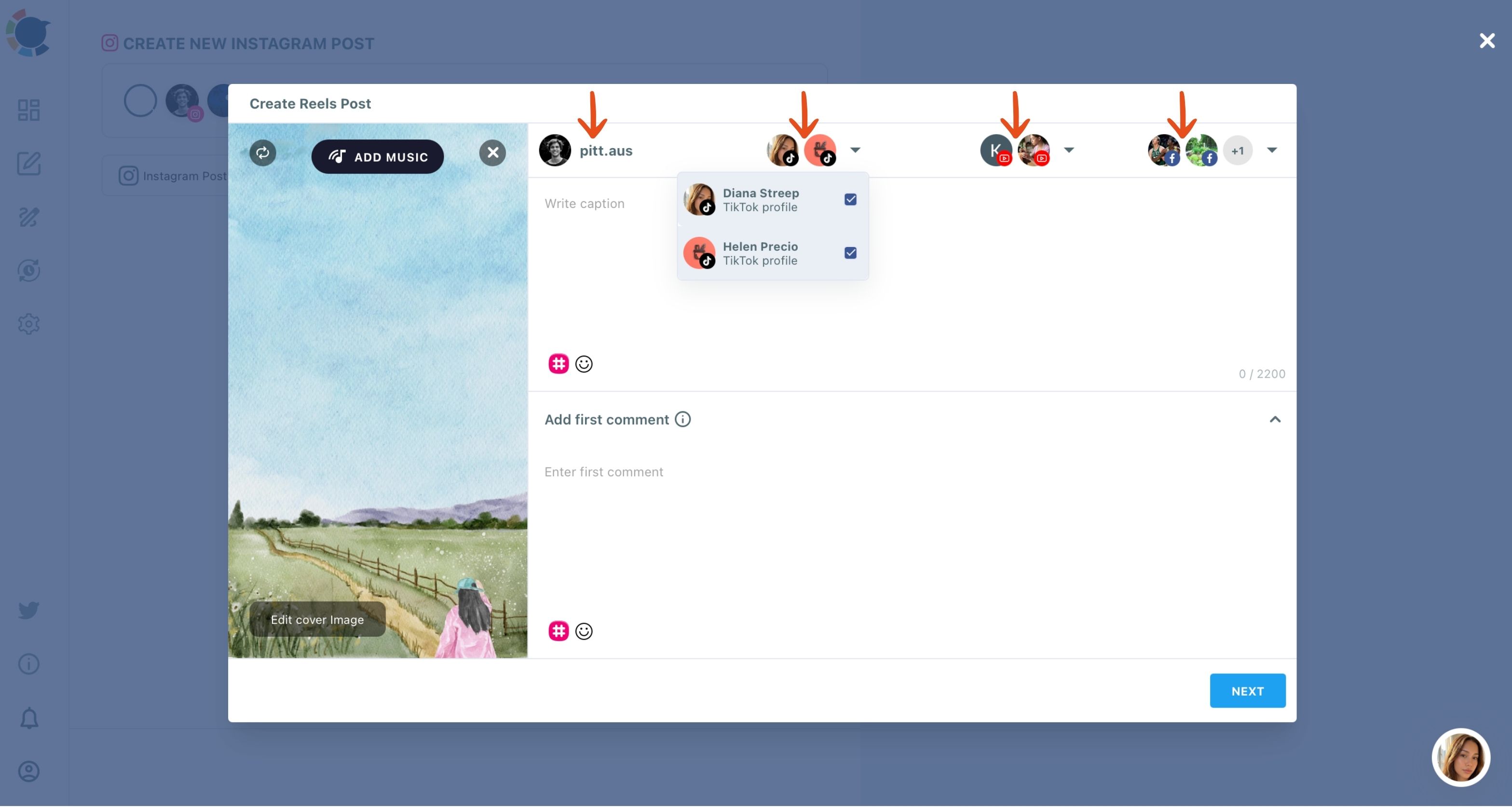
- Write the caption and set TikTok's fields: let the AI write a first draft, choose who can watch the video, confirm Music Usage, and add a track with ADD MUSIC if the clip needs one.
Publish everywhere in one action
- Choose Post Now, Schedule or Post to Queue, and the same video goes to every selected platform together.
Picking every destination before writing the caption means you write once for all four audiences, and the clean file is in place before anything can go out marked.
The file specs that keep one clip valid on all four platforms
The clean-file habit only works if the file passes every platform's limits, and here the strictest destination wins.
TikTok on its own accepts videos up to 10 minutes and 4 GB. YouTube Shorts allows 60 seconds, and Instagram takes up to 300 MB. So a clip meant for one-click, four-platform posting is best exported as:
- vertical 9:16;
- 60 seconds or shorter;
- under 300 MB, ideally as .mp4.
My full-groom time-lapses run three minutes, and those stay TikTok-only. The 45-second reveal cut is what goes everywhere.
Circleboom's media limitations for social platforms page lists the current limits for every network if you post beyond these four.
A music choice made with Add Music travels with the video to every destination, so the Reel and the Short get the same track as the TikTok without a separate edit. That is one less reason to reach for TikTok's in-app editor and its Save button.
When I schedule the four-platform grooming post
Clean files fixed the reach problem. Timing fixed the next one, because a grooming shop's followers are not online when I finish editing at closing time.
When I click Schedule in the composer, Circleboom Publish opens a calendar, a Set Time field and a panel of suggested best post times built from the account's own followers. I pick one of those slots for the TikTok, and the Reel, the Short and the Facebook Reel go out in the same action.
A suggested time does not promise more views. It stops timing from being the reason a good reveal underperforms.
For a steady weekly rhythm, the Queue does the remembering. I set recurring slots in Time and Queue Settings, and Post to Queue drops each new cross-post into the next open one.
That is how I cross post TikTok to Reels without the watermark on a schedule, even in the weeks when appointments fill every afternoon.
Video, ready to post (1:52): the same engine from the Instagram side, one Reel upload picked up by TikTok and YouTube Shorts accounts, then sent now or at a suggested time.
Is the same video on Reels and Shorts treated as duplicate content?
Not when it is your own clean original, posted once to each platform, which is exactly what happens when you cross post TikTok to Reels without the watermark. Instagram's page above is about watermarked and visibly recycled reels, and YouTube's is about content it cannot tell is yours; a groomer's own clip uploaded to each network is neither.
The risk sits elsewhere. Posting the identical video and caption to several accounts on the same platform is what looks like copying. If you run a second TikTok or a second Instagram account for a sister shop, give each version its own caption.
The breakdown of whether you can post TikTok videos on Facebook Reels covers the fourth platform in the same flow.
Captions deserve a second look anyway. TikTok captions can run long and casual, while a Reel caption works better with the hook in the first line. The AI writer in the composer takes a short instruction ("first groom for a rescue terrier, nervous, ends calm") and returns a draft I edit in a minute.
For a deeper look at the two audiences, the comparison of whether Instagram Reels or TikTok performs better for content creators is worth reading.
Looking back at a month of clean uploads
Looking back, the way to cross post TikTok to Reels without watermark problems was to change where a video starts. Once every clip began as one clean file, uploaded once, the watermark problem disappeared along with the twelve uploads a week.
The time math is simple. Four videos a week used to mean twelve separate uploads across three apps, and now it means four. Circleboom's own estimate is roughly five minutes per cross-posted upload instead of twenty spread across apps, which for my four videos is about an hour back every week.
Over the next 30 days, here is what that shift does for a small shop:
- Every Reel and Short arrives looking native, so it competes for non-followers on equal terms.
- Filming and posting stay separate, because the YouTube Shorts scheduler and the Instagram Reels scheduler sit in the same calendar as TikTok.
- The clean original becomes the asset you keep, not the TikTok copy.
Already posting to TikTok and YouTube separately? Read how to link your TikTok and YouTube channel and share the same videos on both next.
→ Cross post your next TikTok to Reels and Shorts from the clean file
Groomer questions about cross-posting TikToks without a watermark
What if I only have the watermarked TikTok and lost the original file?
Check your phone's camera roll and your editing app's exports first, since the clean file usually survives there. If the edit was made inside TikTok, re-export it from the original footage, then cross post the TikTok to Reels without the watermark from that new file.
Can I start from Instagram or YouTube instead of TikTok?
Yes. Instagram Reels, YouTube Shorts, TikTok and Facebook Reels are all entry points to the same cross-posting engine in Circleboom Publish, so start wherever the video is made.
Can I add a first comment when I cross-post a TikTok to Instagram and YouTube?
Yes. The shared cross-posting window includes Add first comment, so the comment is written and scheduled together with the video. That field lives in the shared window, not in TikTok's own caption field.