Can four taproom Threads accounts stay active without four times the effort? Yes, if the brewery schedules them from one dashboard in one weekly sitting instead of posting from each profile in the app.
Can one brewery schedule Threads posts for multiple accounts in one sitting?
Yes. Circleboom Publish selects several Threads accounts in one composer and schedules or queues posts for each of them at its own best time, so four taprooms take one weekly session.
→ Schedule Threads posts for all four taproom accounts
Where the extra work comes from with four taproom Threads accounts
The extra work comes from switching between profiles more than from writing. A brewery with four taprooms usually runs one Threads profile per location, because each taproom has its own regulars, its own tap list and its own events.
Posting natively means signing in to each profile and posting from it, one at a time. Here is the arithmetic for a modest plan of three posts a week per taproom, labelled as an illustration:
- Four taprooms × three posts = 12 posts a week.
- About five minutes each to switch profiles, attach a photo and write.
- Roughly one hour a week, spent mostly on logistics.
Twelve posts a week is a writing job. Four separate logins turn it into a logistics job.
The predictable result is that the flagship taproom posts and the smaller ones go quiet.
Whether Threads even allows advance posting is the first question many owners ask, and the explainer on whether you can schedule posts on Threads answers it.
The practical answer for a brewery is a tool built to schedule Threads posts for multiple accounts from one place. Circleboom Publish lets you schedule Threads posts for every taproom from one dashboard, so the quiet locations stop being the ones that lose.
Does each taproom need its own Threads account?
Not always. Whether a brewery should schedule Threads posts for multiple accounts or run one shared profile depends on how different the taprooms are. Three situations cover most breweries:
One shared brewery account. When the taprooms pour the same list and run the same events, one profile is enough. Every post names the location it concerns, and there is nothing to coordinate. The next step is a steady schedule on that single account.
One account per taproom. When each location has its own regulars, its own guest taps and its own quiz nights, separate profiles let locals follow only the taproom they visit. This is the setup this article plans for, and the reason to schedule from one dashboard.
A brand account plus taproom accounts. Larger breweries keep a brand profile for releases and press, and taproom profiles for local news. A Share Group with every account handles launch days, and a group per taproom handles the rest.
Circleboom recommends the third pattern for brands with many branches: headquarters keeps every account in view and posts brand-wide in one click, while each branch plans its own posts.
What Circleboom Publish does for a multi-taproom Threads setup
Circleboom Publish connects all four taproom profiles to one dashboard, selects any of them in the Threads composer and schedules, queues or publishes the post to each selected account in one action. Multi-account selection is supported on Threads, so there is no one-account-per-post restriction.
Circleboom is a verified Enterprise partner of X, the same company that runs this Threads scheduler, which tells a brewery its accounts connect through approved access.
Four capabilities carry most of the load:
- Multi-account selection in the Select Accounts panel, or one click on a saved Share Group.
- Best Time to Post suggestions computed from each account's own followers.
- A Queue per account, with recurring weekly slots.
- The AI writer, which drafts a post from one instruction or rewrites existing text.
The Manage Multiple Threads Accounts page covers the account side in more detail.
The difference from native posting is scope.
The Threads app posts from the profile you are signed in to. Circleboom decides when each post goes out, from that account's own data, and where it goes, across all four profiles.
You can plan a week of Threads posts for four taprooms in the time one profile used to take.
How to schedule Threads posts for multiple accounts
To schedule Threads posts for multiple accounts, connect every profile to one Circleboom Publish dashboard, select the profiles a post belongs to, and assign it a suggested time or a Queue slot. The process below takes four steps; the first is a one-time setup.
- Log in to Circleboom and connect each taproom's Threads profile under Settings → Manage Social Accounts.

- Create Share Groups under Settings → Manage Share Groups: one group with all four taprooms for brewery-wide news. Add a group per region if two taprooms share a city.
- Open the Threads composer, select the taproom accounts or a Share Group, and write the post under 500 characters, or click the AI button for a first draft.
- Click Schedule and pick a date and a slot from "Pick your best post time", or click Post to Queue to drop the post into each account's next open slot.
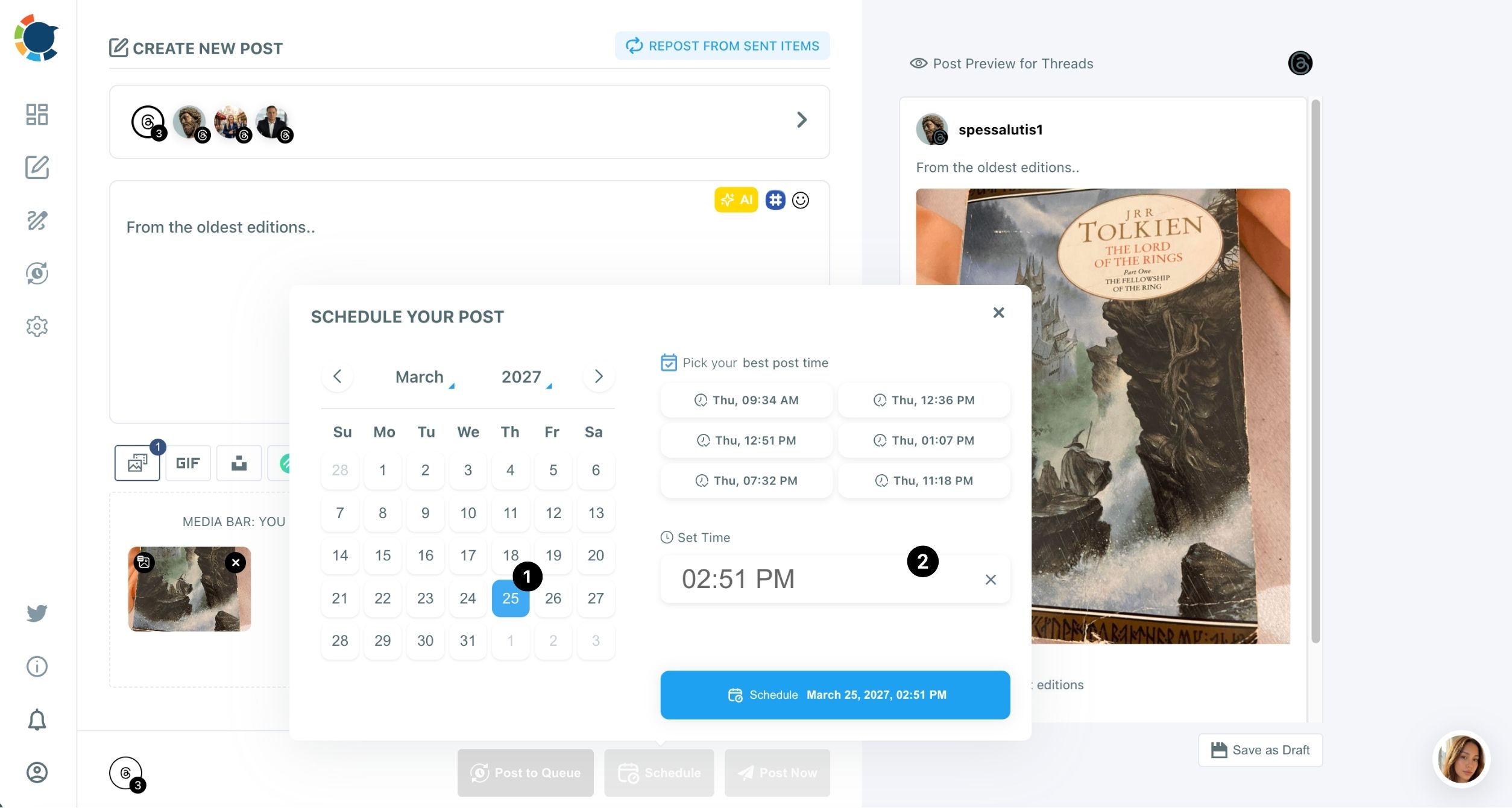
Selecting the taprooms before picking a time is what lets the Schedule modal suggest times from those accounts' own followers, and lets the Queue place the post without anyone choosing an hour.
Should four taproom accounts post the same thing on Threads?
Only for brewery-wide news. Circleboom's guidance for Threads is to rephrase, not repeat, because posting the same text on several of your accounts can cost reach.
A practical split for four taprooms:
- Same post, all four accounts: a seasonal release, a holiday closure or a festival the whole brewery attends.
- One idea, four versions: a weekly tap update written once, then rephrased by the AI writer so each taproom names its own beers and events.
Local discovery adds a second reason to vary posts. Threads' help page on how to tag a topic in your post allows one topic per post, up to 50 characters, and clicking it shows related posts.
Each taproom can tag its own neighborhood or event, which a single shared post cannot do.
A distinct post per taproom also gives each profile its own chance to travel. The guide on how to go viral on Threads covers what makes a first line worth stopping for.
Shared news saves time. Local versions earn the replies.
How the Queue keeps four Threads accounts posting every week
The Queue is the easiest way to schedule Threads posts for multiple accounts week after week. It gives each Threads account its own recurring weekly slots, set in Time and Queue Settings. Post to Queue drops a post into that account's next open slot, so no one has to pick a time for each post.
For a brewery, the Queue turns the weekly sitting into a fill-the-slots job:
- Set three slots a week per taproom, for example Tuesday, Thursday and Saturday.
- Turn on Add Best Times to Post so the slots follow each account's own followers.
- Queue the week's posts on Monday and let each account publish on its own schedule.
The Auto Post to Threads page shows how the Queue works as the brewery's automation layer.
The Queue is also the answer to staff turnover. When a taproom manager leaves, the slots keep running, and the next person only has to fill them.
For the setup from the first slot, read how to auto post to Threads.
How to fill quiet days on four Threads accounts without writing more
Three automation tools cover the days with no new beer, no event and no time:
- Discover Articles finds outside articles on a topic, such as craft beer or local food, and sends them to the Queue with one click.
- Auto Repost brings a strong post back into the feed on a timer you set before posting.
- RSS Feed to Threads posts new items from a source, such as the brewery's own blog, automatically after a one-time setup.
Curated articles keep a taproom account active between original posts, and Threads content curation is the page for that workflow.
Adding a question to each shared article turns a link into a conversation.
Auto Repost asks for three settings in the composer: RePost after, Un-RePost after and Repeat this cycle. In a thread it applies to the first post only. The guide to auto repost on Threads shows how to give a release announcement a second and third chance.
A brewery that already publishes a blog or a news page can connect it once and let new entries post on their own. The steps to post RSS feeds to Threads take a few minutes.
How to pair each taproom's Threads account with its Instagram
Threads sits right beside Instagram's audience, and many taprooms already run an Instagram account. Pairing the two makes the weekly sitting cover both apps.
The simplest pairing is a Share Group per taproom that holds its Threads profile and its Instagram account. A post that suits both, such as a new release photo with a short caption, goes out from the universal Create New Post composer to both accounts in one send.
Two limits decide whether a post fits both apps. Instagram needs an image or a video on every post, and Threads caps text at 500 characters. A release photo with a caption under 500 characters works in both places.
Posts that only make sense on Threads, such as a question to regulars or a thread about how a beer was brewed, stay in the Threads composer. That is also where a brewery can schedule Threads posts for multiple accounts with the Threads composer's own tools, such as the "Add another post" thread builder.
What stays manual for a brewery on Threads
Replies stay manual, and they should, even when you schedule Threads posts for multiple accounts. Threads is a conversation-first network, and the replies under a taproom's post are where regulars ask about tap lists, opening hours and food trucks.
Scheduling saves the posting time so someone can spend it answering.
Approvals are the other human step. When each taproom manager drafts their own posts, Team Management gives them access to only their taproom's account, and their posts wait for approval before going live.
Threads' media limits also apply underneath any scheduling tool: up to 10 images or videos per post, images up to 8 MB each and video up to 1 GB.
For owners still comparing tools, the roundup of the best social media scheduler for small businesses sets out what a multi-location business should check before committing.
What four quiet taproom accounts cost the brewery
Without one dashboard, four Threads accounts mean four logins, about an hour of switching a week and the smaller taprooms going silent first. Those are the locations that most need regulars to hear about tonight's tap list.
When you schedule Threads posts for multiple accounts, one weekly session covers all four. Shared news goes in one send, local versions cover everyday posts, and a Queue keeps each account posting at its own best times when the week gets busy.
A brewery that can schedule Threads posts for multiple accounts keeps every taproom in the conversation, not only the flagship.
→ Queue a week of Threads posts for every taproom
Questions about running several taproom Threads accounts
How many posts a day can each taproom's Threads account publish?
Threads caps posting at about 250 posts per 24 hours per account at the platform level, far above what a taproom needs. Circleboom Publish's scheduling and Queue run underneath that cap.
Can taproom managers schedule Threads posts for multiple accounts or only their own?
Either. Team Management in Circleboom Publish gives each manager access to the accounts assigned to them, one taproom or several, and their posts can be held for the owner's approval before going live.
Can the brewery see which taproom's Threads posts perform best?
Yes. Circleboom Publish includes Threads Content Performance Analytics, which shows which posts and threads earned the most replies and reposts per account.