Three pizzerias and one Friday special add up to 156 Google posts a year if every shop gets its own. For two years that number beat me. Some weeks all three listings showed the special in time; most weeks one shop had it, one had last month's, and one had nothing.
What changed was not effort. It was the unit of work: one Google Business Profile post sent to multiple locations, scheduled before the week gets busy.
Can one Google Business Profile post go to multiple locations at once?
Yes. Circleboom Publish lets you select every connected Google Business Profile in one composer and publish the same Standard, Event or Offer post to all of them in a single action, now or on a schedule.
→ Send one Google Business Profile post to multiple locations
Why three pizzerias kept falling out of sync on Google
The Friday special is the one post I care about most. It is a simple offer: two large pies and a salad for a fixed price, Friday only.
People search "pizza near me" on Friday afternoon, and Google shows them the nearby shops. A shop with this week's deal on its listing gets the call. A shop showing a post from six weeks ago looks like it stopped trying.
My first system was the obvious one. Every Thursday I opened each shop's listing and posted the special by hand. Three logins, three copies of the text, three photo uploads.
It held for about a month. Then a supplier problem ate a Thursday, and the east-side shop went three Fridays without a post before anyone noticed.
The work was small. The problem was that it had to happen three times, in the same narrow window, every single week.
I also learned that multi-location listings have quirks of their own. The post on running a Google Business Profile with multiple locations explains why each shop needs its own verified profile in the first place. It also explains why they still get treated as separate storefronts in Search and Maps.
I thought my problem was discipline. It was that the job was shaped wrong.
Three small jobs at the same moment are harder than one slightly bigger job, because any one of them can slip. What I needed was a way to make a Google Business Profile post reach multiple locations in one move.
What Google's own editor handles, and where I still needed more
Before I paid for anything, I went back to Google's own tools, and it is fair to say they improved. Google's instructions for Business Profile posts describe a "Schedule this post" switch with a "Repeats" menu for weekly or monthly posts. They also say you can select several Business Profiles before you press Post and share one post across them.
So the Google half of my Friday problem has a native answer, and anyone with one shop and no other channels can stop there.
My Friday special does not live only on Google, though. The same deal goes to the restaurant's Instagram and Facebook, and that was where the second set of copy-paste jobs lived:
- The Offer on three Google listings, with the coupon code and the Friday-only dates.
- A Facebook post for regulars who never search Google for us.
- An Instagram post with the photo cropped properly.
- A slightly different line for the shop that closes an hour earlier.
Google could post the special to my three listings; it could not plan my whole Friday. That gap is what I ended up filling with Circleboom Publish.
How I send a Google Business Profile post to multiple locations every Friday
Circleboom Publish is a publishing suite for ten platforms, Google Business Profile among them, and it runs my Friday from one desk.
Circleboom, the company behind it, is listed on X's Enterprise customer directory as an official partner. That mattered to me, because I was about to hand a tool access to the listings that bring in my weekend.
For Google, Circleboom Publish connects through Google's own sign-in and publishes posts. It does not edit my hours, my phone numbers or my categories; those stay inside Google Business Profile, where I keep them.
The piece that lets one Google Business Profile post go to multiple locations is the account selector. With one listing connected, the Google composer picks it for you. With three, it shows every connected shop and lets me tick all of them.
That way I publish one Google Business Profile post across all my locations in the time it used to take to do one shop. The same send works for an Event, like a pizza-making class for kids, or a Standard update about a new topping.
Offer post demo from Circleboom, under three minutes: a Google Business Profile Offer built with a coupon code, the same structure as my Friday special.
The routine I settled on takes about fifteen minutes on Monday and splits into a one-time setup and a weekly send.
Set up the three shops once
- Open Circleboom Publish and sign in with the account that will manage all three listings.

- Connect each pizzeria's Google Business Profile under Settings, Manage Social Accounts, with CONNECT NEW ACCOUNT, until all three shops are listed.
- Save the three shops as a Share Group under Settings, Manage Share Groups. Mine is called "All 3 shops", and it is the only selection I use for the special.
Build the Friday Offer and send it to all three
- Open the Google Business Specific Post composer, click Select by Share Group and choose "All 3 shops".
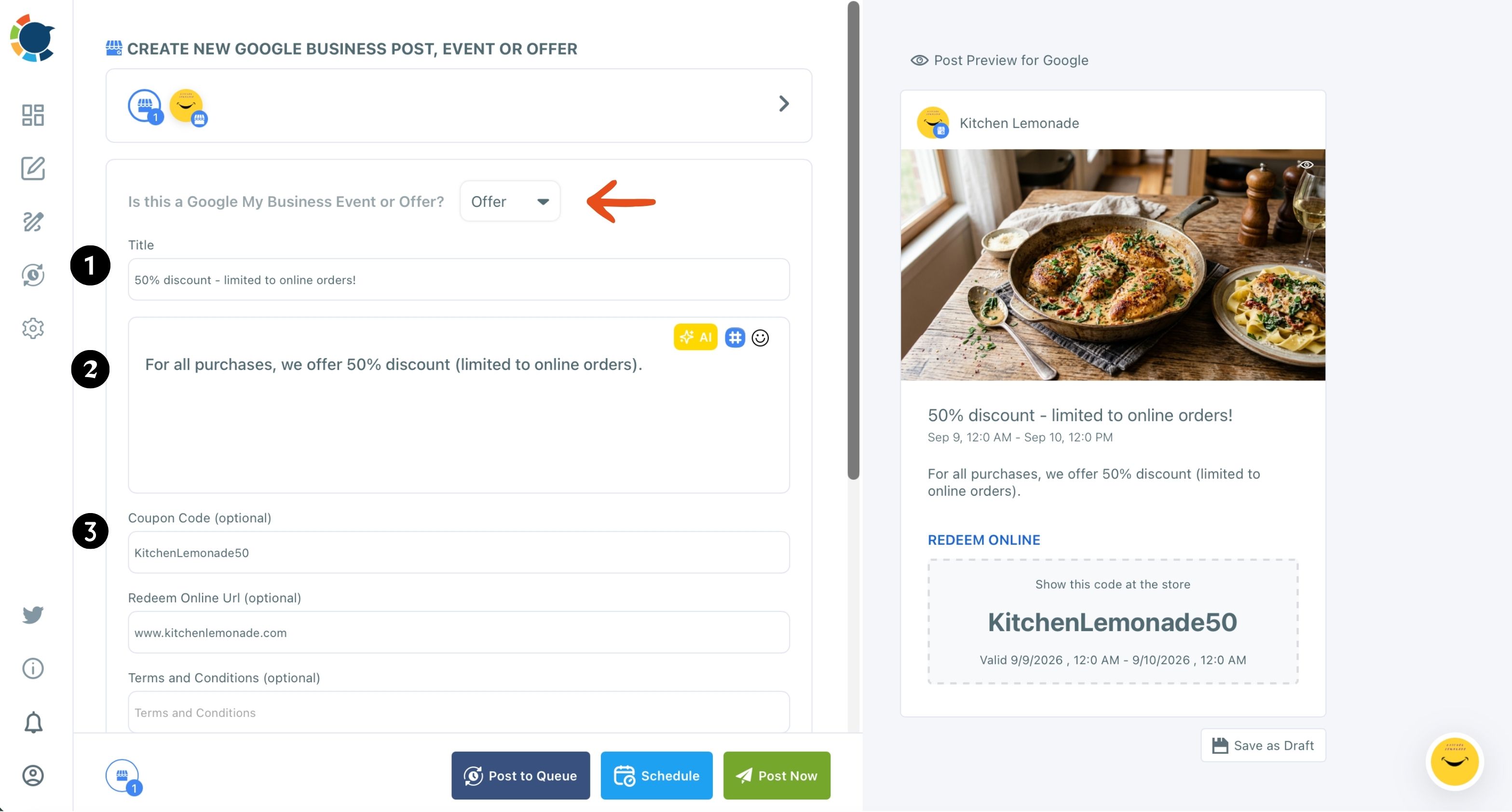
- Pick Offer in the "Is this a Google My Business Event or Offer?" dropdown, then write the title, the coupon code, the Redeem Online link and short terms, and turn on the time fields for Friday.
- Click Schedule and choose one of the slots under "Pick your best post time", or set a time by hand, then confirm.
The Share Group removes the one mistake that used to cost me a Friday: forgetting a shop. The dates on the Offer do the rest, since the special ends on Friday night without anyone deleting it.
Why the Friday special runs as an Offer, not a regular post
Google Business Profile has three post types, and choosing the right one changed how the special looked on the listing:
- A Standard update is a text-and-photo post with an optional button.
- An Event has a title and dates.
- An Offer has a title, a coupon code, a Redeem Online link, terms and a validity window.
The Offer won because the preview shows the code in its own coupon box. My staff stopped explaining the deal at the counter, because people walked in with the code already on their phone.
The post on how to schedule Google My Business Offer posts goes deeper on each field.
Two things I learned the hard way:
- An Offer has no button. The coupon box and the Redeem Online link are the call to action.
- Google's page says an Offer needs a title, dates and time, so I always switch on the optional time fields in the composer.
Some posts do need a button, like a catering announcement or a new location opening. For those, the rundown of effective CTAs for Google Business Profile posts helped me stop defaulting to Learn More. Order Online and Call Now fit a pizzeria far better.
One more rule I keep: the Offer rewards the visit, never a review. Google prohibits discounts in exchange for reviews, so I ask every customer for an honest review at the counter and keep the coupon for the pizza.
When one Google Business Profile post can't serve multiple locations
Sending one Google Business Profile post to multiple locations has one limit I had to plan around. It sends identical content to every selected profile, and different text per location inside one send is not supported.
My east-side shop closes an hour earlier on Fridays, so "until 11 pm" in a shared post would be wrong for one of three listings.
My fix is simple. Shared posts carry only what is true everywhere: the deal, the price, the day. Anything shop-specific goes in a separate send to that one profile.
If a sentence is not true for all three shops, it does not belong in the shared post.
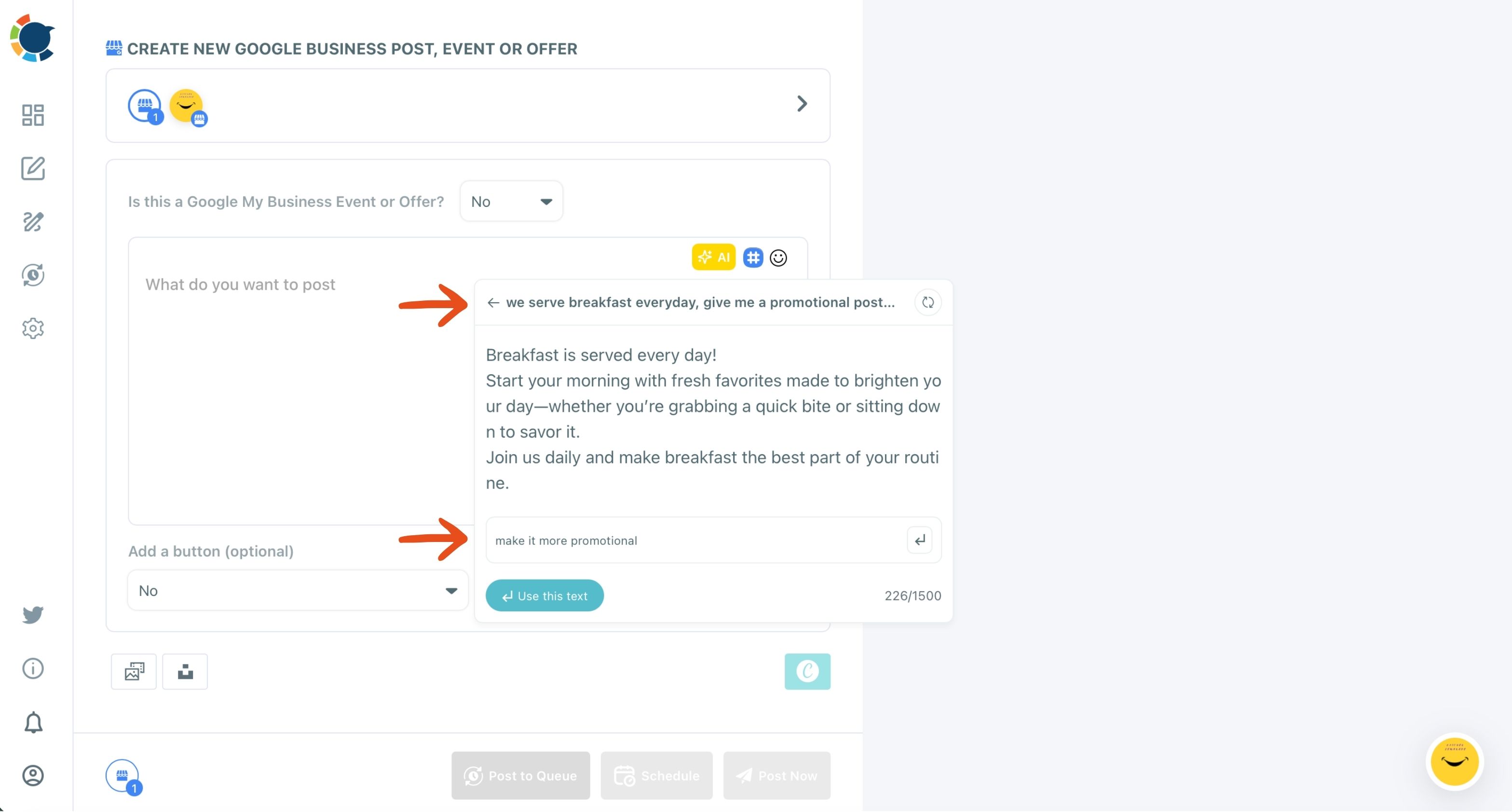
When I want each listing to read a little differently, the AI writer in the composer does the rewrite. I paste the base post, ask for a version that mentions the neighborhood, and send each version to its own shop.
That is a few extra minutes, and it keeps three listings from looking like the same paragraph pasted three times.
Making the photo and timing work for a Friday Google post
The photo sells the special more than the text does. A blurry phone shot of a pizza next to a competitor's clean menu card loses the click.
I design the Friday image in Canva without leaving the composer. I start from a template, and the Google Business Profile post design page shows what that looks like.
I also write alt text on every image, because Google Business Profile is one of the platforms where Circleboom Publish lets me add it, and it helps the photo get found in image search.
The guide to Google Business Profile photos covers sizes and what to shoot. My own rule is one hero pie, good light, no clutter.
Timing is the other half.
Google Business Profile has no followers, so the suggested slots in the Schedule modal follow when each listing's customers search, call and ask for directions. For a Friday dinner deal, the useful window is when people decide on dinner, and I let the suggestions pick inside that.
The post on the best time to post on Google Business Profile explains how those suggested slots are chosen.
Sending the same special to Instagram and Facebook
Google is where hungry strangers find us. Instagram and Facebook are where regulars remember us. The special needs both, but not as one identical post.
I use Create New Post on All Platforms for the social version, with the Facebook page and Instagram account selected, and I rewrite the text with AI so neither platform gets an exact copy of the Google Offer.
Everything lands on one Outbox calendar, which I can filter by platform, account or Share Group. Monday morning I can see whether all three Google listings and both social accounts have Friday covered.
If you run more than a handful of accounts across platforms, the overview on how to manage multiple social media accounts shows how the account side scales.
Twelve Fridays from now
Here is what the routine looks like over the next three months. Twelve Fridays, three listings, two social accounts: 36 Google posts and 24 social posts that I used to type one by one.
With the Share Group and one Offer per week, the Google side becomes 12 sends, each one Google Business Profile post for multiple locations, built in a few minutes on Monday.
The listings stopped drifting because there is no longer a "third shop" to forget. There is one post, and it goes everywhere it should.
If your shops still get their specials one listing at a time, start with next Friday and build that week's Offer once.
→ Schedule one Friday special for every Google Business Profile you run
Pizzeria owner questions about posting to several Google listings
Do I need a separate Circleboom account for each pizzeria?
No. One Circleboom Publish account connects all your Google Business Profiles, as long as the Google account you sign in with manages each listing.
Can the Friday special repeat every week without rebuilding it?
Yes. You can schedule each future Friday in one sitting, or reuse a sent Offer with Share Again and change only the dates; Google's own editor also offers a "Repeats" option for Google-only posts.
Will the Offer show on Google Maps as well as Search?
Google says a live post is public and shows on Search and Maps, so the Friday special appears on each pizzeria's listing in both places once it publishes.