Content marketing automation tools take something you publish once, usually a blog post, and share it to every social account without anyone copying links by hand. The best place to start is the blog's RSS feed, because it already announces every new post.
Circleboom Publish connects your blog's RSS feed to X, Facebook, LinkedIn, Google Business Profile, Bluesky and Threads and posts each new article automatically. You set the accounts, the opening and closing lines, and a daily cap once. After that, nobody has to remember to share.
→ Automate content marketing by posting your RSS feed everywhere
Below: the four automation rungs, which one to add first, and how to set it up.
What content marketing automation tools actually automate
Content marketing automation tools automate the repetitive steps around a piece of content: finding it, distributing it, timing it and drafting the text that goes with it. They do not automate the judgment about what is worth publishing.
That line matters. Google's guidance on creating helpful content says that using generative AI to produce large amounts of text without manual oversight or curation represents little to no effort.
Automate the distribution, and keep a person on the judgment.
The distribution side is where most of the hours go. A post that took a day to write still has to be shared to every account, every time, and that work never gets more interesting.
It is also the side that breaks first.
Shares get skipped on busy weeks, and accounts go quiet just when a new article could have brought readers in. The quickest fix is to set up RSS automation for your content marketing, so every new post is shared the moment it appears in your feed.
The four rungs of content marketing automation
Most lists of content marketing automation tools put twenty products side by side with no order. A more useful way to see them is as a ladder, where each rung removes one more manual step:
| Rung | Tool type | What it removes |
|---|---|---|
| 1 | Article curation | Searching sites for things to share |
| 2 | RSS automation | Picking and posting every item |
| 3 | Queue and scheduling | Choosing a time for each post |
| 4 | AI writing | Starting each caption from a blank box |
Each rung below explains what it does, what it still leaves to you, and the Circleboom tool that covers it.
Rung 1: manual curation
Curation means picking good outside articles and sharing them. With article curation, Circleboom suggests fresh articles matched to the interests you choose, and you send the ones you like to the Queue in one click.
It is the right rung when you do not publish every day. On the days without a new blog post, hand-picked articles keep the accounts active, but someone still has to pick them.
Rung 2: full RSS automation
An RSS connection removes the picking. Once a feed is connected to an account, every new item is posted on the schedule you set, with no selection step at all.
The math shows why this rung matters most. A blog that publishes 20 articles a month and shares each one to 6 accounts needs 120 manual posts a month.
One RSS connection replaces those 120 shares with a single setup of about ten minutes.
What this rung still leaves to you is the choice of feed and an occasional check on it. A feed posts whatever the source publishes, so the quality of the source becomes the quality of the account.
Rung 3: the queue for your own batch-written posts
Some posts are not blog articles: a launch announcement, a carousel, a campaign. Write them in one sitting and automate social media posts by dropping each into the next open slot of each account's Queue, filled with that account's best times to post.
Rung 4: AI writing for the text itself
The last rung shortens the writing. An AI social media post generator drafts a post from a short instruction or turns an article into a new post. You edit it before it goes out.
This rung still needs a person. It saves the blank-page time, not the review.
Why RSS is the rung to add first
RSS is the rung that runs without anyone touching it after setup, which is why it gives the biggest return for the least effort. The RSS Advisory Board's RSS 2.0 specification describes RSS as a web content syndication format, and most blog platforms publish a feed of their posts by default.
Circleboom is an official X Enterprise developer, so an X account connected to a feed posts through access X has approved. The same connection lets you automate content distribution to six social platforms: X, Facebook, LinkedIn, Google Business Profile, Bluesky and Threads.

Circleboom runs its own blog on this rung
Circleboom uses this rung on itself. Its own blog's RSS feed is connected to its own social accounts, so every new article it publishes is shared across those channels with no manual cross-posting.
"Publish once" also works when the source is not a classic blog. If you write on Medium, the roundup of tools to automate your Medium blog posts covers that side of the chain.
A feed can even bridge two channels. The feed of a newsletter or blog posts to all six destinations at once, and a generator can turn a website or another social profile into a feed when it has none.
See it work: one feed connection sending a new article to several social accounts in a single setup.
Which content marketing automation rung fits your situation
The right first rung depends on what you already produce. Content marketing automation tools pay off fastest when they remove the step you skip most often:
- You publish your own blog or newsletter: start with RSS, because every new post is already in the feed.
- You publish rarely but follow good sources: start with curation, then move a source that proves reliable onto RSS.
- You run campaigns and launches: add the Queue, so batch-written posts go out at each account's best times.
- Writing the captions is the bottleneck: add the AI writer, and keep a person on the review.
RSS also works for the second case. Pick three trusted sites in your niche, connect their feeds with a Begin with line such as "Worth reading:", and the accounts keep sharing relevant news while you work on other things.
Choose those sources with care. We would rather see an account post less often than fill its feed with weak automated posts, because low-quality posts hurt an account's credibility faster than a quiet week does.
Why consistency is the real payoff
Staying active is the mechanism behind all of this. A follower who sees an account post regularly starts to expect it, that habit shows up as engagement, and the platform reads that engagement as a reason to show the account to more people.
Miss a few days in a row and the effect reverses. Automation keeps the chain running on the weeks when nobody has time to post by hand.
Automation covers consistency, and the composer covers quality.
Let the feed keep a steady baseline going, and use the composer for the hand-crafted posts, carousels and campaigns that deserve personal attention.
How to set up content marketing automation tools for a blog feed
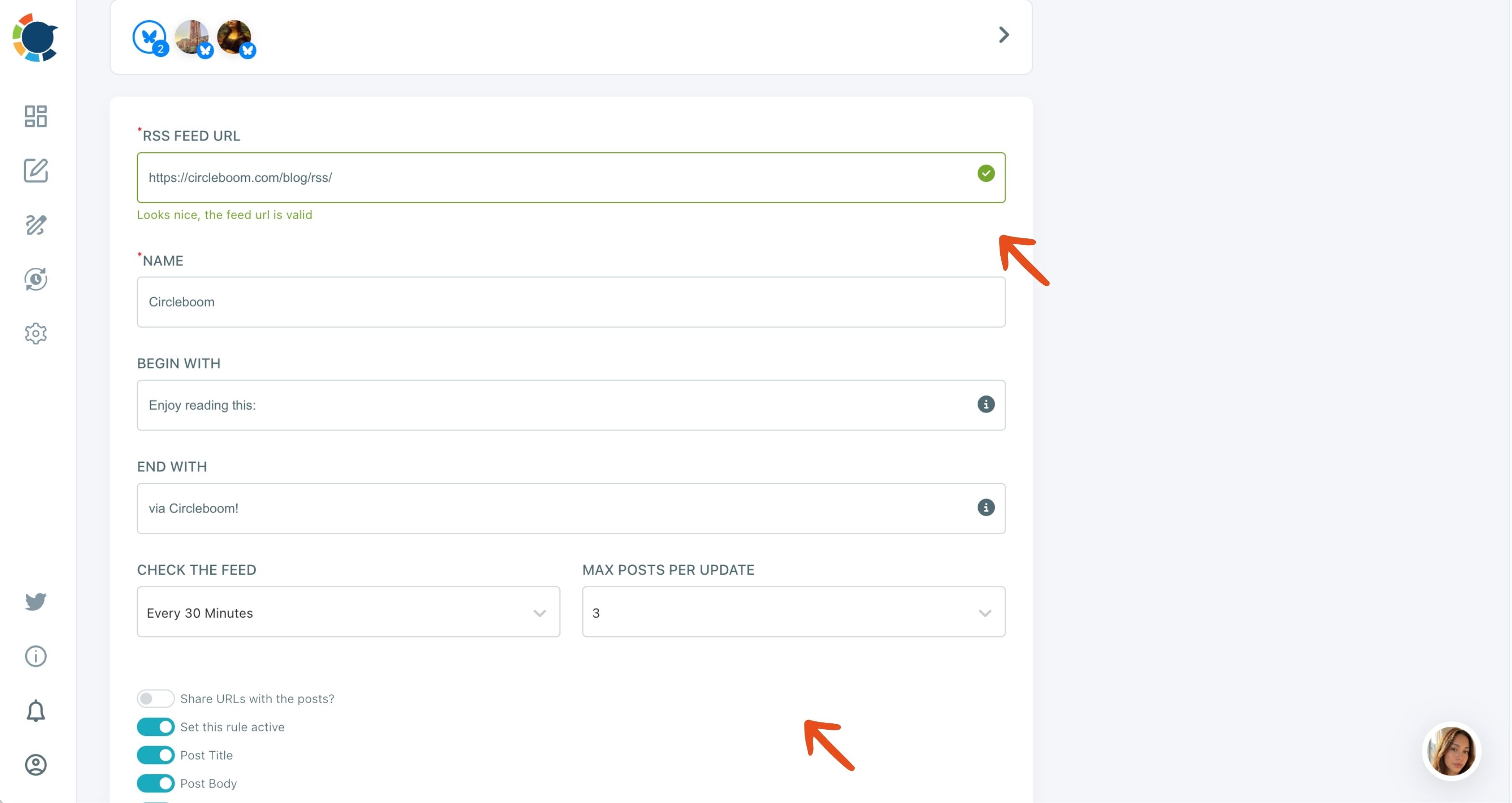
To automate the distribution of a blog, connect its RSS feed to every account that should share new posts, frame each post with your own opening and closing lines, and cap how many posts go out per day. The four parts below follow the order of the setup form in Circleboom Publish.
Connect the feed to the right accounts
Open Connect RSS Feeds from the dashboard, choose the accounts, and paste the feed URL. One connection can post to several accounts across platforms, and one account can hold several feeds, each with its own name.
Frame every post with your own words
Fill in Begin with and End with.
These lines wrap each automated post with your own text, such as "New on the blog:" before the title and a call to action or hashtag block after the link. The post then sounds like the account rather than a raw feed item.
Set the check frequency and the daily cap
Check the feed decides how often Circleboom looks for new items, from once a day to every 15 minutes. Max posts per update caps how many items actually go out per day, so checking every hour with a cap of 1 still posts one item.
Turn the rule on and review the queue
Choose what each post carries with the Share URLs, Post title, Post body and Post photo toggles, turn on Set this rule active, and click ADD RSS FEED. Then look at the Queue to confirm the automated posts land at sensible times.
That order puts the decisions that matter most first. The accounts decide where every post goes, the framing decides how it sounds, and the cap protects your followers from a sudden burst.
For a platform-specific example of the same form, see how to set up an RSS feed on Bluesky.
More setup advice, from choosing sources to wording the framing lines, is in the guide to use Circleboom's smart RSS feed effectively.
How to check that your automation is still working
Automated posts are not reviewed by a person before they go out, unless the rule is paused. That makes a regular check part of the setup, not an extra.
Two things can drift. A source can change what it publishes, and an account's audience can stop responding to the automated posts. A quick look at post analytics now and then shows whether the automated posts still earn engagement.
If they do not, change the framing lines, lower the daily cap or pause the feed with Set this rule active.
Treat the check as part of the schedule, not as a rescue. A short look at the numbers every few weeks is enough to catch a source that has drifted off topic before your followers notice it.
A note for Google Business Profile
Automated posts to a Business Profile still follow Google's rules. The Business Profile posts content policy allows Google to remove posts with contact details it cannot verify, so keep phone numbers out of the Begin with and End with lines.
How Circleboom compares with other RSS automation tools
Several products automate RSS sharing, and they differ in which platforms they support and how much control they give over wording and cadence. The comparison of tools to manage and publish your RSS feeds on social media lays out the options side by side.
If you already use a dedicated RSS posting service, the list of dlvr.it alternatives to automate social media posts is a useful second read.
Keeping X posts visible after they go out
Posts on X move down the timeline quickly. Circleboom's Auto Repost, set in the composer before a post is sent, resurfaces it on a timer on X, Bluesky and Threads. The auto retweeter explains how it works on X.
Summary: publish once, let the tools share it
Content marketing automation tools work best as a ladder. Curation fills quiet days, RSS shares every new post on its own, the Queue releases your batch-written posts at the right times, and AI shortens the writing.
Start with the RSS rung, because it removes the most manual work for the least ongoing effort. Keep the composer for the posts that deserve a personal touch, and check the results now and then.
→ Connect your blog feed once and share it everywhere
Automation tool FAQ
Which platforms can an RSS feed post to in Circleboom Publish?
An RSS feed can post to X, Facebook, LinkedIn, Google Business Profile, Bluesky and Threads. Instagram, YouTube and TikTok are not supported as RSS destinations, so posts for those go through the composer instead.
Will the feed flood my accounts if I publish a lot in one day?
No, not if you set Max posts per update. It caps how many items go out per day from that feed, whatever the check frequency, so a busy publishing day does not turn into a burst of posts.
Do I need a blog with an existing RSS feed?
No. Most blog platforms already publish one, and a feed generator can create one for a site that does not, in a few minutes and without code.