Most business Pages do not run out of things to say; they run out of posts that give followers a reason to answer. A feed of promotions and opening hours collects a few likes and no comments, and the 40 Facebook post ideas below fix that by pairing every idea with a format and a question.
What these 40 Facebook post ideas give your Page.
• Eight groups of ideas, from questions and behind-the-scenes Reels to seasonal posts.
• A format for each group, matched to how Facebook spreads that kind of post.
• A comment prompt for each group, so every post ends with something to answer.
• A routine to write, time and schedule a month of posts in one sitting.
Circleboom Publish writes, schedules and sends Facebook Page posts, Reels and Stories at each Page's best times, with a first comment ready under every post. Plan and schedule your Facebook post ideas for every Page you run.
Why business pages post without getting comments
A business Page gets few comments when its posts only announce things. An announcement has nothing to reply to, so followers read it, maybe tap like, and scroll on.
Facebook's feed ranking makes that worse. It weighs how quickly a post earns reactions, comments and shares after it goes live, so a quiet first hour tells Facebook the post is not worth showing to more people.
The audience is still there. Pew Research Center's 2026 social media fact sheet counts 70% of U.S. adults on Facebook, and DataReportal's Digital 2026 global overview puts the average online adult on social platforms for more than an hour a day.
The fix is not more posts; it is posts that end with something to answer.
The second problem is consistency.
Pages that post steadily are favored over Pages that go quiet for weeks, and a good idea list only helps if the posts actually go out. The simplest way through is to plan a month of Facebook posts in one sitting and let them publish on schedule.
Circleboom Publish keeps a Facebook Page active by scheduling its posts, Reels and Stories ahead of time, so the ideas below turn into a calendar instead of a note on your phone. Circleboom is an official X (Twitter) Enterprise API partner, and the same approved, policy-compliant approach covers your Facebook Page.
Facebook post ideas that start conversations
These first four groups exist to earn comments. Each one names the format that suits it and the prompt that closes the post.
Questions and opinions
Format: a short text post or a single photo. Comment prompt: a choice between two answers. For more posts built around replies, see these Facebook engagement posts.
- This or that: two products side by side, and "which one would you pick?"
- Name it: ask followers to name a new product, dish or office pet.
- Fill in the blank: "The best part of a Saturday morning is ___."
- Ask for their tip: "What is your trick for keeping bread fresh?"
- Vote in the comments: list three options and ask for A, B or C.
Behind the scenes
Format: a short Reel, the format that currently earns the strongest engagement on Facebook relative to a Page's followers. Comment prompt: "guess what happens next" or "what should we film next?"
- Meet the team: one person, one role, one fun fact.
- How it is made: the process behind one product, start to finish.
- Opening up: the first ten minutes of a working day.
- Packing an order: the care that goes into one delivery.
- The outtake: a mistake, a spill or a failed first attempt.
Customers and community
Format: a photo post. Comment prompt: invite others to share their own version.
- Customer photo: a customer using your product, shared with permission.
- Review of the week: a real review, with your thanks.
- Customer of the month: a regular, and why they keep coming back.
- Neighbor shout-out: a local business you work with or love.
- Public answer: a question one customer asked, answered for everyone.
Teaching posts
Format: a carousel, since Facebook has no separate carousel type and the slides become the post's images. Comment prompt: "what would you add to this list?"
- How-to tip: how to store sourdough so it stays fresh, for a bakery.
- Myth vs fact: one belief in your industry, corrected.
- Before and after: the result your service delivers.
- The checklist: five things to check before buying what you sell.
- Care guide: how to make your product last longer.
Facebook post ideas that show the business
The next four groups keep the Page useful and current. They carry the offers, the dates and the personality that make the conversation posts above worth following.
Products and offers
Format: a carousel or a photo, with the link in the first comment. Comment prompt: "which one should we restock first?"
- New arrival: what it is, who it is for, what it costs.
- Menu carousel: six dishes, one per slide, scheduled for Friday.
- The bundle: products that work better together.
- Limited offer: a clear end date and one way to claim it.
- What you get: everything inside one package, laid out.
Timely and seasonal
Format: a photo post, or a Story for countdowns. Comment prompt: "what are your plans for the weekend?"
- Holiday hours: the same notice sent to every location's Page at once.
- Local event: a fair, a match or a festival you are part of.
- Seasonal tip: what your customers need this month.
- Countdown: a Story a day before a launch or sale.
- Anniversary: how long you have been open, with a thank you.
Quotes and light posts
Format: a photo with text, or a plain text post. Comment prompt: "agree or disagree?" When you share a line from someone else, the guide on how to post quotes on Facebook covers the formats that read well.
- Quote with your take: one line, plus why it matters to your work.
- Team favorite: the product or tool the team actually uses.
- Industry joke: a meme only your customers will get.
- Throwback: your first storefront, first logo or first order.
- Milestone thanks: a follower count or sales number, and who made it possible.
First posts for a new page
Format: a photo post pinned near the top. Comment prompt: "say hello and tell us where you found us."
If the Page is brand new, start with your first business post on Facebook before anything else on this list.
- Welcome post: who you are and what the Page will share.
- Founder story: why the business exists, in a few lines.
- Top question answered: the question you hear most.
- How to order: the steps, the hours and the contact options.
- Meet the owner: a face behind the name.
Match each Facebook post idea to the format that earns comments
The same idea earns very different results depending on the format it takes. Facebook currently gives Reels the strongest engagement relative to a Page's followers and plain link posts the weakest, so the format choice matters as much as the idea:
| Format | Best for | Comment prompt | Watch out for |
|---|---|---|---|
| Reel | Behind the scenes, how it is made | What should we film next? | First seconds must hook |
| Carousel | Tips, lists, menus, before and after | What would you add? | Strongest slide goes first |
| Photo | Customers, offers, seasonal news | Share your own version | Under 4 MB per image |
| Text question | Opinions, this or that, fill in the blank | Pick A or B | Keep it to one question |
| Story | Countdowns, quick updates | Reply with your guess | Facebook only, no cross-post |
Write the first comment with the post: the question that starts the thread sits under it the moment it goes live.
We left the link post out of the table on purpose. A post that is only a link gives followers nothing to react to, so put the link in the first comment and let the post itself carry a photo, a carousel or a question.
How to write a Facebook post from an idea with AI
An idea becomes a post once it has a hook, a few clear lines and a closing question. Circleboom Publish's AI Facebook Post Writer handles that step: click the gold AI button above the text field, type the idea as an instruction, and it returns a finished post you can edit.
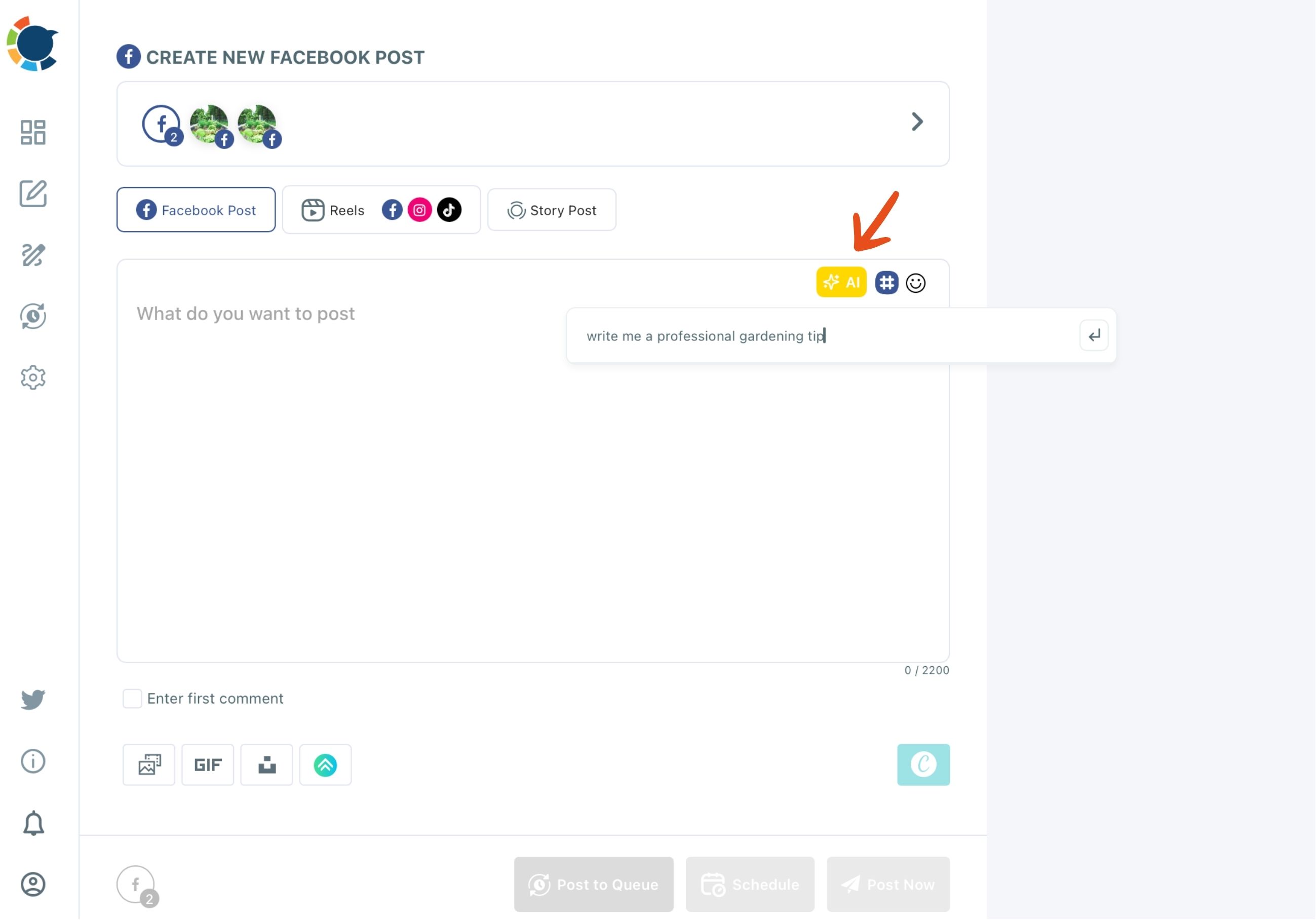
The quick edits finish the job. More Punchier sharpens the hook, Condense cuts it down, Fix Grammar cleans it up and Add Hashtags adds tags, all with one click. Always read the result for accuracy before it goes out.
The writer also fills gaps in expertise. A bakery's Page manager with no nutrition background can ask for a post on why sourdough is easier to digest, and the AI supplies the subject knowledge.
The same engine sits behind the AI Facebook post generator, and it is included in a Circleboom membership at no extra cost.
Short demo: one idea from this list typed as a prompt and returned as a finished Facebook Page post.
For the teaching group, the AI Carousel Generator in the composer's media bar turns a topic into templated slides that attach to the post as its images.
Where should links and hashtags go in a Facebook post?
Links and most hashtags go in the first comment, not the caption. The caption then does one job: hook the reader and ask the question.
Circleboom Publish lets you write that comment in the same composer with "Enter first comment" and schedule it together with the post. It works on feed posts and Reels, and it claims the top comment slot before a random or negative comment can.
If you have never tried it, the answer to whether you can schedule a first comment on Facebook walks through what that slot is good for.
Hashtags are a smaller part of discovery on Facebook than on Instagram, so keep them few and relevant. The Hashtag Generator adds tags in bulk, and you trim the list to the few that fit.
How Circleboom Publish schedules your Facebook post ideas
Circleboom Publish schedules Facebook Page posts, Reels and Stories from one composer, at times drawn from each Page's own followers. Meta offers its own scheduling for Facebook Page posts, and Circleboom adds the parts a busy Page needs on top: suggested times, many Pages at once and a first comment.
Here is how to turn these Facebook post ideas into scheduled Page posts in four steps:
- Log in to Circleboom Publish and connect the Facebook Pages you manage.

- Open the Facebook composer and choose Facebook Post, Reels or Story Post for the idea.
- Write the post with the AI button, add media and fill in the first comment.
- Click Schedule and pick one of the six suggested slots in "Pick your best post time."
That order keeps the idea, the format and the timing in one sitting, so a month of posts is set before the month starts. The suggested slots matter because each Page gets its own set, computed from when its own followers are online.
At a glance: connect, choose the format, write with a first comment, schedule at a suggested time.
Reels, many pages and a steady queue
A Reel scheduled from the Reels tab can go to Facebook, Instagram, TikTok and YouTube in one action, with a track from the built-in Add Music library. The Facebook Reels scheduler covers that flow for the behind-the-scenes group.
For days with no idea ready, Post to Queue drops a post into the Page's next open slot, and RSS Feed to Facebook shares new items from your blog automatically.
Reusing a Facebook post idea that worked
A post that earned comments can return, but not word for word.
Facebook penalizes duplicate content, so run the old post through the AI writer first and change the opening or add a new detail. The question of repeating posts on a Facebook Page is answered by that kind of refresh.
Your Facebook post ideas checklist
Forty ideas only help once they are on the calendar. Before the month starts, run these five checks:
- Pick ten ideas from at least four of the eight groups.
- Give each one a format from the table, leading with Reels and carousels.
- End every post with a question taken from its group's comment prompt.
- Write the first comment with the link or hashtags before you schedule.
- Schedule at suggested times so each post meets its Page's followers online.
Circleboom Publish keeps every Page you run on one calendar, with the AI writer, the first comment and the suggested times in the same composer.
→ Schedule your next Facebook post ideas
Facebook post FAQ
When should each Facebook post go out?
Post when that Page's own followers are online, not at a generic hour. Circleboom Publish suggests six slots per Page in the Schedule modal. The page on the best time to post on Facebook explains how they are chosen.
Can I post these ideas to my personal profile or a Facebook group?
No. Circleboom Publish supports Facebook Pages only; personal profiles are not supported, and Group posting was removed after Meta restricted third-party access.
Can I send the same post to several Facebook pages?
Yes. Select every Page in one composer send, which has been proven with 30 Pages at once. The page on how to manage multiple Facebook accounts covers Share Groups for repeat combinations. Give each Page its own AI-rewritten version to avoid duplicate content.