
Recording the episode is the hard part. Booking the guest, prepping the questions, fixing the audio, writing the show notes. That is real work and it takes real hours.
Then it goes out, and the tweet announcing it gets 11 impressions.
The gap between those two things is where most podcasts quietly stall on X. Not because the show is bad, but because the thing being posted is a link and an announcement, and an announcement is the single weakest unit of content on the platform. Nobody has ever stopped scrolling for the words "New episode is out now."
The awkward truth is that a podcast is already full of things that perform well on X. A guest saying something slightly reckless. A number that contradicts what everyone assumes. A two minute exchange that works with no context at all. All of it is sitting inside the audio file, and almost none of it makes it into the feed, because extracting it is a separate job that nobody scheduled time for.
To grow a podcast audience on Twitter you have to stop treating the episode as the post and start treating it as raw material for about fifteen of them. With Circleboom Twitter, you can build those posts in one sitting through the X Post Planner tool, schedule them across the week, and use the Real-time Tweet Search tool to find the accounts already talking about your episode's topic while the conversation is still live.
What Is Circleboom Twitter?
Circleboom is an Official X Enterprise Developer, working directly with X's official APIs.
No scraping, no credential sharing, and no extension logging into your session, which matters when the account in question is your show's front door.
- Writes, edits, and schedules posts and threads of up to 25 tweets from a single composer, with drag to reorder
- Generates a thread draft directly from a URL, so show notes or an episode page become a structured thread skeleton
- Bulk schedules a full week of clips and quotes in one session instead of one post at a time
- Collects live public tweets about your topic or your guest from a start date you choose, then pivots to the accounts behind them
- Cross posts the same episode to LinkedIn, Threads, Bluesky, Facebook, and Instagram with per platform text
- Shows when your own followers are actually online, and reports on which posts worked afterward
For a podcast, that combination covers the whole loop: pull the episode apart, place the pieces across a week, find the people who care about the topic, and check what landed.
How to Grow a Podcast Audience on Twitter with Circleboom Twitter
- Connect your X account and open the X Post Planner tool. This is the workspace where everything else happens. Authentication runs through X's official API, and the planner is where writing, media, scheduling, and drafts all live in one screen instead of scattered across notes apps and browser tabs.
- Turn the episode page into a thread skeleton first. Paste your show notes URL or episode page into the Generate a Thread from URL feature. Circleboom reads the page and returns a structured multi tweet draft that preserves the main points and flow. Treat it as a skeleton, not a finished thread. It will need your voice on the opener and your commentary between the points, but it removes the blank page problem, which is the actual reason most episode threads never get written.
- Mine the episode for standalone posts and save them to Collections. Open a new draft for each one and save it rather than publishing. You are looking for claims that survive without context: a number, a disagreement, a prediction, a correction of something people commonly believe. Aim for ten to fifteen per episode. The Collections panel on the right stores them all, searchable by keyword and filterable by collection, so one recording session fills a queue that lasts a week.
- Build the thread properly inside the composer. Click "Add another post" to add each tweet, and use the reorder handle on the left of any block to drag tweets into a better sequence. The order matters more than the wording. Your strongest line should be the first tweet, not the payoff at tweet seven, because tweet seven only gets read if tweet one earned it.
- Attach the clip, not just the link. Use the image icon to open Image Tools and upload your audiogram or video clip. One video per tweet, up to 512 MB and 2 minutes 20 seconds, or up to 4 images at 5 MB each. Images and video cannot go in the same tweet. Put the episode link in a later tweet in the thread rather than the first one, so the opening post is judged on the clip alone.
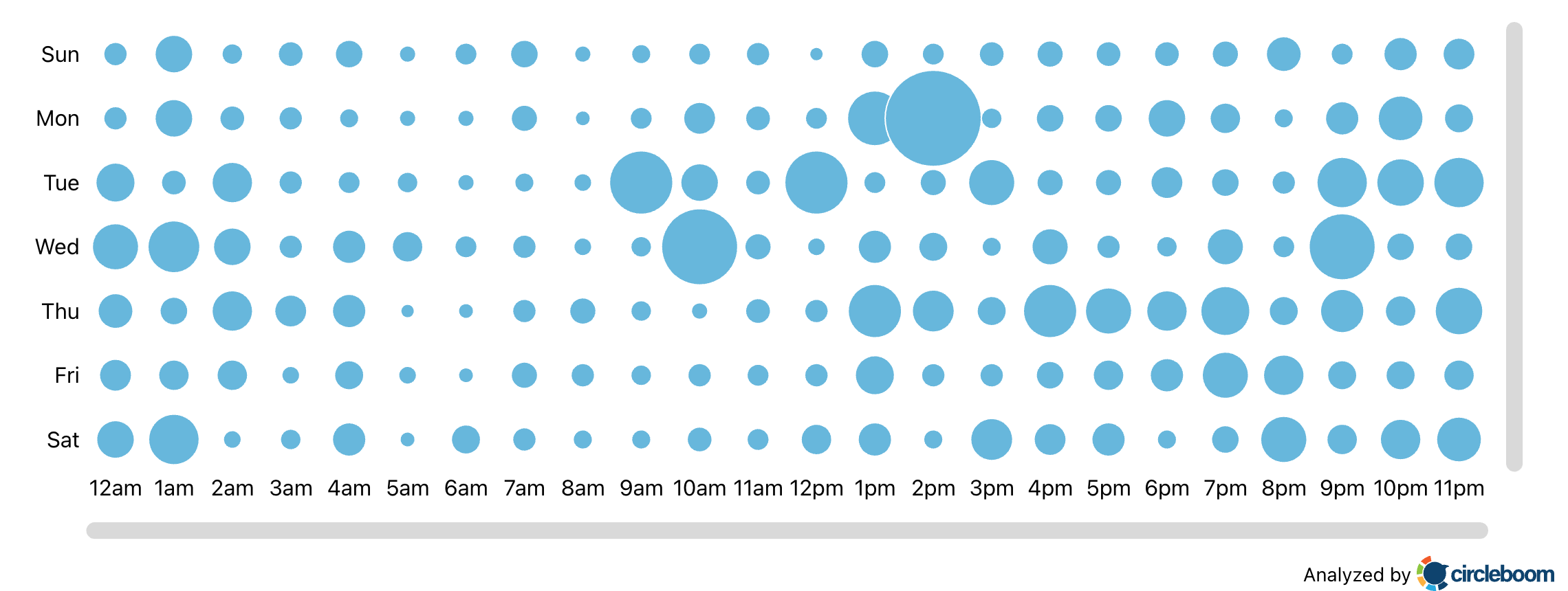
- Find your posting windows before you schedule anything. Open the When Followers Are Online tool and read the bubble chart for your account. Pick 2 to 4 windows rather than one. Then in the planner, click SCHEDULE and use "Find your best posting time" inside the modal, which offers six AI suggested slots and fills the time field without making you leave the composer.
- Bulk schedule the week in one pass. Rather than scheduling fifteen posts individually, use the Bulk Schedule tool to place clips and quotes across the days following release. A podcast has a release day, but the episode does not expire on it, and spreading the pieces means the people who missed Tuesday still meet the episode on Friday.
- Set up a Real-time Tweet Search around the topic before the episode drops. Open Real-time Tweet Search, describe what you want in plain language, set the start date to a day or two before release, and add exclude terms and a language filter so the stream stays readable. Search the topic your guest is known for, not your show name. Nobody is searching your show name yet, which is the problem you are trying to solve.
- Pivot to the profile view and build a list. Click "Display Profiles of this search" to get the deduplicated accounts behind those tweets, with follower counts, follow ratio, and activity classification. Add the relevant ones to an X List rather than mass following them. That list becomes your reply surface for the week, and replying to people already discussing your topic reaches more new listeners than any announcement post will.
- Queue a second showing for the strongest posts. Use the Auto Retweet tool to resurface your best clip in a different time window so the segment of your audience that was asleep the first time still sees it. Do this for the one or two posts that actually performed, not for everything.
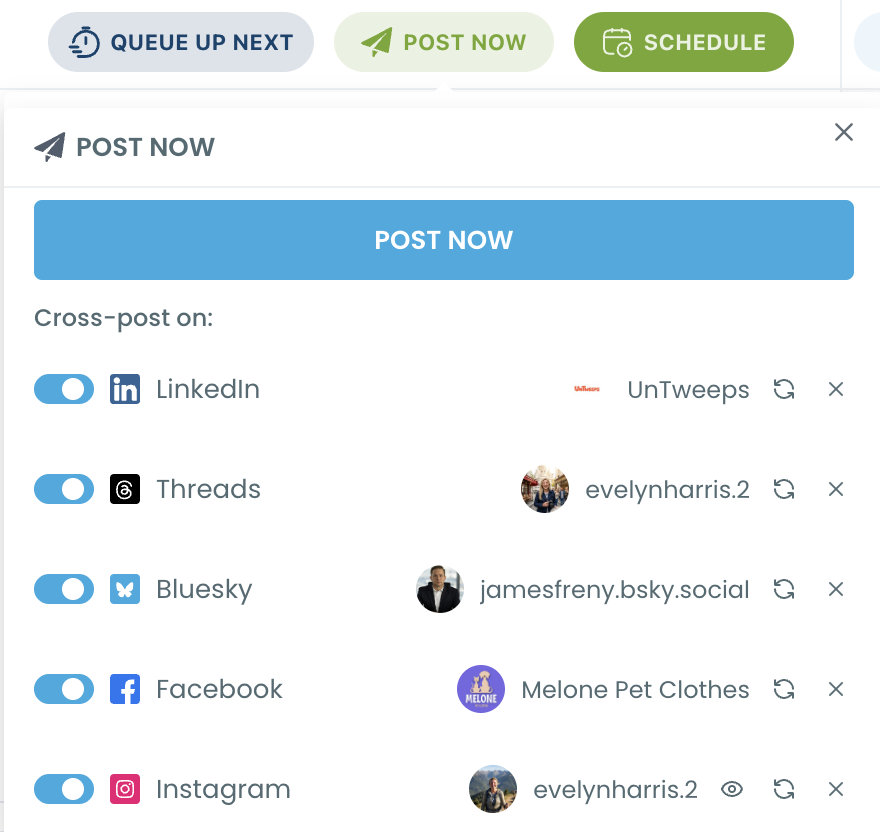
- Cross post the episode without rewriting it five times. In the Schedule modal, toggle LinkedIn, Threads, Bluesky, Facebook, or Instagram and edit the per platform text. Bluesky caps at 300 characters and Threads at 500, so the X version usually needs trimming for one and expanding for another.
- Check what worked, then repeat only that. After two weeks, look at which clips pulled replies and profile visits versus which ones just filled the queue. Cut the formats that did nothing. Most shows discover that one specific post type carries almost everything, and the fastest growth comes from doing more of that and less of the rest.
Why the "New Episode Is Out" Post Fails
The announcement post asks for a large commitment from someone who has been given no reason to make it. Click the link, leave the app, open a player, and give you forty minutes. That is an enormous ask from a cold impression.
A clip asks for eight seconds and delivers something on its own. Even if nobody clicks through, the post did work: it showed a stranger what your show sounds like and what kind of thinking happens on it.
There is also a distribution problem underneath. Posts that push people off the platform have to work harder than posts that keep them on it, which is why native video and text consistently outperform link drops on X. This is not a rule you can argue with, only one you can design around, and the design is simple: put the substance in the post and the link somewhere further down.
📌 The best performing podcast posts usually do not mention the podcast. They make a claim, and the show is how the claim is sourced. The plug is the footer, not the headline.
The mechanics of why some posts travel and others do not are covered in how to increase X post impressions, and getting more impressions on X videos is directly relevant if audiograms are your main format. It is also worth knowing whether shared videos earn impressions the same way before you decide how to publish clips.
Where New Listeners Actually Come From
Almost never from your announcement. Usually from one of four places, and all four are workable.
Your guest's audience. This is the largest and most ignored source. Your guest has followers who have never heard of your show and who trust the guest. With Circleboom Twitter, you can pull the follower list of any public X account, so you can see exactly who that audience is before the episode airs and write clips aimed at them rather than at your existing listeners. Finding people who follow a certain account and searching someone's followers both cover the mechanics.
People already arguing about your topic. Real-time Tweet Search finds them while the argument is live, which is the only time joining it looks natural. A reply with a genuinely relevant clip attached, posted into an active thread, outperforms a standalone post by a wide margin because it borrows an audience that is already assembled.
Replies, not posts. Reply volume is the least glamorous growth lever and the most reliable one for small accounts. How to engage with followers on X and improving your engagement rates both come down to showing up in other people's conversations rather than waiting in your own.
Adjacent creators. Not competitors, adjacent shows. Finding X influencers for your brand works the same way for podcasts, and the useful targets are usually accounts with 5,000 to 50,000 followers who cover a neighbouring subject, because they reply to people and larger accounts do not.
⚠️ One warning about the guest angle. Pulling a guest's follower list and mass following it will get you rate limited and will read as exactly what it is. Add them to a List instead, watch what they respond to, and let the clips do the work. Lists are built for this, and they do not touch your follow graph.
What Happens If You Only Post on Release Day
The episode gets one shot at one hour. If that hour lands when your followers are asleep, the episode effectively did not publish. Best time to post on X covers why one slot is never enough, and a podcast is the worst possible case for it because there is no second post to recover with.
Your feed goes quiet for six days. Consistency compounds on X, and an account that posts once a week trains the algorithm and the audience to expect nothing. Building a content calendar and queueing posts properly are the difference between a show that appears weekly and one that appears daily while still only recording weekly.
You waste the best material. Every episode contains a few genuinely good moments. Publishing them as one link means none of them get their own chance. Content repurposing is the whole discipline here, and scheduling threads plus auto generating threads from any text make it fast enough to actually do every week.
You never learn what works. One post per week is not enough data to tell you anything. Fifteen posts per week tells you which format, which guest, and which topic pulls. What to tweet based on past post analytics is the follow up, and checking your analytics without Premium covers how to see it in the first place.
Monetization stays out of reach. Reach is the input to everything else. The 14 day playbook for creators earning on X and measuring and increasing your tweet value both assume a baseline of consistent posting that a release day only account never reaches. Low cost strategies for increasing reach is a good starting point if the budget is zero.
FAQ
How many posts should one episode produce?
Ten to fifteen is a realistic target for an hour long interview. One thread, three or four clips, four or five standalone quotes or claims, a poll, and a reply ready observation or two. That fills a week without repeating yourself, and it comes from material you already recorded.
Should I post the episode link at all?
Yes, but not as the opening tweet. Put it in the second or third tweet of a thread, or in a reply to a clip that performed. The post that earns attention and the post that asks for a click do not have to be the same post.
Do I need video, or are audiograms enough?
Audiograms work, but native video with captions consistently does better because it plays silently in the feed and still communicates. If you record video, clip it. If you do not, an audiogram with burned in captions is the next best option. Turning Spaces into video clips covers the process for audio first shows.
Can X Spaces help grow the podcast?
It is one of the more direct routes, because a Space puts you in front of people live rather than asking them to leave the app. How to start X Spaces covers the setup, turning a Space into a podcast episode covers the reverse direction, and listening to Spaces later explains what happens to the recording. If you are still setting the show up, how to start a podcast covers the ground before any of this applies.
How far in advance should I schedule?
Batch a full week at a time, immediately after recording, while the episode is still fresh in your head. Scheduled posts must be at least 15 minutes in the future, and there is no upper limit that matters for a weekly show. The point of batching is that it removes the daily decision, which is what actually kills posting consistency.
Should I cross post to other platforms?
Yes, with edited text rather than identical text. Bluesky caps at 300 characters, Threads at 500, LinkedIn at 3,000. Same clip, different framing per platform. Cross posting to Instagram Stories and promoting streams across platforms both cover the pattern.
What if my show is small and nobody replies?
Then reply outward instead of waiting. Use Real-time Tweet Search to find live conversations about your subject, join them with something useful, and let people find the show from your profile. Growth for a small show is almost entirely a function of how many other people's conversations you show up in.
Final Thoughts
The episode was never the problem. Most shows that struggle on X are producing perfectly good audio and then representing forty minutes of it with one link and six words.
To grow a podcast audience on Twitter, the shift is from publishing an episode to publishing everything inside it, spread across the week, aimed at people who do not know your show yet but do care about the thing your guest was talking about.
With Circleboom Twitter, you can build a week of episode content on X in one sitting, schedule it into the hours your followers are actually online, and find the accounts already discussing your topic while the conversation is still open.
https://circleboom.com/twitter-management-tool/x-post-planner

