How do you create a social media strategy you will still be following in week three?
Most strategies are long documents that describe the ideal brand and never mention who will post on a busy Tuesday. The version below fits on one page, and every line on it is something you can act on this week.
How do you create a social media strategy?
Write one page with eight lines: a goal, an audience, two or three platforms, content pillars, a cadence, a weekly time budget, a plan for empty days and one metric with a review date. Circleboom Publish then schedules that cadence across LinkedIn, Instagram, X and seven more platforms at each account's own best times.
→ Automate the posting side of your social media strategy
Why most social media strategies stop working in week three
A social media strategy usually fails at execution, not at planning. The goals are sensible and the audience is right, but the posting stops once the first busy week arrives.
Two blockers cause almost every stall. The first is time: writing, formatting and publishing the same idea separately for each platform multiplies the work with every network you add. The second is content: on the days with nothing ready, the account goes quiet.
A strategy without a posting cadence you can afford in hours per week is a wish list.
That is why the one-page version treats time and empty days as lines of the plan, not as problems for later. If you want the broader picture first, the difference between a strategy and a social media plan is that the plan schedules what the strategy decides.
The fix is to decide the cadence up front. Then automate the social media posts your strategy depends on, so the plan keeps running in the weeks you cannot give it attention.
Circleboom Publish schedules one post to LinkedIn, Instagram, X, Facebook and six more platforms in a single send, which turns the strategy's cadence line into something a small team can actually keep.
The one-page social media strategy, line by line
The whole strategy fits in eight lines. Each line answers one question, and together they cover direction, content and survival. Here is the template, filled in for an illustrative small B2B consultancy that leads on LinkedIn:
| Line | The question it answers | Example entry |
|---|---|---|
| Goal | What should social media do for us? | Book 4 discovery calls a month |
| Audience | Who must see it? | Operations leads at firms of 20 to 200 |
| Platforms | Where are they? | LinkedIn first, Instagram and X second |
| Pillars | What do we talk about? | Process tips, client results, team view |
| Cadence | How often, on each platform? | LinkedIn 3 a week, others 2 a week |
| Time budget | Who posts, and how many hours? | One person, 2 hours a week |
| Empty days | What goes out when nothing is ready? | Hand-picked articles and blog posts |
| Metric | How do we know it works? | Profile visits and tagged clicks, reviewed monthly |
If you prefer to start from a broader document, this marketing strategy template for small businesses covers the wider plan the eight lines sit inside.
Keep the page short on purpose. In my view, a strategy you can read in one minute gets checked before every posting session; a 20-page deck gets read once.
How to create a social media strategy in eight lines
Here is the order that works, from direction to survival.
Set the direction: goal, audience and platforms
- Write one goal tied to a business result, such as calls booked, signups or store visits.
- Name the audience by role or situation, not by age range alone.
- Choose two or three platforms where that audience already spends time.
The goal decides everything below it. A goal of awareness asks for reach and shares, while a goal of loyalty asks for replies and repeat visits.
The guide to build brand awareness and loyalty on social media shows how the two pull your content in different directions.
A useful audience line names a moment as well as a role: an operations lead who has just hired a tenth employee and can feel the old process breaking. That moment tells you what to post before it tells you where.
Choosing the platforms for your strategy
Platform choice is where most strategies overreach. Pew Research Center's 2026 social media fact sheet puts YouTube at 84% of U.S. adults, Facebook at 70%, Instagram at 51%, LinkedIn at 33%, TikTok at 31% and X at 25%.
Those numbers describe the general public, not your buyers. A B2B consultancy may find its best audience on the platform with the smallest share.
DataReportal's Digital 2026 global overview counts 5.66 billion social media user identities, and the average user visits 6.75 platforms a month.
Your audience is already spread out, so pick the two or three where it acts, not every platform it visits. The case for multichannel marketing is coverage of those few channels, done well.
Plan the content: pillars and cadence
- Pick three content pillars, the recurring themes every post belongs to.
- Set a cadence per platform, written as posts per week, not "regularly."
Pillars stop the daily "what should we post?" question. With three, every new idea either fits one or gets dropped, and the feed stays recognizable.
Give each pillar a job.
In the consultancy example, process tips earn saves and shares, client results build trust before a sales call, and the team view gives the page a face. When a pillar fails its job for two review periods, replace it instead of posting it harder.
Watch: turning a strategy's content pillars into posts that people actually stop for.
Cadence is the line that makes the strategy real. LinkedIn's own LinkedIn Pages best practices reports that companies posting weekly see a 2x lift in engagement, which makes a steady weekly rhythm the floor, not a stretch goal.
Make it survivable: time, empty days and one metric
- Price the cadence in hours per week, and name the person who owns them.
- Decide the empty-day source in advance, such as hand-picked articles or your own blog.
- Choose one metric and a review date, and change nothing before that date.
The time budget is the line almost every strategy template leaves out. Add up the posts in your cadence, estimate the minutes each one takes to write and publish, and compare the total with the hours someone actually has.
An illustrative calculation: the example cadence is 3 LinkedIn posts plus 2 each on Instagram and X, so 7 posts a week. At 15 minutes to write and publish each one by hand, that is 105 minutes, nearly the whole 2-hour budget, with no slack for a sick day.
When the numbers do not match, cut the cadence or cut the platforms. Never keep both and hope.
The empty-day line protects the cadence. Platforms reward accounts that post consistently, so a planned fallback keeps the rhythm going in the weeks when nothing original is ready.
Why the eight lines run in this order
This order works because each line limits the next one. The goal narrows the audience, the audience picks the platforms, and the time budget decides how much of the cadence survives, so nothing on the page is a promise the team cannot keep.
Quick recap:
- Direction: one goal, one named audience, two or three platforms.
- Content: three pillars and a weekly cadence per platform.
- Survival: hours priced, empty days covered, one metric with a review date.
How to put your social media strategy on a schedule with Circleboom Publish
Circleboom Publish turns the cadence and empty-day lines into a posting schedule that runs on its own. The fastest route is to schedule your social media strategy a month at a time, in four steps:
- Log in to Circleboom Publish and connect the accounts on the platforms your strategy names.
- Set up the Queue in Time and Queue Settings, and click Add Best Times to Post so each account's slots follow its own followers' activity.
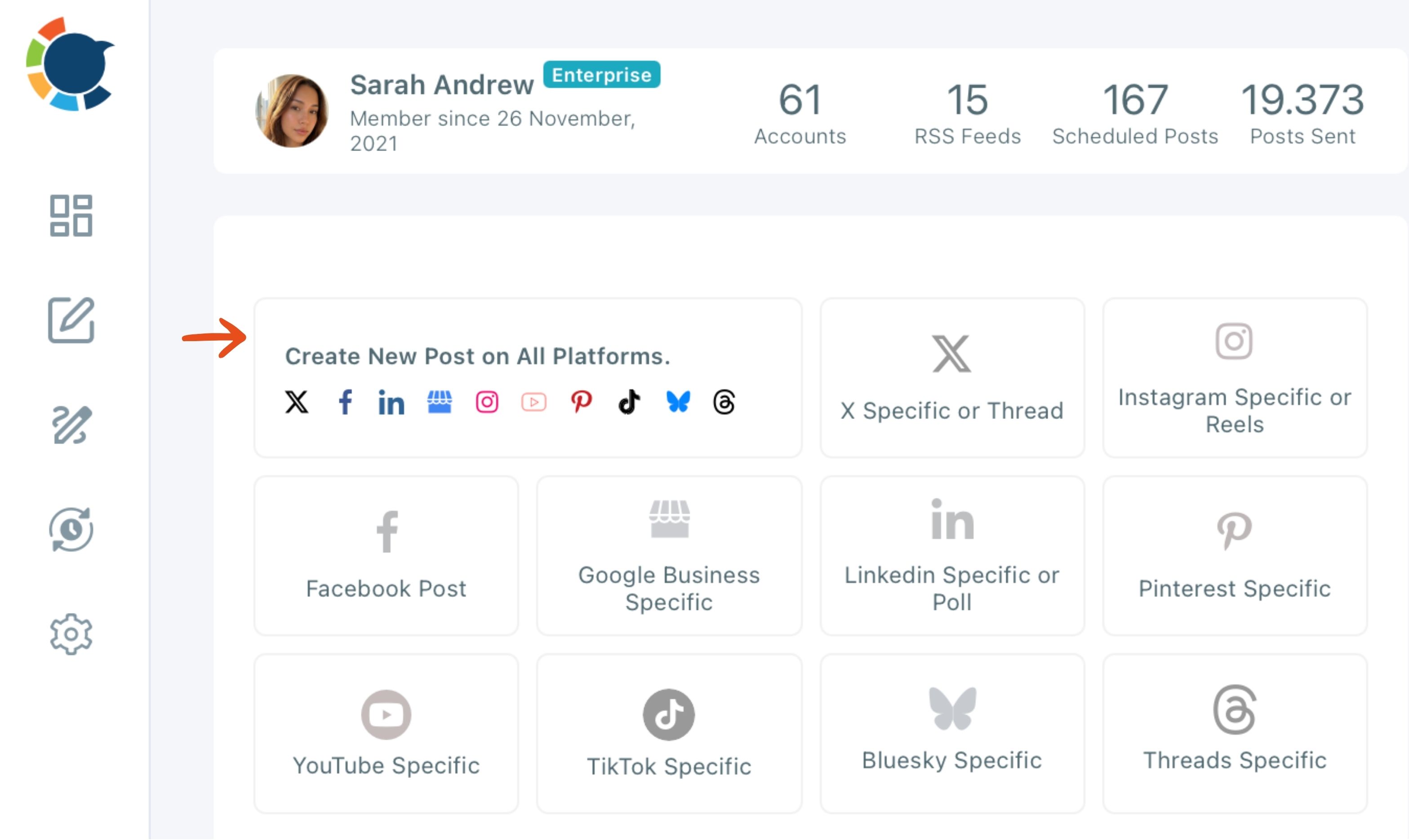
- Open Create New Post on All Platforms from the dashboard and select every account the post belongs to.
- Click Post to Queue or Schedule, and pick a suggested best-time slot when you schedule.
That sequence matches the strategy's own order. The accounts come from the platforms line, the Queue holds the cadence, and each post lands in the next open slot without anyone picking a time, which is what keeps the cadence alive in a busy week.
Keeping the time budget honest
The time budget shrinks when one send replaces several. A post written once can go to LinkedIn, Instagram and X together, and a recurring combination of accounts can be saved as a Share Group so the selection takes one click.
Check the per-platform preview before sending. One post to several platforms has to respect the strictest limit, and X allows 280 characters on a standard account, while Circleboom Publish takes up to 1,300 for a LinkedIn post.
For the X side of the plan, Circleboom is an official X Enterprise Developer, so X posts go out through approved access.
The AI writer is included in the membership, with no separate ChatGPT or Gemini subscription needed. Use it to give each platform its own version, because the same text pasted everywhere reads as duplicate content.
For the empty-day line, Discover Articles finds fresh articles on your pillar topics and sends them to the Queue, and RSS Feed shares every new post from your own blog automatically on the platforms it supports.
With RSS, the Queue and bulk scheduling in place, setting up a month of posts takes a couple of hours, not a few minutes every day.
How do you know if your social media strategy is working?
You know it is working when the one metric on your page moves by the review date. Read it the same way every time, with the same metric, the same period and the same accounts.
Circleboom's post analytics show each platform's posts in a sortable table, with a percentage change against the previous period, so the review starts from the trend instead of a total.
The strategy's goal usually lives off the platform.
Tag every outbound link with the UTM Link Builder in the composer: click the link icon next to the link and fill in source, medium and campaign. Google Analytics then shows which platform and which post sent the visits and signups.
On review day, change one line of the page at most. If the metric is flat, the pillars or the cadence are the usual suspects; if it is rising, leave the page alone for another period.
Social media is one channel in a larger plan. When the review shows social is doing its job, the next question is how it supports email, search and events, which is the thinking behind a 360 marketing plan.
Your one-page social media strategy checklist
The page is ready when every line has an entry and a person attached to it. Before you post anything, check these five things:
- One goal tied to calls, signups, sales or visits.
- Two or three platforms chosen for where your audience acts.
- A weekly cadence per platform that fits the hours you priced.
- An empty-day source connected before the first quiet week.
- One metric and a review date written at the bottom of the page.
Circleboom Publish keeps the cadence running across LinkedIn, Instagram, X and every other platform on the page, with the Queue, suggested times and tagged links in one place.
→ Put your new social media strategy on a posting schedule
Strategy questions
What if I have nothing to post this week?
Use the empty-day line. Circleboom's article curation finds fresh articles on your topics and sends them to the Queue in one click, and RSS Feed can share new posts from your own blog automatically.
Do I need to be on every social media platform?
No. Two or three platforms where your audience acts beat ten accounts posted to occasionally, and you can add a platform once the first ones run on schedule.
Can I post the same thing on every platform?
You can send one post to every platform, but give each one its own version. The help answer to can I post duplicate content covers the rules, and the built-in AI writer rewrites a post for each account in seconds.