
The hard part is not knowing that people criticize your competitor on X. The hard part is getting a usable list of those accounts. Native X search returns a feed of tweets you can read but not act on: no dedupe, no export, no clean roster of the people behind the posts. Anyone who has tried to build a prospect list this way ends up copying handles into a spreadsheet by hand and losing the older conversations entirely.
Searching by tweet content solves the problem profile search cannot.Native X search shows tweets, not an exportable list of the accounts behind them.People describe competitor frustration in posts, never in their bio.Circleboom deduplicates the authors of matching tweets into one account roster.
Use Circleboom to find Twitter accounts that tweeted about competitor names and export them in a few clicks.
This guide walks through the exact steps to search X by competitor mention, pivot from the matching tweets to the accounts that wrote them, and export that list for outreach or research. The method works for recent complaints and for conversations from months or years ago.
Why Profile Search Fails for This Task
Profile-based search matches only what people choose to put in their bio. A buyer who is actively unhappy with your competitor will almost never write that in their profile, but they will tweet it: a complaint about support, a question about switching, a comparison post weighing two tools. That behavioral signal lives in the tweet text, which is where a content-first search has to look.
Circleboom approaches the data as a verified X Enterprise API developer, pulling public tweets through the sanctioned channel rather than scraping. The practical payoff is twofold: the search reaches deep into historical tweets, and it returns the account behind every match. That account-level output is the difference between reading the conversation and owning a list you can work.
The same export discipline you would use to export all tweets of a Twitter user to Excel or CSV applies here, only the unit you keep is the account rather than the tweet. Each row is a real, public statement about a rival, attributed to a real account, with the engagement and recency context attached.
The goal of this whole exercise is a clean, deduplicated, exportable roster. To start building one, find competitor-mention accounts on X directly inside the tool.
What You Will Need Before You Start
Before running the search, line up three things so the results stay focused:
- The competitor name and any product or brand terms people use for it.
- The complaint or intent language that signals a switchable account, like "cancel," "switching," or "alternative."
- A rough date window, especially if a specific event drove the conversation.
With those ready, the search itself is quick. Filters do the narrowing, and the date range keeps the results tied to the moment that matters.
A short example helps. Say a rival raised prices in March and the backlash ran for a few weeks. You would search the rival's name plus "price," "cancel," and "switching," set engagement minimums so only tweets that drew reactions survive, and scope the date range to March and April. The result is not every mention ever posted, but the concentrated wave of switchable accounts from the exact period when frustration peaked. That is the kind of targeting native X search cannot assemble on its own.
How to Find Twitter Accounts That Tweeted About a Competitor
Follow these steps in order. The login and menu steps come first, then the search and the pivot to accounts.
Open the Tool and Start a Search
- log in to Circleboom by connecting your X account to reach the dashboard.

- Go to the Advanced X Search menu and select Historical Tweet Search.
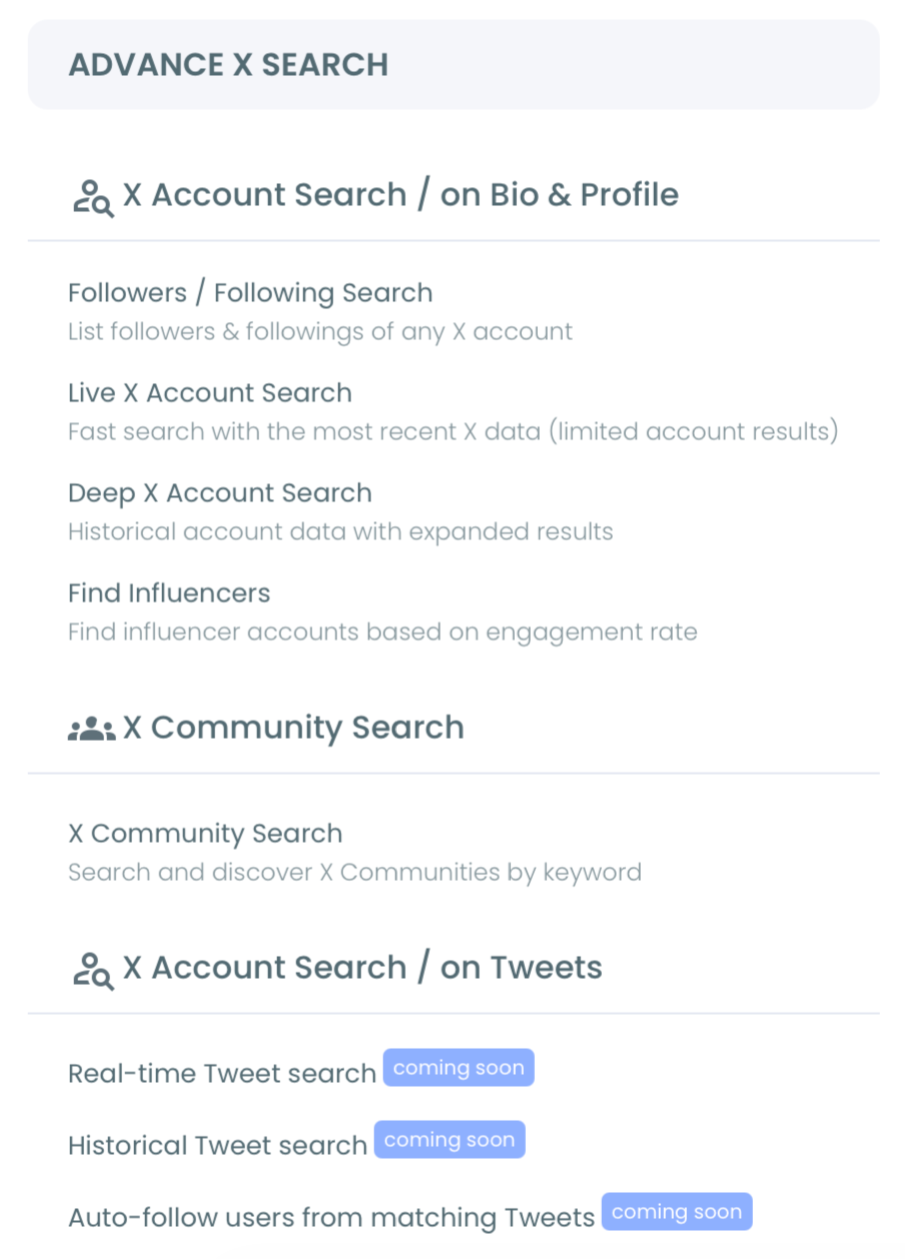
- Write your search in plain language, naming the competitor and the intent terms you prepared, then review the AI search suggestions.
Filter, Collect, and Extract the Accounts
- Open Filters and apply exclude terms, language, replies, links, verified-only, media type, and engagement minimums to remove low-relevance tweets.
- Choose a date range, from the last 30 days up to a year or a custom window, then set how many tweets to collect.
- Run the search and review the collected tweets with their full metrics.
- Click "Display Profiles of this search" to switch to the deduplicated account roster.
- Select accounts, then follow, add to a list, or export them to CSV.
Once the export is in hand, you have a working prospect file built entirely from competitor mentions. That list pairs naturally with broader audience work, such as deciding whether to target a competitor's followers with Twitter Ads using the same accounts you just gathered.
Watch the Search Workflow
This video demonstrates searching X accounts by keyword, which is the same engine that powers the competitor-mention search.
Seeing the keyword-to-account flow once makes the filter choices easier to reason about on your own searches.
Tips to Keep the List Clean
A keyword match is a starting point, not a verdict. Some accounts mention the competitor neutrally or even positively, so review the profile view before any bulk action. Check the active-or-inactive flag, since an account that complained a year ago may have gone quiet, and confirm follower and join-date signals look reasonable for your goal.
Two operational notes matter. First, searches and exports both draw on your token balance, so check it before pulling a large set. Second, the tweet count you request controls how many tweets are collected, not how many unique accounts come out: a high count from a few loud authors still yields few profiles. When the roster looks right, the same care you would apply to a search of someone's Twitter followers keeps your final list trustworthy.
For ongoing coverage rather than a one-time pull, pair this with continuous monitoring. The keyword and hashtag tracker watches for new competitor mentions as they happen, so your historical list and your live list stay in sync. Broader discovery tools like search Twitter bios and profiles then help you qualify the accounts you surface.
What Each Filter Controls
The Filters panel is where a broad mention dump becomes a focused account list, so it helps to know what each control actually changes before you collect.
The keyword match type sets how literal the search is. Exact phrase catches the precise complaint wording, contains widens to variants, and partial casts the broadest net. Exclude terms strip predictable false positives such as your own brand name or an unrelated use of the competitor's word. Language keeps results in markets you serve, and the verified-only toggle narrows to accounts X has confirmed when you want a higher trust floor.
The remaining controls shape relevance the most:
- Replies and links toggles separate original opinions from thread chatter and link-drops.
- Media type can narrow to text-only tweets, which usually carry the clearest stated intent.
- Engagement minimums on likes, retweets, and impressions surface complaints that drew reactions.
- Date range scopes the entire search to the period when the conversation peaked.
A practical order works best: set the date range and keywords first, add exclude terms to kill obvious noise, then apply engagement minimums last to keep only the statements that landed. Tightening before you collect beats cleaning up after, because every filter you apply early shrinks the roster you have to review by hand.
What the Export File Actually Contains
When you export the profile view, the CSV is built for downstream work rather than a screenshot. Knowing the columns helps you decide how to segment before the file ever reaches your CRM.
Each row is one unique account, deduplicated so an author who posted ten matching tweets appears once. The columns carry the account-level signals Circleboom uses across its search tools: display name and username, account join date, tweet count, following and follower counts, the follow ratio, and the active-or-inactive classification. Those fields let you sort the list before outreach, separating reachable, established accounts from dormant or brand-new ones.
The separate tweet export keeps the post-level context instead, including the tweet text, the direct link to the original post on X, the creation timestamp, and the full engagement metrics. Many teams export both: the profile file feeds outreach, while the tweet file documents the exact statements behind each prospect. That paired record is useful when you cross it against a list of the best social media monitoring tools and want evidence, not just handles, for why each account made the cut.
Your Action Checklist
Run the task end to end with this short list:
- Prepare the competitor name, intent terms, and date window.
- Log in and open Historical Tweet Search under Advanced X Search.
- Apply filters and engagement minimums before collecting.
- Pivot from tweets to the deduplicated profile view.
- Review accounts, then follow, list, or export to CSV.
Work through it once and you will have a competitor-mention list that profile search could never produce. The steps stay the same whether you are chasing a single rival or comparing several, and the export is reusable across outreach, ads, and research. Build your first one now.
→ export accounts that mentioned a competitor on X
Frequently Asked Questions
Can I find accounts that tweeted about a competitor a year ago?
Yes. Historical Tweet Search supports ranges up to a year and custom windows, so conversations from months back are reachable as long as the X API has indexed them. This is what makes researching a past competitor incident possible.
How is this different from finding influencers in my niche?
Competitor-mention search starts from a specific statement about a rival, while influencer discovery starts from topic authority and reach. The two complement each other. Many teams run a competitor search for warm prospects, then a separate pass to find Twitter influencers for free for partnerships.
Do I get the tweets or the accounts?
Both. The tweet view shows every matching post with metrics, and the profile view deduplicates the authors into an account roster. The profile view is the one you export for outreach.
Is scraping involved?
No. All tweet data is retrieved through Circleboom's official developer access to public posts on X. Only public tweets appear, and bulk actions stay subject to X's standard rate limits.
How many tweets should I collect for a clean list?
Collect enough to cover the conversation without drowning in noise. Because the tweet count controls collection size, not the number of unique accounts, a focused search of a few hundred tweets around a real competitor incident often returns a tighter roster than thousands of broad mentions. Start narrow with exact keywords and engagement minimums, read how many profiles came back, then widen the count only if the list is thinner than your goal needs.
Can I save the accounts into a Twitter List instead of exporting?
Yes. From the profile view you can add selected accounts to a Twitter List without following them, which is the cleaner choice when you want ongoing visibility rather than a one-time CSV. Doing this in volume is faster when you create Twitter Lists in a few clicks and drop the whole cohort in at once, then watch what they post next before you reach out.
Do searches and exports use the same tokens?
No. The search consumes GetTweetTokens proportional to the tweets collected, and the export draws tokens separately when you download the file. If the balance empties mid-collection, the search stops there and saves the partial results, so nothing already gathered is lost. Confirm the remaining balance shown during setup before pulling a wide date range.