

I once hit a strange point in my Twitter journey:
my follower count kept growing, but my engagement stayed completely flat.
I’d post consistently, try new formats, even jump on trends, but impressions barely moved. Likes and retweets felt random. Some good tweets failed, some simple ones worked, and nothing made sense.
So I stopped and asked myself:
What am I doing wrong?
Was it the timing?
My followers?
The content itself?
The algorithm?
I tested everything, tracked every change, and slowly pieced together what truly affects engagement. And what I discovered was eye-opening:
Most people don’t have a content problem.
They have a visibility problem.
Your tweets don’t get engagement because people don’t see them in the first place.
After understanding this, I rebuilt my entire Twitter strategy. I cleaned my audience, aligned my content with follower interests, posted when my audience was active, and most importantly, found ways to keep my tweets alive longer.
Here are the exact strategies that worked for me, step-by-step.
Why Your Engagement Is Low (It’s Not What You Think)
Before fixing anything, you need to understand the real reasons engagement drops. In my case, I learned that low engagement usually has nothing to do with “bad tweets.” It’s almost always one of these:
1. Your tweets die too fast. The average tweet only lives around 12 minutes.
If your followers are offline during that tiny window, your tweet is gone forever.
2. Your audience quality isn’t great. Bots, inactive accounts, or irrelevant followers drag your engagement rate down.
3. You’re posting at the wrong time. Most creators post when they are free, not when their audience is online.
4. Your content doesn’t match your followers’ interests. You’re talking, but not necessarily about what they care about.
5. You’re letting great tweets die after one day. Even your best-performing tweets disappear quickly if you don’t resurface them.
6. Your profile is full of low-engagement tweets. This hurts first impressions and algorithm trust.
7. You’re posting links instead of threads. Threads keep people on X. Links push them away, so X suppresses them.
Once I realized these patterns, everything became clearer.
And I knew I needed a tool that helped me fix all of these in one ecosystem.
That’s when I started using Circleboom, an official partner of Twitter/X.
Keep in mind that the API provides a more accurate real-time data stream than the X interface itself. While the platform UI may experience lag, the API captures and reflects new developments instantaneously.
Strategy #1 - Clean Your Audience (Engagement Starts Here)
Your engagement rate is a percentage.
If half your followers are bots or inactive users, your percentage crashes.
Here’s a simple example:
- I have 10,000 followers
- You have 5,000 followers
- We both get 10 likes
Your engagement is double mine.
The algorithm favors you.
This is why your follower count can grow while your engagement stays low.
How I fixed it
I used Circleboom’s Fake/Bot Follower detection.
It scanned my followers, flagged suspicious accounts, and let me remove them in bulk.
In minutes, my audience became healthier and my engagement rate instantly reflected reality.
Step #1: Go to the Circleboom Twitter website and log in with your credentials.
If you’re a new user, sign up, it’s quick and easy!

Step #2: On the left-side menu, click on the Followers / Following Management section. A dropdown menu will appear. Select Fake/Bot Followers to see the full list of your followers.
If you want to remove specific accounts, such as inactive users, you can directly select these categories from the dropdown menu instead of viewing all followers.
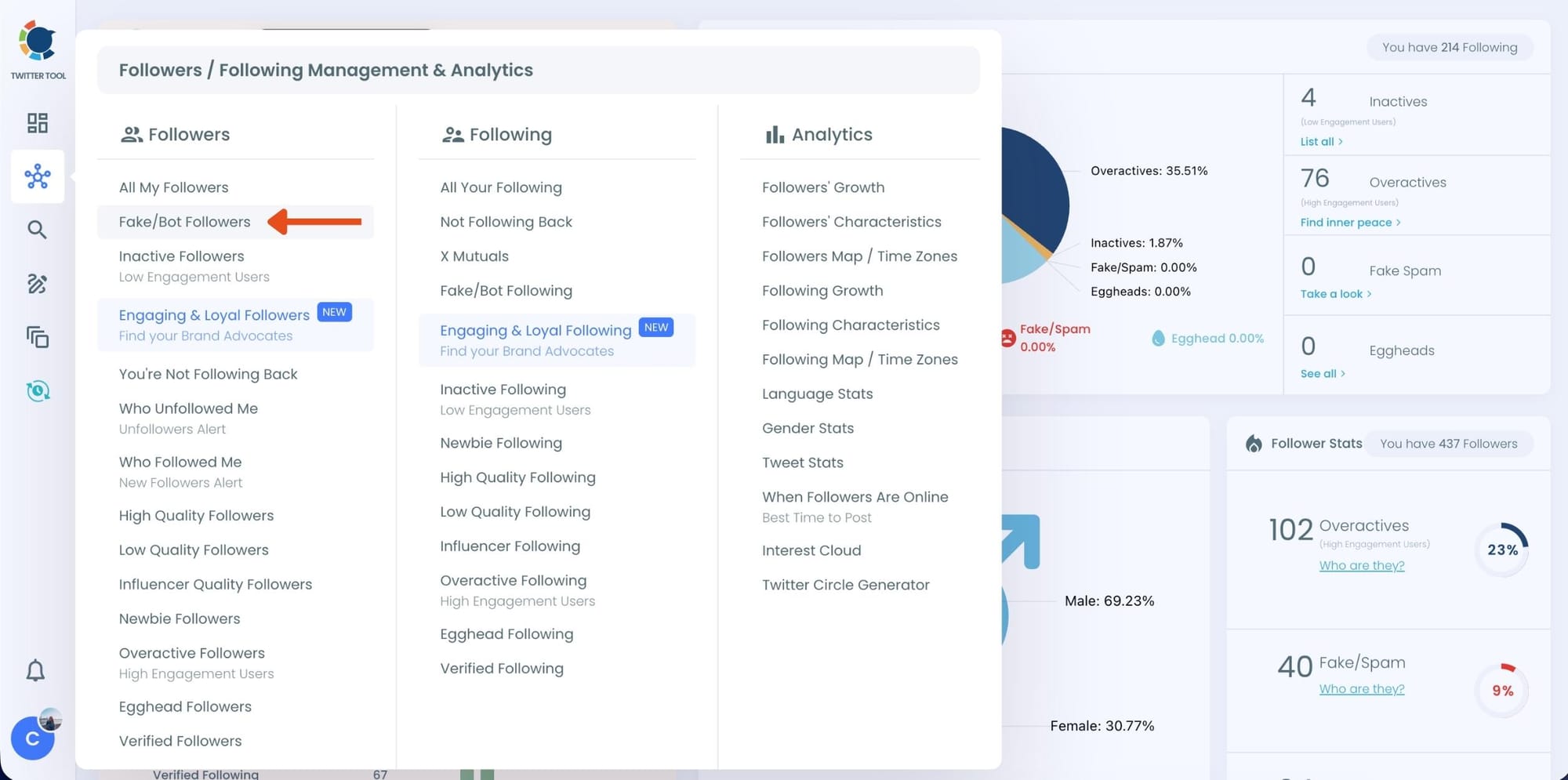
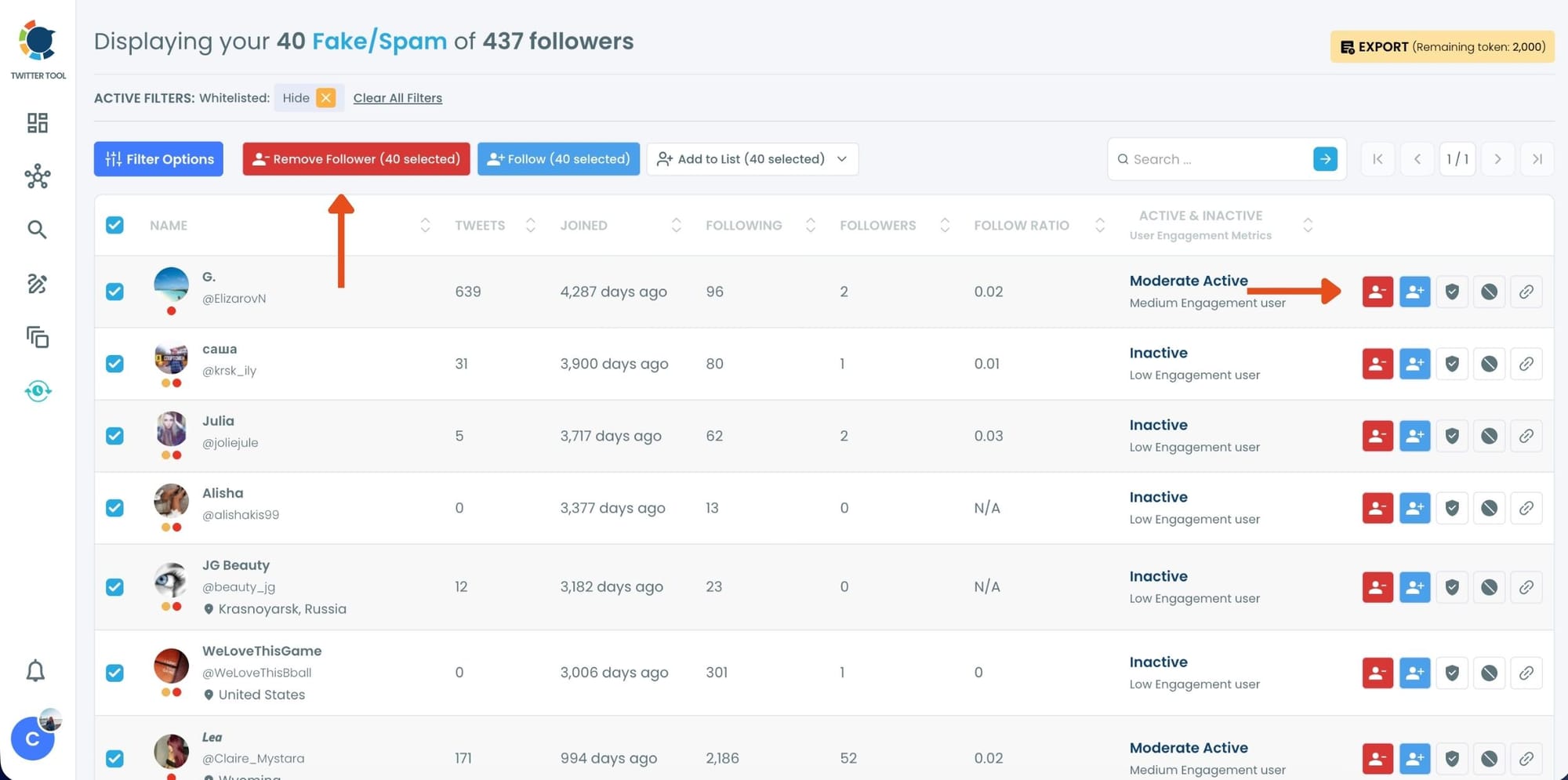
Step #3: You will see a complete list of your fake/bot followers.
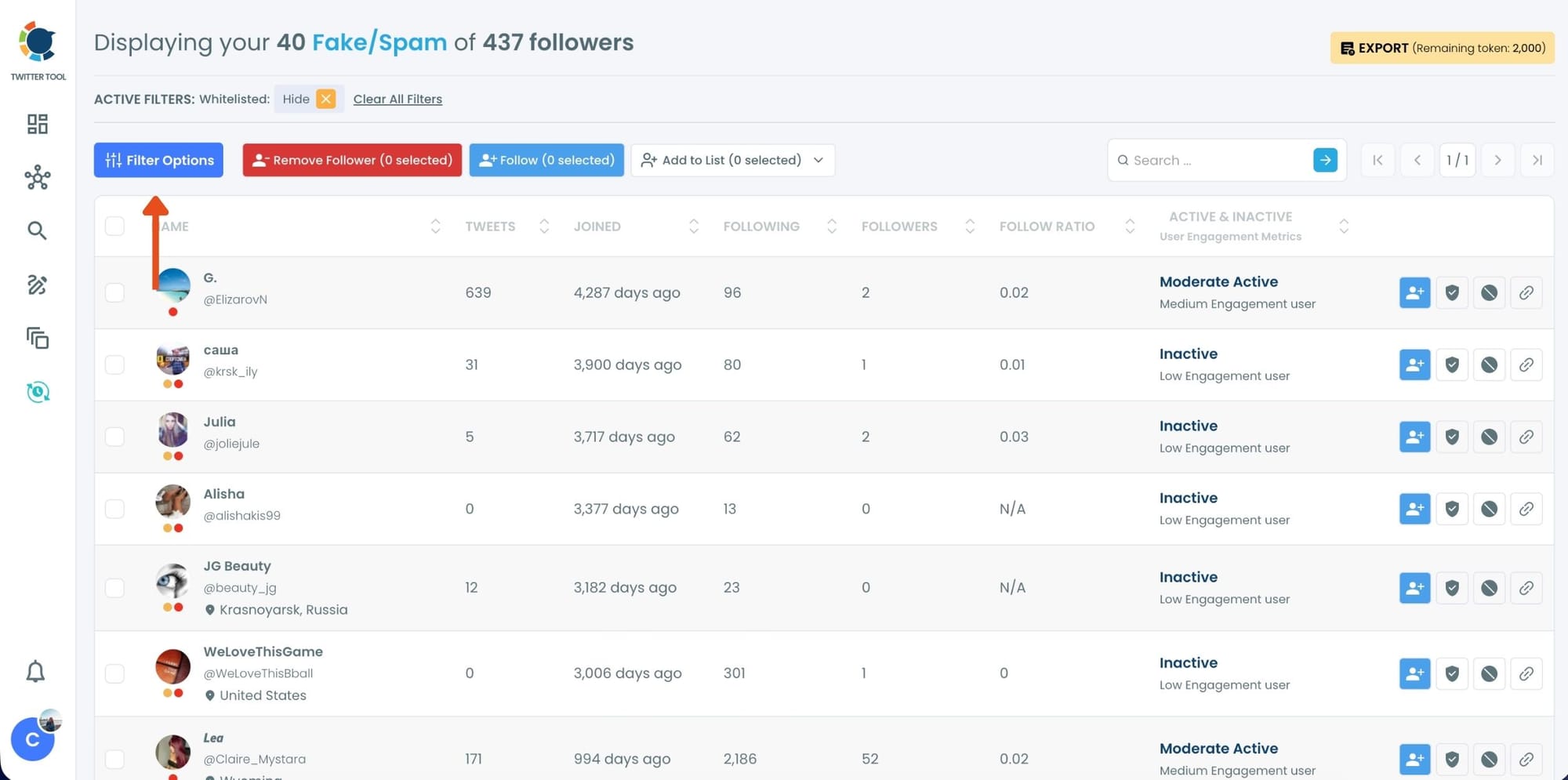
Use the Filter Options on the left side to refine your list.
You can filter followers based on engagement levels, inactivity, verification status, follower/following count, and more.
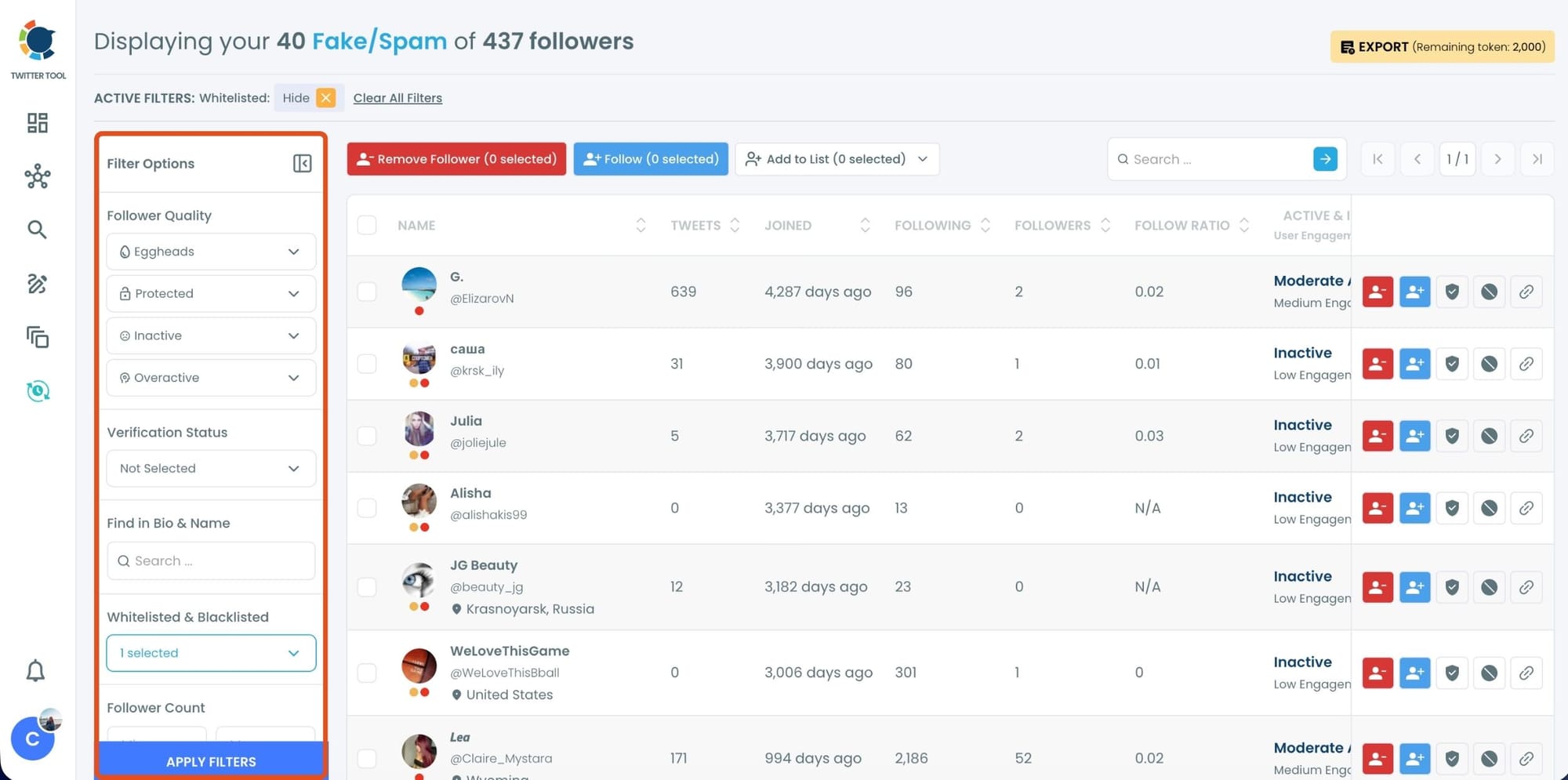
Step #4: Browse through your followers and check the boxes next to the users you want to remove.
You can also select multiple users at once. Once you have selected the users, click on the Remove Followers button at the top. Alternatively, you can remove individual followers by clicking the red remove icon next to their name on the right side of the list.
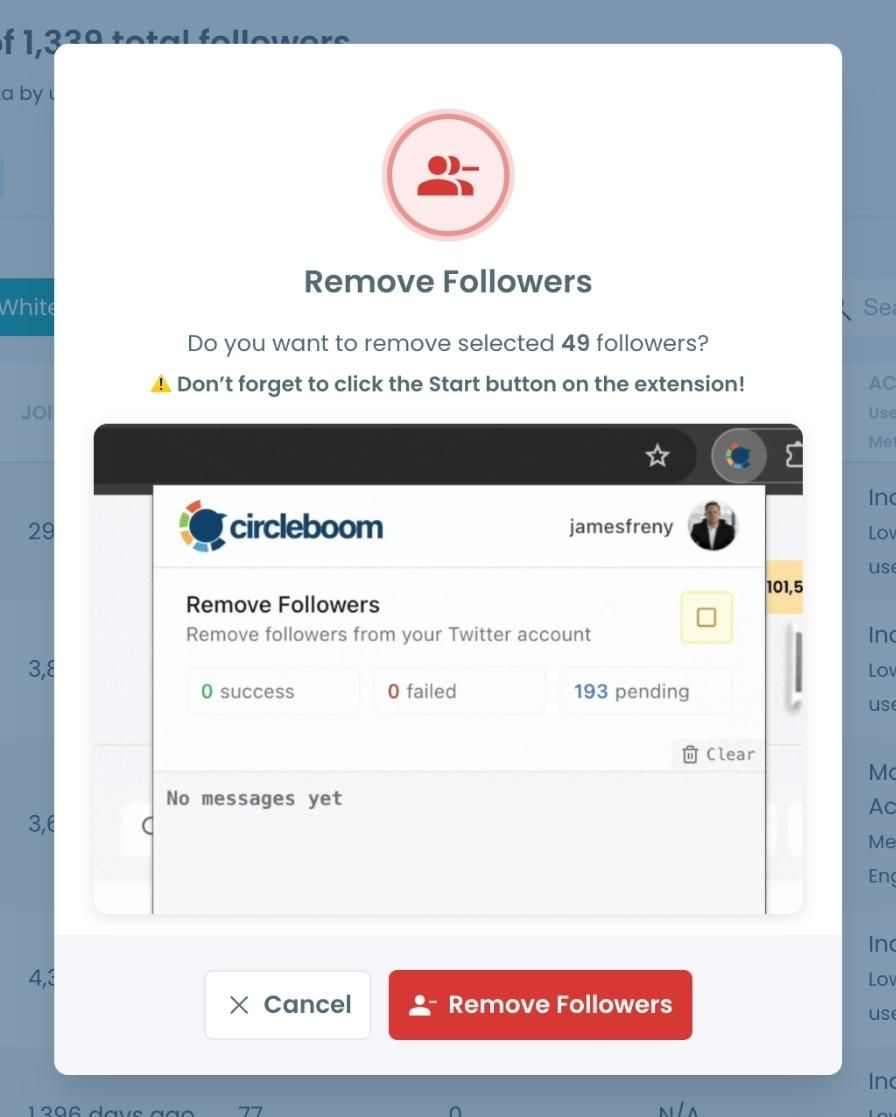
A confirmation message will appear asking if you are sure you want to remove the selected followers.
Click ''Remove Followers''.
Step #5: Since the removal action is processed via the Circleboom Remove Twitter/X Followers extension, you need to install it to complete the process.
Click on Download the Extension and install it from the Chrome Web Store. Once installed, you can easily remove followers.

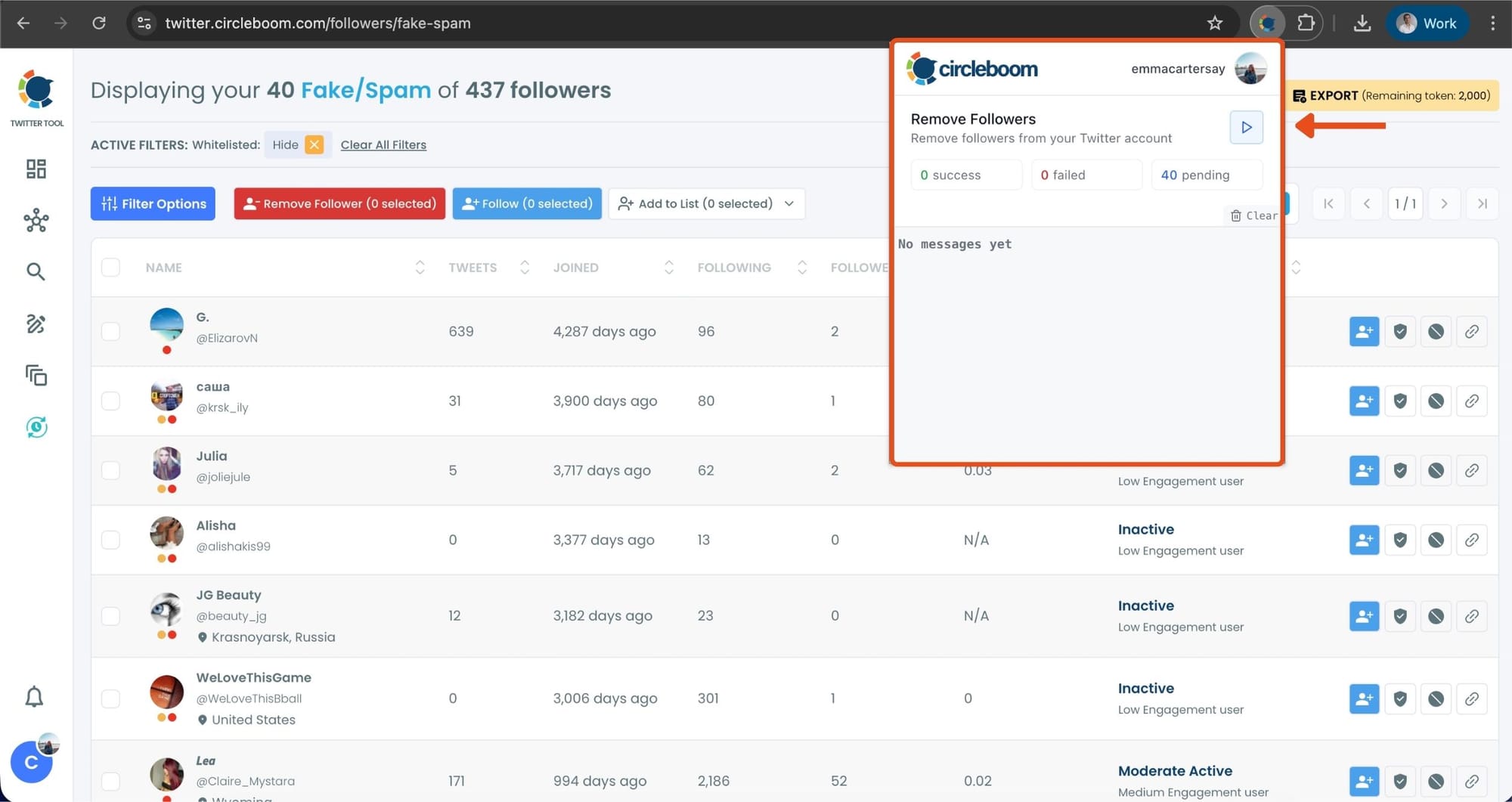
Step #6: After installing the extension, Circleboom will automatically add all your removal requests to the extension queue.
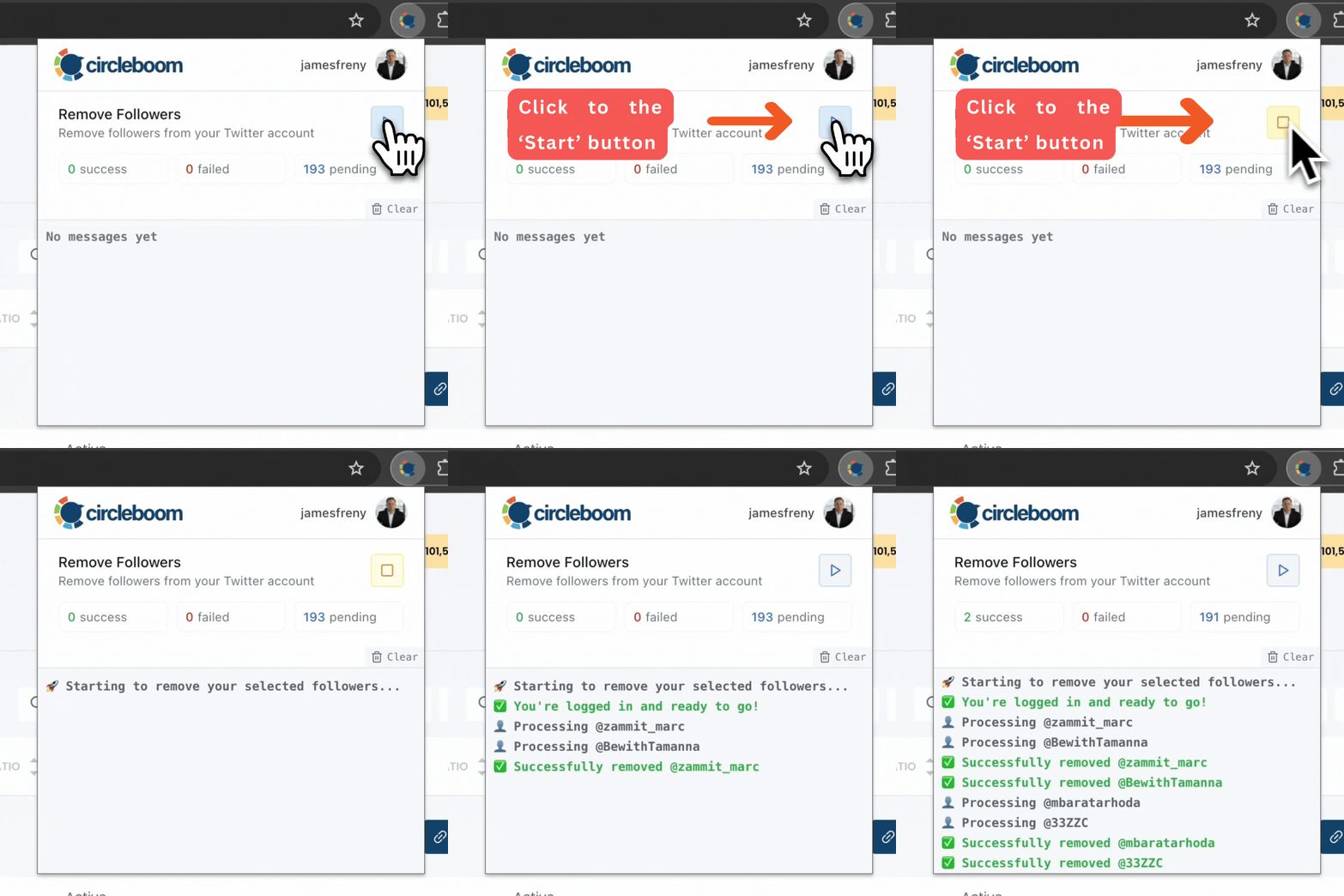
Click on the Start button to begin the removal process. The extension will process your requests and remove the selected followers.
That's it!
Your selected followers are now removed automatically.
If you need a more detailed guide check this video ⬇️
Strategy #2 - Tweet Based on Follower Interests
A big shift happened when I realized:
It doesn’t matter how good your tweets are if your followers don’t care about the topic.
Twitter doesn’t give enough insight into audience interests, but Circleboom does.
How I used it
I opened Circleboom’s Interest Cloud, and suddenly I could see exactly what my followers talked about:
- topics
- keywords
- hashtags
- industries

Then I used the AI Tweet Generator to build content directly around those topics.
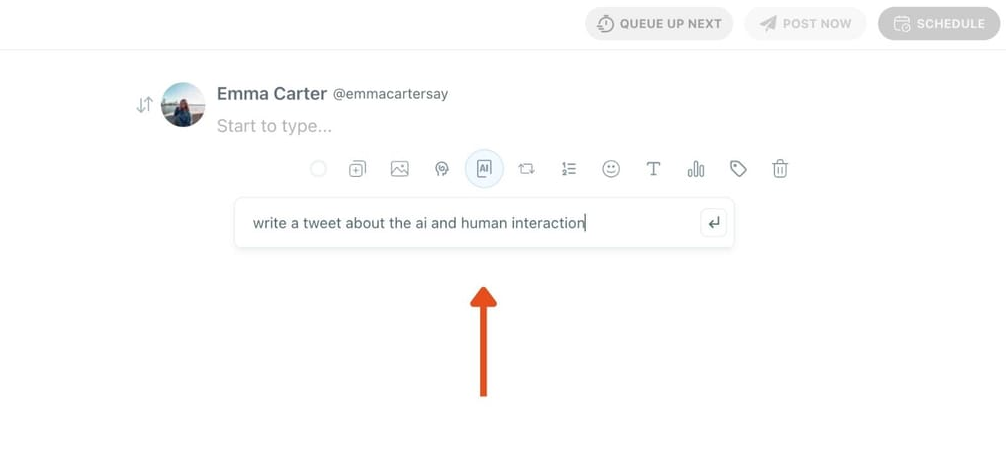
Immediately, my tweets became more relevant, more clickable, more engaging.
Strategy #3 - Post When Your Followers Are Actually Online
This is one of the biggest reasons engagement stays low.
For a long time, I posted when I was free, not when my audience was active.
But impressions rely almost entirely on timing.
X doesn’t reveal the exact online times of your audience, but Circleboom does.
How I used it
I checked the When Your Followers Are Online heatmap:
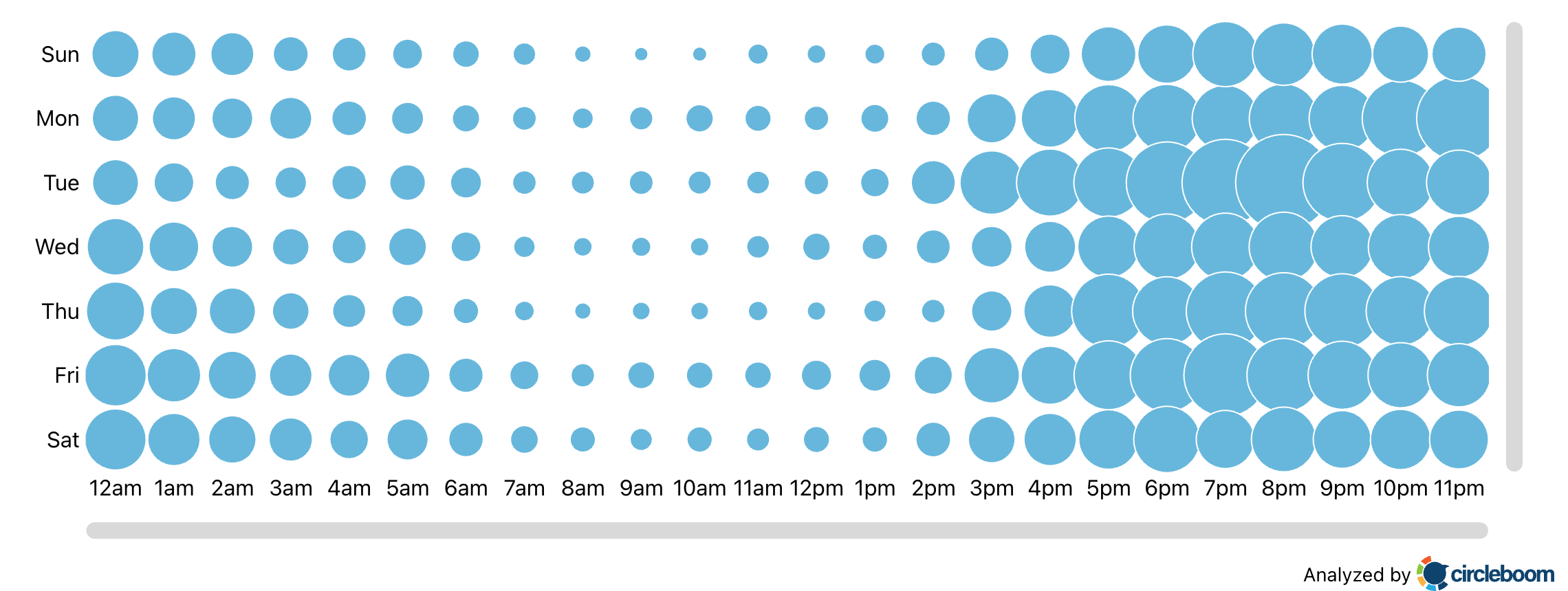
- Most of my audience was active around evening hours
- Thursdays and Sundays were my peak days
- Early mornings were completely dead for me
Then I switched to Circleboom’s Best Time to Post scheduling.
Once my tweets aligned with real audience activity, impressions instantly jumped, and with them, engagement followed.
Strategy #4 - Extend Your Tweet Lifespan
This one is huge.
Most tweets die before your followers even open the app. That’s why you sometimes see:
- great tweets flop
- simple tweets go viral
It’s about visibility, not quality.
I used to manually retweet my own posts. It helped, but only a little. Then I tested something much better.
Circleboom Auto-Retweet = game changer
Circleboom’s Auto-Retweet feature keeps your tweet alive for hours:
- retweet
- unretweet
- retweet again
- repeat safely
It pushes your tweet into fresh timelines multiple times, which can easily 3x–5x your impressions.
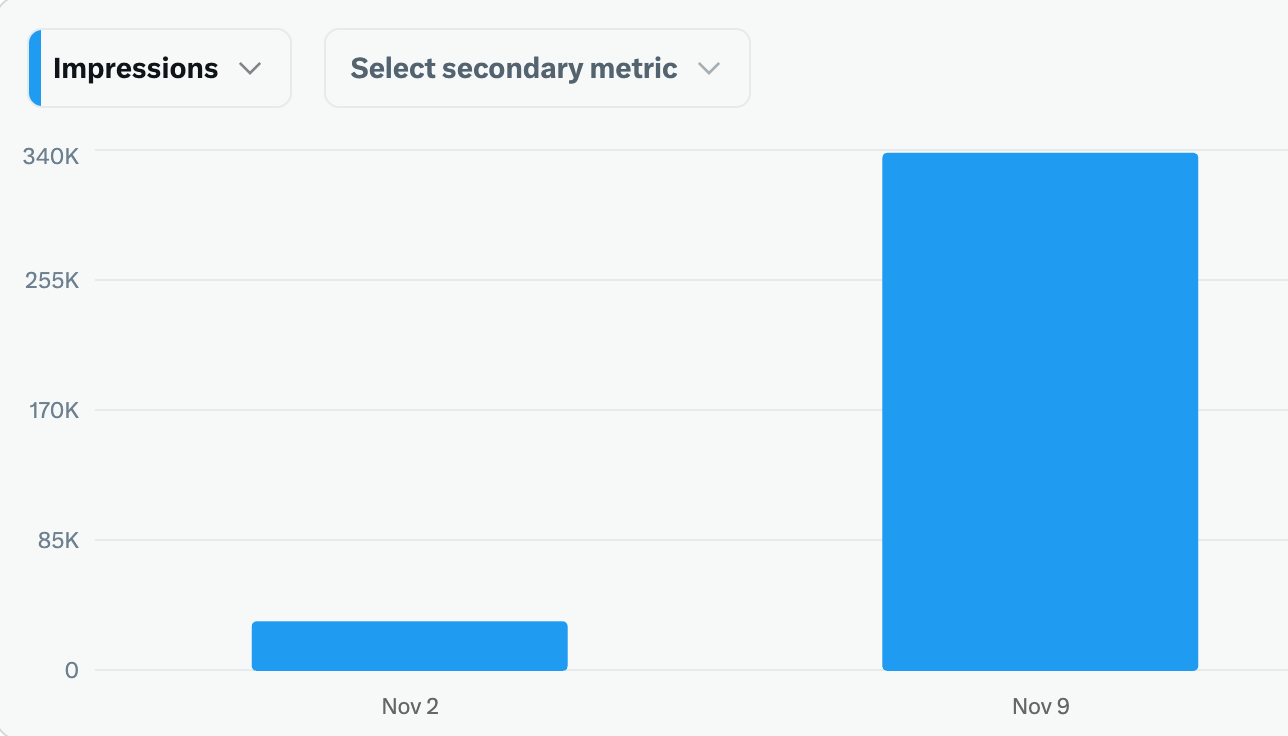
And once impressions go up, engagement naturally follows.
Strategy #5 - Revive High-Performing Old Tweets
Your best tweets should not be one-day content.
I used Circleboom’s Post Analytics to sort tweets by impressions.
Once I found my top performers, I:
- rescheduled them
- refreshed the wording using Circleboom AI
- improved hooks and CTAs
- reposted at better times
Some regenerated tweets even outperformed the original ones.
Step #1: Navigate to the Analytics Menu
From the left-hand menu, click on the "Post Management & Analytics" tab, then select "Post Analytics" from the dropdown.
Within Post Analytics, select the "Post Engagement Analytics" option.

Circleboom will display a detailed breakdown of your posts, including metrics like impressions, likes, retweets, replies, and more.
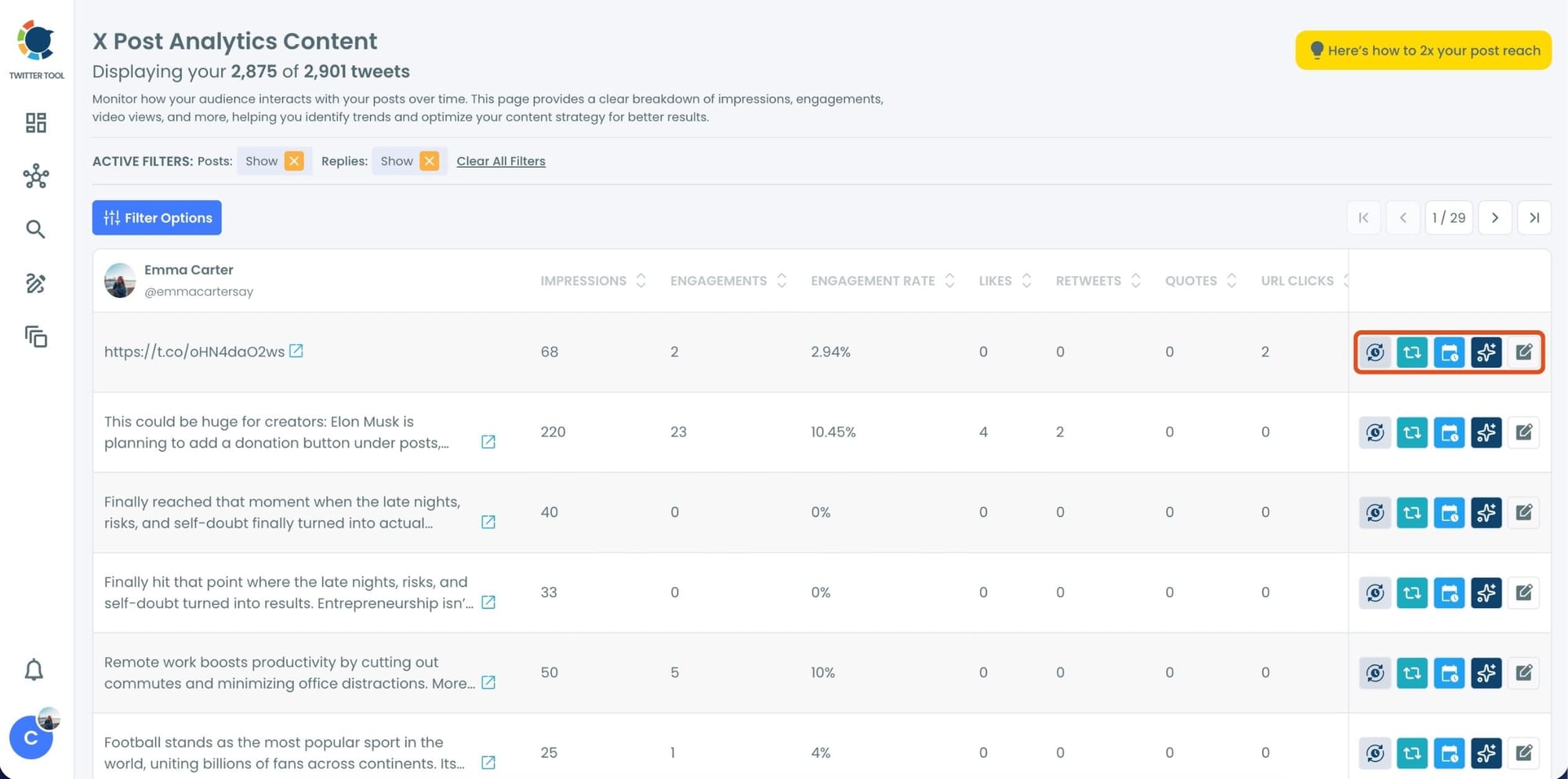
Step #2: Once you’ve found your old tweets, Circleboom offers several tools to make the most of them; choose which you want to use:

🟢 Reschedule Popular Tweets: Found a tweet that’s still relevant or hilarious but didn’t get the engagement it deserved? With Circleboom, you can reschedule it to repost it at a better time.
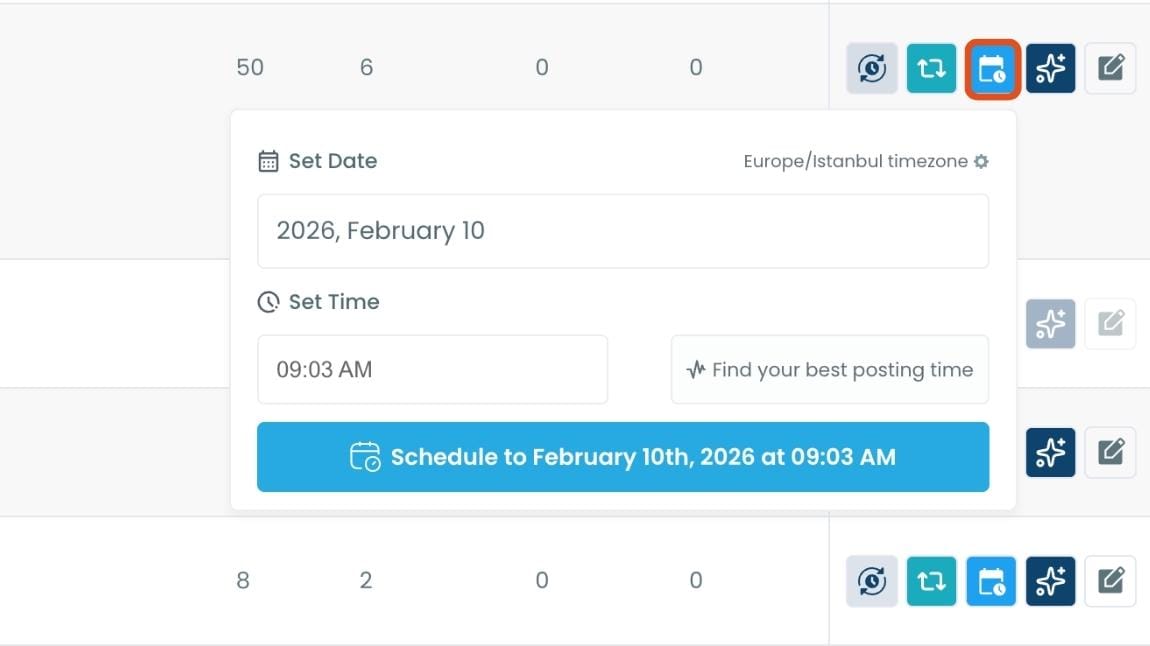
Maybe your audience wasn’t active when you first tweeted it, or perhaps it just got lost in the noise. Rescheduling ensures your best content gets a second chance to shine.
🔵 Refresh Content with AI: Some of your old tweets might feel outdated or could use a fresh twist. Circleboom’s AI-powered tweet generator can help you rewrite or improve them.
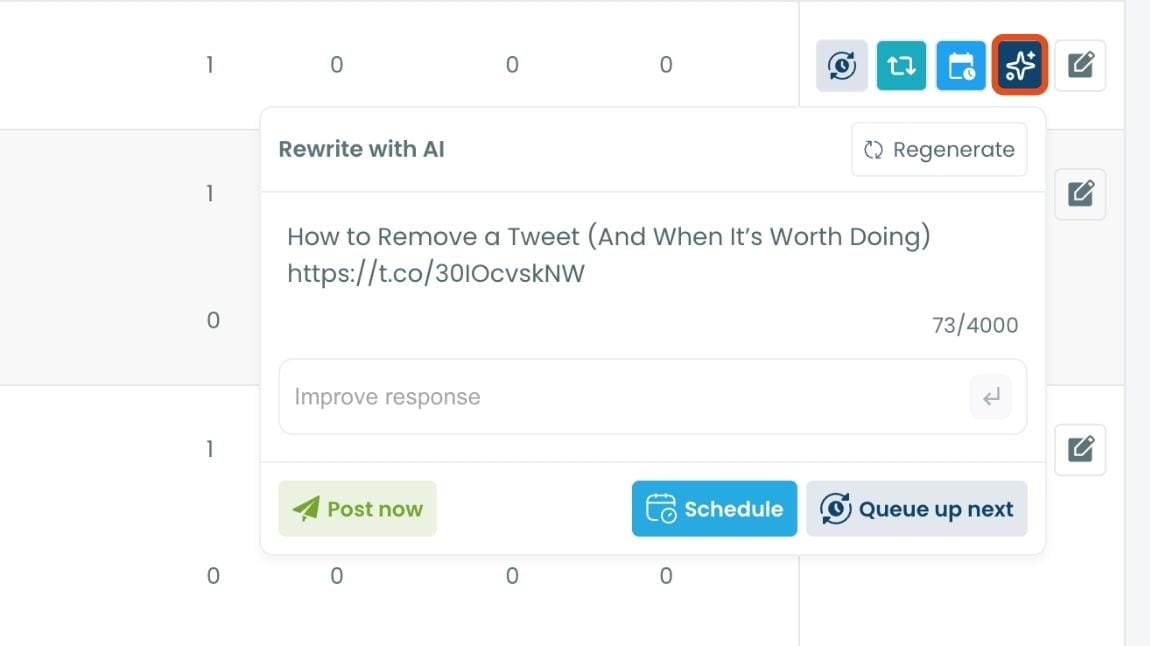
Whether you want to update the language, add a modern twist, or make it more engaging, the AI feature has got you covered.
🟡 Set Auto-Retweets: If you’ve got evergreen tweets that are still relevant, why not let them work for you on autopilot?
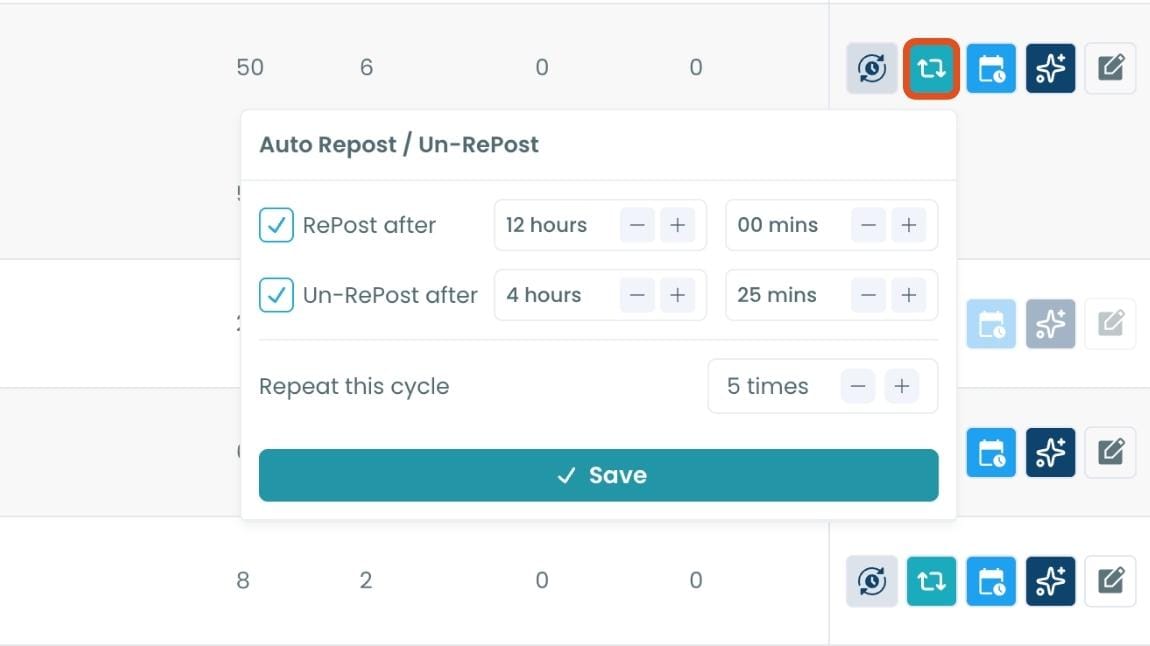
Circleboom’s auto-retweet feature allows you to automatically retweet your best-performing content at regular intervals. This is perfect for driving consistent engagement without lifting a finger.
Strategy #6 - Use Threads, Not Links
Links kill engagement.
Threads grow it.
Instead of tweeting a blog link, I started turning articles into threads using Circleboom’s AI Thread Generator. It split the content into clean, engaging, bite-sized tweets that kept people on-platform.
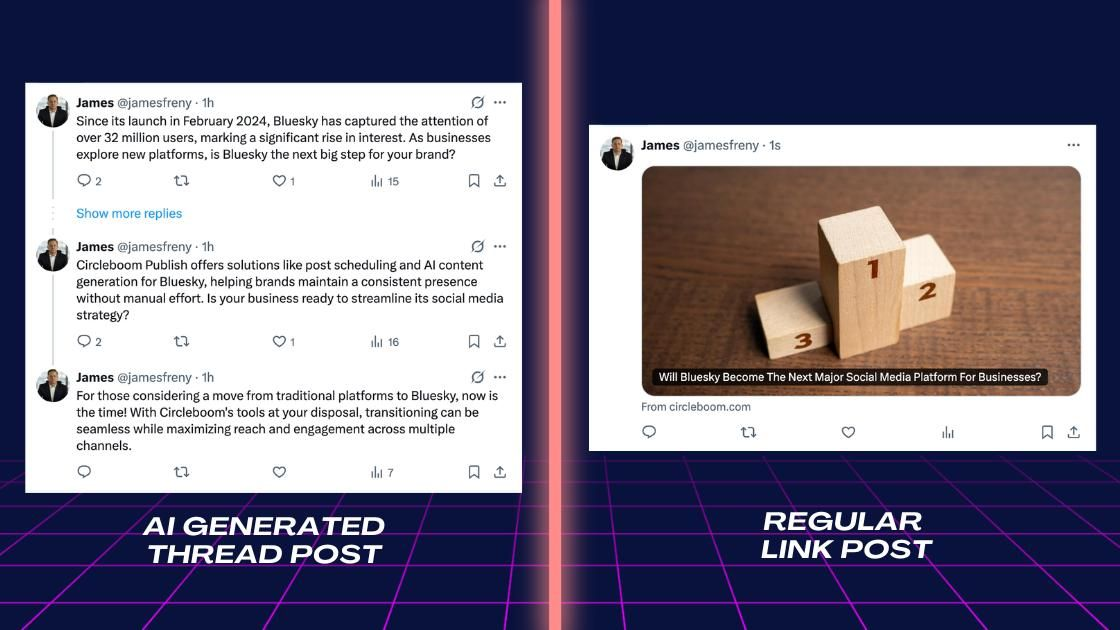
And because threads increase session time, they get pushed harder by the algorithm.
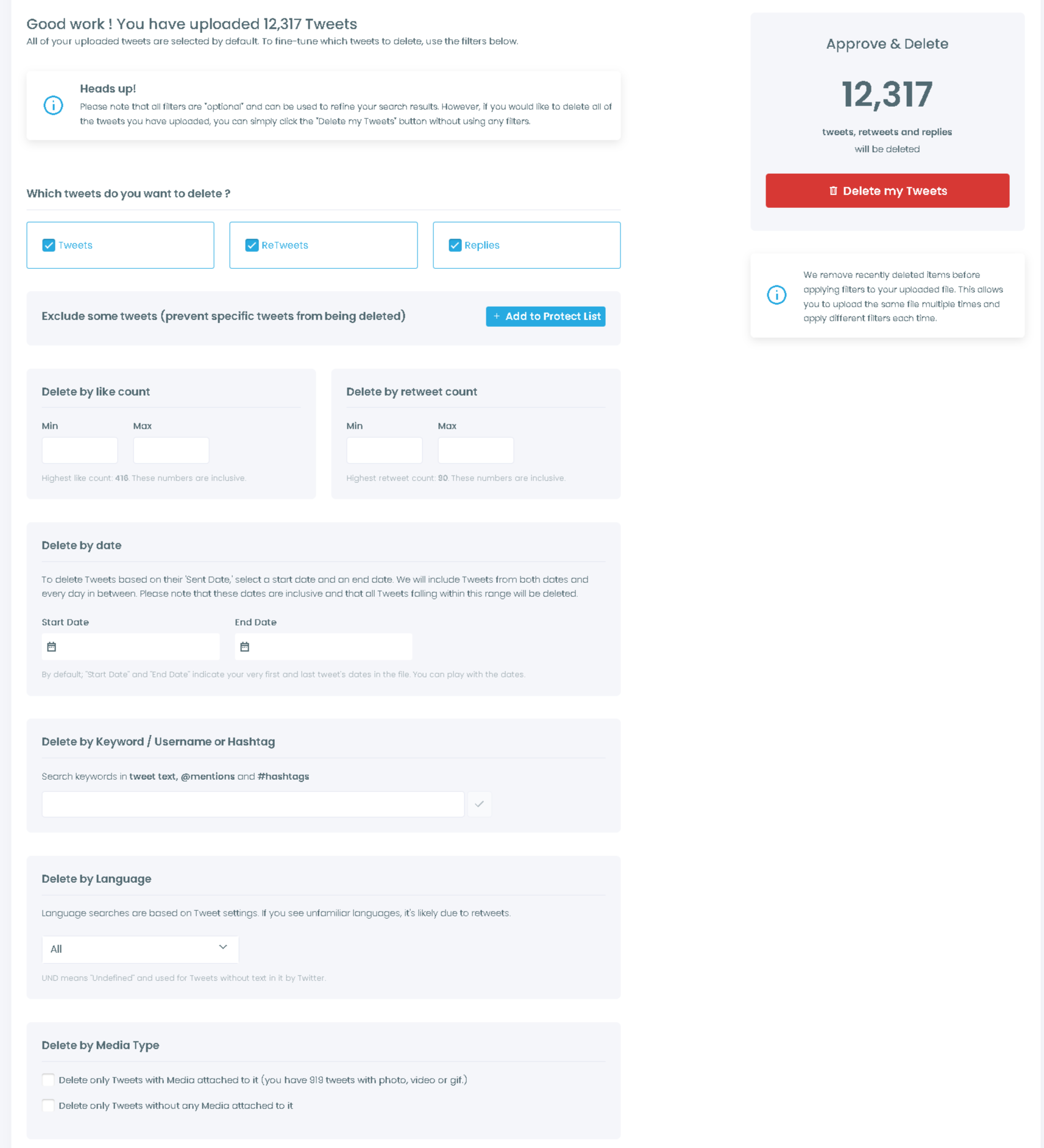
Strategy #7 - Clean Low-Engagement Tweets From Your Profile
Your profile is your storefront.
When new visitors scroll, they judge you based on your top 10–20 tweets.
Low-engagement tweets create a weak first impression.
I used Circleboom’s Delete Tweet tool to bulk-delete tweets with low likes, replies, or retweets. After removing the “dead weight,” new tweets started performing better.
Strategy #8 - Follow Smart, Not Random
Early on, I followed random people hoping they’d follow back.
But most of them:
- were inactive
- irrelevant
- bots
- or low-quality accounts
This hurts engagement.
Now I use Circleboom’s Smart Search to follow:
- niche accounts
- active users
- verified users
- users in specific industries
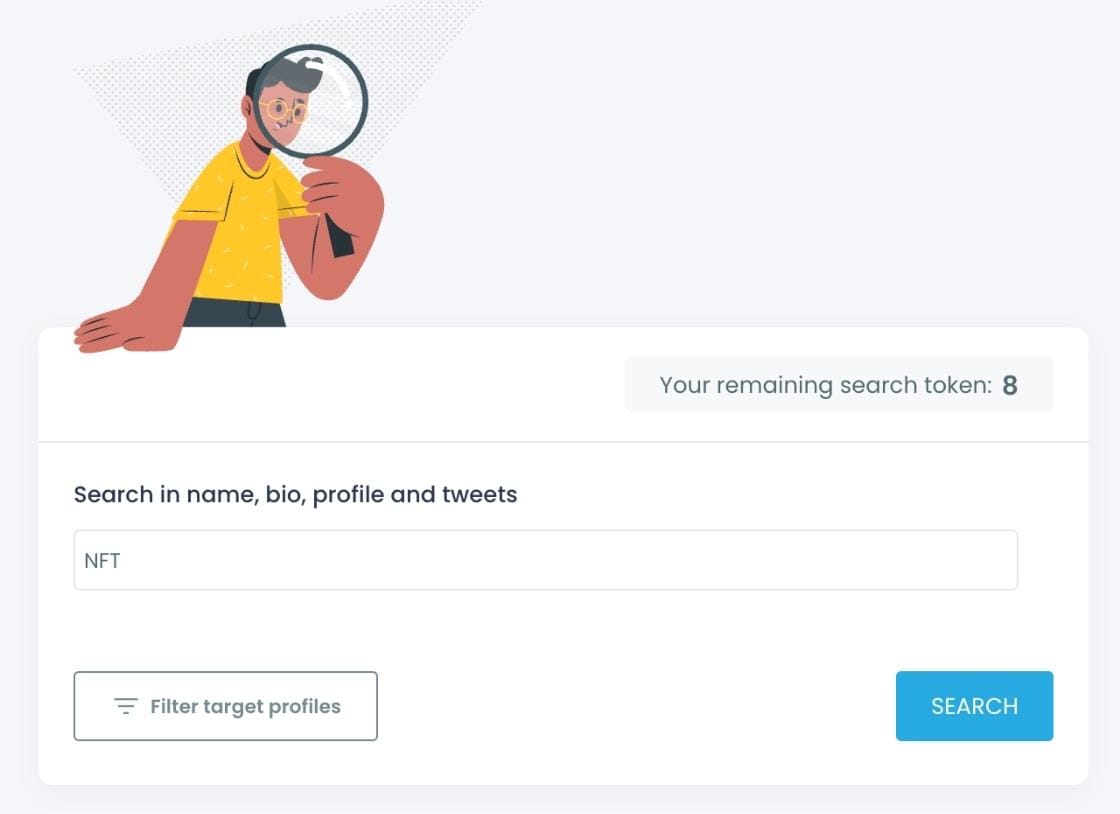
Then I use Not Following Back to remove the people who didn’t follow back within a few days.
This built a real audience that actually cared about my tweets.
Strategy #9 - Don’t Keep Your Tweets Only on X
Why limit your reach to one platform?
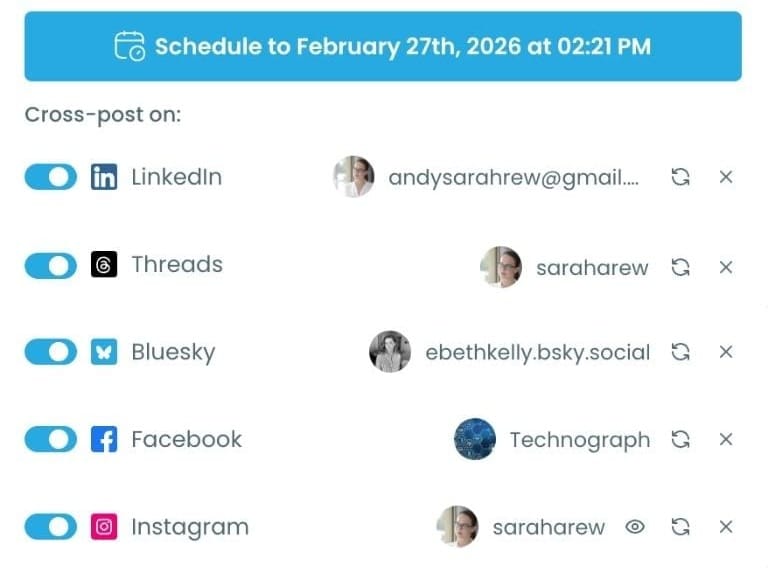
Circleboom Publish lets you cross-post tweets to:
- Threads
- Bluesky
- Instagram (as text images)
Increasing your presence on other platforms boosted profile visits back on X too.
Final Thoughts
Improving engagement on Twitter isn’t about tweeting nonstop.
It’s about building a system that works even when you’re offline.
These strategies:
- cleaned my audience
- aligned my tweets with follower interests
- helped me post at perfect times
- revived my best content
- kept my tweets alive longer
- expanded my visibility across platforms
And Circleboom, an official partner of Twitter/X, gave me all the tools I needed to do it efficiently and safely.
If you're tired of low engagement, start with two or three of these strategies.
Optimize slowly. Track results. Then scale what works.
Your tweets deserve to be seen, and now you have the roadmap to make it happen.
%3A%20The%20Real%20Strategies%20That%20Actually%20Work)
