

Most advice on getting found on Google stops at verification, as if a finished profile keeps itself visible. The profiles that keep appearing are the ones that post regularly, and post when nearby customers are searching.
How do you make your business show up on Google?
Claim, verify and complete your Business Profile in Google, then post regularly at the times your customers search. Circleboom Publish suggests six posting slots for each Google Business Profile and schedules Standard updates, Events and Offers into them.
→ Find your Google Business Profile's best posting times
What decides whether a business shows up on Google
A business shows up on Google through its Business Profile, which appears in local results on Search and Maps. Google ranks those results on relevance, distance and prominence, and only two of the three respond to anything the owner does.
The profile itself is the entry ticket. Google's page on how to add or claim your Business Profile says that adding a profile costs nothing. It also says that once you add and verify it, customers can find the business on Search and Maps.
A verified profile is eligible to appear. Regular, well-timed posts are what give it reasons to appear more often.
Why name searches are not enough on Google
An idle profile only reaches people who already know the business by name.
Posts change that. A locksmith who posts about what to do when you are locked out of your car gives Google a reason to show the profile to someone typing that problem, a person who has never heard of the shop.
That is how a business starts to show up on Google for searches beyond its name.
Each post like that is one more search the profile can answer, and a few dozen of them over a season add up to a listing that appears far more often than the business name alone would allow.
That second half is where most owners stall. Writing a post takes ten minutes, but writing one every weekday, at a sensible hour, while running a shop, rarely survives the second week.
Searches for your own name will find you anyway. To get your business to show up on Google for everything else, fix the posting routine first, starting with your profile's best times to post.
Circleboom Publish, a multi-platform publishing suite, handles the posting side of Google Business Profile with AI-written drafts, scheduled Standard updates, Events and Offers, and time suggestions for each profile.
What a complete Google Business Profile has before posting starts
Profile work has two parts, and only one of them ends. The first is done once, inside Google Business Profile itself:
- The right primary category and subcategories.
- Accurate opening hours and contact details.
- A clear logo plus interior and exterior photos.
- A complete business description.
The second part never ends: posting regularly, so the listing keeps telling Google and customers that the business is open and active. Most optimization checklists stop after part one, which is why so many complete but silent listings never climb in local results.
Circleboom Publish works only on part two. It does not change a profile's hours, category, address or reviews; those stay in Google. What it handles is the posting side: writing with AI, scheduling, timing and automating Standard updates, Events and Offers.
Why Google Business Profile posting times work differently
Google Business Profile has no followers, so a post is not pushed to a feed at all. It appears when someone searches for the business or its category, or views the profile on Google Maps.
That changes what "best time to post" means. On a feed platform, timing is about catching followers while they scroll. On Google, timing is about matching the hours when this profile's customers are active: searching, viewing, calling and asking for directions.
The suggested times for a Google Business Profile are built around customer activity on that profile, never around a follower count it does not have.
For showing up on Google, this is the useful part. A post does not get one chance at a feed and then disappear under newer posts. It sits on the profile and meets each searcher who arrives, so the goal is to have something fresh there during the hours when most of those searchers arrive.
Circleboom Publish shows those suggestions inside the Schedule modal of the Google Business Profile composer as six clickable slots under "Pick your best post time." The panel works the same way for Standard posts, Events and Offers.
Circleboom does not publish the exact signal behind each suggestion. What it does state is that the slots are specific to each connected profile and differ from one location to the next.
Generic best-time tables versus your profile's suggested times
People searching for timing advice usually expect a table of days and hours that works for everyone. Those tables exist for feed platforms, and posts on the best times to post on social media explain where that expectation comes from. For a Google listing, a universal table answers the wrong question.
| Generic best-time table | Your profile's suggested times | |
|---|---|---|
| Built from | Averages across many accounts | That one Google Business Profile |
| Assumes | Followers scrolling a feed | Customers searching, viewing, calling and asking for directions |
| Same for every location? | Yes | No, each connected profile gets its own six slots |
| Works for Events and Offers? | Rarely mentions them | Same six slots for Standard, Event and Offer posts |
| What it can tell you | Which days are busy in general | When this profile's customers act |
The table above is a comparison of approaches, not Circleboom data about any specific day or hour.
The weekday pattern from Circleboom user data
One broad pattern is still useful as a planning tip. Data from thousands of Circleboom users shows that most Google Business Profile posts go out on weekdays, and that weekend posting and viewing both drop.
A practical week built on that pattern:
- A post every weekday, five in total.
- No post on Saturday.
- One post on Sunday, when people browse in their free time.
The pattern picks the days. The profile's own suggestions pick the hours.
Does posting often matter more than posting on time?
Posting often matters more. A profile that posts about six times a week at average hours will usually do better than one that posts once a month at a perfect hour, because consistency is the base that timing builds on.
A Google post also fades within about a week, after which few people see it. Timing then multiplies a steady routine: the same six weekly posts reach more searchers when each one goes out at a suggested slot. One habit without the other leaves visibility on the table.
A quick check on your own routine
Count the posts your profile published in the last 30 days. If the count sits well below the six-a-week tip, fix the cadence first: batch a week of posts and schedule them.
If the profile already posts steadily, move those same posts into suggested slots and leave everything else unchanged, so any change in calls or direction requests can be traced to timing.
How Circleboom Publish picks a posting time for each Google profile
Circleboom Publish pairs the scheduling routine with the timing, so one sitting covers both. You write a week or a month of posts, give each a date, and click a suggested slot instead of guessing an hour.
For a profile that should keep posting without daily attention, Add Best Times to Post in Time and Queue Settings fills that profile's Queue with its own suggested slots. Post to Queue then drops each new post into the next open time. The settings are per profile, so each location keeps its own rhythm.
That is the route to show up on Google at your profile's best times without a reminder on your phone. Compared with posting by hand whenever a gap opens in the day, the post content stays identical and only the timing improves.
What one sitting can cover
Take an illustrative case: a café that wants six Google posts a week. That is about 24 posts a month. Written live, it means opening the profile almost every day. Batched, it becomes one afternoon of writing with the AI Google Business Profile Post Writer, followed by a click on a suggested slot for each post.
Because a Google profile has no followers, each suggested slot reflects when that profile's own customers are searching for it and calling.
That suggestion is about timing alone. The batching is what makes the timing affordable, because nobody picks the right hour for a post they never had time to write.
The broader Google My Business scheduler covers the rest of the composer: AI writing, the Event and Offer structures, and alt text on images.
How to make your business show up on Google with scheduled posts
To schedule a Google Business Profile post at a suggested time, compose it in Circleboom Publish and click Schedule. Then choose one of the six slots listed under "Pick your best post time." The same flow works for Standard updates, Events and Offers. The four steps below assume your profile is already claimed and verified in Google.
Open the Google Business Profile composer
- Log in to Circleboom with the account that holds your Google Business Profile connection.
- Start a Google Business Specific Post from the dashboard card or the Create New Post menu. With a single profile connected, it is selected for you; with several, tick the locations in the account panel, as covered in guides on how to manage multiple Google My Business accounts.
Schedule the post into a suggested slot
- Write the post and click Schedule. Choose Standard, Event or Offer in the "Is this a Google My Business Event or Offer?" dropdown, add the text and image, then open the "SCHEDULE YOUR POST" modal.
- Click one of the six suggested times under "Pick your best post time," check the date, and confirm with the Schedule button. The slots follow the time zone saved for that profile, which you can review in the time zone and queue settings.
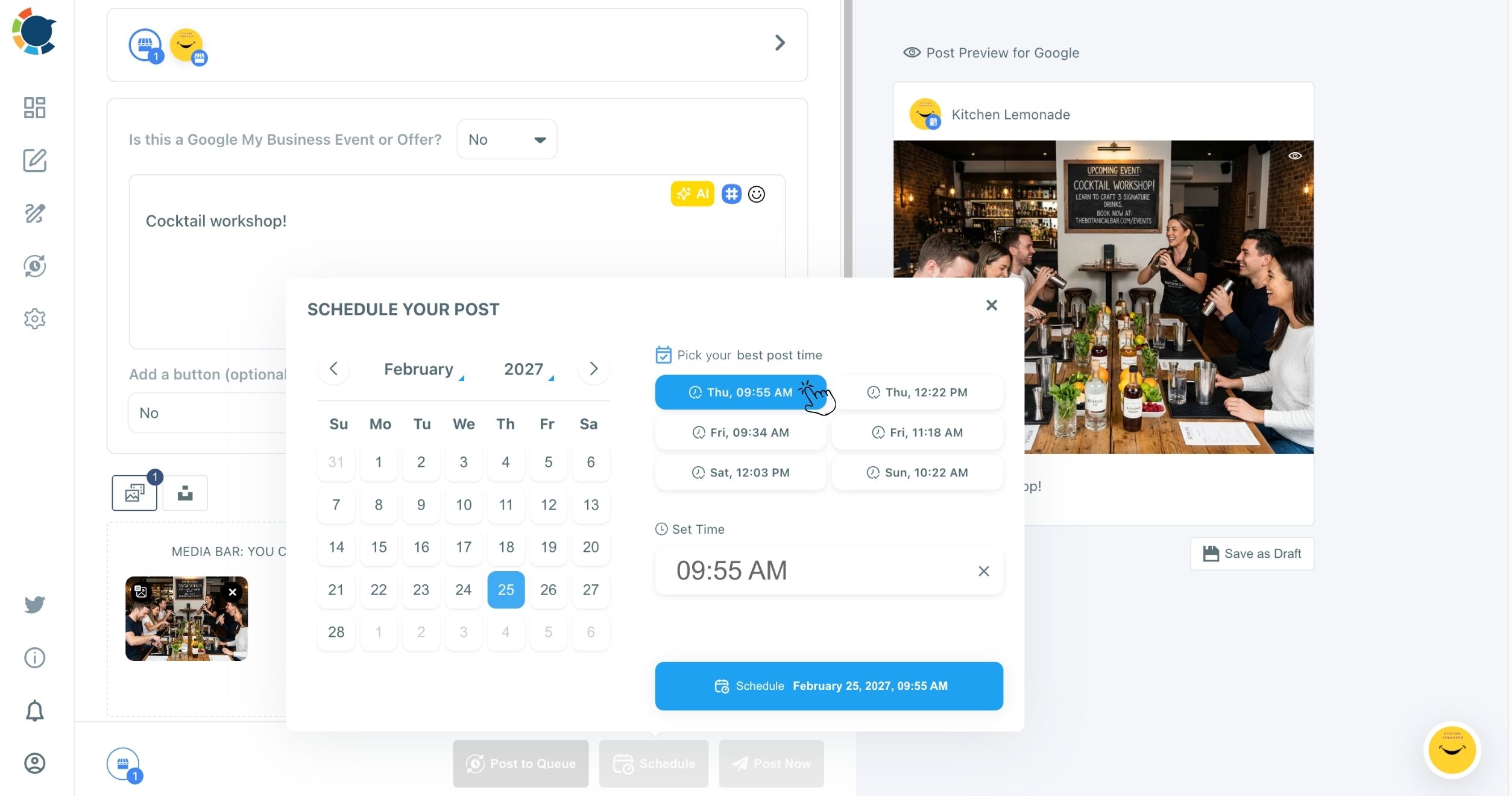
Writing comes before timing in this flow, so the post is finished before an hour is chosen, and that hour comes from the profile's own suggestions rather than from whichever slot happens to be free.
In one line: compose, click Schedule, pick a suggested slot, confirm.
Measuring calls and direction requests after timed posts
Measure timed posts by customer actions, not likes. On Google Business Profile, the outcomes that matter are calls, direction requests and website clicks, because each comes from someone close to buying.
Google's guide to Business Profile performance lists calls, directions, website clicks, views and searches among its metrics. It counts a person once a day for views, and it shows performance data only for verified profiles.
Inside Circleboom, post analytics for Google Business Profile reads posts through the same kind of actions: views, clicks, calls and direction requests. Compare the weeks before and after you switched to suggested slots, and compare Standard posts with Events and Offers.
Tracking the website side of a timed post
Calls and directions are counted by Google. Clicks that land on your website are easier to trace with tagged links. A button link on a Standard post can carry UTM parameters for social media posts, and so can the Redeem Online link on an Offer. The visits from each post then appear separately in Google Analytics.
Tag each button link before a post goes into the Queue. It takes a minute and turns "the profile seems busier" into a number you can compare week by week.
Reading the comparison fairly
Give a change at least a few weeks before judging it, since a single slow week can hide a real improvement. Compare like with like: a timed Offer against an earlier Offer, not against a Standard update. If Offers bring most of the calls and Standard posts mostly bring views, shift the mix toward Offers and keep the timing.
Two habits that keep a business showing up on Google
A complete profile gets you onto the map; posts that go out often, at the hours your own customers search, keep you on it.
Everything else in this guide supports those two habits. Write the week in one sitting, take the profile's suggested slots, and judge the result by calls and direction requests.
→ Schedule Google Business Profile posts at the hours customers search
Timing Questions for Google Business Profile posts
Do all my locations get the same suggested posting times?
No. Each connected Google Business Profile gets its own six suggestions, and they are expected to differ by location. Add Best Times to Post applies them per profile. That keeps each branch on its own timing when you manage 20 Google Business Profiles for multiple locations.
You can still send one post to several profiles at once if you manage multiple Google Business Profiles from one account.
Should an offer with a redemption deadline go out at a suggested time?
Yes. Timing matters most for Offers and Events with a date, because the post has to be seen in time for people to act. Schedule it several days ahead and into one of the profile's suggested slots, so it appears before the deal or the event begins.






)