
The cost of missing a direct competitor's strategic move on X for two weeks is rarely small. A partnership announcement that broke on a competitor's account before you saw it usually costs a quarter of negotiation room. A product-launch signal that surfaced in their new-following list six weeks before the public press release costs a quarter of competitive response time.
The intelligence gap is structural, not effort-based. The feed surface that most operators read for competitor activity is the wrong surface for the job. The follower and following diff is the right one, and the workflow change is a single setup.
The competitor tracking feature replaces feed-based watching with snapshot-based monitoring. It runs through official X Enterprise APIs so the snapshot reads stay compliant even at multi-competitor cadence.
The workflow gives you four things.A continuous snapshot of each tracked competitor's follower and following lists.A diff view that surfaces new followers, new followings, and unfollow events between snapshots.Profile data on every detected account so you can read intent on the spot.Alert thresholds for follower-count changes that signal viral threads or campaign launches.
→ Start the competitor tracking workflow
The Problem: Feed-Based Competitor Watching Misses the Signals That Actually Move
Feed-based watching fails on two predictable axes. The first axis is algorithmic curation. The feed shows you the competitor's most engaging posts, which are rarely the strategically interesting ones. Partnership announcements, quiet hires, and segment pivots usually post as low-engagement tweets that the algorithm buries. The watching operator never sees them.
The second axis is follow-action visibility. A follow from your account (even from a secondary handle) is observable to the competitor. Most competitors notice rival follows and adjust their public posting to reflect awareness of who is watching. The signal you get from the feed after a follow is a managed signal, not a candid one.
Circleboom's piece on the best social-media monitoring tools covers the broader monitoring-tool landscape that the competitor-tracking workflow sits inside. The piece is useful because it shows the structural argument: monitoring is a data problem, not a feed-consumption problem, and the tool stack should reflect that.
The structural fix is to decouple the data source from the feed. Snapshot tracking pulls the follower and following lists on a schedule and surfaces the diff. The feed disappears from the workflow because it was never the right surface, and the competitor sees no follow relationship to read.
Three Concepts to Lock In Before the First Monitoring Run
Three concepts to lock in before the first competitor tracking run.
- Follower and following data is public by design. The snapshot tracker reads what is already on the competitor's profile, just on a schedule rather than on a manual click.
- The diff is the signal, not the absolute numbers. What changed between snapshots is more informative than a single point-in-time count.
- Three to five competitors is the sweet spot for tracking. Tracking too many dilutes the cross-competitor pattern recognition; tracking too few misses the industry-level read.
Circleboom's piece on Twitter Lists for business covers the list-based competitor organization pattern that pairs with snapshot tracking. The list pattern matters because the tracked competitors usually fit into structural categories (direct rival, adjacent leader, audience overlap), and the list view makes the cross-category read easier.
How to Monitor a Competitor Account Step by Step
The workflow runs in two phases: setup and read. Each phase has three actions. The full per-competitor setup takes about 5 minutes and the read runs about 10 minutes on a weekly cadence.
Phase 1: Set Up the Tracking
Log in to Circleboom Twitter
- Log in to Circleboom Twitter with the X account you want to monitor from. The login uses official OAuth, so credentials never pass through Circleboom.
Open the Monitoring menu
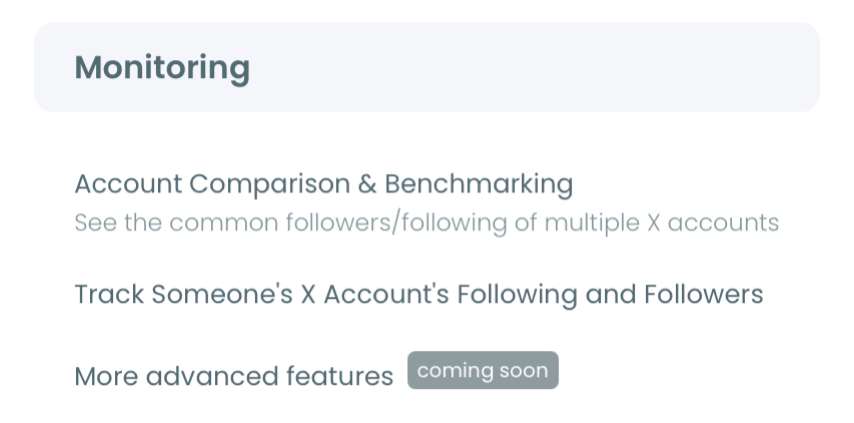
- Open the Monitoring menu in the left navigation. This menu surfaces the external-account tracking features for competitor and influencer monitoring.
Select the tracking feature and enter the competitor handle
- Select Track Someone's X Account's Following and Followers and enter the competitor's X handle. Circleboom captures the first snapshot as the baseline and starts the tracking schedule on the chosen cadence.
Phase 2: Read the Diff on a Weekly Review
Open the tracking dashboard
- Open the tracking dashboard on a weekly cadence. The dashboard surfaces three separate views per tracked account: new followers, new followings, and unfollow events. Each detected account shows profile data, follower count, and account age inline.
Cross-reference the diffs across competitors
- Compare the diffs across the tracked competitors to surface cross-competitor patterns. Accounts that newly follow three of your competitors in the same week are an industry-wide audience movement worth investigating. The cross-competitor view is what turns single-account tracking into industry intelligence.
Investigate the high-signal clusters
- Pick the two or three highest-signal clusters from the weekly read and investigate further. New-following clusters in specific industry niches usually signal directional bets. New-follower clusters around the same time as a competitor's recent thread usually signal viral content. Set alerts for change thresholds you want to be notified about between weekly reviews.
The six-step sequence is what separates a sustainable monitoring workflow from one that collapses after the first session. The OAuth login earns sanctioned API access. The menu navigation loads the tracking interface. The handle entry establishes the snapshot baseline. The weekly read, cross-reference, and investigation are where competitor activity turns into the strategic intelligence the feed could not produce.
Video walkthrough: the competitor-tracking setup and weekly dashboard read.
What the Tracking Workflow Produces
The output is a continuous diff of competitor follow activity across three to five direct competitors, plus the cross-competitor pattern read that surfaces industry-wide signals. The downstream effects accumulate across several weeks as the dashboard reads start to surface bets, launches, and partnerships ahead of public announcements.
The Circleboom workflow uses official X Enterprise Developer access for the snapshot tracking. The system stays within X's published platform limits at every step. The compliance layer matters more for competitor tracking because the cadence and the multi-account scope make the data access more visible than single-account watching, and unsanctioned scrapers risk both legal exposure and account-level restrictions.
Two adjacent surfaces extend the tracking workflow. The X List Manager landing covers the list-based grouping pattern for organizing competitors by category. The user-analytics overview covers the broader analytics surface where tracked competitor data integrates with your own account analytics.
External context for the monitoring math: X Help's documentation on the timeline explains why the feed is algorithmically ordered rather than chronological, which is the structural reason feed-based competitor watching is incomplete. DataReportal's global digital reports cover the platform-level audience trends that frame what competitor follower-count movements mean.
Related Circleboom reading on the list-and-tracking theme.
- How to make and use Twitter Lists on the list-construction fundamentals that pair with tracking.
- Twitter List Manager on the list-management workflow at scale.
- How to create Twitter lists with just a few clicks on the fast-setup pattern for competitor categorization.
Why the Tracking Workflow Sticks Once You Run It Once
The reason snapshot tracking holds where feed watching breaks down is that the structural change removes the algorithmic curation that hides the most informative signals. The diff between snapshots is the data competitor analysis was always supposed to read.
The compounding effect surprises most operators after the second or third weekly review. The first review surfaces obvious signals from a single tracked competitor. The second adds cross-reference across competitors. By the third or fourth review, the dashboard reads like a weekly industry brief with bets, launches, and audience movements all surfacing through the diff.
By the second month, the feed-watching workflow is gone entirely. The weekly dashboard read produces faster, more directional intelligence than the daily feed scroll ever produced, and the time freed up goes back into actually deciding what to do with the signals.
Action Summary: Monitor Competitor Twitter Accounts
The short version. Run through the setup once per competitor and the read on a weekly cadence.
- Connect the X account to Circleboom. One-time per workspace.
- Open the Monitoring menu and select the tracking feature. One-time setup.
- Add three to five direct competitors by handle. One-time setup.
- Open the dashboard on a weekly cadence to read new followers, new followings, and unfollow events. Per week.
- Cross-reference the diffs across competitors and investigate the highest-signal clusters. Per week.
Monitor competitor Twitter accounts and the strategic signals that were hiding in the follow data start surfacing on a schedule the feed never could.
What to Know Before You Start Monitoring
How many competitors should I start with for the first tracking session?
Three direct competitors is the right starting count. Add adjacent industry leaders after the first month if the read pattern is producing useful signals. Going above seven dilutes the cross-competitor read because the dashboard gets noisier.
What if a tracked competitor's account is temporarily set to private?
The tracking pauses for that account because follower and following data is no longer public. Most direct competitors stay public because their audience growth depends on visibility, so the private-account pause rarely binds for long.
How fresh does the snapshot data need to be?
Daily cadence is the default for active competitors, and weekly is enough for slower-moving accounts. The freshness needed depends on how fast the competitor's industry moves; segments with frequent partnerships and launches need daily, while quieter segments stay informative on weekly.
Can multiple team members read the same tracking dashboard?
Yes. The Circleboom workspace supports multi-user access under one account, and the tracking dashboard is visible to all workspace members. Most teams put the weekly read on a recurring meeting agenda so the cross-reference happens collectively.
How do I know which detected accounts in the diff are worth investigating?
Cluster shape and account quality are the two main filters. Clusters of accounts that newly follow your competitor within a 48-hour window usually map to a specific trigger event. Accounts inside the cluster with high follower counts and clear industry context are the ones worth opening profile-deep.