
A brokerage with eight agents usually has nine Instagram accounts: one for the office and one per agent. When a new listing or open house goes live, all nine should carry it, and the Instagram app makes that a job of nine separate posts.
This guide shows how a real estate team can post to multiple Instagram accounts at once, keep each agent's version personal and control who is allowed to post.
What an eight-agent team gets from this setup.
• A setup that sends one listing post to all eight agent profiles plus the office account.
• A way to keep captions different per agent so the posts do not read as duplicates.
• A team structure where agents draft posts and the broker approves them.
Circleboom Publish sends one Instagram post to every selected account in a single action, so a listing reaches the whole team in one pass. Post to multiple Instagram accounts at once from one composer.
Why posting to 8 agent Instagram profiles breaks in the app
The Instagram app is built for one person running a few accounts, not a brokerage running nine. Instagram's help page on how to switch between Instagram accounts without logging out sets the ceiling at five accounts per app, so an eight-agent team cannot even hold every profile in one phone.
Even inside that limit, switching is not publishing. Every account still needs its own post, its own caption paste and its own upload. For a team of eight, here is the arithmetic on a single open house announcement:
- Nine posts, one per profile.
- About five minutes each to switch, upload, paste and check.
- Roughly 45 minutes for one listing, before anyone writes a different caption.
Three listings a week costs more than two hours of repeated uploads.
That is why most teams end up with a lopsided feed. The office account posts everything, two or three active agents repost some of it, and the rest of the profiles go quiet for weeks.
A quiet agent profile reads as an inactive agent to anyone who finds it through a property search.
The fix is to choose all nine accounts once and publish once. That is what it means to post to multiple Instagram accounts at once. It needs a scheduler that treats accounts as a list, not as separate logins.
What has to be in place before the first multi-account Instagram post
Each agent profile must be an Instagram professional account before Circleboom Publish can connect it. Personal accounts cannot be connected, so check every agent's settings first. The switch happens in the Instagram app, is free and keeps the account's followers and posts.
Here is the prerequisite checklist for a real estate team:
- Every agent profile switched to a professional account in the Instagram app.
- Each agent's login available for the one-time connection, or the agent present to approve it.
- A clear list of which profiles belong together, such as the office plus all agents, or agents by neighborhood.
- A decision on who approves posts before they go live.
If you are unsure how the profiles relate to each other in Instagram itself, the explainer on how to link Instagram accounts covers the account side before any tool is involved.
Connection is a one-time job; selection is the daily one.
How Circleboom Publish sends one post to every agent profile
Circleboom Publish connects all nine Instagram accounts to one dashboard and lets you select any number of them in the Instagram composer, so you can post to multiple Instagram accounts at once in a single publish action.
Circleboom is an official X (Twitter) Enterprise partner on X's customer directory, a status that matters to a brokerage handing agent accounts to a third-party tool.
The account selector in the Instagram composer is scoped to Instagram only. Tick the office account and all eight agents, then write the post once. You can publish one listing to every agent's Instagram profile instead of nine separate uploads.
Cost is the other half of the decision for a small team. Circleboom Publish is $34 a month for 10 accounts with one team member, which covers the office plus eight agents with one account spare. Each extra team member is about $4 a month.
A 10-channel plan elsewhere often runs about $100 a month.
Still comparing options? The roundup of the best tools to manage multiple Instagram accounts sets out what to check in any scheduler before committing a whole team to it.
Watch one Instagram post go to several accounts from a desktop browser instead of a phone.
How to post to multiple Instagram accounts at once
The steps below take a real estate team from connected accounts to a scheduled listing post on all nine profiles.
Connect the office and agent Instagram accounts
- Open Circleboom Publish and go to Settings, then Manage Social Accounts.
- Click Connect New Account and add the office account and each agent profile, watching the usage indicator against the plan's account allowance.
- Create a Share Group under Settings, then Manage Share Groups, named something like "Whole team," holding all nine accounts.
Compose the listing post once for every profile
- Open the Instagram composer from the dashboard and choose Select by Share Group, or tick each account in the Select Accounts panel.
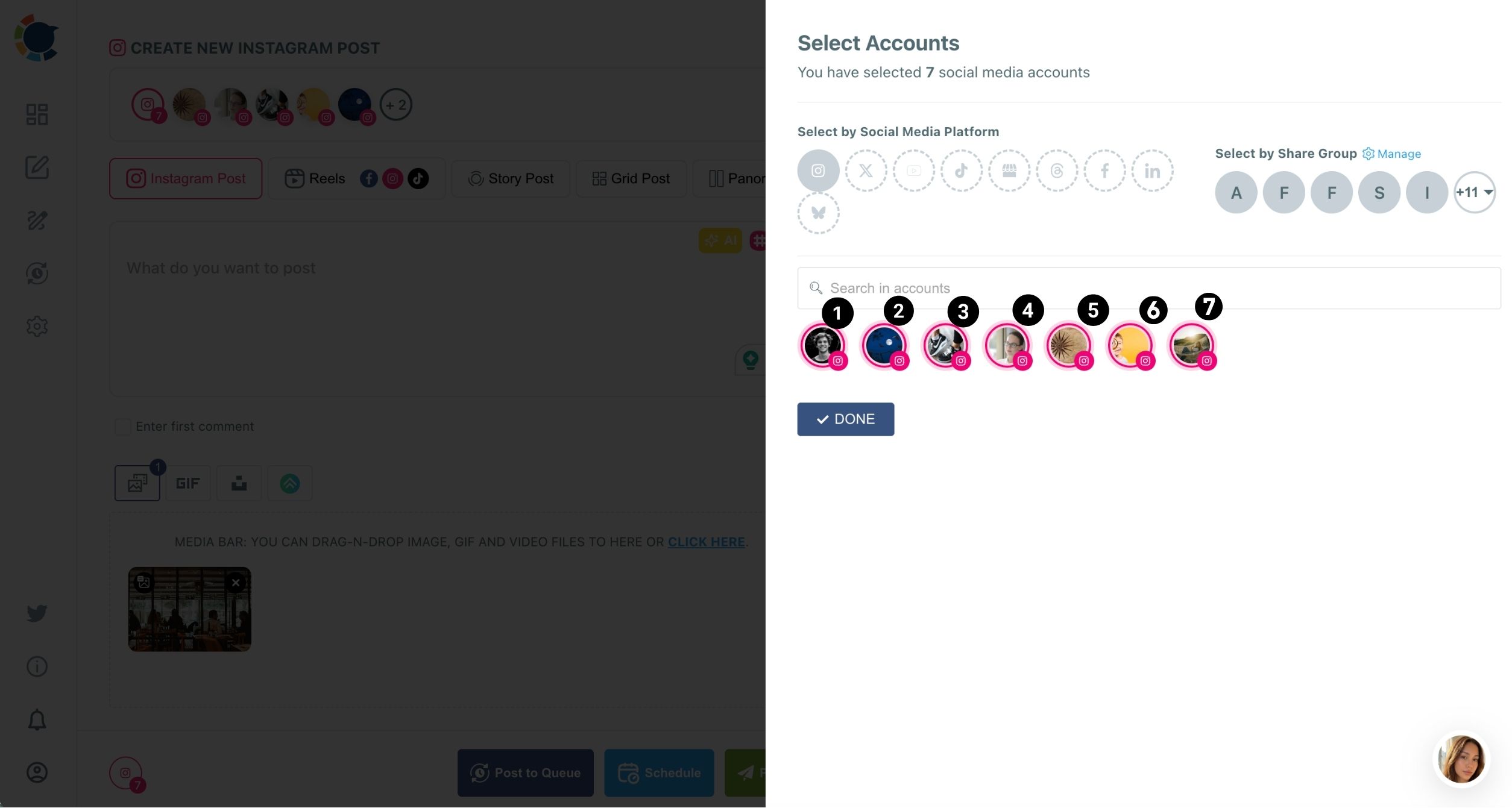
- Upload the listing photos as a carousel of up to 10 images on the Instagram Post tab.
- Write the caption with the AI button, then tick Enter first comment for the address, price and showing times.
Schedule it and check the spread
- Click Schedule and pick a date plus one of the suggested best-time slots in the Pick your best post time panel.
- Open the Outbox in List View or Calendar View and confirm the post sits under every agent account.
Picking the Share Group at step 4 is where the time comes back. The photos, the caption and the slot chosen after it all land on the nine profiles together, so nobody has to track which agent is still missing the post.
Now the listing is out on every profile. The next decision is how personal each version should be.
Should every agent's Instagram post use the same caption?
No. Identical posts across several Instagram accounts count as duplicate content, and accounts that keep posting the same caption risk lower reach and, in serious cases, restrictions. One shared photo set is fine; nine identical captions are the risk.
A practical rule for real estate teams works well:
- Office account: the full listing caption with price and features.
- Agent profiles: a short caption in the agent's own voice, naming why that agent likes the home.
- First comment: the showing schedule, different per agent if each hosts a slot.
The AI Instagram caption generator handles the variation. Describe the listing once and ask for versions with different hooks, then assign each to an agent.
To give an agent their own version, the Duplicate option copies a post into an editable copy, so the caption and account change without re-uploading the photos.
The first comment is the easiest place to add a personal line. The guide on how to schedule first comments on Instagram posts explains why claiming that slot early protects a listing from an off-topic reply.
Grouping agent Instagram profiles by neighborhood
Not every listing belongs on all nine profiles. A Share Group is a saved, named bundle of accounts, and one click selects the whole bundle, so a team can keep several groups side by side and pick the right one per post.
A typical brokerage setup looks like this:
- "Whole team": the office account plus all eight agents, for brokerage news and big open houses.
- "Downtown agents": the four agents who sell condos and lofts.
- "Suburbs agents": the four agents who handle family homes.
With those saved, the decision to post to multiple Instagram accounts at once becomes a single choice in the composer instead of nine ticks. A downtown loft goes to the downtown group and the office, and a suburban open house goes to the suburbs group.
The Outbox can also be filtered by Share Group, which makes it quick to check one neighborhood's week without scrolling through every agent.
The right group is a faster choice than the right nine accounts.
How agents draft posts and the broker approves them
Team Management lets agents prepare posts for their own profiles while the broker keeps the final say. Each agent joins as a User with only their own Instagram account assigned, and anything a User schedules waits in Waiting for Approval until an Admin approves or rejects it.
Only two roles exist, Admin and User. The broker, or the marketing lead, is the Admin, acts immediately and sees every account. Agents are Users.
An agent can schedule a just-listed post or an open house reminder for their profile, but it does not go live until the Admin clears it. A rejection can carry a comment explaining what to fix.
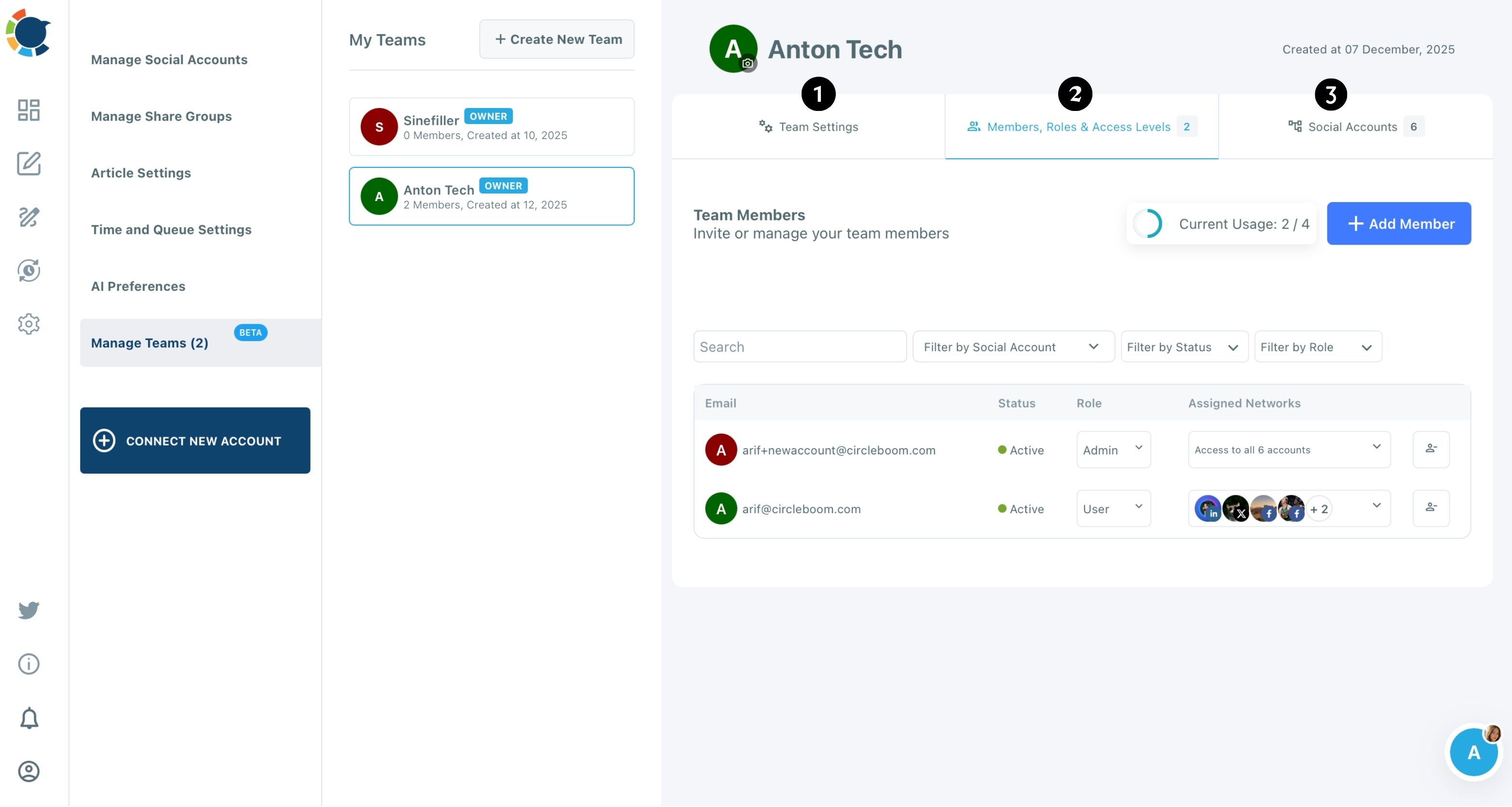
For a brokerage this solves two problems at once. Nobody shares agent passwords, and no listing goes out with a wrong price because someone posted from the car. The Team Management page covers the plan limits on members and teams.
Scheduling a full week of listings across agent Instagram accounts
Once single posts work, batch the week. Prepare each listing post one after another in the composer, give each its own date and time, and review the spread in the Outbox calendar. Circleboom calls this bulk schedule Instagram posts, and it sets up a whole team's week in one session.
Timing deserves its own check. The suggested slots come from each account's own followers. So the best time to post on Instagram for a luxury agent's audience may differ from a first-time-buyer agent's.
Instagram also caps an account at roughly 25 posts per 24 hours, which no listing calendar should approach.
For the scheduling basics on a single account, the walkthrough on how to schedule Instagram posts covers the Schedule window in detail. The same steps apply to each agent in the batch.
Your checklist for a nine-profile real estate Instagram setup
A brokerage that can post to multiple Instagram accounts at once keeps the whole team visible without asking agents to become social media managers. Here is the order to set it up:
- Switch every agent profile to a professional Instagram account and connect all nine in Manage Social Accounts.
- Save a "Whole team" Share Group, plus smaller groups by neighborhood if agents specialize.
- Add agents as Users in Team Management with only their own profile assigned.
- Write each listing once, then give agent versions their own caption and first comment.
- Schedule into suggested best times and check the Outbox calendar each Monday.
Circleboom's position as an official X Enterprise partner is part of why a broker can trust it with nine accounts, and the shared calendar is why the team stops missing posts.
I would start with one listing and the Whole team group, then add approvals once the agents are comfortable.
For a deeper look at running many profiles day to day, the guide on how to manage multiple Instagram accounts pairs well with this setup.
→ Schedule one listing post for all 8 agent Instagram profiles
Real estate team questions about multi-account Instagram posting
What happens when the team grows past 10 Instagram accounts?
Total connectable accounts are capped by plan, so an eleventh profile needs a larger plan. The usage counter on Manage Social Accounts shows how close the team is to that allowance before the next agent joins.
Can an agent who leaves the brokerage still post to the team accounts?
No, once they are removed. Deleting the member in Members, Roles and Access Levels ends their access immediately, and because they never had the passwords, nothing needs to be changed on Instagram.
Can I send a Reel to all agent profiles too?
Yes. The account selector works the same way on the Reels tab, so a video can go to every agent profile too. A Reel can also be cross-posted to the team's Facebook Pages, TikTok or YouTube accounts from the same window.