A gym that posts three Shorts a week on each of its three YouTube channels faces about 36 separate uploads a month. If it can schedule YouTube Shorts on multiple channels from one upload, the same month fits into one sitting a week.
Circleboom Publish schedules YouTube Shorts to several connected YouTube channels in one send, so a gym's main channel, coaching channel and beginners channel can share a Short from a single upload. Bulk uploading and channel-specific best times let a whole week go into the calendar in one session.
→ Schedule YouTube Shorts on multiple channels in one session
The steps below use a gym with three channels as the worked example.
Why three gym channels turn Shorts into a scheduling problem
The gym in this example runs a main channel for the brand, a strength-coaching channel for members who lift, and a beginners channel for people who have just signed up. The coaches film on Monday: squat cues, a class preview, a holiday-hours notice, two mobility drills.
Some of those Shorts belong on one channel. Some belong on all three. Doing it natively means logging in and out of YouTube Studio for every channel and filling the same form again each time.
This is where a gym channel usually stalls: the coaches film twelve good Shorts, upload four, and the rest sit on a phone until they are out of date.
The upload session is the bottleneck.
The numbers make it plain. Three channels with three Shorts a week each is nine uploads a week, about 36 a month, each with its own title, description, tags and audience settings.
A tool built to schedule YouTube Shorts on multiple channels collapses the shared ones into a single upload and moves the rest into one weekly sitting.
There is also the YouTube algorithm to think about. A channel that posts on a steady cadence is treated more favorably by YouTube's recommendations than one with bursty uploads.
Every busy gym channel eventually asks about posting multiple YouTube Shorts a day, and the answer depends on what the channel can sustain.
What Circleboom Publish does for a gym running several YouTube channels
Circleboom Publish is a multi-platform scheduler for ten social networks, and its YouTube composer lets you schedule YouTube Shorts on multiple channels: videos up to 60 seconds, 9:16 vertical recommended. There is no long-form upload flow, so full-length class recordings stay in YouTube Studio.
The company is an official X Enterprise developer, and it connects your YouTube channels through the same approved, policy-compliant access it uses for every platform.
Inside the YouTube composer, three things matter for a multi-channel gym:
- Several channels per Short. The account row lets one Short be scheduled to several YouTube channels at once.
- Several Shorts per session. More than one video can be added in the upload step and scheduled in bulk.
- A time slot per channel. The Schedule step suggests best times built from each channel's own viewers.
One upload can now serve the whole gym, and one sitting can cover the week.
That is the core of the queue Shorts for every YouTube channel you run workflow below.
If you want your Shorts batch to include posts for other networks too, batch social media content covers the same one-sitting idea across platforms.
Bulk uploading YouTube Shorts, picking channels, filling the settings and choosing best-time slots in Circleboom Publish (1:45):
Preparing gym YouTube Shorts before the upload sitting
When you schedule YouTube Shorts on multiple channels in bulk, the sitting only saves time if every file goes through the first time.
Circleboom Publish's YouTube composer accepts Shorts up to 60 seconds, recommends .mp4 (other major formats such as .mov also work) and recommends a vertical 9:16 frame. Export the coaches' clips to that spec before the sitting starts.
The usual problem in a gym is length. A coach records a 90-second technique explanation, and it cannot go out as a Short as it is. Trim it to the strongest 60 seconds, or split it into two Shorts with one cue each. Two short cues often hold attention better than one long one anyway.
Two settings deserve a decision up front rather than per Short. Set Made for Kids accurately for each channel, since it affects which platform features are available. Decide whether Notify Subscribers should be on for every Short or only for gym-wide news, so the beginners channel does not ping its audience three times a day.
With the files and settings ready, the sitting itself is pure scheduling, and the steps below cover the rest.
How to schedule YouTube Shorts on multiple channels at once
Eight steps in three phases, from connecting the gym's channels to the last time slot of the week.
Connect the three gym channels once
- Log in to Circleboom Publish with the account the gym's social team shares.

- Connect each YouTube channel under Settings, Manage Social Accounts, with the CONNECT NEW ACCOUNT button, and check the usage indicator against your plan's account allowance.
- Create a Share Group under Settings, Manage Share Groups, that holds all three channels, so "every gym channel" becomes one click later.
Upload a week of Shorts in one sitting
- Open the YouTube Specific card and drag and drop the week's Shorts into the CREATE NEW YOUTUBE SHORT POST composer, each up to 60 seconds.
- Select the channels for each Short in the account row, or pick the whole set under Select by Share Group for gym-wide Shorts.
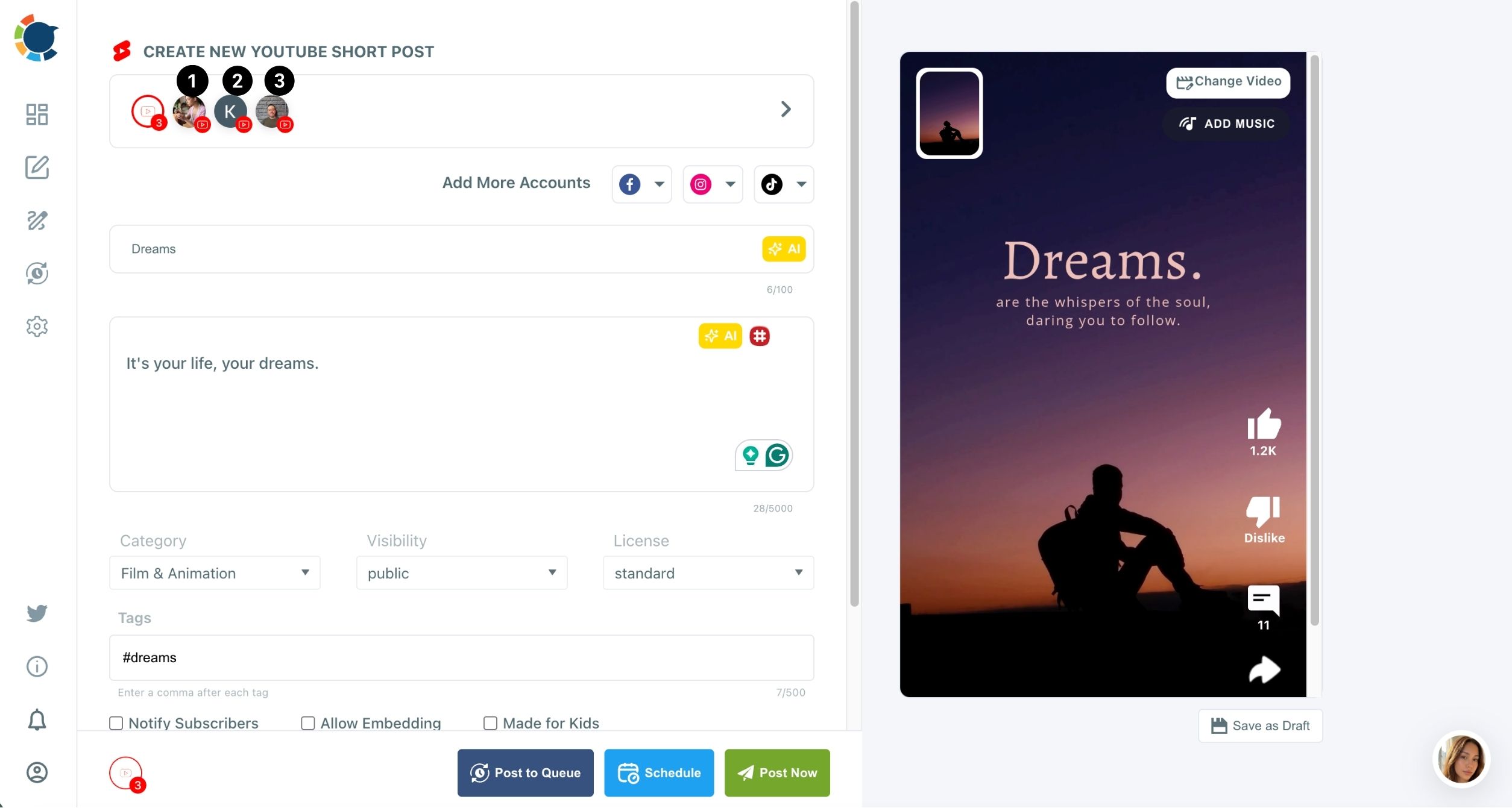
- Fill in the form: the title with its AI button, the description, tags, Made for Kids and Notify Subscribers, then add hashtags with the hashtag icon (the best gym hashtags for YouTube Shorts list is a useful starting set).
Time each Short to its channel's audience
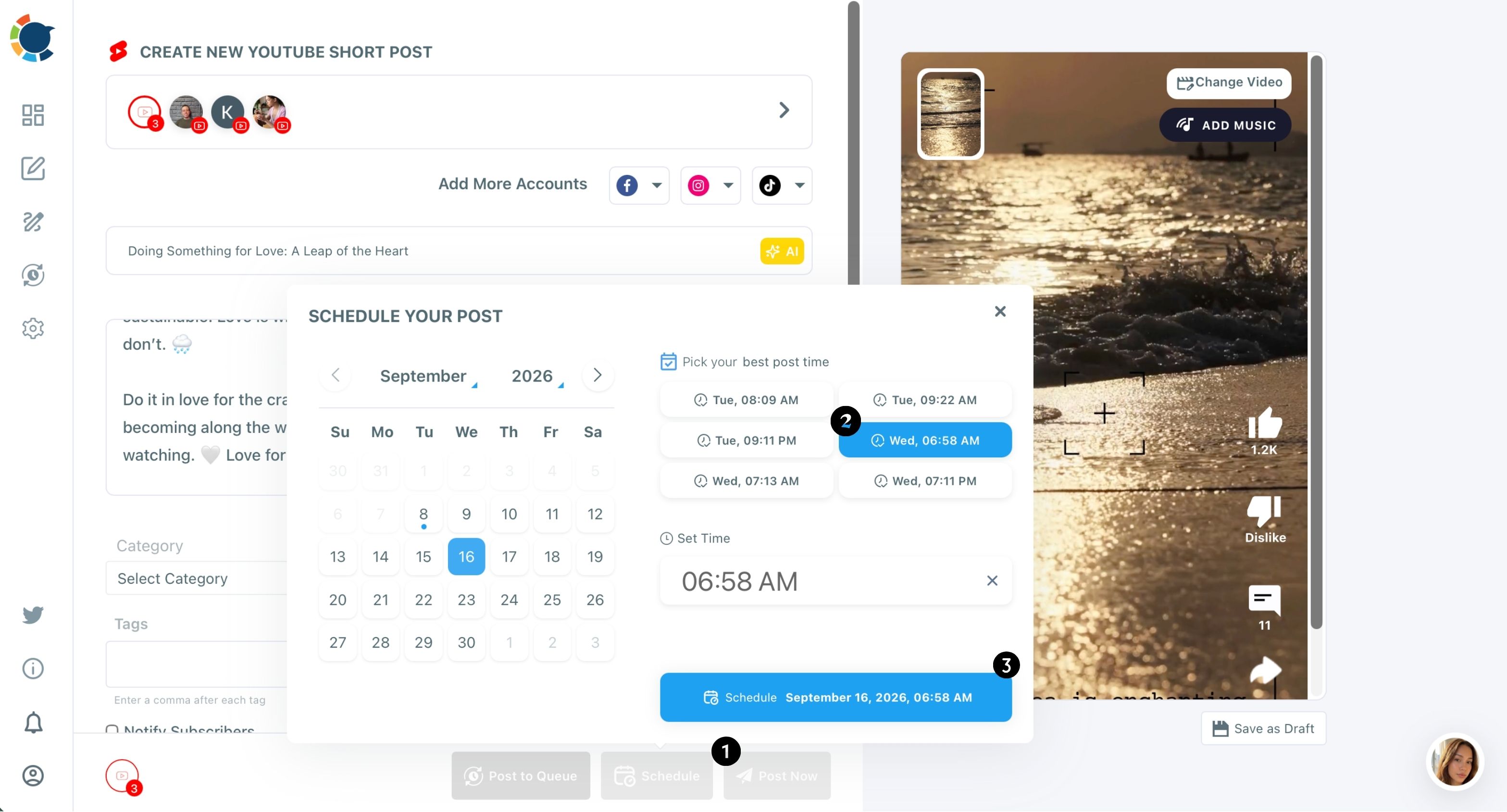
- Click Schedule and pick one of the six suggested slots under "Pick your best post time," or set a time yourself.
- Review the week in the Outbox Calendar View, filtered by platform or Share Group, and fix any day that is crowded or empty.
The order is deliberate. Connecting the channels and saving the Share Group comes first because it is the step people get wrong when they rush, and a gym-wide Short sent to only two channels is easy to miss.
Bulk uploading before channel selection then keeps the whole week in one screen, and timing comes last because each channel's best slot depends on who watches it.
Which Shorts go to all three channels and which stay on one
Being able to schedule YouTube Shorts on multiple channels does not mean every Short belongs everywhere. A holiday-hours notice, a new class launch or a members' challenge is gym-wide news, so it goes to all three channels in one send.
A heavy deadlift cue belongs on the strength channel. A "first week at the gym" walkthrough belongs on the beginners channel.
Send gym-wide news everywhere. Send coaching where the audience for it lives.
There is a platform reason too. YouTube's spam policy on repetitive content and coordinated channels names "repetitive or templated content aimed at artificially inflating engagement" as spam. The same page says the policy applies to "coordinated networks of channels" too.
It does not name one gym posting its own Short on its own channels, but identical uploads all week sit close enough to that wording that varied titles are the safer habit.
So for an evergreen coaching Short that does fit two channels, give each channel its own title and description. The AI button on the Title field writes a fresh angle in seconds, for example "3 squat cues for heavier lifts" on the strength channel and "Your first squat, done right" on the beginners channel.
Same video, two honest framings.
How many Shorts each gym channel should schedule per week
The right number is the highest cadence each channel can keep without dropping watch time. Circleboom's guidance on Shorts frequency gives realistic starting ranges by content type:
- Tips and light education (most gym coaching Shorts): one to three a day.
- High-effort content such as full technique breakdowns: three to seven a week.
- Brand-new channels: one Short a day for 30 days, then scale up once a format holds retention.
For the gym, that means the beginners channel might start with one a day while the main channel runs fewer, higher-effort Shorts.
The trap is a burst: five Shorts on Monday and silence until the next month works against the steady cadence YouTube's recommendations favor. Scheduling a week ahead in one sitting is what keeps the cadence steady when coaches are busy on the floor.
Picking the best time for each YouTube channel
When you schedule YouTube Shorts on multiple channels, each channel gets its own suggested slots, because the strength channel's lifters and the beginners channel's new members are not online at the same hours. The Schedule modal shows six clickable slots built from that channel's subscribers and viewers, not a generic chart.
Posting at a suggested time does not guarantee more views. It raises the odds of a strong early watch signal, which the Shorts shelf can then amplify.
If you want the reasoning behind those suggestions, the guide to the best time for YouTube Shorts walks through how audience activity shapes the window. The best time to post on YouTube page shows the same feature from the product side.
Some weeks nobody has time to pick slots by hand. For those, turn on Add Best Times to Post in Time and Queue Settings and send each Short with Post to Queue. Every recurring slot then fills with the channel's own best time, the same approach behind the option to automate social media posts.
Checking what the three YouTube channels' Shorts did
Once the week runs, look at impressions before views. An impression is each time a Short's thumbnail is shown, and it is the first number to move when a schedule change works. What are impressions on YouTube explains where to find them in YouTube Studio and how they turn into click-through rate and watch time.
Compare the three channels side by side. If the beginners channel gets impressions but few views, its titles and thumbnails need work; if the strength channel gets few impressions, its cadence or timing does.
The Sent Items list in Circleboom Publish shows every Short that went out, and Failed Items lists anything that did not, with the error reason.
Your gym's weekly YouTube Shorts routine
To schedule YouTube Shorts on multiple channels, a three-channel gym does not need three upload sessions. It needs one sitting, a Share Group and a clear rule for which Short goes where.
Teams that rate tools on this kind of daily use give Circleboom Publish 4.8/5 on Capterra. That matters when the person doing the uploads is a coach, not a social media manager.
The weekly checklist:
- Monday filming: shoot the week's Shorts in one session, vertical and under 60 seconds.
- One upload sitting: bulk upload them in the YouTube Specific composer.
- Channel rule: gym-wide news to the Share Group, coaching to the channel it fits, fresh titles where a Short goes to two.
- Timing: a suggested best slot per channel, or the Queue.
- Friday check: impressions per channel, then adjust next week's mix, with how to get more views on YouTube Shorts as the playbook for weak titles.
The YouTube Shorts hashtag generator and the AI title writer keep the form-filling part short, so the weekly sitting stays manageable for a busy coach.
→ Set up your gym's YouTube Shorts schedule across all three channels
Multi-channel YouTube Shorts scheduling questions
Can I schedule a long class recording to all three channels?
No. The YouTube composer in Circleboom Publish is Shorts-only, up to 60 seconds, so long-form class recordings need YouTube Studio.
How many YouTube channels can I connect?
The total number of connected accounts depends on your plan, and Manage Social Accounts shows how many you have used against the allowance.
Can the same Short also go to the gym's Instagram, TikTok and Facebook?
Yes. The Add More Accounts row in the YouTube composer adds Facebook, Instagram and TikTok accounts to the same post, so one upload can reach all four video platforms.
Can a coach upload Shorts without having access to every channel?
Yes. Team Management gives staff access to only the channels you assign, and their uploads can go through Admin approval before they publish.