The best Twitter poll examples for a business ask one clear question tied to one goal, offer 2 to 4 short and clearly different options, and suit a follower who has one tap to spare.
What are good Twitter poll examples for a business?
Good ones match a business goal: choosing what to build, what to publish, how customers think, or how to restart a quiet timeline. Circleboom schedules these X polls ahead of time in X Post Planner, and it is listed on X's Enterprise customer directory.
→ Create Twitter poll examples like these in X Post Planner
What makes a business poll on X worth posting
A business poll is worth posting when the result can inform something you are about to do.
Polls work as lightweight directional feedback: they show which way your followers lean, and they do not replace serious research.
Wording causes most failures. Overlapping options, leading choices and a missing obvious answer all produce a result nobody can read, and the poll still looks successful because votes kept arriving.
X adds a hard constraint that most example lists ignore. Each option is capped at 25 characters, so a poll that reads well in a document can fail the moment you paste it into the composer.
That is why every option below shows its character count in brackets.
Circleboom lets a business plan these polls on X in advance, so a poll goes out on a date you chose. You can schedule your own Twitter poll examples alongside the rest of the week's content.
Copy the structure and replace the details with your own product, audience and topic.
How to pick from these Twitter poll examples
Pick by what the result has to change, since each group below answers a different business need. This table gives you the short route to the right group:
| Your goal | Poll group | What you get |
|---|---|---|
| Settle a shortlist | Product feedback | A tiebreaker for your team |
| Decide what to publish | Content planning | A topic readers asked for |
| Understand buyers | Customer research | A lead worth investigating |
| Restart activity | Quiet weeks | Votes from silent followers |
Two habits make any example here stronger. Keep the question short enough to understand in the feed, and write the follow-up post before the poll goes out, because a poll with no planned follow-up rarely gets one.
I also rewrite the options until each one is plainly different from the others. If two could describe the same voter, the split between them tells you nothing.
Circleboom's X Post Planner keeps the whole sequence in one place, so you can plan these X poll examples by goal and space them out across a campaign.
Twitter poll examples for product feedback
Product polls work best when you already have a shortlist and need a tiebreaker. Each of these gives your team a next step, whichever option wins.
Feature priority
"Which should we build next?"
- CSV import (10)
- Mobile app (10)
- Calendar sync (13)
- Dark mode (9)
Verdict: use it when all four are realistic. Remove any option you would refuse to build.
Naming a new plan
"Which name fits a plan for small teams?"
- Starter (7)
- Team Lite (9)
Verdict: two options suit a naming choice, because the comparison stays direct and the result is easy to read.
Reason for not upgrading
"What stops you upgrading?"
- Price (5)
- Missing a feature (17)
- No time to switch (17)
- I already upgraded (18)
Verdict: good for spotting a pattern, weak for diagnosis. Ask for the reason in the replies, because this format holds no nuance.
For B2B accounts, these product polls fit inside a wider business-to-business marketing strategy, where one public question can inform a sales or positioning choice.
X poll examples for content planning
Content polls have the most direct payoff of any group: the winning option becomes something you publish, and readers arrive having already asked for it.
Next thread topic
"Which topic should our next thread cover?"
- Pricing mistakes (16)
- Hiring your first rep (21)
- Cold email tests (16)
- Retention basics (16)
Verdict: the safest poll in this bank, and a strong weekly habit.
Format preference
"How do you want our next guide?"
- Short checklist (15)
- Long how-to (11)
- Video walkthrough (17)
Verdict: useful once. Repeated monthly, it tells you nothing new.
Webinar timing
"When would you attend a live session?"
- Weekday morning (15)
- Weekday evening (15)
- I prefer the replay (19)
Verdict: the replay option keeps out-of-time-zone followers in the result, so a low live count does not mislead you.
Twitter polls for customer research
Research-style polls give you a direction to investigate, not a conclusion.
Treat a result as a reason to run a proper interview or survey, particularly when the people you most want to hear from may not follow you yet.
Biggest obstacle
"What slows your team down most?"
- Too many tools (14)
- Slow approvals (14)
- Unclear reporting (17)
- Small budget (12)
Verdict: strong for messaging, because the winning phrase often becomes the first line of your next landing page test.
Buying trigger
"What made you try a new tool last?"
- A colleague's tip (17)
- A bad renewal price (19)
- A new team goal (15)
- A public review (15)
Verdict: works only with a clear option set, so check for overlap before you post.
Current habit
"How often do you review your analytics?"
- Daily (5)
- Weekly (6)
- Monthly (7)
- Only when asked (15)
Verdict: clean, non-overlapping and easy to quote in a follow-up post, which makes it good for a results tweet.
Who answers matters as much as what they say. Engaging, loyal followers on Twitter tend to vote first, so an early lead can reflect your fans more than your market.
To see who those people are, the Twitter circle view of engaging followers and following names the accounts interacting with you most.
X polls for quiet weeks
These polls are for restarting activity when the timeline goes flat.
One tap is a lower barrier than a reply, and followers who never comment will often vote on a simple A or B choice.
The light opinion
"Pineapple on the team pizza order?"
- Absolutely (10)
- Never in this office (20)
Verdict: fine for a small brand with a personality, off-brand for most B2B accounts. Skip it if it says nothing about your work.
The industry split
"Best day to ship a release?"
- Monday (6)
- Tuesday (7)
- Thursday (8)
- Never on a Friday (17)
Verdict: the strongest of this group, because the debate is about your field and the replies usually carry real opinions.
The interest check
"What should we talk about this week?"
- Pricing (7)
- Product news (12)
- Customer stories (16)
Verdict: a useful bridge back to planned content. Choose its options from what Twitter interest targeting shows your audience follows.
For a worked example from start to finish, read this interactive X poll walkthrough that builds one step by step.
Can you add an image to these Twitter polls?
No. X does not allow images, GIFs or video in the same tweet as a poll, because the poll widget takes the media slot.
This limit changes how you plan any poll about a product.
For the naming or feature examples above, you have two workable routes:
- Publish the visual as its own post first, then run the poll as a follow-up that refers to it.
- Describe the product in the poll's tweet text, which can run up to the character limit for the connected account.
I prefer the first route for anything visual, because it gives you two posts for one idea.
Pick the option labels so they still make sense to a follower who has not seen the earlier post.
Can you schedule these Twitter poll examples in advance?
Yes. X's own composer has you create the poll at the moment of posting, while Circleboom's Twitter poll scheduler treats a poll like any other scheduled post.
This answer to whether you can schedule a Twitter poll covers the question in more detail.
Two rules apply. A scheduled poll must be set at least 15 minutes ahead, and its length starts counting when it publishes rather than when you schedule it.
Scheduling is what makes this bank usable as a series. You can line up one audience question a week, alternating groups, instead of creating each poll by hand on the day.
A campaign can then ask for input before a launch and again at its midpoint, with both polls ready before the campaign starts.
How to create Twitter poll examples in X Post Planner
To put any example from this bank on your calendar, open the post editor in X Post Planner, attach the poll through the Add Poll panel, and pick a publishing time.
The panel is manual: you type the question and options yourself, so what you see here is what gets posted.
The four stages below take a few minutes, which is what lets you line up a month of questions in one sitting.
Connect your X account to Circleboom
- Log in to Circleboom Twitter and connect your X account.
Navigate to the post editor
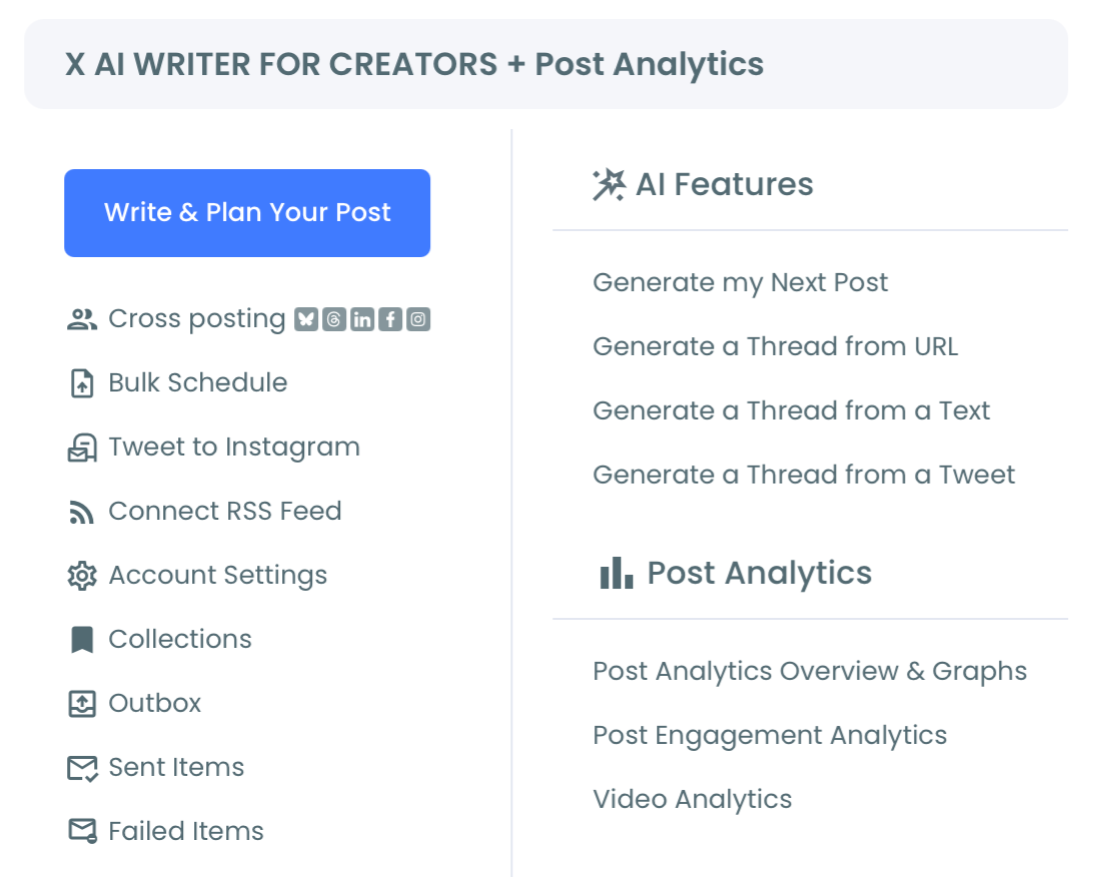
- Open the X Post Planner menu and select Write & Plan Your Post.
Add the poll to your post
- Write the poll question in the post box.
- Click the poll icon (the bar chart) in the toolbar.
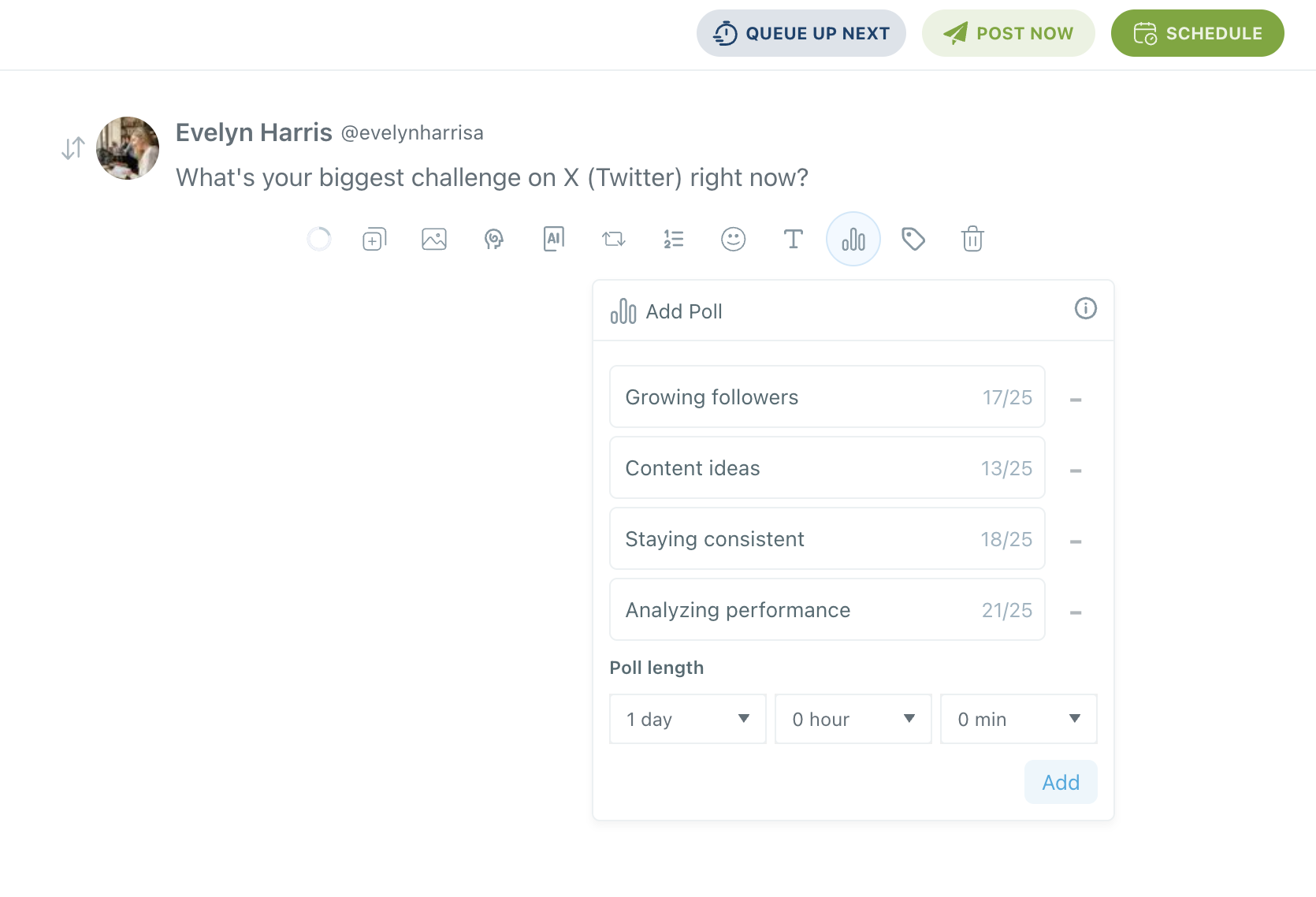
- Enter 2 to 4 choices and check each counter against the 25-character limit.
- Set the poll length in days, hours and minutes, then click Add.
Publish or schedule it
- Select Schedule to choose a future time, or post it immediately.
That order matters because the counters catch an overlong option before anything goes live, and the Add step is what attaches the poll.
Skip Add and you schedule a plain post with a question in it.
At a glance: write the question, attach the choices, set the length, then schedule.
Pick your slot from your best time to post on Twitter, since a poll needs enough active followers for the count to mean something.
What to do with results once a Twitter poll closes
Publish a results post that states the outcome and what happens next.
"62% of you picked Tuesday, here is what we changed" is a sample of the form, and it brings voters back while starting a new round of replies.
The follow-up depends on which group the poll came from:
- Product feedback: say what moved up the roadmap.
- Content planning: publish the winning topic and credit the vote.
- Customer research: turn the top answer into your next interview prompt.
- Quiet weeks: reply to the best comments and return to planned content.
Results stay visible on the tweet permanently after voting ends, so the closed poll can back up the later post.
I would draft that post the day the poll closes, while the replies are still fresh.
Afterward, check its engagement analytics to see whether it reached beyond the people who voted.
The same idea can run on another network under that network's own rules, and these LinkedIn poll examples are the closest match.
A short summary of this poll bank
Pick the goal first, then the example:
- Product polls settle a shortlist.
- Content polls produce a topic.
- Research polls point you to a question worth investigating.
- Quiet-week polls restart activity.
Every option above fits X's 25-character limit, so you can use it as written or adapt it with the counter in view.
Circleboom keeps that work planned, and as an official X Enterprise developer it gives you approved access to your account while you do it.
→ Add these Twitter poll examples to your posting calendar
Twitter poll examples FAQ
How long should a business poll run?
Most business polls should run 24 hours, which covers every time zone and is the panel's default of 1 day.
X allows anything from 5 minutes, which suits a live event, to 7 days, which suits a bigger question that needs time to spread.
Can I see who voted in my poll on X?
No. X keeps votes anonymous, so a poll creator sees only the total percentages for each option.
If you need to know who thinks what, invite replies under the poll.
Can I edit a poll on X once it is published?
No. Options cannot be edited and the length cannot be changed after the tweet publishes, so the only correction is deleting the tweet and posting again.
Read every option once more before you schedule.