What is the best scheduler for LinkedIn when you post as yourself and as your company? It is the one that publishes to a Profile and a Company Page in one send, schedules the Page formats LinkedIn's own tool leaves out, and times each account by its own audience.
LinkedIn's own scheduler: free, one account at a time, no polls or multi-photo posts on Pages. Circleboom Publish: schedules your Profile and Company Pages together in one send, with polls, documents and carousels, at each account's own suggested times.
→ Schedule LinkedIn posts to your Profile and Company Pages at their own best times
The criteria, the comparison table and a decision tree for your setup follow.
How I built this LinkedIn scheduler comparison
I compared four options a LinkedIn poster weighs most often: LinkedIn's built-in scheduler, Buffer, Hootsuite and Circleboom Publish. Each was judged on what a person running a Profile and at least one Company Page actually needs, using LinkedIn's own Help Center, LinkedIn's Pages guidance, Pew Research data and each vendor's current public pricing page.
All facts were checked in October 2026.
LinkedIn is worth the effort for many professionals. Pew Research's social media fact sheet puts LinkedIn use at 33% of US adults.
The five criteria I used:
- Profile and Page together: can one send reach a personal Profile and a Company Page?
- Format coverage: can it schedule polls, documents and carousels, beyond plain text posts?
- Timing: are suggested times computed from the account's own audience?
- Automation: is there a queue or a feed that keeps posting between your own posts?
- Cost model: do you pay per channel or per plan?
A note on evidence: I did not run first-hand tests of Buffer or Hootsuite for this piece, so their rows rely on their own public pricing pages, and I flag where a feature was not verified. If you want the wider view of how scheduling tools differ on LinkedIn, the overview of a LinkedIn scheduling tool covers the basics.
The best scheduler for LinkedIn at a glance
| Scheduler | Cost model | Free option | Best fit |
|---|---|---|---|
| LinkedIn native | Free | Yes | One account, simple posts |
| Buffer | Per channel | 3 channels | A few channels, low volume |
| Hootsuite | Tiered plans | 14-day trial | Large teams, annual budget |
| Circleboom Publish | Plan-based | See plans | Profile plus Pages, all formats |
The table settles cost. The harder question is format coverage, and that is where the options split sharply.
LinkedIn's built-in scheduler is free, but narrower than it looks
LinkedIn's own scheduler is the right starting point for one account and plain posts, and it costs nothing. Its limits show up the moment you manage a Company Page with more than text.
According to LinkedIn Help on how to schedule a LinkedIn Page post, a Page post can be scheduled from one hour to three months ahead. The same page lists what a Page cannot schedule at all: events, multiple photos, reshares, polls, jobs and service posts.
The native LinkedIn scheduler skips the formats that earn the most on Pages.
Personal posts work a little differently. LinkedIn's help page on how to schedule posts says a personal post can be scheduled between 10 minutes and 3 months ahead, with Events and Jobs unsupported.
In both cases you schedule one account at a time, from that account's own view.
That gap matters because polls and multi-image posts are exactly the formats a Company Page uses to start conversations. If those are part of your plan, you need a tool that can schedule LinkedIn Page polls and carousels alongside your posts instead of switching back to posting them live.
Buffer charges per channel, which suits small setups
Buffer prices by channel. Its public pricing page lists a free plan for up to 3 channels with 10 scheduled posts per channel, Essentials at $5 per month per channel, and Team at $10 per month per channel.
It supports LinkedIn Pages and Profiles, with Profiles left out of its advanced analytics.
As an illustrative calculation, a founder with one Profile and two Company Pages is three channels: about $15 per month on Essentials, or $30 on Team. That is fair for a small setup and adds up as channels grow.
I did not verify Buffer's support for LinkedIn polls or document posts, so check its current help pages if those formats matter to you.
Hootsuite is built for larger teams on annual plans
Hootsuite sells tiered plans on annual billing. Its public plans page lists Standard from $99 for up to 10 accounts, Professional from $199 with unlimited accounts, and Advanced at up to $399, with a 14-day free trial.
The entry price is the main drawback for a solo founder or a small B2B team that only needs LinkedIn plus one or two other networks. The plans make more sense for a larger team that wants many accounts on one bill.
As with Buffer, I did not verify its LinkedIn poll or document support for this comparison.
Circleboom Publish handles profiles, pages and every LinkedIn format
Circleboom Publish is a LinkedIn scheduler that puts personal Profiles and Company Pages in one account selector and sends the same post to every selected account in one action. It schedules all four LinkedIn post structures from one composer: a LinkedIn Post, a LinkedIn Poll, a Document Post and a Carousel/Gallery Post.
For a founder, that one-send behavior removes the daily switch between a personal view and each Page's admin view. The visibility setting follows LinkedIn's own rules: "Connections Only" works for Profiles only, because a Company Page has followers, not connections.
Scheduling at each account's own best time
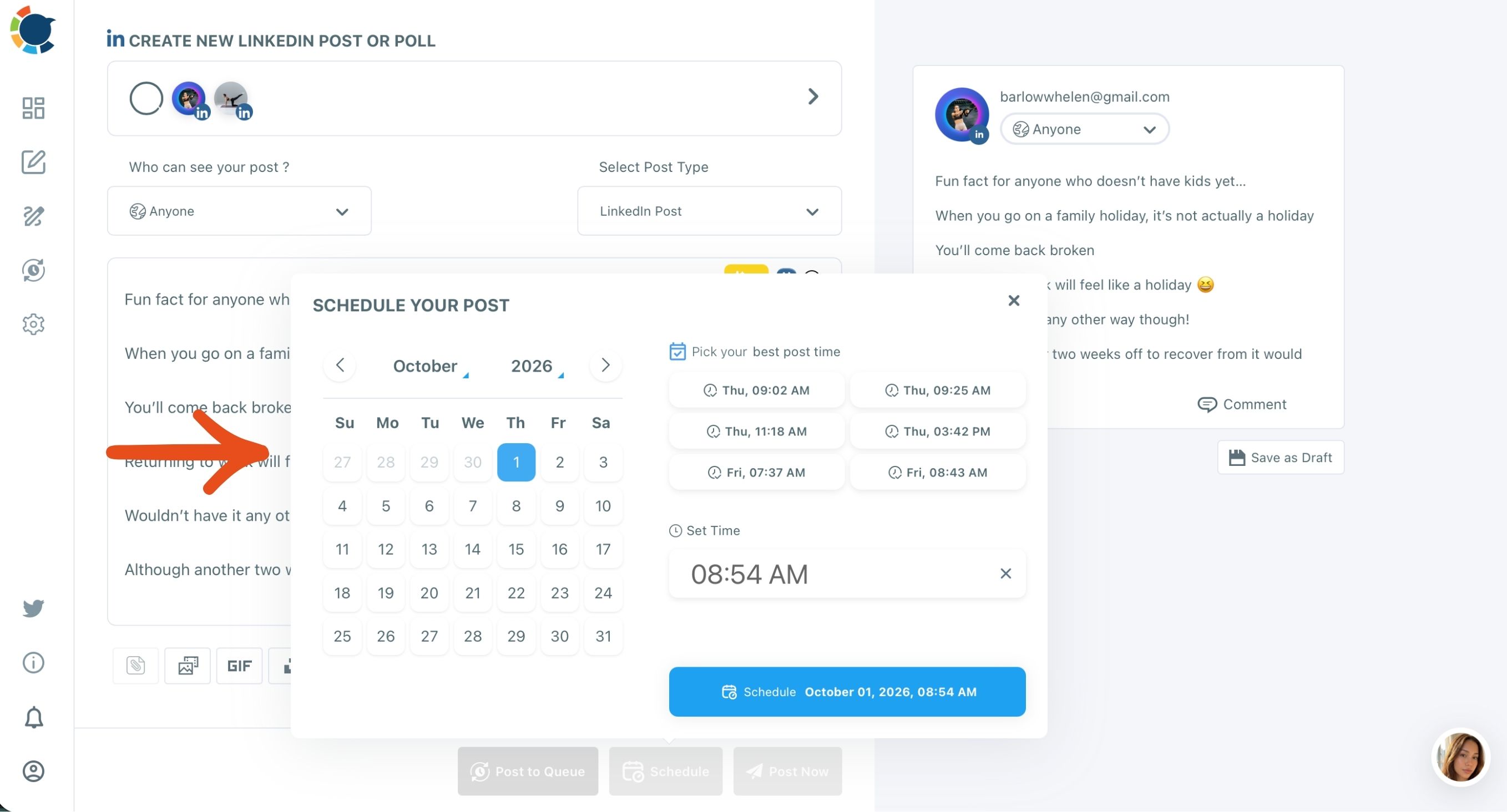
The Schedule modal pairs a calendar and a Set Time field with "Pick your best post time," six suggested slots computed from that account's own connections and followers. A Profile and a Company Page are computed separately, so each one gets its own timing.
If that is the setup you need, you can pick a LinkedIn scheduler that posts to Profiles and Company Pages together and plan a month in one sitting.
The math shows why this matters. A founder with one Profile and two Company Pages, each posting three times a week, needs about 36 posts a month. Circleboom Publish lets you write them in one session and schedule each at its account's suggested time.
Carousels, the AI writer and automation
Carousels are the format I would push first on a Company Page. Circleboom has observed LinkedIn carousel posts earn around 200% more impressions and engagement than a plain post, and the AI Carousel Generator builds the slides inside the composer.
The AI LinkedIn Post Writer is included in the membership, with no separate AI subscription.
Watch the scheduling flow from composer to the Schedule modal, the step LinkedIn's own tool handles one account at a time:
For the days between your own posts, the Queue drops prepared posts into recurring slots per account, and RSS Feed to LinkedIn shares a company blog or industry source on its own.
The one limit to know: a single send carries the same text to every selected account. If your Profile and your Page need different wording, compose them as two posts.
What to check before a LinkedIn post goes out
Circleboom Publish applies these size limits to LinkedIn posts, so check them before you schedule:
- Text: up to 1,300 characters.
- Images: up to 20 per post, 10 MB each.
- Video: up to 200 MB.
These limits matter most when you reuse a post written for another network. A 3,000-character Facebook story will not fit as it is. Shorten it with the AI writer to the strongest 1,300 characters and move the rest into the First Comment, which is scheduled together with the post.
The same habit protects a mixed Profile and Page send. Write to the tighter limit first, preview the post, and only then pick the accounts.
Can a LinkedIn scheduler handle polls and documents?
Yes, Circleboom Publish schedules both, which is the format gap LinkedIn's own Page scheduler leaves open. A LinkedIn Poll takes a question of up to 140 characters, options of up to 30 characters each, and a duration of 1 day, 3 days, 1 week or 2 weeks.
LinkedIn's own rules still apply, so polls on political, medical or sensitive personal topics are not allowed.
The LinkedIn poll scheduler page shows the feature itself. For the content side, the guide on how to create and schedule LinkedIn polls walks through writing questions that people answer.
A Document Post is one uploaded PDF or deck, shown page by page in the feed. It suits a report, a checklist or a slide deck you already have, and the walkthrough on how to post a PDF on LinkedIn covers preparing the file.
Which is the best scheduler for LinkedIn?
The best scheduler for LinkedIn depends on how many accounts you run and which formats you use. On the five criteria, my verdict is:
- Native LinkedIn scheduler: best for one account that posts text and single images.
- Buffer: best for two or three channels where per-channel cost stays low.
- Hootsuite: best for large teams that want many accounts on an annual plan.
- Circleboom Publish: best for a Profile plus Company Pages that use polls, documents and carousels.
Consistency is the reason to pick carefully. LinkedIn's own Pages best practices say companies that post weekly see a 2x lift in engagement. A scheduler is what keeps that weekly rhythm going when the calendar gets busy.
Agencies have one more requirement: keeping clients apart. Circleboom Publish groups each client's Company Page with their executives' Profiles in a Share Group, so one click selects the right accounts.
The page on how to manage multiple LinkedIn Company Pages explains the setup.
If you run several Pages already, the guide to managing multiple LinkedIn Company Pages covers the day-to-day workflow that keeps them from blurring together.
When to schedule LinkedIn posts once your tool is chosen
Schedule each LinkedIn account at the times its own audience is active, not at a generic "weekday morning."
Circleboom's Best Time to Post on LinkedIn suggestions are computed from each account's real connections and followers. A Profile and a Page get separate results.
A suggested time does not guarantee more engagement. It removes timing as a reason a good post underperforms.
Timing also works better when the mix is right. A simple balance for a Company Page is the 4-1-1 rule, applied to every six posts:
- Four educational posts, such as how-tos and industry takes.
- One soft promotion, such as company news.
- One hard promotion, such as a launch or an offer.
Lean harder on promotion in a launch week, then go back to the mix.
For the research behind it, the article on the best time to post on LinkedIn explains why active hours differ by industry and seniority.
Add Best Times to Post in Time and Queue Settings applies the same computation to every future queue slot. And when ideas run short, a LinkedIn auto poster can share new items from your company blog's feed so the Page never goes quiet.
Pick your LinkedIn scheduler by situation
Use this decision tree to settle it in one read:
- If you post from one account, mostly text: LinkedIn's own scheduler is enough.
- If you run two or three channels at low volume: a per-channel plan such as Buffer keeps cost down.
- If a large team needs many accounts on one annual bill: look at Hootsuite's tiers.
- If you run a Profile plus Company Pages with polls, documents or carousels: Circleboom Publish covers every format in one send.
- If X and LinkedIn are your only two networks: consider the X Post Planner, which cross-posts to LinkedIn.
The X Post Planner comes from Circleboom, an official X Enterprise Developer, so the X side runs on approved access while LinkedIn gets the same post. For everyone running LinkedIn as yourself and as your company, the choice is simpler.
→ Choose Circleboom as your LinkedIn scheduler
LinkedIn scheduler questions
Can I connect my LinkedIn profile and company page to the same scheduler?
Yes. Circleboom Publish shows LinkedIn Profiles and Company Pages in the same account selector, and you can select them together so one post goes to both in a single send.
Can I schedule a first comment on LinkedIn?
Yes. Circleboom Publish lets you write the first comment in the same LinkedIn composer and schedules it together with the post, which is a good home for links and details.
The guide to schedule your first comments on LinkedIn shows how to use it well.
Can one post go to my profile and my page with different wording?
Not in one send. Each send carries the same content to every selected account, so write the Profile version and the Page version as two posts and schedule each at its own suggested time.